
Hi,
I'm not a programmer but I'm trying to build an Applescript that will take all the files in a folder and create a playlist in iTunes from that folder.
I can successfully get the action to complete, however, the name of the playlist is set to the path of every file within the folder. So the playlist name is super long, being the full path of every track in the folder back to back.
Is there a way to capture JUST the folder name and set it as the variable to use when naming my playlist?
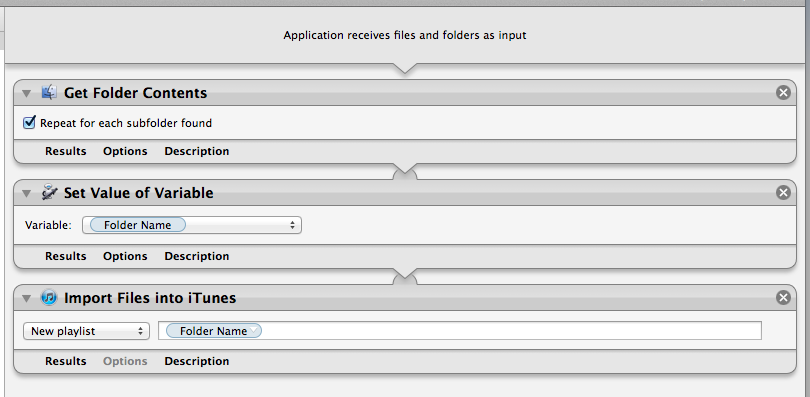
Here's an image of the current workflow: Note the FolderName variable is just a placeholder.
I'm not a programmer but I'm trying to build an Applescript that will take all the files in a folder and create a playlist in iTunes from that folder.
I can successfully get the action to complete, however, the name of the playlist is set to the path of every file within the folder. So the playlist name is super long, being the full path of every track in the folder back to back.
Is there a way to capture JUST the folder name and set it as the variable to use when naming my playlist?
Here's an image of the current workflow: Note the FolderName variable is just a placeholder.
