|
|
#1 |
|
Gaming graphics in Mac Pro 3,1
Hi,
Please bear with me if this has already been asked and answered elsewhere. I am getting a headache from all the reading I have done the last week... I have the MacPro3,1 - Early 2008 - which I am also trying to use in bootcamp as a gaming machine. I currently have the ATi HD5870 installed, and it is getting tired. I'd like to put in another videocard, but wonder which one fulfills the following criteria: 1) Must be significantly faster than the HD5870, in OSX as well as in Windows 7, 2) Does NOT need any additional power supply installed, 3) Works in the Boot screen, 4) Has a Displayport output for my ACD 27". I have seen several posts concerning the GTX680 cards, but some say they need extra power, and I am not sure which ones have displayport. Anyone? /Bo
__________________
MP 2.8GHz 8C/16GB/960GB Accelsior/250GB SSD/GTX680 - MBP 15"/2.53GHz/8GB/250GB SSD - MBP 15"/2.66GHz/8GB/250GB SSD - MBA 2GHz i7/8GB/250GB - MMI 2.3HGz/8GB/500GB - TC 3TB - ReadyNAS Pro 6x3TB
|
|
|
|
0
|
|
|
#2 |
|
Just go MACcing!
Hi Bo, there's NO PROBLEM running games on a MAC PRO 3.1! See my signature for more details. For the video card I used a EVGA GTX 670 FTW 4GB :thumbup:, this can be a PC VERSION (full driver support in MAC OS X 10.8.2) no matter what.
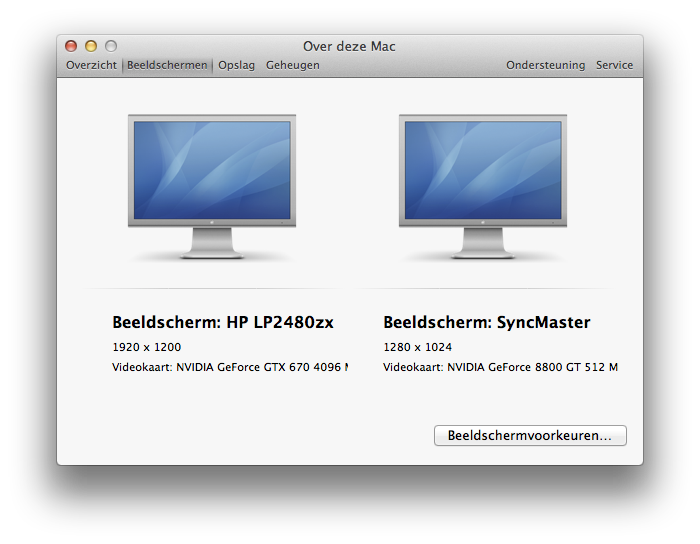
I used (2x) MAC mini PCIe to PCIe PC Y-splitter cable's and cross-wired both my NVIDIA GT8800 MAC-EDITION and the EVGA GTX 670 FTW PC VERSION for maximum logic-board PCIe power balancing! These cables are both connected to the onboard PCIe power connectors: See image below https://www.dropbox.com/s/2357wpm1g2...board_PCIe.jpg ![]() http://www.moddiy.com/products/Apple...wer-Cable.html Hook-up your monitor to the EVGA and keep your ATI-MAC edition with a (added) simple TFT monitor for bootscreen and/or admin tweaks! Screenoptions in MAC OS X 10.8.2. https://www.dropbox.com/s/3mpdg6w172...CAMP%205_0.jpg Output EVGA OC Scanner X 2.2.2 2013/01/19 @ 20:12:55 >> Detecting GPUs... 2013/01/19 @ 20:12:55 >> Found 2 GPUs. 2013/01/19 @ 20:12:55 >> - GPU 1: NVIDIA GeForce 8800 GT 2013/01/19 @ 20:12:55 >> - Bus ID: 1 2013/01/19 @ 20:12:55 >> - Cores: 112 2013/01/19 @ 20:12:55 >> - Partitions: 4 2013/01/19 @ 20:12:55 >> - Shader Pipes: 7 2013/01/19 @ 20:12:55 >> - Memory size: 0MB 2013/01/19 @ 20:12:55 >> - Memory type: GDDR3 2013/01/19 @ 20:12:55 >> - Bios: 62.92.20.00.16 2013/01/19 @ 20:12:55 >> - GPU temperature: 67.000°C 2013/01/19 @ 20:12:55 >> - Graphics driver: 2013/01/19 @ 20:12:55 >> - True clocks - GPU clock: 300MHz - Memory clock: 100MHz - Shader clock: 0MHz - GPU voltage: 0.000V 2013/01/19 @ 20:12:55 >> - PState 0 - GPU clock: 600MHz - Memory clock: 900MHz - Shader clock: 0MHz - GPU voltage: 1.050V 2013/01/19 @ 20:12:55 >> - PState 12 - GPU clock: 300MHz - Memory clock: 100MHz - Shader clock: 0MHz - GPU voltage: 0.950V 2013/01/19 @ 20:12:55 >> - Fan speed: 30% 2013/01/19 @ 20:12:55 >> - Fan speed: -1 RPM 2013/01/19 @ 20:12:55 >> - GPU 2: NVIDIA GeForce GTX 670 2013/01/19 @ 20:12:55 >> - Bus ID: 2 2013/01/19 @ 20:12:55 >> - Cores: 1344 2013/01/19 @ 20:12:55 >> - Partitions: 4 2013/01/19 @ 20:12:55 >> - Shader Pipes: 4 2013/01/19 @ 20:12:55 >> - Memory size: 4096MB 2013/01/19 @ 20:12:55 >> - Memory type: GDDR5 2013/01/19 @ 20:12:55 >> - Bios: 80.04.4b.00.70 2013/01/19 @ 20:12:55 >> - GPU temperature: 68.000°C 2013/01/19 @ 20:12:55 >> - Graphics driver: 9.18.13.1090 2013/01/19 @ 20:12:55 >> - True clocks - GPU clock: 1005MHz - Memory clock: 3004MHz - Shader clock: 0MHz - GPU voltage: 0.000V 2013/01/19 @ 20:12:55 >> - GTX 600 series - GPU base clock: 1006MHz - GPU boost clock: 1084MHz 2013/01/19 @ 20:12:55 >> - PState 0 - GPU clock: 1293MHz - Memory clock: 3004MHz - Shader clock: 0MHz - GPU voltage: 0.988V 2013/01/19 @ 20:12:55 >> - PState 2 - GPU clock: 1293MHz - Memory clock: 3004MHz - Shader clock: 0MHz - GPU voltage: 0.988V 2013/01/19 @ 20:12:55 >> - PState 5 - GPU clock: 862MHz - Memory clock: 810MHz - Shader clock: 0MHz - GPU voltage: 0.988V 2013/01/19 @ 20:12:55 >> - PState 8 - GPU clock: 324MHz - Memory clock: 324MHz - Shader clock: 0MHz - GPU voltage: 0.988V 2013/01/19 @ 20:12:55 >> - Fan speed: 46% 2013/01/19 @ 20:12:55 >> - Fan speed: 1890 RPM 2013/01/19 @ 20:12:55 >> GPU monitoring thread started up ok. 2013/01/19 @ 20:13:47 >> Freeing EVGA OC Scanner X resources... 2013/01/19 @ 20:13:47 >> Exit from EVGA OC Scanner X. EVGA installed in Slot-1, NVIDIA MAC installed in Slot-2 NVIDIA GT8800: 1x PCIe 6-pin from onboard connector #1 EVGA GTX 670 FTW: 1x PCIe 6-pin from onboard connector #1 1x PCIe 6-pin from onboard connector #2 1x PCIe 6-pin from onboard connector #SPARE https://www.dropbox.com/s/r8zuz3eda2..._in_MACPRO.jpg RED: indicates a non-compatibility issue within Windows using the scanner on the NVIDIA GT8800 MAC_EDITION! Goodluck mate and cheers on your choise to use your MAC!!!! RUNS LIKE A HOT KNIFE THRU BUTTER! ;-)

__________________
MAC PRO 3.1 | OSX 10.8.3 (12D78) - NVIDIA 304.10.65f03 - CUDA 5.0.45 - GT-8800 MAC | SneakerCamp - WIN8 PROx64 - NVIDIA 310.90 WHQL + CUDA 5.0.35 - EVGA GTX-670FTW
Last edited by BDM STUDIOS NL; Jan 28, 2013 at 04:41 PM. |
|
|
|
0
|
|
|
#3 |
|
Thanks!
So you're saying "install a GTX670 in addition to the HD5870. Powering both off the MoBo using splitter cables. Connect my ACD to the GTX card, for primary use in Windows and in OSX, and use any TFT connected to the HD card for boot and normal second screen also in Windows and OSX"? You mention the GTX670 card, what about the GTX680 cards? And, any suggestion for a GTX670/680 card with Displayport? /Bo
__________________
MP 2.8GHz 8C/16GB/960GB Accelsior/250GB SSD/GTX680 - MBP 15"/2.53GHz/8GB/250GB SSD - MBP 15"/2.66GHz/8GB/250GB SSD - MBA 2GHz i7/8GB/250GB - MMI 2.3HGz/8GB/500GB - TC 3TB - ReadyNAS Pro 6x3TB
|
|
|
|
0
|
|
|
#4 |
|
I don't think its a good idea to use both your 5870 and a 670 together without an additional power source. That being said your list of requirements cannot be met by using just a 670 as it does not have EFI so you would have no boot screens. I ran a 670 in my MP 3,1 for awhile and it ran fine using both power cables connected to the motherboard, however performance in games such as COD Black OPS and Batman Arkham City was not so great in OSX. I never bootcamped, so I cannot comment on performance in windows on the machine. The 670 is significantly faster then the 5870, it does have a display port (not mini), can support three or four monitors, but you will not get a boot screen. You could look at a 680 but its more money and requires an 8 pin power connector which some people have used with adapters to 6 pin. For gaming only, I think a 670 would be fine for your needs.
__________________
Iphone 4s 16GB, iPad Mini 32GB wifi Mac Pro 3,1 2x2.8GHz Xeon quad core, EVGA 670, 16GB RAM, 1x256GB SSD, 1x2TB, 4x3TB, LG Bluray burner, 3x Dell 23" LED |
|
|
|
0
|
|
|
#5 | |
|
Quote:
/Bo
__________________
MP 2.8GHz 8C/16GB/960GB Accelsior/250GB SSD/GTX680 - MBP 15"/2.53GHz/8GB/250GB SSD - MBP 15"/2.66GHz/8GB/250GB SSD - MBA 2GHz i7/8GB/250GB - MMI 2.3HGz/8GB/500GB - TC 3TB - ReadyNAS Pro 6x3TB
|
||
|
|
0
|
|
|
#6 |
|
I wonder if that double card deal you set up would work with an atu hd 2600 and an amd hd 6870...
|
|
|
|
0
|
|
|
#7 | |
|
Quote:
|
||
|
|
0
|
|
|
#8 |
|
I think the GT8800 requires one power connector and the 680 definitely requires two, one 8 pin and one 6 pin, so no, that would not work either.
__________________
Iphone 4s 16GB, iPad Mini 32GB wifi Mac Pro 3,1 2x2.8GHz Xeon quad core, EVGA 670, 16GB RAM, 1x256GB SSD, 1x2TB, 4x3TB, LG Bluray burner, 3x Dell 23" LED |
|
|
|
0
|
|
|
#9 | |
|
Quote:
The 8800GT uses 105W and the GTX680 uses 195W, so exactly 300W combined. /Bo
__________________
MP 2.8GHz 8C/16GB/960GB Accelsior/250GB SSD/GTX680 - MBP 15"/2.53GHz/8GB/250GB SSD - MBP 15"/2.66GHz/8GB/250GB SSD - MBA 2GHz i7/8GB/250GB - MMI 2.3HGz/8GB/500GB - TC 3TB - ReadyNAS Pro 6x3TB
|
||
|
|
0
|
|
|
#10 | ||
|
Quote:
In OS X I use both monitors the same way! E.g COD4 runs a steady 60fps in OSX! ![]() Splitting the cables to each card is for better load balance on mobo! And yes one of the four will be a spare! Must say I'm very happy with this setup, but therfore I'm (not yet ;-) a hardcore gamer that needs 3D surround! But the additional GTX670 gives me a whole new experience in use of my mac pro 3.1. Goodluck on your choise, Bo ---------- Quote:
NVIDIA GT8800: 1x PCIe 6-pin from onboard connector #1 EVGA GTX 670 FTW: 1x PCIe 6-pin from onboard connector #1 1x PCIe 6-pin from onboard connector #2 1x PCIe 6-pin from onboard connector #SPARE ![]() FORGOT TO MENTION: running BootCamp 5.0 and not a VM because the drivers in a VM are also virtual, so no native connection to the GTX670 with the 310.90 WHQL Drivers! ![]() Cheers
__________________
MAC PRO 3.1 | OSX 10.8.3 (12D78) - NVIDIA 304.10.65f03 - CUDA 5.0.45 - GT-8800 MAC | SneakerCamp - WIN8 PROx64 - NVIDIA 310.90 WHQL + CUDA 5.0.35 - EVGA GTX-670FTW
Last edited by BDM STUDIOS NL; Feb 3, 2013 at 09:06 AM. |
|||
|
|
0
|
|
|
#11 |
|
Killerbob - I would advise only having a single graphics card in the machine at one time. It avoids driver conflicts, power issues and noise.
As you know, the 5870 is beginning to show its age in games that require a lot of VRAM, Skyrim in particular. This is why folks are looking at cards with 2Gb or even more. At the moment, 2Gb is plenty for games run at 1080p on a single monitor that are not loaded to the max with textures. As soon as you start running at a higher resolution (say 2560x1440 on the Apple 27" display), go to triple monitor setups or start loading the textures up in the game, you can easily go through that 2Gb. Skyrim and BF3 are examples. I would have a look at either the 3Gb ATI cards like the 7970 or the 4Gb nVidia 670/680 cards. If you are careful you can still find ones with 2x 6-pin. The MSI 680 4Gb Twin Frozr is one. If you can only find a card with one 6-pin and one 8-pin, you have to look very carefully at the peak load TDP. Some of these cards self-overclock if the power supply and temperatures are good and this could in theory take it over the 225W your MP is specced to deliver. As I am sure you will have read, that is made up from 75W from the PIC slot and 75W from each of the two 6-pin leads for a total of 225W. The 300W figure you see going around is based on the assumption that you are using a second card (such as a pair of 5770s) so that second card gets its own 75W from its own PCI slot. Keep it simple and only have the one card. Use the free app called BootChamp to swap from OSX to windows easily and keep your old card safely somewhere. It it all goes horribly wrong, you can pull the new card and pop in the Apple 5870 to diagnose faults.
__________________
MacPro 5,1: 6 x 3.33 GHz / 12 GB RAM / AMD 7950 3Gb / 120Gb SSD, 240Gb SSD, 500Gb HDD / ACD 27" / APC SMT1000I iPhone 5: 32Gb White / O2 3G / TwigCase Bamboo / BodyGuardz Pure |
|
|
|
0
|
|
|
#12 | |
|
Quote:
That was my originial plan, but it seems impossible to have your cake and eat it too ![]() The HD7970s that are available, will they work in the MP3,1, and will they have a boot screen? /Bo
__________________
MP 2.8GHz 8C/16GB/960GB Accelsior/250GB SSD/GTX680 - MBP 15"/2.53GHz/8GB/250GB SSD - MBP 15"/2.66GHz/8GB/250GB SSD - MBA 2GHz i7/8GB/250GB - MMI 2.3HGz/8GB/500GB - TC 3TB - ReadyNAS Pro 6x3TB
|
||
|
|
0
|
|
|
#13 | |
|
Quote:
I was looking into the modular PSU for a second 5870 but decided against it, I'd lose the space for more drives in the ODD and would it generate a decent amount of heat. If you decide to pursue the 670 you should take those two into consideration.
__________________
I am currently taking wagers on whether or not Finder will be killed off in 10.9. |
||
|
|
0
|
|
|
#14 |
|
Killerbob - the 690 needs external power to run. See the big sticky thread for 6xx and ati 7xxx cards that have been found to work.
|
|
|
|
0
|
|
|
#15 |
|
I am now focussing on getting a GTX690 to work in my Mac Pro.
If I added a second PSU, internally (Booster X5) or externally (any ol' PSU), that would give me enough juice. I would have the 75W from the PCIe slot, as well as what the second PSU could provide in the 6 and/or 8 pin power connections. 1) If I keep the HD5870 (for boot purposes only, switching the monitor cable to it, if I need it), adding a a GTX69, what sort of conflicts could I experience? 2) In adding a second PSU, the Booster X5 for instance requires a HDD/CD power connection to tell it that the computer has been turned on, how will that work on any other PSU? /Bo
__________________
MP 2.8GHz 8C/16GB/960GB Accelsior/250GB SSD/GTX680 - MBP 15"/2.53GHz/8GB/250GB SSD - MBP 15"/2.66GHz/8GB/250GB SSD - MBA 2GHz i7/8GB/250GB - MMI 2.3HGz/8GB/500GB - TC 3TB - ReadyNAS Pro 6x3TB
|
|
|
|
0
|
|
|
#16 |
|
No reason to keep it in the computer. That will just use up power, slots, and create more heat to get rid of. Just keep it handy in the closet to reinstall in case you have bootup or driver issues.
|
|
|
|
0
|
|
|
#17 |
|
That would work if it wasn't because I often have boot problems, and need access to the boot menu. I don't know why, but perhaps because I have; 1 SSD for OSX booting, 2 HDDs in Raid0 for "stuff", and 1 HDD for Windows. All of these installed in the SATA connections on the MoBo. Also I have 2 ODDs.
Bascially I sometimes experience that I am in Windows in Bootcamp, and when I shutdown, the next time I start up the MP, It doesn't boot until I select the OSX or the Windows drive in the boot menu.
__________________
MP 2.8GHz 8C/16GB/960GB Accelsior/250GB SSD/GTX680 - MBP 15"/2.53GHz/8GB/250GB SSD - MBP 15"/2.66GHz/8GB/250GB SSD - MBA 2GHz i7/8GB/250GB - MMI 2.3HGz/8GB/500GB - TC 3TB - ReadyNAS Pro 6x3TB
|
|
|
|
0
|
|
|
#18 |
|
I see.
If it were me, I'd pay a little extra for a Macvidcards Nvidia card, which have boot screens. Then there would only be one card. It would be fast, it would have boot screens, and it wouldn't require all this nonsense with extra power supplies. Less energy, less heat, less opportunity for problems, more slots free, optical bay free, and no external crap. It is basically what you originally asked for with your 4 requirements, before all this weird stuff about y-cables and multiple cards. Also, since the new card would have boot screens, you'd be able to sell your Apple 5870 for a decent chuck of money, which would offset the cost of the new card. |
|
|
|
0
|
|
|
#19 |
|
Unfortunately Macvidcards have no cards with Displayport, and they are seriously behind on their mods.
__________________
MP 2.8GHz 8C/16GB/960GB Accelsior/250GB SSD/GTX680 - MBP 15"/2.53GHz/8GB/250GB SSD - MBP 15"/2.66GHz/8GB/250GB SSD - MBA 2GHz i7/8GB/250GB - MMI 2.3HGz/8GB/500GB - TC 3TB - ReadyNAS Pro 6x3TB
|
|
|
|
0
|
|
|
#20 | |
|
Quote:
__________________
Mac Pro 3,1, 3,0GHz [Octo], 22GB, 2*180GB Intel 330 [RAID 0], 2TB, GTX 570, 2*HP23xi 32GB iPad 4 32GB iPhone 5 2TB Lacie Cloudbox |
||
|
|
0
|
|
|
#21 | |
|
Quote:
I have a GTX580 with DisplayPort but it needs external power. Had the Mac K5000 come out in October as the press releases claimed, there would be GTX670 & GTX680 cards with EFI and DisplayPort. Apple and/or Nvidia and/or PNY have dropped the ball and the cards are late. So we have nothing to work with. We have extracted the UEFI on Retina MBP and new 2012 iMac but the new machines use UEFI with GOP drivers. Sadly, Mac Pro got earlier version of EFI that uses UGA. So the giant crop of nifty new UEFI cards from Nvidia and AMD DON'T WORK on Mac Pro. The real sp[eculation should be on future of 2013 Mac Pro. Do they switch to GOP and make all prior cards unusable, and thus new cards unusable on previous Mac Pros or do they continue using their pre-release EFI that no longer complies with UEFI as implemented by WIndows world? Bit of a conundrum, actually. |
||
|
|
0
|
|
|
#22 |
|
A 1.2GB GTX570 card is seroiusly no match for a 2GB GTX680 card, which I can get anywhere, and the GTX580 requires (as you say) external power.
Let's get the GTX680 and GTX690s modded, but for now I guess a GTX680 PC-Card will have to do, with no boot screen, and then have the original 8800GT on standby, or my current HD5870 (if I don't sell it), as a boot screen backup. And, I am not even sure we will ever get a Mac Pro 2013. With the MP news today, and Apples lack of interest in the MP line....
__________________
MP 2.8GHz 8C/16GB/960GB Accelsior/250GB SSD/GTX680 - MBP 15"/2.53GHz/8GB/250GB SSD - MBP 15"/2.66GHz/8GB/250GB SSD - MBA 2GHz i7/8GB/250GB - MMI 2.3HGz/8GB/500GB - TC 3TB - ReadyNAS Pro 6x3TB
|
|
|
|
0
|
|
|
#23 | |
|
Confused!
Quote:
Please explain what you mean! Confusing to me.... Cheers
__________________
MAC PRO 3.1 | OSX 10.8.3 (12D78) - NVIDIA 304.10.65f03 - CUDA 5.0.45 - GT-8800 MAC | SneakerCamp - WIN8 PROx64 - NVIDIA 310.90 WHQL + CUDA 5.0.35 - EVGA GTX-670FTW
|
||
|
|
1
|
|
|
#24 | |
|
Quote:
Apple uses an apple specific EFI not standard EFI..
__________________
The Christian resolution to find the world ugly and bad has made the world ugly and bad--Nietzsche |
||
|
|
0
|
|
|
#25 | |
|
Quote:
|
||
|
|
0
|
![]() |
|
«
Previous Thread
|
Next Thread
»
| Thread Tools | Search this Thread |
| Display Modes | |
|
|
All times are GMT -5. The time now is 04:36 AM.


MP 2.8GHz 8C/16GB/960GB Accelsior/250GB SSD/GTX680 - MBP 15"/2.53GHz/8GB/250GB SSD - MBP 15"/2.66GHz/8GB/250GB SSD - MBA 2GHz i7/8GB/250GB - MMI 2.3HGz/8GB/500GB - TC 3TB - ReadyNAS Pro 6x3TB


- WIN8 PROx64 - NVIDIA 310.90 WHQL + CUDA 5.0.35 - EVGA GTX-670FTW


Linear Mode