|
|||||||
![]() |
|
|
Thread Tools | Search this Thread | Display Modes |
|
|
#1 |
|
iOS 6.1 Tidbits: Music Controls on Lock Screen, Maps 'Report a Problem' Button, Diagonal Swiping Bug
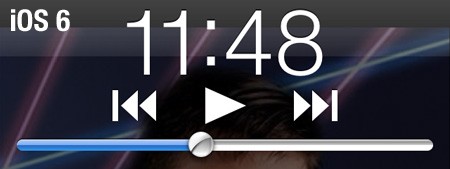
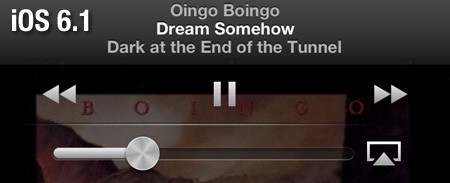
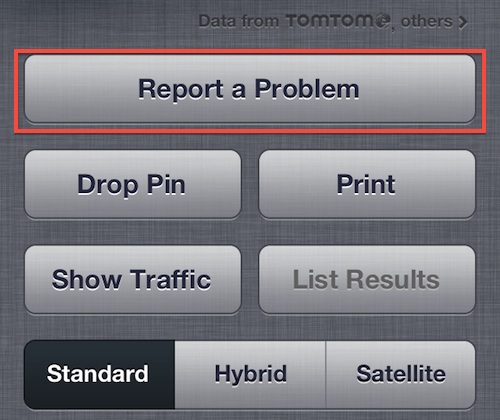
![]() While iOS 6.1 brought several widely publicized new features such as support for several dozen new LTE carriers and new support for ordering Fandango movie tickets through Siri in the United States, a number of other minor changes were also included in the update. Given the frequency with which our readers have been pointing some of them out, we thought it would be appropriate to make note of them in a brief roundup. - Lock screen music controls: The music controls on the iPhone's lock screen have been enhanced as noted by TUAW, bringing them in line with those in the Music app. ![]() ![]() The volume knob also copies the Music app's visual trick of using the phone's accelerometer to vary the angle of virtual reflections on it. - Maps "Report a Problem" button: Apple has tweaked the "Report a Problem" button in its Maps app, accessible in the preferences section by tapping at the lower right corner of the map page. The option had previously been a small text link, but Apple has now made it a much more prominent and accessible button which is actually now the largest button on the page. ![]() Article Link: iOS 6.1 Tidbits: Music Controls on Lock Screen, Maps 'Report a Problem' Button, Diagonal Swiping Bug |
|
|
|
5
|
|
|
#2 |
|
Diagonal swiping is the same for me...not that it was ever an issue.
|
|
|
|
1
|
|
|
#3 |
|
The shadows serve no purpose, why are they wasting more time on that waste of time. Particularly given the bad taste left behind by so much effort out into it for the original release that was full of serious bugs.
|
|
|
|
1
|
|
|
#4 |
|
I love that the reflection changes as you move your phone via the accelerometer. Wonderful detail here! Just like the icon on icloud.com when you move your mouse.
__________________
You know what they say... once you go Mac you ain't never gonna go back. |
|
|
|
5
|
|
|
#5 | |
|
Quote:
I'm sure this little reflection change won't even make it to iOS7
__________________
2011 iMac - Quad Core i7 - 27" - 16GB RAM |
||
|
|
2
|
|
|
#6 |
|
Verizon's carrier version was 14.0 on the iPhone 5 on the 6.1 release, but then this morning I got a message that the carrier information was updated. Checked and it was 14.1.
|
|
|
|
1
|
|
|
#7 |
|
The maps 'report a problem' button is not new (which I know you stated). It's been there from the beginning. People just dont bother as Apple dont fix the problems.
Moving the button and making it more prominent really wont fix maps. It just makes it more obvious that Apple are having a hard time doing it themselves. Stuff I reported on launch day is still not fixed.
__________________
|
|
|
|
4
|
|
|
#8 |
|
Useless feature, but great to see you're listening to Oingo Boingo!
|
|
|
|
2
|
|
|
#9 |
|
That's great that the swiping issue was a bug. Just an argument starter---->(Some people play games that involve swiping rapidly, stop complaining about having/not having problems with it)
__________________
If you want to know what people think of you, pull up your Facebook and judge yourself. Image |
|
|
|
0
|
|
|
#10 | |
|
speak for yourself
Quote:
__________________
"Never doubt that a small group of thoughtful, committed citizens can change the world; indeed, it's the only thing that ever has." - Margaret Mead |
||
|
|
6
|
|
|
#11 |
|
I'm also able to control my music from my iPhone when it's connected via usb in my car. It used to say accessory connected and I either had to use the car controls or select my music then plug it in. I love this!
|
|
|
|
4
|
|
|
#12 |
|
Hallelujah! I'm sure a lot of people will consider this an insignificant update, but it's a big improvement for me.
I listen to a lot of audiobooks. I can't tell you how many times I've accidentally hit the forward or backward button instead of the play/pause button and then spent several minutes trying to find where I was in the book.
__________________
Question Authority, but obey random strangers' signatures. |
|
|
|
18
|
|
|
#13 |
|
The lock screen controls and maps button update are a nice thing. I remember when Apple Maps first came out I was looking for a way to report problems.
|
|
|
|
1
|
|
|
#14 | |
|
Another "tidbit" in iOS 6.1 that I'm surprised hasn't been reported on:
Quote:
|
||
|
|
3
|
|
|
#15 |
|
Boingo!
|
|
|
|
0
|
|
|
#16 |
|
Track and Pause Controls on Lock Screen
Since Apple enabled Lock Screen track and pause controls I've felt that the three buttons were much too close.
I've been using a jailbreak fix for a year or two. Good they adjusted this for those who are in jail.
__________________
inThirty.net - New, 30 minute, tech podcast on iTunes JustinFreid.com | Twitter.com/JustinFreid | Facebook.com/JustinFreid Think different? Install OS X on anything x86 / Jailbreak iOS |
|
|
|
2
|
|
|
#17 |
|
Same here.
I've more or less given up an Apple Maps. I just open it occasionally out of curiosity to check if the one huge error that's local to me has been fixed yet. |
|
|
|
0
|
|
|
#18 |
|
You're swiping it wrong.
|
|
|
|
0
|
|
|
#19 |
|
|
0
|
|
|
#20 |
|
Yep. I had found it too, but now this is much easier, as it should have been from the start.
|
|
|
|
3
|
|
|
#21 |
|
Super. Now fix the podcast app.
The podcast app is the most obvious example of Apple's horribly dysfunctional software design. I hope this app is the last of the legacy of Scott Forstall.
The interface is nothing like any other Apple app. It is not intuitive to use or easy to figure out how to use. The control layout not consistent with any other app. The controls themselves are tiny little buttons and hard to hit with an adult fingertip. The relationship between Library, playlist, and episode is so disjointed and without flow. Oh! But it's got a really ridiculous skeuomorphic reel-to-reel tapedeck animation when you finally succeed in getting a podcast to play. Super. Right now while trying to write about it, I feel myself getting more confused as I try to explain why I think this app is just bad. So, it's super that a couple of buttons got moved apart in iTunes. Now deal with this tangled rat's nest that is the podcast app. <steps down from soapbox of rant, picks up espresso, and slinks away> |
|
|
|
3
|
|
|
#22 | |
|
Quote:
Complaining about how much time they spent on this "feature" is a moot point, as they most certainly just copied the code over from these other apps and replaced the existing button. Come down from your soapbox and put the razorblade down, chicken little. The sky is not falling. |
||
|
|
10
|
|
|
#23 | |
|
Quote:
|
||
|
|
0
|
|
|
#24 |
|
The diagonal swiping bug has definitely been cured on my iPhone 5 with this update. Wizardry.
|
|
|
|
0
|
|
|
#25 | |
|
Quote:
|
||
|
|
3
|
![]() |
|
«
Previous Thread
|
Next Thread
»
| Thread Tools | Search this Thread |
| Display Modes | |
|
|
All times are GMT -5. The time now is 10:43 PM.


Linear Mode