|
|
#1 |
|
iTunes putting movies into "home video" category
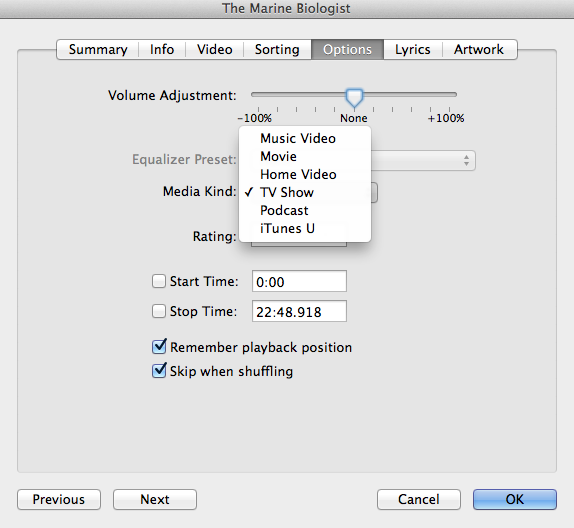
Since upgrading to itunes 11, I've put a couple movies that I digitized via handbrake and tagged via meta x into itunes and it automatically puts it under home videos even though i tagged it as a movie (like usual) in meta x. I have to go into "get info" and then change it from home video to movie to fix it.
Any way to get it placed into the movies section right away (like it did in 10.7) or even get rid of the home video section all together? |
|
|
|
0
|
|
|
#2 |
|
Sounds more like a possible problem with MetaX. I've done a couple of movies so far w/ handbrake but using iDentify to tag them and iTunes 11 puts them in the right category. I've actually had to go back and retag the home movies using iTunes11 to move them out of the regular movies category as it seems Movies is the default.
|
|
|
|
0
|
|
|
#3 | |
|
Quote:
best part of meta x is that its free lol |
||
|
|
0
|
|
|
#4 |
|
I'm having the same issue, even tried going through finder to move the files from "Home Videos" to "Movies" within the library to no avail.
__________________
MR Challenge Part 2 Score: 1 |
|
|
|
0
|
|
|
#5 | |
|
Quote:
Last edited by SandboxGeneral; Dec 1, 2012 at 03:42 PM. Reason: Fixed typo |
||
|
|
2
|
|
|
#6 |
|
Don't Want "HOME MOVIE"
Before the latest iTunes upgrade, all my Quicktime home movies made with iMovie were in the "MOVIE" folder (I have no downloaded movies or TV shows). Since the upgrade my new home movie is sent to the "HOME MOVIE" folder with all my previous movies in the original "MOVIE" folder. I want all my movies in one place - preferably the "MOVIE" folder. I tried SandboxGeneral's suggestion in moving the new movie from "HOME MOVIE" to "MOVIE" but once moved the movie will not play. Also, the 1st attempt to move the movie causes iTunes to freeze causing a need to force quit iTunes.
Any suggestions? EDIT: I just discovered that I can move some of my home movies from "MOVIE" to "HOME MOVIE" rather than the other way around as I had preferred. However, only some of my QT movies are moveable using Get Info>Options>Media Type. Even though all the movies are the same QT file type, some have the Media Type option grayed out with only the Rating option selectable. Why are some moveable and some not? Help, please! EDIT #2: Workaround for immoveable QT movies in "MOVIE". I discovered that I can get a QT movie with a grayed out Media Type in Get Info>Options into "HOME MOVIES" by deleting it and re-importing it to "HOME MOVIES". A slow, tedious process, but it works! If you're wondering why I would go thru this trouble instead of playing my QT home movies using QT Player, I like iTunes thumbnails which make movie selection more pleasant and easier. BTW, the thumbnails are larger in "HOME MOVIE than in "MOVIE".

__________________
Macmonter 2008 Mac Pro 3.1, 2X 2.8 GHz Quad, 6 GB RAM, 320 GB + 1.5 TB + 3TB internal HD, 2 TB external HD, OS 10.6.8, 30" HP LCD monitor Last edited by Macmonter; Dec 8, 2012 at 10:04 AM. |
|
|
|
0
|
|
|
#7 |
|
MetaX is abandonware. There is MetaZ. I use Subler with no problems. It's free.
|
|
|
|
0
|
|
|
#8 |
|
I was having this same issue since upgrading to 11. Glad I found this thread, and thanks for the help!
__________________
MacBook 2.26 Ghz IMac IPad 1,3, Mini 2 IPhone 4 ![]() Mac Mini 2.4 Ghz ATV3 ![]() PowerMac G5 PowerBook G3 5 Ipods 2 Airport Extremes
|
|
|
|
0
|
|
|
#10 |
|
Right, I do that all the time when I import TV shows so as to fill in all the identical information. Then go into them individually to fill in the episode specific information.
|
|
|
|
0
|
![]() |
|
«
Previous Thread
|
Next Thread
»
| Thread Tools | Search this Thread |
| Display Modes | |
|
|
All times are GMT -5. The time now is 05:34 PM.


IMac
Linear Mode