|
|
#151 | |
|
Quote:
http://eshop.macsales.com/item/NewerTech/MXPCIE6GS2/ I have a 2008 Mac Pro so only have one PCIe-2.0 slot in addition to the video card slot. So the eSATA was in one of the slower slots and I think I tried it in 2 different slots with no effect. Removing it allowed booting without problems, and I used the 2nd SATA port on the Solo x2 card to cable out as eSATA to run my RAID-5 backup drive in place of the removed card. The Velocity Solo x2 card had exceptional performance with a Samsung 840 Pro 256GB SSD mounted to it as my boot drive. -howard |
||
|
|
0
|
|
|
#152 |
|
That's a good idea using the spare eSATA socket on the Velocity X2 card as it is SATA-III. I too have a 2008 Mac Pro 3,1 so am using the spare SATA-II connectors on the motherboard to connect to my external RAID-5 boxes.
|
|
|
|
0
|
|
|
#153 |
|
That will work too, although I am using my motherboard SATA-II ports to connect a pair of 240GB SSDs in RAID-0 mounted in the spare optical bay. That is my boot drive.
|
|
|
|
0
|
|
|
#154 | |
|
What speed you get on MP 3.1 2008 ?
Quote:
Hi, I have one X2 on MacPro 3.1 2008, and I tested it with 2 SSDs, One Samsung 840 one Sandisk Extreme, I tested it with 2 drives but got only 160write/ 190read. on both drives, is there a trick to make it work at the factory stated speed??
|
||
|
|
0
|
|
|
#155 | |
|
Quote:
What test program are you using? |
||
|
|
0
|
|
|
#156 |
|
Thank you for your reply !!
I'm using the most upper slot, the one nearest HDD and I believe that's a X4 slot, I tested it with blackmagic's Disk speed test, got those result,
That's worse than the stock's SATA2's 250mb/sec. I don't know what to change, Hopefully, someone from can help. or I'll return it for refund.
|
|
|
|
0
|
|
|
#157 | |
|
Quote:
-howard Last edited by hfg; Jan 30, 2013 at 07:49 PM. Reason: correction for slot as PCI 2.0 ... not 4-lane |
||
|
|
0
|
|
|
#158 | |
|
Quote:
Have so far no clue what's wrong.. and I found out one more issue on My MP3.1 If you try to using VMware to open a Bootcamp partition on Solo X2, it will just disconnect it. I still don't know what went wrong,.
|
||
|
|
0
|
|
|
#159 | |
|
Quote:
You will not see the high performance of the Velocity x2 card if it is plugged into a non-PCIe 2.0 slot, which the topmost slot is defined as PCIe 1.0. If you are using the lower two PCIe 2.0 slots for dual video cards, you will not get the full potential from your Velocity x2 card in a 2008 Mac Pro. Regarding the BootCamp issue ... I believe I read here that you could not partition the disk on a Velocity x2 card for dual operating systems, so in mine I have a separate SSD for Windows on one of the drive sleds. I use Sled-1 for Windows because it is sensitive to additional drives (partitions) in the search path and may not boot in other positions. The Windows issues may also have to do with the fact that the PCIe based drives are considered "external" drives, which also seems to cause them to be the last boot devices to be recognized, causing a delay prior to actual boot activity. From the 2008 Mac Pro Developer Notes: PCI Express Architecture The Mac Pro has four internal PCI Express (PCIe) links connected to the North Bridge IC and South Bridge IC. Two of the links provide 4-lane expansion slots supporting the PCIe 1.0a standard at 2.5 GHz. The other two links provide 16-lane 5.0 GHz PCIe 2.0 interfaces: one double-wide graphics slot and one expansion slot. Slot ---- Type ----- Bandwidth 4 --- PCI Express 1.1 ---- 4-lane 3 --- PCI Express 1.1 ---- 4-lane 2 --- PCI Express 2.0 ---- 16-lane 1 --- PCI Express 2.0 ---- 16-lane (double wide) -howard Last edited by hfg; Jan 30, 2013 at 07:58 PM. |

||
|
|
0
|
|
|
#160 | |
|
Quote:
|
||
|
|
0
|
|
|
#161 | |
|
Quote:
I get 410MB/s Write and 337MB/s Read from a pair of OWC SATA-II drives mounted in the optical bay and cabled down to the two SATA ports on the motherboard under the fan. You can use smaller sized SSDs, although I used 240GB SSDs to create a 480GB RAID-0 boot/system drive. Seems like a good compromise to me to keep the old Mac Pro relevant today. -howard |
||
|
|
0
|
|
|
#162 | |
|
Quote:
Thank you, I have the same configuration like yours,2 Sandisk SATAII drives result is close to your 410mb/330mb, I was planned to use a single drive to free up one drive space. anyway, thanks for the info !! |
||
|
|
0
|
|
|
#163 |
|
Mac Pro 3.1 with SoloX2 Update
Hi,
I've installed the X2 on one of the X16 lane, and it seems working well with the Samsumg 840 series HDD, I got 300/500 write/read on a single drive setup. BTW, does anyone knows how to get the extra power connector from the Mac Pro 3.1 ? I don't see there is enough space to route the cable form the optical drives area, is there a way to convert the 6pin power cable for the 2nd SSD drive on SoloX2 ?? perhaps just a cable converter can do ?? Nick |
|
|
|
0
|
|
|
#164 | |
|
Quote:
|
||
|
|
0
|
|
|
#165 | |
|
Quote:
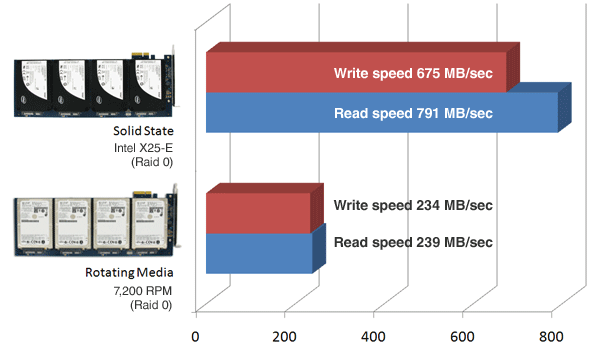
![]() Is it really that slow? I get the same as they show for their SSDs with 4 rotational drives in the normal bays. EDIT: OOps... I just noticed you said PCI-x and not PCI-e... Sorry... |
||
|
|
0
|
|
|
#166 |
|
The picture is old the Intel X25-E became available in 2010 or earlier. The mentioned HDDs are 2.5" notebook drives and these had only 60 MB/s.
|
|
|
|
0
|
|
|
#167 |
|
mac pro 3,1 Velocity Solo x2 + CalDigit FASTA-6GU3
Velocity Solo x2 works on my mac only if it is installed as the top PCI card i.e. that it is bootable! This MUST be the very first top card.
The CalDigit FASTA-6GU3 with esata and usb3 I installed on the last available slot. Now all is working. THis is all a painful experience because I thought it is OSX 10.8.3 causing all these issues. |
|
|
|
0
|
|
|
#168 |
|
I have this card and it's working excellently in my 2008 Mac Pro 3,1.
I have 2x 512GB M4's connected, both are separate drives but I can max them out both during a speed test.
__________________
iPhone 5, MacBook Pro (2011), Mac Pro 2008, Apple Cinema Display 30" Aluminium |
|
|
|
1
|
|
|
#169 | |
|
Quote:
|
||
|
|
0
|
|
|
#170 | |
|
Quote:
![]() I currently have a CalDigit FASTA-6GU3 card in the top slot, closest to the disk trays, and the Solo x2 card in the lowest available slot, next to the graphics card. It seems to be working OK so far, although I did have some problems with 2 Solo x2 cards installed in the 2 middle slots, but that may have been due to my unconventional configuration of the SSDs on those cards. This is in a 2012 5,1 Mac Pro. -howard |
||
|
|
0
|
|
|
#171 | |
|
So, can you confirm the Velocity Solo x2 is bootable and work fine in addition to the Caldigit FASTA-6GU3 I already have ?
Is the Caldigit card bootable i this configuration ? Thanks Ps : I've read elsewhere in this forum that the Velocity x2 don't boot with the Caldigit FASTA-6GU3 because they use the same chipset for the SATA part. In other hand the Velocity x1, which use another chipset is claimed to be ok, but the performances are not the same... Quote:
|
||
|
|
0
|
|
|
#172 | |
|
Quote:
I can also boot Windows 8 from a Solo x2 card with the CalDigit. What isn't working for me is 2 ea. Solo x2 cards, one with OS X and one with Windows 8, with or without the CalDigit card, Windows won't complete the boot process ("no bootable disk found"). Moving the OS X SSD over to a Sonnet Tempo Pro card, leaving the Solo x2 with Windows, and having the CalDigit card installed is working fine for me. -howard |
||
|
|
0
|
|
|
#173 |
|
Well ... shoot ... confused again!
![]() I just put everything together again in the Mac Pro, and all of a sudden I am able to get to the boot-device menu with the option-key on startup while using the Sonnet Tempo Pro. ![]() I have 2 bootable environments I am experimenting with: a Fusion OS X and a SSD RAID-0 OS X, both with a bootable Windows 8 SSD. My hardware layout: Bay-1: empty Bay-2: Samsung 840 Pro (part of OS X Fusion array) Bay-3: Seagate 3TB Hard Disk (part of OS X Fusion array) Bay-4: Seagate 3TB Hard Disk (used with OS X RAID-0 for archive, movies, etc.) PCIe Slot 4: CalDigit FASTA-6GU3 6G eSATA & USB 3.0 Card Card PCIe Slot 3: Sonnet Tempo SSD Pro with 2 ea. Crucial M4 512GB SSD in RAID-0 OS X PCIe Slot 2: Velocity Solo x2 with Crucial M4 256GB Windows-8 ---- PCIe Slot 1: Sapphire HD 7950 Graphics I don't know what changed in the drive / card arrangement that caused the Boot-Selection to again function while the Sonnet card is active. -howard Still unable to get Windows to boot when 2 ea. Solo x2 cards are used, one for Windows and one for OS X. |
|
|
|
0
|
|
|
#174 |
|
Anyone know where I could buy one of these in the UK?
Also, could I link a second SSD (Windows 7 boocamp) to the second SATAIII port on the Solo x2 card and then power the second SSD from one of the hard drive bays? Many thanks, Moley
__________________
I am actively seeking employment in the Norfolk/Suffolk area of the UK. I have good IT and communication skills, with 18 years of print experience. If you can help me in any way, please send me a PM. |
|
|
|
0
|
![]() |
|
«
Previous Thread
|
Next Thread
»
| Thread Tools | Search this Thread |
| Display Modes | |
|
|
All times are GMT -5. The time now is 12:52 AM.


Linear Mode