|
|
#226 | |
|
Quote:
For $5 its hard to go wrong. I picked one up at my local brick-and-mortar for a HDD replacement and it has all the stuff for a recent mini
__________________
2012 Mac Mini - i7 Quad Core 2.3 GHz - 4GB RAM - 128 GB SSD |
||
|
|
0
|
|
|
#227 | |
|
Quote:
|
||
|
|
0
|
|
|
#228 |
|
I've only had my unfused dual drive setup for a week now but have been amazed at how quiet and cool it runs—possibly due to how the mini is set up (OS and apps on the SSD; all other data and some User folders on the HDD). The fans have yet to blast on even while watching 1080p films. The SSD makes all the difference.
|
|
|
|
0
|
|
|
#229 | |
|
Quote:
|
||
|
|
0
|
|
|
#230 | |
|
Quote:
__________________
27" iMac, 2.93GHz i7, 16GB of RAM, 1TB HD 15" MacBook Pro, 2.4 GHz i7, 8GB RAM, 750GB HD 8GB iPod Nano iPhone 5 (T-Mobile) Apple TV2 AirPort Extreme
|
||
|
|
0
|
|
|
#231 | |
|
Quote:
|
||
|
|
0
|
|
|
#232 | |
|
Late 2012 Mac Mini broken fan connector
Quote:
__________________
Mid-2010 Mac Mini; Late-2012 Mac Mini; iPhone 4S; IPad (4th gen, Wifi, 32GB); IPad (3rd gen, Wifi, 16GB) |
||
|
|
0
|
|
|
#233 |
|
I didn't use it on a Mini but they fit perfectly into my iMac and MacBook Pro with no issues. I had to apply a little more pressure than normal but no issues other than that.
__________________
27" iMac, 2.93GHz i7, 16GB of RAM, 1TB HD 15" MacBook Pro, 2.4 GHz i7, 8GB RAM, 750GB HD 8GB iPod Nano iPhone 5 (T-Mobile) Apple TV2 AirPort Extreme
|
|
|
|
0
|
|
|
#234 |
|
The bits fit the screw heads fine. I've never had issues using cheap driver bits for small precision things like computers. The screws on mine came out relatively easy. Just take your time undoing everything, don't overtighten when it goes back together and you should be set.
__________________
2012 Mac Mini - i7 Quad Core 2.3 GHz - 4GB RAM - 128 GB SSD |
|
|
|
0
|
|
|
#235 | ||
|
Quote:
Quote:
|
|||
|
|
0
|
|
|
#236 | |
|
Quote:
|
||
|
|
0
|
|
|
#237 | |
|
Quote:
|
||
|
|
0
|
|
|
#238 |
|
Wow, just had the worst experience with the OWC Data Doubler Kit. The T6 screw driver they mailed me stripped every screw I tried to use it on. Went out and bought another one at the store and had no problems. Disappointed in the quality of the screw drivers sent. It really messed up some of the screws. Don't know about the iFixIt kit though
|
|
|
|
0
|
|
|
#239 |
|
I just used the owc data doubler kit a couple days ago to install 2 ssd's in my new mac mini and it worked just fine for me. I was going to get the ifixit kit at first but they wanted something like $40 to ship it to brisbane australia on top of the $50 for the kit itself so ended up going the owc kit for $50 delivered.
The ifixit kit did look much higher quality thats for sure but no way im paying $40 delivery for it. |
|
|
|
0
|
|
|
#240 | |
|
Quote:
__________________
15" 2.3 GHz QC i7 MBP 2.6 GHz QC i7 Mini 2.0 GHz QC i7 Mini |
||
|
|
0
|
|
|
#241 |
|
I have all kinds of hex and Torx screwdrivers and I'm only interested in he actual cable for the second drive. Is this available somewhere?
|
|
|
|
0
|
|
|
#242 |
|
The only cable i found was on amazon but its $28. You might as well pay the extra $7 and get the owc dual hdd kit.
|
|
|
|
0
|
|
|
#243 | |
|
Quote:
|
||
|
|
0
|
|
|
#244 |
|
Hi Guys,
Looking for someone to suggest the best configuration to suit my needs. Current config: Mac Mini 5,2 2.5 GHz Intel Core i5 4Gb Memory 500Gb HDD 2TB External iOmega Drive (Firewire) 1TB Time Capsule Use: Mostly web design so Adobe CS5 (Mostly Photoshop and Dreamweaver) plus photography stuff; Lightroom. Plus Plex Media Server, iTunes, etc. Operating System (OSX 10.8.2), data and photography on internal 500GB drive. Only 120Gb free. External 2TB used for media storage. So what would give me the best performance? Ok, upgrading memory to 16Gb is a given. (Crucial £76.79). Looking to purchase the OWC Drive Doubler kit, and wondered what people would recommend would suit me best in terms of drives. Mid range budget. Thanks in advance, guys. Graeme |
|
|
|
0
|
|
|
#245 | |
|
Quote:
I sold my mac mini and now use a macbook, however, before I sold it I used the data doubler kit to install this alongside 16GB RAM: http://www.amazon.co.uk/gp/product/B007R1FH3K/ This was a very quick drive for my usage, Fireworks CS5, iTunes, xcode, similar to the stuff you do (I did not use lightroom though). So my setup was mac mini 2.5GHz, 16GBRAM, 1 x 500GB 5400rpm and 1 x 128GB SSD and it was sweet!! Go for it, but be VERY careful taking the mini apart to install the SSD, a few people have broken bits. It's really fiddly, take your time and don't force anything. If something feels stuck, come at it from a different angle rather than more pressure! Hope this helps, good luck ![]() Sam. |
||
|
|
0
|
|
|
#246 | |
|
Quote:
Thanks for the reply and the info. After you installed the new SSD drive, I assume you reinstalled the OS and Applications on it, and then used the HDD as a 'data' drive after removing the OS? What was the performance like running the OS and apps from the SSD? Thanks again, Graeme |
||
|
|
0
|
|
|
#247 |
|
Hi Graeme,
Yes I reinstalled the 10.8.2 Lion on the SSD and moved my home folder to the HDD. Restart and you're good to go. You can find a guide for moving the home folder with a search, on phone now so can't find/paste the link easily! The overall snappiness was very noticable, apps open a lot quicker. It doesn't affect the actual processing speed of things (the processotlr is still the same) but it's an all round tune up so to speak. Boot up went from about 25secs to about 12secs. Firefox opned almost instantly, same with fireworks cs5, large photos opened a lot faster etc... Well worth doing but be careful! I can't stress this enough. Sam. |
|
|
|
0
|
|
|
#248 |
|
Second hard drive cable
I have 2012 mac mini (i7 2.3), and I want to add second hard drive to it. I am not sure what cable to order:
Mac Mini Server Bottom Hard Drive Flex Cable - http://www.powerbookmedic.com/Mac-Mi...e-p-20708.html or Mac Mini Top Hard Drive Flex Cable with Sensor - http://www.powerbookmedic.com/Mac-Mi...r-p-22345.html I would say that the first one is what I need, but in product description for the first cable it says: "For the 2012 models, this is the standard hard drive cable." For second cable it says: "For the 2012 model this is used to add a 2nd drive." so I am not sure what cable should I order. Can someone help? Thanks! |
|
|
|
0
|
|
|
#249 |
|
So when you add a second hard drive, the cable can't be in the same place as the primary hard drive. Think about it. If the cable was in the same place they wouldn't both fit. That's why there are two.
So depending on what you want to do pick a cable. I would pick the top one for adding a second drive. |
|
|
|
0
|
|
|
#250 |
|
Hi Everyone, lokks kine I found the right discussion. I purchased last week (got it yesterday) a slightly used basic Mac Mini (MD387LL/A ; machine was sold to original owner on December 12, 2012), to which was added a second Intel 120GB SSD drive with the use of the OWC kit. It came with 4GB of memory, but I upgrade it to 16GB by installing two 8GB SIMS (Corsair Vengeance RAM DDR3 1600 MHz PC3 12800, model CMSX16GX3M2A1600C10) even before starting it for the first time and sucessfully went through the initial setup and showed the 16GB memory without any issues.
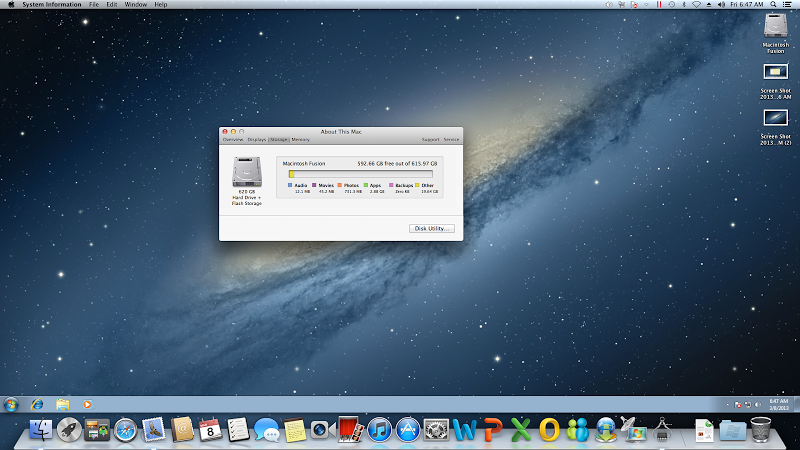
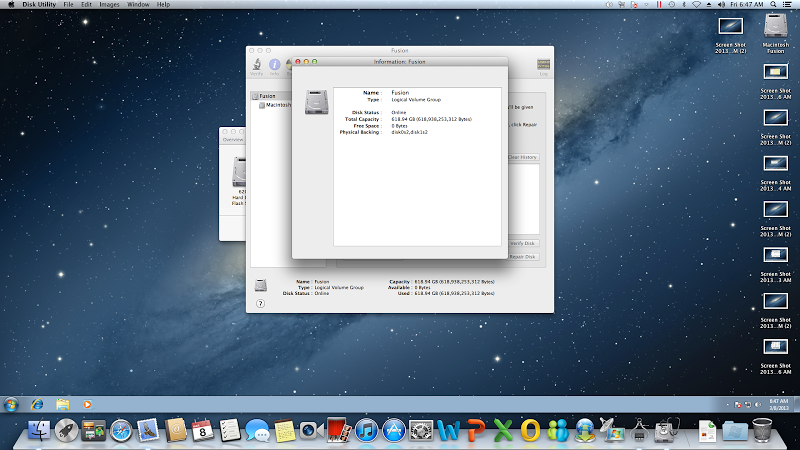
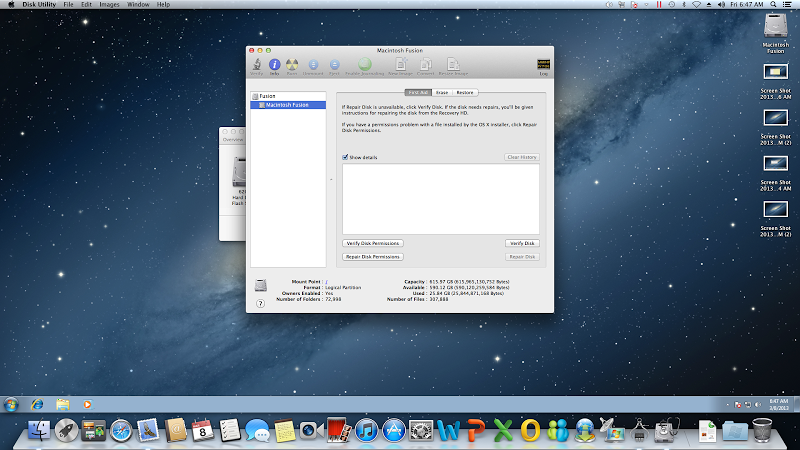
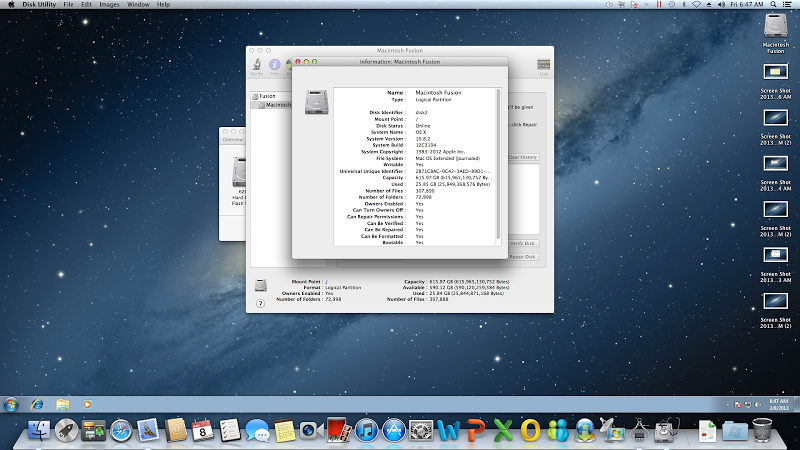
When I checked the hard drive space, I noticed that it reflected a 620GB hard disk instead of the expected 500GB and 120GB hard disks, noticed it said "hard drive + flash storage", as shown below: ![]() I went to the disk utikity option and this is what it shows: ![]() ![]() ![]() It talks about a logical volume group. Is this the way that it should be configured after adding the second drive? Furthermore, I did a Mac OX update after installing a few programs and the machine startup is really slow (took several minutes to start), which makes me beleive there is something wrong with the way the HD's were configured by the original owner. Your help will be appreciated. ![]() Francisco
__________________
2012 15" rMBP 2.7 | 16 | 768 | (Full Samsung) | 64GB Nifty Micro SD I5 | 64 | JB | EC Black Ops | AT&T ∞ Data iPad 4 | 6.1.2 | 32 GB | AT&T + LTE Mac Mini | 2.5 |500 | 120GB SSD |
|
|
|
0
|
![]() |
|
«
Previous Thread
|
Next Thread
»
| Thread Tools | Search this Thread |
| Display Modes | |
|
|
All times are GMT -5. The time now is 08:26 PM.


15" MacBook Pro, 2.4 GHz i7, 8GB RAM, 750GB HD 


Linear Mode