|
|
#26 | |
|
Quote:
As I understand it there are already two boot methods in the ROM: BIOS and EFI. Why not three? |
||
|
|
0
|
|
|
#27 |
|
[QUOTE=DanielCoffey;16745486]Killerbob - I would advise only having a single graphics card in the machine at one time. It avoids driver conflicts, power issues and noise.
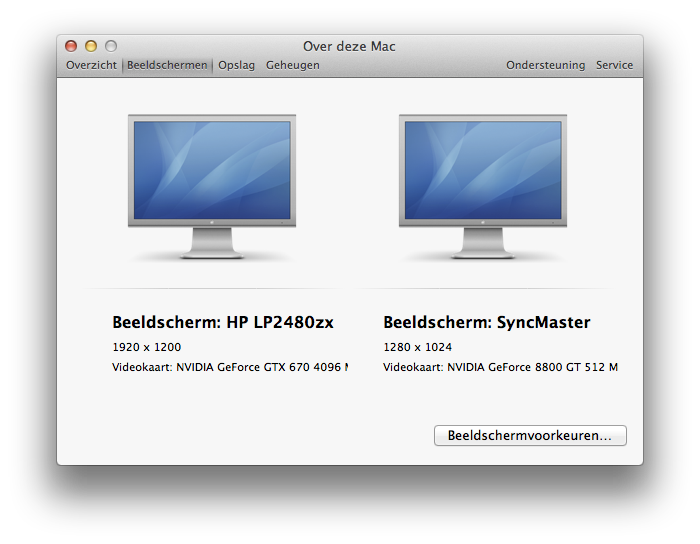
NOT TRUE!!! My setup works flawless with the original GT8800 MAC and the ATI 2600HD in combination with the EVGA GTX 670 FTW 2 and 4GB versions, the latter doesn't extra power (45w)! ![]() No driver issues, even with the combined ATI and EVGA Nvidia cards No power issues No noise issues more then normal when using high GPU loads! That's what the fans are made for!
__________________
MAC PRO 3.1 | OSX 10.8.3 (12D78) - NVIDIA 304.10.65f03 - CUDA 5.0.45 - GT-8800 MAC | SneakerCamp - WIN8 PROx64 - NVIDIA 310.90 WHQL + CUDA 5.0.35 - EVGA GTX-670FTW
|
|
|
|
0
|
|
|
#28 |
|
GTX 660 with NVIDIA GT8800 MAC-EDITION
i have the NVIDIA GT8800 MAC-EDITION and a EVGA GTX 660. I have tried to connect both. I have the EVGA in slot 1 and NVIDIA GT8800 MAC-EDITION in slot 2. I bought another apple PCIe connector, just like the stock one, and have connect both of them to the board but they wont work in tandem.
Both combined dont exceed 300w, but they never work when plugged into the motherboard at the same time. Do you have any idea or thoughts on how to make them both work at the same time. Does it have to do with drivers? i have the nvidia drivers installed. would using the Apple Mini-PCIe 6-Pin to Standard Dual PCIe 6-Pin Video Card Power Cable make it work? I would think using 2 cables would work fine, but its not. I would really like to have the option of going to recovery if something bad happens, and not switch out GPU's. My mac is 3,1 2008 model. Any help would be awesome by anyone. |
|
|
|
0
|
|
|
#29 | |
|
Quote:
![]() Does the GTX 660 has 2 power connectors on the card itself? If so it needs a dual power line as shown in my earlier post in this thread! Make sure to CROSSlink the two Y-spit cables t both graphics cards! My hardware setup in Mac Pro 3.1 EVGA installed in Slot-1, NVIDIA MAC installed in Slot-2 NVIDIA GT8800: 1x PCIe 6-pin from onboard connector #1 EVGA GTX 670 4GB FTW: 1x PCIe 6-pin from onboard connector #1 1x PCIe 6-pin from onboard connector #2 1x PCIe 6-pin from onboard connector #2 = SPARE
__________________
MAC PRO 3.1 | OSX 10.8.3 (12D78) - NVIDIA 304.10.65f03 - CUDA 5.0.45 - GT-8800 MAC | SneakerCamp - WIN8 PROx64 - NVIDIA 310.90 WHQL + CUDA 5.0.35 - EVGA GTX-670FTW
Last edited by BDM STUDIOS NL; Mar 2, 2013 at 02:42 AM. |
||
|
|
0
|
|
|
#30 |
|
I can't find the references, but there has been mentionings in forums that splitting the 6-pin power cables in the Mac Pro is a VERY bad idea. Supposedly this setup can draw too much power and fry the motherboard.
I know it probably works in many cases, even for longer time, but one day you might try to turn on the MP and find it rendered useless. Your call...
__________________
MP 2.8GHz 8C/16GB/960GB Accelsior/250GB SSD/GTX680 - MBP 15"/2.53GHz/8GB/250GB SSD - MBP 15"/2.66GHz/8GB/250GB SSD - MBA 2GHz i7/8GB/250GB - MMI 2.3HGz/8GB/500GB - TC 3TB - ReadyNAS Pro 6x3TB
|
|
|
|
0
|
|
|
#31 | |
|
Quote:
![]() Much appreciated!
__________________
MAC PRO 3.1 | OSX 10.8.3 (12D78) - NVIDIA 304.10.65f03 - CUDA 5.0.45 - GT-8800 MAC | SneakerCamp - WIN8 PROx64 - NVIDIA 310.90 WHQL + CUDA 5.0.35 - EVGA GTX-670FTW
|
||
|
|
0
|
|
|
#32 |
|
As I said, I can't find the references, but effectively you are demanding more than the standard 75W from each power cable. Just because you are only running/using one of the cards, the other is still running, i.e. pulling power.
Each card will pull power from the PCIe slot, that's OK, the Mac Pro can handle it. Each card will however also pull power from the PCIe power cables, and they are only dimensioned to handle 75W. In your example you are possibly pulling 2x75W from onboard connector #1 if I understand it correctly. Again, the Mac Pro can handle it, the PSU is rated at 980W However, the connector on the MoBo can't, and there is a likely possibility that one day it will die! It is the same as using the 6-pin MoBo connector in an 8-pin card (using a splitter or not) - i.e. HIGHLY DISCOURAGED. It may work fine for a while, but you do risk the chance of frying your MoBo or graphics card. You can read page up and page down about this in these forums - ASGORATH is a great source for this. I am not saying it does not work, I know BDM has been doing this for a long time, I am merely saying it is very much at your own risk, and shouldn't be encouraged.
__________________
MP 2.8GHz 8C/16GB/960GB Accelsior/250GB SSD/GTX680 - MBP 15"/2.53GHz/8GB/250GB SSD - MBP 15"/2.66GHz/8GB/250GB SSD - MBA 2GHz i7/8GB/250GB - MMI 2.3HGz/8GB/500GB - TC 3TB - ReadyNAS Pro 6x3TB
Last edited by Killerbob; Mar 2, 2013 at 10:53 AM. |
|
|
|
0
|
|
|
#33 |
|
Hi Bob,
Even after a lot of time spending on forums before my excecution of the Y-splitting and crosslinking the power to both cards, I'll submit a post on apple.com just to check for comments from some of the guru's there! 😎 Thanks for your extensive reply on this matter! Keep you posted! Cheers |
|
|
|
0
|
|
|
#34 | |
|
Quote:
And i do know that my evga isn't able to show bootscreen, which is why i want to get the old nvidia card to work. I do have two newer montiors, one is from 2009 (asus)and the other is 2011 (samsung), so maybe the monitors are drawing to much power? I doubt it but who knows. The GTX 660 only has 1 power connector by the way. I had tried connecting both cards in different connector ports, so the evga in 1 and 2 as well as the old GT card. No luck. Any other idea besides trying a old monitor? |
||
|
|
0
|
|
|
#35 | |
|
Quote:
If your two graphics cards both only have one 6-pin power connector, and you have connected both of the MoBo PCIe power cables to each their own connector on the MoBo, there should be no reason why it does not work. You could try switching around the power cables, to check if one of them is a dud, and you have already tested the cards, and the two slots, so try the different combinations, and see if that won't narrow down the culprit.
__________________
MP 2.8GHz 8C/16GB/960GB Accelsior/250GB SSD/GTX680 - MBP 15"/2.53GHz/8GB/250GB SSD - MBP 15"/2.66GHz/8GB/250GB SSD - MBA 2GHz i7/8GB/250GB - MMI 2.3HGz/8GB/500GB - TC 3TB - ReadyNAS Pro 6x3TB
|
||
|
|
0
|
|
|
#36 | |
|
Quote:
|
||
|
|
0
|
|
|
#37 |
|
got both to work finally thanks.
|
|
|
|
0
|
![]() |
|
«
Previous Thread
|
Next Thread
»
| Thread Tools | Search this Thread |
| Display Modes | |
|
|
All times are GMT -5. The time now is 01:59 AM.


SneakerCamp
- WIN8 PROx64 - NVIDIA 310.90 WHQL + CUDA 5.0.35 - EVGA GTX-670FTW


However, the connector on the MoBo can't, and there is a likely possibility that one day it will die!
Linear Mode