

Got a tip for us?
Let us know
Become a MacRumors Supporter for $50/year with no ads, ability to filter front page stories, and private forums.
iPhone LockInfo 5 just released in Cydia!!!!!
- Thread starter corey407woc
- Start date
- Sort by reaction score
You are using an out of date browser. It may not display this or other websites correctly.
You should upgrade or use an alternative browser.
You should upgrade or use an alternative browser.
BrianBaughn
macrumors G4

Time Less
macrumors 6502a
Yes, on the lock screen. I find this whole widgets vs. notifications thing confusing. What makes something a widget vs. a notification?
I really do miss the old lockinfo. When I get a new email and I tap on it (I guess I'm tapping on the widget?), it launches a preview of that email; however, if I then tap the envelope icon next to the delete icon, shouldn't it launch the actual mail app? For me it doesn't do that until I unlock the phone. What am I missing here? This just seems like a total mess.
i agree, the old one worked perfectly.
i don't like how lockinfo 5 lockscreen mail preview works. when you have multiple emails you have to manually tap on each one instead of having the option to go to the next when you're in preview.
preferences can also use some cleaning up.

swordfish5736
macrumors 68000
Yes, on the lock screen. I find this whole widgets vs. notifications thing confusing. What makes something a widget vs. a notification?
I really do miss the old lockinfo. When I get a new email and I tap on it (I guess I'm tapping on the widget?), it launches a preview of that email; however, if I then tap the envelope icon next to the delete icon, shouldn't it launch the actual mail app? For me it doesn't do that until I unlock the phone. What am I missing here? This just seems like a total mess.
Anything that is a push notification from an app like an email or message is under the notifications section. LI5 was rewritten to take advantage notification center. So things like your calendar, reminders, weather, stocks, and NCsettings are considered widgets.
try swiping across the mail thumbnail when you have a notification it should launch the mail app.

twisted-pixel
macrumors 6502a
It isn't intuitive but you have to set these things to be on in notification center, even if you don't use it.
You need to make sure that both calendar and reminders are set to "on" for Notification center. Alert style can be none if you wish. View in lockscreen "on".
I can't seem to get that to work. Here you can see I have calendar items and some emails, but I can't get them to show on the one screen. Both are set to on in notification, and widgets is selected on lock info
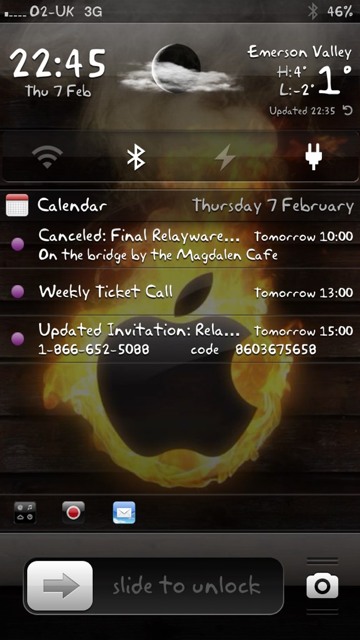
Anything that is a push notification from an app like an email or message is under the notifications section. LI5 was rewritten to take advantage notification center. So things like your calendar, reminders, weather, stocks, and NCsettings are considered widgets.
try swiping across the mail thumbnail when you have a notification it should launch the mail app.
It's not launching the mail app for me - all it does is give me a preview of the message. And shouldn't the emails be appearing in my widgets anyway? Like right now the notifications say that I have 6 emails yet none of them are showing up under widgets. Same with my text messages - they are only appearing under notifications. Arrrgh - I hate this new setup😡.
I'm actually thinking about giving ISX a try at this point because I just don't know what the heck I'm doing with LockInfo. I find the settings to be completely & utterly confusing. I don't know if I should be adjusting the settings under LockInfo, notifications or what.
swordfish5736
macrumors 68000
It's not launching the mail app for me - all it does is give me a preview of the message. And shouldn't the emails be appearing in my widgets anyway? Like right now the notifications say that I have 6 emails yet none of them are showing up under widgets. Same with my text messages - they are only appearing under notifications. Arrrgh - I hate this new setup😡.
I'm actually thinking about giving ISX a try at this point because I just don't know what the heck I'm doing with LockInfo. I find the settings to be completely & utterly confusing. I don't know if I should be adjusting the settings under LockInfo, notifications or what.
you have it backwards emails and text messages are supposed to show up under notifications. So if you'd like to be able to view your notifications by default go to the main settings page of lockinfo and set the show on lock option to notifications if it isnt already.
Just as it says as soon as you open the main settings page for lockinfo "Configure each applications notifications and the iOS widgets here". So if you'd like to alter the way notifications are displayed for your emails go to the notifications and widgets menu(can also be accessed by simply going to the stock notifications section from the main settings page) and find mail then set how you'd like it to show up. To adjust settings for the weather widget you go to the same place but select the weather widget instead.
you have it backwards emails and text messages are supposed to show up under notifications. So if you'd like to be able to view your notifications by default go to the main settings page of lockinfo and set the show on lock option to notifications if it isnt already.
Just as it says as soon as you open the main settings page for lockinfo "Configure each applications notifications and the iOS widgets here". So if you'd like to alter the way notifications are displayed for your emails go to the notifications and widgets menu(can also be accessed by simply going to the stock notifications section from the main settings page) and find mail then set how you'd like it to show up. To adjust settings for the weather widget you go to the same place but select the weather widget instead.
So everything that has "widget" in its name is a widget and anything that doesn't is a notification?
Regarding emails, why am I showing no emails under notifications when I have 8 unread emails?
New to Lockinfo
I agree. I am totally confused with the setup in Lockinfo. I came from ISX.
Lockinfo is not intuitive at all. There should be a users manual with a step by step easy to follow configuration guide. If there is one I haven't found it yet.
I hope the folks at Lockinfo are monitoring this discussion. We need some help here.
It's not launching the mail app for me - all it does is give me a preview of the message. And shouldn't the emails be appearing in my widgets anyway? Like right now the notifications say that I have 6 emails yet none of them are showing up under widgets. Same with my text messages - they are only appearing under notifications. Arrrgh - I hate this new setup😡.
I'm actually thinking about giving ISX a try at this point because I just don't know what the heck I'm doing with LockInfo. I find the settings to be completely & utterly confusing. I don't know if I should be adjusting the settings under LockInfo, notifications or what.
I agree. I am totally confused with the setup in Lockinfo. I came from ISX.
Lockinfo is not intuitive at all. There should be a users manual with a step by step easy to follow configuration guide. If there is one I haven't found it yet.
I hope the folks at Lockinfo are monitoring this discussion. We need some help here.
Regarding emails, why am I showing no emails under notifications when I have 8 unread emails?
I was having problems with new emails not showing up in Notifications. I found out it had to do with "Mail Enhancer Pro" and it not displaying new email as a notification. Made some changes within that to have all emails show up as a notification, and it started showing up.

rick snagwell
macrumors 68040

swordfish5736
macrumors 68000
So everything that has "widget" in its name is a widget and anything that doesn't is a notification?
Regarding emails, why am I showing no emails under notifications when I have 8 unread emails?
i dont think so. Calendar and reminders for example show up under widgets if you configure them to show up on the lock screen.
go to the mail settings page for notification center/lockinfo. How do you have it configured for your accounts?
love lockinfo.
Ah - old school LI!!!
----------
i dont think so. Calendar and reminders for example show up under widgets if you configure them to show up on the lock screen.
go to the mail settings page for notification center/lockinfo. How do you have it configured for your accounts?
Which specific settings are you asking me about?
macsrcool1234
Suspended
Download NCDate for Notification Center.
http://moreinfo.thebigboss.org/moreinfo/depiction.php?file=ncdateweeappDp
Image
And yes, it will only show Calendar Alerts by default. There may be a NC tweak out there for Calendar Events but I haven't seen one. An alternative is to set "Default Alert Times" for Calendar Events in Settings App to 2 Days. Then it will show the next two days of events in NC.
Image
My NCDate is just giving a blank box (with no date). Do you have any ideas why? You just installed it and added to NC right?
swordfish5736
macrumors 68000
Ah - old school LI!!!
----------
Which specific settings are you asking me about?
it may look different depending on whether you have a single account or multiple. If you have multiple accounts then from within the NC mail settings page select the account you want on the lock screen. Is view in lock screen turned to 'ON'?
Here is an earlier post from David the creator of lockinfo
Firstly, thanks to those of you who have taken the time to explore LockInfo 5 and helped other people out with questions and concerns on this forum. It's always nice to have people "in the trenches" helping out while my inbox is getting filled with emails.
To those of you that have voiced concerns about the direction LockInfo 5 has gone, it's worth reading my blog http://blog.dba-technologies.com/post/33157907923/lockinfo-rebooted to understand the design thoughts I had when approaching this project. The decisions were not made haphazardly.
My rationale for the rewrite, for those of you who are not technical, is that the original LockInfo code base, the one that powered LockInfo 4, is three years old and is based heavily on code that existed back in iOS3. It didn't leverage new frameworks like Theos or new iOS frameworks. It didn't integrate will with the notification system and resulted in a lot of inconsistency with the state of the system. The iOS ecosystem is very different now and the maintenance costs of LockInfo had reached the point that a rewrite was necessary. And when it came time to rewrite, I also looked to simplify the overly complex settings that LockInfo 4 and earlier came with.
I do want to have satisfied users. I do want to continue to iterate on LockInfo 5 to provide a tool that everyone will enjoy using. That will not be LockInfo 4 on iOS6 - that's just not going to happen. But it will be a new LockInfo that supports some of the features of LockInfo 4, but many that LockInfo never had. It will support a standard plugin architecture that will allow it to use any NC widget.
If there are usability issues that you feel need to be addressed, email me. I may not be able to reply immediately (I'm focused right now on license issues and critical bugs) and you may not see those features immediately in the product, but I do want to continue to improve LockInfo.
Email me at support (at) dba-technologies (dot) com.
All I ask is for the conversation to be constructive.
- David
----------
I can't seem to get that to work. Here you can see I have calendar items and some emails, but I can't get them to show on the one screen. Both are set to on in notification, and widgets is selected on lock info
Image
this is because the calendar is treated as a notification center "widget" and emails are considered to be notifications. Having both notifications and widgets on the screen at the same time was a feature of previous versions of lock info but not this current version. Im sure a lot of us are hoping it comes back in an update though.
swordfish5736
macrumors 68000
I have three accounts and all three are configured to show up on the lock screen. It seems as though new messages that come in ARE showing up on the lockscreen. It's just the unread messages that are already on my phone that aren't showing up.
that makes sense i guess.
My notifications button is unresponsive?
The red/white dot notification button? is it at the top or the bottom?
thomasfrdavis
macrumors member

j4zb4
macrumors 6502a
Yeah, I don't think my suggestion works. I was able to turn off banners, and remove the text messages from the Widgets page (so they only showed on the Notifications page), but when I turn Banners back on, it doesn't seem to show up on the widgets pages.
Honestly, this app is really wishy-washy. Settings that seem to work one time, don't seem to work again when set up the same way later.
David. I know you posted on this thread once already. If you're still reading this, I think we all need some help, mate. We're trying really hard to figure out how this works, and what the settings do, but it seems inconsistent at best.
Any help would be appreciated!
What's the version #? Cydia's taking a crap and not refreshing my sources.
I tried to install the latest beta that I saw (14-22), but it kept respringing my Verizon iPhone 4 (running 5.1.1). I let David know via Twitter, and he asked for my crash report (which I'm still unable to get, blah).
(Edit: it's now 14-45 on the beta repo, installing now and seeing if I still have the resprings).
14-45 works now on iOS 5.1.1 VeriPhone. =)
I am so confused now I don't know where to start... But I think I have got a couple of things figured out... Finally...!!!
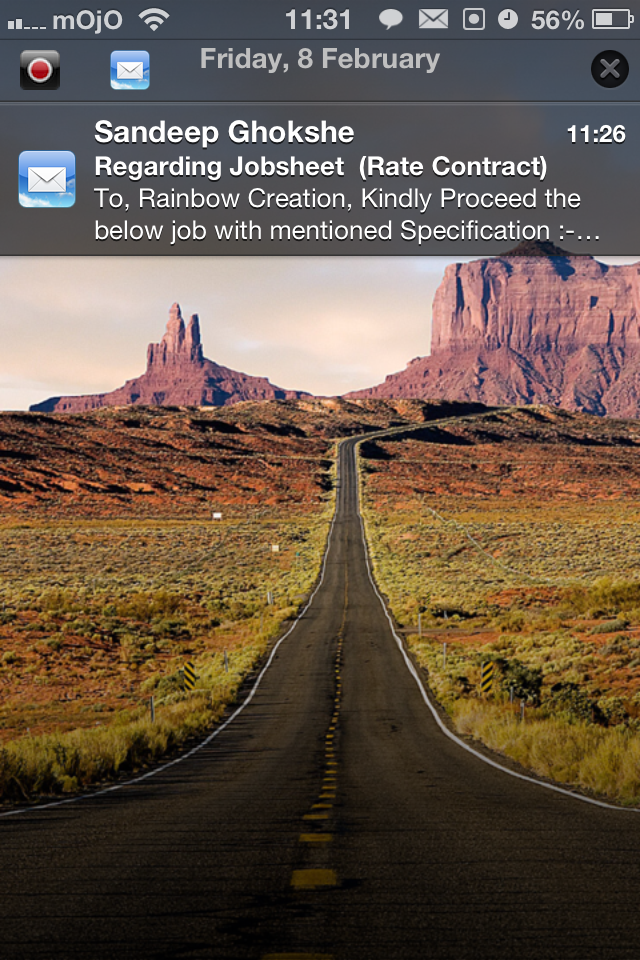
The way I have set it up I get my notifications in the info shade.. When I pull down the widgets section I have my NC settings and tap to post and calendar...
When I unlock the phone they are visible when I pull down my notification centre...
Now in the info shade as you see above (ok I don't know if its actually called the info shade... I always assumed this to be the info shade...) If you swipe right as you normally do for ios notifications it will open the mail like in LI4 without leaving the lockscreen and going into the app... If you swipe left it will give you the buttons to delete and and reply like in LI4 but with a nicer UI... I think this can be applied to most... Swipe left and you get the option to remove notification or swipe right to see the message... Either by opening the app or right there, depending on the app... If you set "tap to open" then you don't need to do the slide to right to go to the app...
If you want to clear all notifications you hit the "x" on the top right and hit clear... all notifications gone in 1 shot...
Ok now a couple of things I don't think are working correctly...
1. Now in the above pic if I unlock normally and then open the app directly red my messages etc etc and lock my phone again... This will be as it is... It doesn't go away...
2. And since the last update even if I clear the lockscreen via the "x" on the top right the status bar symbols remain unless I respring... Now I wrote to the developer about this... He says its an iOS problem and a statuslib problem... But, I fail to understand how can that be... Maybe some technical people can throw some light on that aspect...
I am sure he is wrong about the status bar problem as it started after I updated it to 14-22 beta...
Regarding emails, I'm finding that, apart from old unread ones not staying in the locksreen, when I preview the email in LI and press done, it's then marked as read, which isn't the action I want. I want an option to mark it as read but the default should be to leave it unread (as I tend to leave unread emails on my lockscreen as a reminder to deal with them).
Is there any way the LI5 set-up can be tweaked to allow this? The Mark Read on Clear toggle is off currently, so it doesn't appear to be this (unless it's a bug).
Is there any way the LI5 set-up can be tweaked to allow this? The Mark Read on Clear toggle is off currently, so it doesn't appear to be this (unless it's a bug).
twisted-pixel
macrumors 6502a
is it not possible to collapse the notifications?
right now I have 11 unread email notifications, all showing on the screen. I would prefer to collapse it and have (for example) Email (11) which would expand when I clicked it....
I just can't believe how much of a struggle this is. LI4 did everything perfectly, this does almost nothing, and does it badly!!
I do understand why it needed to be changed, but if only the old one was available as an option. I'd love to see the feedback/requests from people who asked for it to be this way (as per David's post) and ask them what the hell they were thinking!
right now I have 11 unread email notifications, all showing on the screen. I would prefer to collapse it and have (for example) Email (11) which would expand when I clicked it....
I just can't believe how much of a struggle this is. LI4 did everything perfectly, this does almost nothing, and does it badly!!
I do understand why it needed to be changed, but if only the old one was available as an option. I'd love to see the feedback/requests from people who asked for it to be this way (as per David's post) and ask them what the hell they were thinking!
Miss the old LockInfo
Hope the new one improves or reverts back to the previous version.
Regardless, thanks to the developer.
Same here. Now it is 'more integrated' but basicaly it is using apple notifications. Before it looks better and now it has no options to change looks, fonts size, ...
Been using it for long time now but version 5 is simply not looking good any more.