|
|
#1 |
|
Macintosh LC II doesn't turn on
Hello,
My Boss gifted me with a Mac LC II kept turned off for years. Last time she turned it on it was working. I never fixed an old Mac, but I have some experience with PCs. In the PC world, normally I can bring them back to live cleaning sockets or replacing the power transformer or memories. However, this Mac doesn't show any signs of living. PCs generally produce those BIOS diagnostic beeps. But at least in modern Macs, Apple devices are pretty silent on giving feedback about lower level issues (the lack of HDD led on Macbooks is a good example). Any suggestions? Thanks!
__________________
iWon't |
|
|
|
0
|
|
|
#2 |
|
If you're getting absolutely NO sounds at all, you possibly have a flat battery.
Remove the battery from the logic board and let the machine sit for a day. Then try powering it up WITHOUT the battery. It won't harm the machine to run it without the battery. Another possibility is a faulty power switch. Very common on the LC power supplies. Options are, replace the power supply, replace the switch, or bridge the switch. I assume you have a monitor and keyboard? Also note that the power supplies are NOT auto-ranging. IE, if the machine is a 110V version, and it's been plugged into 220V, the power supply is probably damaged.
__________________
iBook14" 1.42Ghz, G4 DigitalAudio 733Mhz, iMac Snow 700Mhz, iBook SE 466Mhz, PowerBook Pismo 500Mhz, G3 B&W, G4 MDD 1.25Ghz, iMac 233 1998, iMac G4 USB2 1.25Ghz, iMac C2D 2.16Ghz, MacMini G4 1.25Ghz |
|
|
|
0
|
|
|
#3 |
|
I have experienced that to, just crack it open, pour out the dust, and start the fan like a wwI airman.
Jolly good govena
__________________
Check out my PowerPC blog http://whitetigerindustries.blogspot.com/ |
|
|
|
0
|
|
|
#4 | |
|
Quote:
I researched about using the ADB keyboard and mouse with my Macbook so I've found that a cause for LCII doesn't turn on is a defective fuse in the logic board. This happens usually when the user pulls the cables out with the computer turned on (earlier ADB implementations were not hot swapable). So I'll also check that fuse. ---------- I'll try it, thanks!
__________________
iWon't |
||
|
|
0
|
|
|
#5 |
|
Yup, thats what happened to mine except the power supply just started smoking one day. The 68040 card probably did more harm than good for it in the longrun.
__________________
I am currently taking wagers on whether or not Finder will be killed off in 10.9. |
|
|
|
0
|
|
|
#6 |
|
Sorry for bringing back an old post.
OP - did you ever get your LCII started again? I have an LC that I haven't started in about 10 years that I thought I would try it out. I switched it on and all I got was a clicking noise from the speaker - nothing else. I know the internal battery was dead, so I haven't replaced that yet. I did try starting the LC with no battery but I didn't wait the suggested day. I unplugged the HD, reseated the ram and vram. Still no joy. The power supply does start to get warm. I haven't tried to manually kick start the fan yet either. Any ideas? |
|
|
|
0
|
|
|
#7 | |
|
Quote:
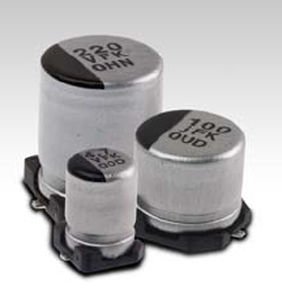
It could be a fault in the power supply itself or anywhere in the computer. Try disconnecting everything EXCEPT the speaker. Remove the RAM and battery too. Another possibility is capacitors that have leaked on the motherboard. They are unfortunately very common. ![]() If you see the capacitors pictured below with what appears to be a wet "stain" around them, they need to be removed, the board cleaned and new capacitors fitted. It's not a task for the beginner and requires pretty good soldering skills. Sometimes these bad capacitors can prevent the sound circuit from working so hooking up a monitor AND fitting some RAM may be required to see if anything is working.
__________________
iBook14" 1.42Ghz, G4 DigitalAudio 733Mhz, iMac Snow 700Mhz, iBook SE 466Mhz, PowerBook Pismo 500Mhz, G3 B&W, G4 MDD 1.25Ghz, iMac 233 1998, iMac G4 USB2 1.25Ghz, iMac C2D 2.16Ghz, MacMini G4 1.25Ghz |
||
|
|
0
|
|
|
#8 |
|
Capacitors
I second capacitors, but not just on the motherboard. Power supply will need new ones also.
__________________
Its but a flesh wound. You don't know the power of the Dark Side!
|
|
|
|
0
|
|
|
#9 |
|
Looks like it's game over for my LC.
![]() I tried starting with everything unplugged and all of the ram and vram removed. No joy, still get the clicking noise. Found spots of clear fluid on the circuit board, not directly around the capacitors but in random places on top of small bits of solder. I'm not experienced enough to solder or go anywhere near a circuit board. |
|
|
|
0
|
|
|
#10 |
|
Help
You could ask someone like me or Oberon 68kmla to recap the board for you. It wouldn't be free but we do it to keep old macs alive.
__________________
Its but a flesh wound. You don't know the power of the Dark Side!
|
|
|
|
0
|
|
|
#11 |
|
Havokalien - thanks for the offer, unfortunately I'm on the other side of the world in New Zealand, so it would be cost prohibitive for me to do so.
I'm sure there are people in NZ that could replace the capacitors but I don't know of anyone. A bit of a shame, as the rest of the computer is in pretty good condition. |
|
|
|
0
|
![]() |
|
«
Previous Thread
|
Next Thread
»
| Thread Tools | Search this Thread |
| Display Modes | |
|
|
Similar Threads
|
||||
| thread | Thread Starter | Forum | Replies | Last Post |
| Resolved: Just got a Macintosh LC. How can I get it on my LAN? | alexreich | Apple Collectors | 7 | Mar 17, 2013 01:45 PM |
| Macbook Pro (early-2008) won't turn on... | oxfordguy | MacBook Pro | 43 | Nov 8, 2012 06:52 AM |
| Macintosh LC Issues...won't boot? | alexreich | Apple Collectors | 15 | Jan 16, 2012 09:57 PM |
| iphone not turning on | naeema | iPhone Tips, Help and Troubleshooting | 1 | Nov 16, 2010 10:54 AM |
| iphone 3g 8g will not turn on | notahacker | iPhone Tips, Help and Troubleshooting | 4 | Nov 11, 2010 06:00 AM |
All times are GMT -5. The time now is 02:04 AM.


Linear Mode