Congratulations on your purchase and I hope you will not be overwhelmed by the number of guides I will probably link to (I am known for that), and if it is too much, just say so.
1. I was told by the guy at the apple store that if I tried to copy files over from my old windows format to my new apple PC that it would reformat the drive and erase EVERYTHING on it without copying it, is this true? If it is, how would I get my stuff off of my my old PC?
Reading from any HDD will not delete or format any data on it.
What that guy probably meant, is that once you copied all your data from that external HDD you used with Windows, in order to transfer all your documents, you can reformat the HDD to your needs, if it needs to be used with Windows still or if it can be used only with Mac OS X.
____________________________________________________________
Overview of the four major file systems (called "Formats" in Mac OS X) used on Windows and Mac OS X, compiled by
GGJstudios. You can use
Disk Utility to format any HDD to your liking.
Any external hard drive will work with PCs or Macs, as long as the connectors are there (Firewire, USB, etc.)
It doesn't matter how the drive is formatted out of the box, since you can re-format any way you like. Formatting can be done with the Mac OS X Disk Utility, found in the /Applications/Utilities folder. Here are your formatting options:
HFS+ (Hierarchical File System, a.k.a. Mac OS Extended (Journaled) Don't use case-sensitive)
NTFS (Windows NT File System)
- Read/Write NTFS from native Windows.
- Read only NTFS from native Mac OS X
[*]To Read/Write/Format NTFS from Mac OS X, here are some alternatives:
- For Mac OS X 10.4 or later (32 or 64-bit), install Paragon (approx $20) (Best Choice for Lion)
- For 32-bit Mac OS X, install NTFS-3G for Mac OS X (free) (does not work in 64-bit mode)
- For 64-bit Snow Leopard, read this: MacFUSE for 64-bit Snow Leopard
- Some have reported problems using Tuxera (approx $36).
- Native NTFS support can be enabled in Snow Leopard and Lion, but is not advisable, due to instability.
- AirPort Extreme (802.11n) and Time Capsule do not support NTFS
- Maximum file size: 16 TB
- Maximum volume size: 256TB
- You can use this format if you routinely share a drive with multiple Windows systems.
exFAT (FAT64)
- Supported in Mac OS X only in 10.6.5 or later.
- Not all Windows versions support exFAT. See disadvantages.
- exFAT (Extended File Allocation Table)
- AirPort Extreme (802.11n) and Time Capsule do not support exFAT
- Maximum file size: 16 EiB
- Maximum volume size: 64 ZiB
- You can use this format if it is supported by all computers with which you intend to share the drive. See "disadvantages" for details.
FAT32 (File Allocation Table)
- Read/Write FAT32 from both native Windows and native Mac OS X.
[*]Maximum file size: 4GB.
- Maximum volume size: 2TB
- You can use this format if you share the drive between Mac OS X and Windows computers and have no files larger than 4GB.
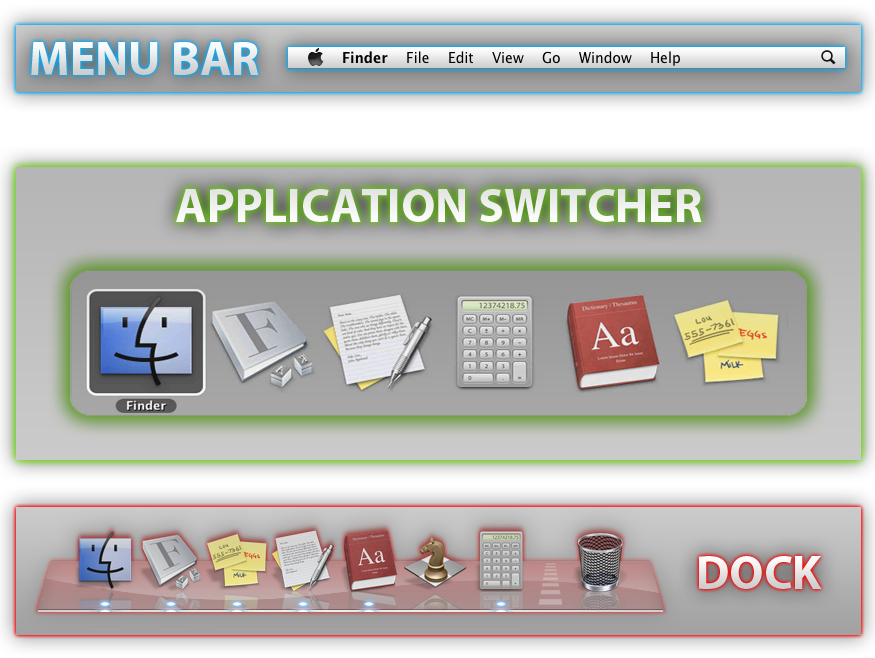
2. The downloads in the taskbar, it doesn't look like it's making any progress, I clicked on it, but I see a progress bar, but no estimated time left (is there a way to pull that up?) on the download. How can I check this info?
What you call a "taskbar" is the Dock.
Basic Mac OS X Graphical User Interface (GUI) Elements
clickable for bigger picture
If you download with Safari, on the top right there should be an icon which indicates a download in progress and also should show the remaining time.
The Dock icon of the Downloads folder is not an actual place to store files, it is just a link to your proper Downloads folder, and it also should not indicate any time remaining.
3. how does mac handle zip files and other compressed file formats?
And again, that frelling REDO button on top of the text entry field, which I accidentally clicked, deleted the already given answer to this, and UNDO does not work. Fine work VBB.
Anyway, ZIP files will be decompressed via a double click on the ZIP file in Finder, ZIP and other compressed archive preview tools are available via the
Mac App Store (MAS), since OS X does not do that. RAR and other compressed archives can be extracted via The Unarchiver, freely available from the MAS. Other tools exist of course.
4. Is there any software to mount an ISO to have the new PC read it as if it were a disc in the drive so that I can install some stuff? I have backups of some software and without a DVD drive I wouldn't be able to install it.
Double clicking an ISO file should mount that image and make it available in Finder's Sidebar under
Devices.
5. How do I do boot camp to run windows 7? Where is a guide for that?
You get a Windows installer (USB or DVD) and go to Applications / Utilities / Boot Camp Assistant.
More info:
Booting Windows on the Mac
Sorry for so many questions, I'm formerly a windows guy making the transition.
This could give you some ideas:
----------
1. windows uses ntfs format of course and apple uses HFS + an Apple computer can't read ntfs. the only way you can share a hard drive is to format it in fat 32. so i don't see how this is true.
A Mac running Mac OS X or OS X can read NTFS formatted volumes, it cannot write to it without additional software though.
Look above for a more thorough guide on file systems and their compatibilities.