
Got a tip for us?
Let us know
Become a MacRumors Supporter for $50/year with no ads, ability to filter front page stories, and private forums.
Help? (Defining "Next Song" in iTunes)
- Thread starter chasemac
- Start date
- Sort by reaction score
You are using an out of date browser. It may not display this or other websites correctly.
You should upgrade or use an alternative browser.
You should upgrade or use an alternative browser.

spicyapple
macrumors 68000
Use Party Shuffle?
Go into Preferences > General and turn it on, if it was originally turned off.
Go into Preferences > General and turn it on, if it was originally turned off.

Use Party Shuffle?
Go into Preferences > General and turn it on, if it was originally turned off.
Hmm. Not really. I want to select the next song while the current one is playing. I would like to put a song in queue. Get it ready to play next while the current is playing. By the why, hows it going? Nice locks.
Tried creating a playlist?
Why? Could you tell me why?
Hmm. Not really. I want to select the next song while the current one is playing. I would like to put a song in queue. Get it ready to play while the current is playing.
Yes Party shuffle it.
then right/ctrl click the song u wanna play next and choose "Play Next In Party Shuffle"
Yes Party shuffle it.
then right/ctrl click the song u wanna play next and choose "Play Next In Party Shuffle"
Yes, but it will play right away.🙁 Sorry, but I want it to play after the current song playing. Am I missing something? I don't want to use Party Shuffle because strangely, I can't search other music with it like I want.


Mitthrawnuruodo
Moderator emeritus
Yes, it will start playing at once, unless you are already playing songs from the Party Shuffle playlist, then the song you added will be - you guessed it - the next song played...Yes, but it will play right away.🙁 Sorry, but I want it to play after the current song playing. Am I missing something? I don't want to use Party Shuffle because strangely, I can't search other music with it like I want.

fistful
macrumors 6502a
Why? Could you tell me why?
I guess I didn't think the question all the way through. All I know is that you can change the song play order while listening to a playlist, this obviously doesn't help if you're in your library.
missing feature I agree
I think whats missing here is, while I am playing a song from the entire library, I should be able to line up songs to play next by clicking on a song and clicking something like "play next in the queue". I dont want to make a playlist and i dont want to have a party, I just want to listen to song #2 once song #1 ends as i go through the list of songs (I pick my favorites on the fly and .. something like "this would be great to hear next"..)
Even windows media player allows you to queue songs from the library up for playing..
I think whats missing here is, while I am playing a song from the entire library, I should be able to line up songs to play next by clicking on a song and clicking something like "play next in the queue". I dont want to make a playlist and i dont want to have a party, I just want to listen to song #2 once song #1 ends as i go through the list of songs (I pick my favorites on the fly and .. something like "this would be great to hear next"..)
Even windows media player allows you to queue songs from the library up for playing..
Mitthrawnuruodo
Moderator emeritus
You mean something like "Play in iTunes DJ", "Play Next in iTunes DJ" or "Add to iTunes DJ"? 🙄I think whats missing here is, while I am playing a song from the entire library, I should be able to line up songs to play next by clicking on a song and clicking something like "play next in the queue".
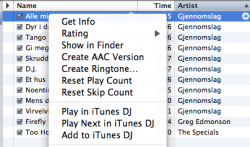
iTunes DJ is the new name of the above mentioned Party Shuffle, BTW, and the feature has become a lot better in the couple of years since this thread was made...

BlueRevolution
macrumors 603
iTunes DJ is the new name of the above mentioned Party Shuffle, BTW, and the feature has become a lot better in the couple of years since this thread was made...
How so? The only useful difference I've seen is that now if you right-click on a playing song and select Play in iTunes DJ, the play continues seamlessly. Other than that, the iPhone remote voting feature? Bloody useless.
I think whats missing here is, while I am playing a song from the entire library, I should be able to line up songs to play next by clicking on a song and clicking something like "play next in the queue". I dont want to make a playlist and i dont want to have a party, I just want to listen to song #2 once song #1 ends as i go through the list of songs (I pick my favorites on the fly and .. something like "this would be great to hear next"..)
Even windows media player allows you to queue songs from the library up for playing..
That is it! It has taken forever to get the point across! From the Entire Library! Right click! Play next!!
BlueRevolution
macrumors 603
That is it! It has taken forever to get the point across! From the Entire Library! Right click! Play next!!
You.
Can.
Already.
Do.
This.
How many times do I have to say it?
iTunes' fatal flaw
You have discovered the chink in iTunes' armor. Curiously, unlike virtually every other music player, you can't be listening to a song from your main library and select another song or songs to play after the current one finishes. The whole process of making a separate playlist or using DJ is silly and annoying. MusicMatch had it right ages ago. Who thought would convolute things?
I hope I'm wrong. Please tell me there's a play next feature (without having to start in DJ!) and clearly tell me how to use it (especially on the iPhone!).
You have discovered the chink in iTunes' armor. Curiously, unlike virtually every other music player, you can't be listening to a song from your main library and select another song or songs to play after the current one finishes. The whole process of making a separate playlist or using DJ is silly and annoying. MusicMatch had it right ages ago. Who thought
would convolute things?I hope I'm wrong. Please tell me there's a play next feature (without having to start in DJ!) and clearly tell me how to use it (especially on the iPhone!).
BlueRevolution
macrumors 603
Subdubba, this doesn't really solve your problem of not wanting to use the iTunes DJ/Dance Party Mix, but does let you start choosing your playlist without having to stop the currently playing song. (After the songs you've "added to the DJ" are over, it will continue playing the "DJ"s picks):
While your current song is playing, Right click and select "Play next in iTunes DJ". This will make it the first (0th) song in DJ as it is already playing. The next song you choose to "Play next in iTunes DJ" will be the next song you hear.
While your current song is playing, Right click and select "Play next in iTunes DJ". This will make it the first (0th) song in DJ as it is already playing. The next song you choose to "Play next in iTunes DJ" will be the next song you hear.
While your current song is playing, Right click and select "Play next in iTunes DJ". This will make it the first (0th) song in DJ as it is already playing. The next song you choose to "Play next in iTunes DJ" will be the next song you hear.
This is true, but the OP's request/workflow/need still isn't met. I totally get what he wants. An ad-hoc playlist out of the library, starting now, playing as he builds it. If you use DJ, each tune you pick to "Play next..." will go to the top of the play next queue, not be appended to it. So if you're playing Song1, add Song2, then add Song3, Song4, what you'll hear is Song1, Song4, Song3, Song2.
I, too, am looking for the ability to browse my library while a song is playing and pick the next 5 or 20 songs to play in that order, so I can go on about whatever else I want to do.

inket
macrumors regular
I, too, am looking for the ability to browse my library while a song is playing and pick the next 5 or 20 songs to play in that order, so I can go on about whatever else I want to do.
I hope I'm not intruding. (Sorry for the bump)
I got tired of waiting for Apple to add this so I went ahead and made an app for it. It's called "Next" and it's on the Mac App Store so check it out.
To anyone out there reading...
I couldn't find inket's application, but I did find an old applescript that is supposed to do the same thing.
However, it wasn't working and needed to be updated for iTunes 10. I have done so and the new script is available here:
5vforest (dot) net/files/PlayThisNext.zip
"Put this script in your iTunes Scripts folder. This is located in home > Library > iTunes. If there is no folder named "Scripts" there, create one and put the script in it. It will then appear in iTunes' Script Menu, where you can select it by clicking on its name.
While a track is playing, select another track and run this script. It is an applet whose generic script icon will appear in the Dock. It will wait for the current track to finish playing and then start playing the selected track, and then dismiss itself.
Play sequence will proceed from the selected track.
You can select the same track so that it plays again.
If you can't wait for the selected track to start playing, re-activate the script by clicking its icon in the Dock; it will start playing the selected track immediately and dismiss itself."
This is based on Doug Adam's original script. All credit to him where due, I just updated this as his script was no longer working.
I couldn't find inket's application, but I did find an old applescript that is supposed to do the same thing.
However, it wasn't working and needed to be updated for iTunes 10. I have done so and the new script is available here:
5vforest (dot) net/files/PlayThisNext.zip
"Put this script in your iTunes Scripts folder. This is located in home > Library > iTunes. If there is no folder named "Scripts" there, create one and put the script in it. It will then appear in iTunes' Script Menu, where you can select it by clicking on its name.
While a track is playing, select another track and run this script. It is an applet whose generic script icon will appear in the Dock. It will wait for the current track to finish playing and then start playing the selected track, and then dismiss itself.
Play sequence will proceed from the selected track.
You can select the same track so that it plays again.
If you can't wait for the selected track to start playing, re-activate the script by clicking its icon in the Dock; it will start playing the selected track immediately and dismiss itself."
This is based on Doug Adam's original script. All credit to him where due, I just updated this as his script was no longer working.
cshannahan
macrumors newbie
Is there anyway to get the DJ app to see my shared library? I don't have music on my ipad but I want to queue up songs!!! Anything out there that can do this?
wordphrase
macrumors newbie
This is true, but the OP's request/workflow/need still isn't met. I totally get what he wants. An ad-hoc playlist out of the library, starting now, playing as he builds it. If you use DJ, each tune you pick to "Play next..." will go to the top of the play next queue, not be appended to it. So if you're playing Song1, add Song2, then add Song3, Song4, what you'll hear is Song1, Song4, Song3, Song2.
I, too, am looking for the ability to browse my library while a song is playing and pick the next 5 or 20 songs to play in that order, so I can go on about whatever else I want to do.
Late to the "party" here, but the best way to queue songs in the order you add them is to use the "Add to iTunes DJ" button, but as the "source" playlist choose a blank playlist. This will avoid the auto-created DJ songs and just give you a blank playlist that queued songs will get added to in the order you select them. You can also just drag a song to iTunes DJ and it will add the song to the end of the list (the right-click menu is getting rather long these days). Also, with a bit of dragging or resizing, you can double-click on iTunes DJ and create a new window to have next to your main iTunes window and drag songs to wherever you want. I toyed with this for a while to figure that out, as I miss that very basic function from WinAmp.
Actually iTunes does it a touch better because it gives you two queue options. Basically you can choose to add a song to the top or bottom of the playlist. Sometimes you want to build off the song you just added (if you're, say, 10 songs deep), but sometimes you find a song you don't want to wait to hear. This way you can add it to the top with "Play next in iTunes DJ" button.
It's not the greatest system, but it gets the job done until Apple realizes we want a very simple way to queue songs. without all the settings, confusion, etc.
Hvaffornoget
macrumors newbie
THANK YOU! It works, yay. Now, I'm thinking, is it possible to queue more than one song? Because this doesn't seem to be working for me..
Thanks!
Thanks!
I couldn't find inket's application, but I did find an old applescript that is supposed to do the same thing.
However, it wasn't working and needed to be updated for iTunes 10. I have done so and the new script is available here:
5vforest (dot) net/files/PlayThisNext.zip
"Put this script in your iTunes Scripts folder. This is located in home > Library > iTunes. If there is no folder named "Scripts" there, create one and put the script in it. It will then appear in iTunes' Script Menu, where you can select it by clicking on its name.
While a track is playing, select another track and run this script. It is an applet whose generic script icon will appear in the Dock. It will wait for the current track to finish playing and then start playing the selected track, and then dismiss itself.
Play sequence will proceed from the selected track.
You can select the same track so that it plays again.
If you can't wait for the selected track to start playing, re-activate the script by clicking its icon in the Dock; it will start playing the selected track immediately and dismiss itself."
This is based on Doug Adam's original script. All credit to him where due, I just updated this as his script was no longer working.
RKEdwizzle
macrumors newbie
That is it! It has taken forever to get the point across! From the Entire Library! Right click! Play next!!
A few years down the line and I'm still googling this issue being led to this thread.
It is actually retarded that a simple feature that Windows Media Player offers, is not found on iTunes.
If I have my library of 2500+ songs, I don't want them all in a playlist, and I am happy with them being shuffled not playlist-ed.
Am I right in saying you want this too...
ShuffleSong1, ShuffleSong2, UserDefined"Play Next"Song, ShuffleSong3 and so on...
It's 2012! Surely they can do this one little thing for us?
Please Apple?