|
|
#1601 | |
|
Quote:
|
||
|
|
0
|
|
|
#1603 |
|
Gave it another try, except added a little outer glow to it.
![]() I'm actually quite pleased with it so far. Thanks for the link! Will give it a try with your separators.
__________________
March 2009 15" Unibody Macbook Pro 2.66GHz, 4GB RAM, 512MB NVIDIA 9600M GT, | 32GB White iPhone 4S | 32GB 3G iPad 2 |
|
|
|
0
|
|
|
#1604 |
|
I had to open the image in GraphicConverter and make the background transparent, then it worked like a charm
Just duplicate the first image in GT and change the file name Thanks! ![]() Woof, Woof - Dawg
|
|
|
|
0
|
|
|
#1605 |
|
Thanks bud. Love the way the separators look. Got rid of the outer glow.
__________________
March 2009 15" Unibody Macbook Pro 2.66GHz, 4GB RAM, 512MB NVIDIA 9600M GT, | 32GB White iPhone 4S | 32GB 3G iPad 2 Last edited by jck1634; Jan 11, 2010 at 07:32 PM. |
|
|
|
0
|
|
|
#1606 |
|
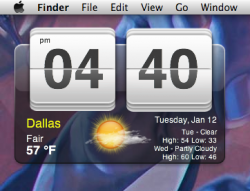
After much tweaking I've finally finished it!
It started off as this... ![]() then to this... ![]() then this.. ![]() and after adding some inner bevel, shadow and a touch of gloss, I think I've finally cracked it! ![]() I'm really happy how it turned out. Think I'm going to leave it alone now and get some sleep
__________________
March 2009 15" Unibody Macbook Pro 2.66GHz, 4GB RAM, 512MB NVIDIA 9600M GT, | 32GB White iPhone 4S | 32GB 3G iPad 2 |
|
|
|
0
|
|
|
#1607 | |
|
Quote:
![]() P.S.: what string do you use to have "1 °C" with the ° in Celsius indication??? Last edited by poppero; Jan 12, 2010 at 10:00 AM. |
||
|
|
0
|
|
|
#1608 |
|
|
0
|
|
|
#1609 | |
|
Degree mark?
Poppero,
Love this script. Would adore it if someone could help me figure out how to insert a degree mark between the temp and "F". Best, Proofrock Quote:
|
||
|
|
0
|
|
|
#1610 | |
|
Quote:
I'm on my iPhone at the moment. I'll put up the lines once I'm home! Oh and while I'm here, do you or anyone else know of a way to show just the hi-lo temperature for the day?
__________________
March 2009 15" Unibody Macbook Pro 2.66GHz, 4GB RAM, 512MB NVIDIA 9600M GT, | 32GB White iPhone 4S | 32GB 3G iPad 2 |
||
|
|
0
|
|
|
#1611 | |
|
Quote:
UPDATE: i found a regex for the ° symbol, this is the complete script for degrees only: Code:
curl --silent "http://xml.weather.yahoo.com/forecastrss?p=YOURCITY&u=c" | grep -E '(Current Conditions:|[A-Z]<BR)' | sed -e 's/Current Conditions://' -e 's/<br \/>//' -e 's/<b>//' -e 's/<\/b>//' -e 's/<BR \/>//' -e 's/[A-Z a-z]*, //' -e 's/\(.*\) F/\1 °F/' -e 's/\(.*\) C/\1 °C/' | tail -n1 Note: you must remember to set the encoding to UTF-8! This is my creation...
Last edited by poppero; Jan 12, 2010 at 11:28 AM. |
||
|
|
0
|
|
|
#1612 |
|
That looks great!
I'm so glad this is catching on!!
__________________
March 2009 15" Unibody Macbook Pro 2.66GHz, 4GB RAM, 512MB NVIDIA 9600M GT, | 32GB White iPhone 4S | 32GB 3G iPad 2 |
|
|
|
0
|
|
|
#1613 |
|
|
0
|
|
|
#1614 |
|
Hey guys! I've uploaded the separator I'm using. It's been extracted from the original image. I added an inner bevel which adds the slight inner shadow to give it a bit of depth and then placed a small white transparent gradient to give the numbers a bit of gloss, again for a bit more depth.
Download It's only one separator so you need to make two geeklets for the same image file and then just resize it over the numbers. I think it works pretty well.
__________________
March 2009 15" Unibody Macbook Pro 2.66GHz, 4GB RAM, 512MB NVIDIA 9600M GT, | 32GB White iPhone 4S | 32GB 3G iPad 2 |
|
|
|
0
|
|
|
#1615 | |
|
Quote:
Thanks dude.....U R THE MAN!!
|
||
|
|
0
|
|
|
#1616 |
|
|
0
|
|
|
#1617 |
|
|
0
|
|
|
#1618 |
|
I'm just going to write up a little guide for any beginners to Geektool who may want to have this on their desktop
![]() Watch this video first, if your completely new to geektool The First thing you'll need is the background which you can download here Save the background image in a folder where you'll remember it is Then to place the image onto your desktop just drag the image icon from Geektools preference pane on to your desktop ![]() and then specify the location of the image inside the box above [set local path]. (or you could just click the button and find the image when the pop up box appears) Now you should have the HTC background on your desktop ![]() Place this anywhere on your desktop where you want the Geeklet to sit. All the next commands are Shell commands. Next thing to add would be the Hour and Minute. Hour ![]() Code:
date +%I ![]() Code:
date +%M The City name is just a simple echo which just displays any text you want it to. So in this case... ![]() Code:
echo YOURCITYNAME Use this Script: Code:
date +'%A, %b %d' The script for this is: Code:
date +%p To get the weather for your city you need to first head over to Yahoo Weather and do a search for your city. Copy and save the URL for your city as you'll need it later. Then, whilst on the page for your city's weather, hit the RSS button and the page will change to a feed page. In the URL for this page you'll see a code that’s all in uppercase. That’s your city code. Copy and save this next to your city URL as you will need this later aswell. To get the current weather for your location Current Weather Conditions You'll need this script: Code:
curl --silent "http://weather.yahooapis.com/forecastrss?p=YOURCITYCODE&u=c" | grep -E '(Current Conditions:|[A-Z]<BR)' | sed -e 's/Current Conditions://' -e 's/<br \/>//' -e 's/<b>//' -e 's/<\/b>//' -e 's/<BR \/>//' -e 's/<description>//' -e 's/<\/description>//' -e 's/, [0-9]* [A-Z]//' | tail -n1 To get the Temperature, Use this script: Code:
curl --silent "http://xml.weather.yahoo.com/forecastrss?p=UKXX0085&u=c" | grep -E '(Current Conditions:|[A-Z]<BR)' | sed -e 's/Current Conditions://' -e 's/<br \/>//' -e 's/<b>//' -e 's/<\/b>//' -e 's/<BR \/>//' -e 's/[A-Z a-z]*, //' -e 's/\(.*\) F/\1 °F/' -e 's/\(.*\) C/\1 °C/' | sed 's/ //' | tail -n1 Use this script: Code:
curl "http://xml.weather.yahoo.com/forecastrss?p=YOURCITYCODE&u=c" | grep -e "Forecast:" -A 2 | tail -n 2 | sed -e 's/<br \/>//' -e 's/<BR \/>//' | sed "s/\(.*\)\.\ \(.*\)/\1\?\2/" | tr "?" "\n" | sed "s/Hi\:\ \(.*\)\ Lo\:\ \(.*\)/\?Hi\: \1\ Lo\:\ \2/" | sed "s/\?\(.*\)/\\1/" To get the image for the weather for your city, Use this script: Code:
curl --silent "WEATHER URL FROM YAHOO/" | grep "forecast-icon" | sed "s/.*background\:url(\'\(.*\)\')\;\ _background.*/\1/" | xargs curl --silent -o /tmp/weather.png\ To get the image to show up on your desktop use this script: Code:
file:///tmp/weather.png Once you've done that you just need to overlay the numbers with a set of separators to really finish it off. ![]() You can download it from here All you need to do with this is place it on your desktop as an image command in the same way you did with the background image. Only, for THIS image you have to do it twice using the same Separator image and place it over both the Hour and minute numbers. This gives the numbers a bit of shine and depth to really top it of. Just wanted to say a big thank you to everyone in this thread. I couldn’t have done any of it without the scripts you clever people have so generously shared. I hope you find this guide useful Jai.

__________________
March 2009 15" Unibody Macbook Pro 2.66GHz, 4GB RAM, 512MB NVIDIA 9600M GT, | 32GB White iPhone 4S | 32GB 3G iPad 2 Last edited by jck1634; Sep 7, 2010 at 07:51 PM. |
|
|
|
0
|
|
|
#1620 |
|
Thanks! I've fixed the links.
__________________
March 2009 15" Unibody Macbook Pro 2.66GHz, 4GB RAM, 512MB NVIDIA 9600M GT, | 32GB White iPhone 4S | 32GB 3G iPad 2 |
|
|
|
0
|
|
|
#1621 |
|
|
0
|
|
|
#1622 |
|
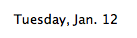
You can us this for the date all in one line.
date +'%A, %b. %d' Probably want to set it to right align as well. That way when the length changes it 'pushes' to the center of the graphic and not out of the border. Last edited by creator2456; Jan 12, 2010 at 04:11 PM. |
|
|
|
0
|
|
|
#1623 |
|
Thanks for that! I've updated the guide!
__________________
March 2009 15" Unibody Macbook Pro 2.66GHz, 4GB RAM, 512MB NVIDIA 9600M GT, | 32GB White iPhone 4S | 32GB 3G iPad 2 |
|
|
|
0
|
|
|
#1624 |
|
In order to the get the forecast as it appears in jck1634's post, I did this:
Code:
curl --silent "http://weather.yahooapis.com/forecastrss?p=YOURCITYCODE&u=f" | grep -e "Forecast:" -A 2 | tail -n 2 | sed -e 's/<br \/>//' -e 's/<BR \/>//' | sed "s/\(.*\)\.\ \(.*\)/\1\?\2/" | tr "?" "\n" | sed "s/\?\(.*\)/\\1/" Last edited by codymac; Jan 12, 2010 at 04:42 PM. |
|
|
|
0
|
|
|
#1625 |
|
Problem With Top output
I am having an issue with the top command in geektool v3 RC5. I am running snow leopard 10.6.2. My main problem is that when I run my command:
top -n 20 -l 1 | cut -c 1-28 | tail -21 The PID for top, cut, and tail each increase by a few each time it updates. the PID for Top might be 4015 but later in the day it is like 51450. If I change the refresh time this doesn't happen so fast, but I was wondering if there was anyway to run top through geektool where it is constantly updating like running it from the terminal. If I run it in the terminal the Top PID never changes vs. creating a new instance in geektool each time it refreshes. Is there anyway to run top without this occurring? Any help would be greatly appreciated. |
|
|
|
0
|
![]() |
|
| Tags |
| background, desktop, geektool, time, wallpaper |
«
Previous Thread
|
Next Thread
»
| Thread Tools | Search this Thread |
| Display Modes | |
|
|
Similar Threads
|
||||
| thread | Thread Starter | Forum | Replies | Last Post |
| How to fix this Geektool Script for Lion? | its | Mac OS X 10.7 Lion | 9 | Jun 21, 2012 06:30 PM |
| Your GeekTool Scripts (Part 2) | celticpride678 | Mac Applications and Mac App Store | 0 | Jun 5, 2010 11:26 PM |
| 2 Calendars on the Desktop Using a Geektool Script? | Fisa | MacBook | 2 | Nov 26, 2009 05:12 AM |
| Why do I have to manually refresh GeekTool Scripts everytime I restart my mac. | pi110w | Mac Basics and Help | 0 | Oct 3, 2009 03:54 PM |
| somewhat new geektools script (audio player info) | defsquad | Mac Applications and Mac App Store | 0 | Mar 8, 2008 07:40 AM |
All times are GMT -5. The time now is 02:01 PM.


Use this Script:
The script for this is:
You'll need this script:
Use this script:
Use this script:
Use this script: 

Linear Mode