Register FAQ / Rules Forum Spy Search Today's Posts Mark Forums Read
Go Back   MacRumors Forums > iPhone, iPod and iPad > iPod touch

Reply
 
Thread Tools Search this Thread Display Modes
Old Nov 28, 2010, 08:20 PM   #1
michael31986
macrumors 65816
 
Join Date: Jul 2008
4.2.1 album art bug..kind of

Ok so when I put new music on my iPod touch it has album art. The album art displays correctly on every page. Except if u lock your phone screen then press home button it won't show the album art. Only after u restart the iPod will it display the album art for the new songs u just updated on the lock screen. I think it has something to do with the iPod updating the music library.

This isn't the same bug that was happening before where wrong album art would display for different songs. Cause the album art is their. Just that on lock screen it won't display for newly synced songs till u restart. Then all the newly synced songs show the album art on the locked page.
michael31986 is offline   0 Reply With Quote
Old Nov 29, 2010, 07:04 AM   #2
Ivan P
macrumors 68030
 
Ivan P's Avatar
 
Join Date: Jan 2008
Location: Home
Send a message via AIM to Ivan P
Quote:
Originally Posted by michael31986 View Post
Ok so when I put new music on my iPod touch it has album art. The album art displays correctly on every page. Except if u lock your phone screen then press home button it won't show the album art. Only after u restart the iPod will it display the album art for the new songs u just updated on the lock screen. I think it has something to do with the iPod updating the music library.

This isn't the same bug that was happening before where wrong album art would display for different songs. Cause the album art is their. Just that on lock screen it won't display for newly synced songs till u restart. Then all the newly synced songs show the album art on the locked page.
Yep, I can confirm this is happening to me too. Got a 4G touch over the weekend and couldn't figure out why album art for some music wasn't appearing on the lock screen until I restarted the device.
__________________
Black 64GB iPhone 5 / Black 3rd-gen iPad, 64GB Wi-Fi
17" 2011 MacBook Pro, 2.4GHz Core i7, 750GB HDD, 6GB RAM
11" 2010 MacBook Air, 1.4GHz, 128GB SSD, 2GB RAM
Ivan P is offline   0 Reply With Quote
Old Nov 29, 2010, 10:28 AM   #3
michael31986
Thread Starter
macrumors 65816
 
Join Date: Jul 2008
You upgraded to 4.2.1. I'm not sure if I should restore and then everything again.
michael31986 is offline   0 Reply With Quote
Old Nov 29, 2010, 12:07 PM   #4
smirk
macrumors 6502
 
Join Date: Jul 2002
Location: Orange County, CA
Hmm, I've restarted my iPod and it's still doing that. You mean powering it off and rebooting it, right?
smirk is offline   0 Reply With Quote
Old Nov 29, 2010, 12:49 PM   #5
michael31986
Thread Starter
macrumors 65816
 
Join Date: Jul 2008
Yea. Just turning it off and on. For me it only does it to anything new I put on. Old stuff that was synced before update works fine.
michael31986 is offline   0 Reply With Quote
Old Nov 29, 2010, 01:57 PM   #6
mlmwalt
macrumors 6502
 
Join Date: Jun 2010
Location: Philadelphia, Pa, USA
I had a really weird one happening to my 3G running 4.2.1. It was showing the most recently added album art and applying it to all of my most recently added music. Turned it off and on, and now all is well. I didn't even notice it was happening until I saw this thread. Weird.
mlmwalt is offline   0 Reply With Quote
Old Nov 29, 2010, 09:35 PM   #7
michael31986
Thread Starter
macrumors 65816
 
Join Date: Jul 2008
So I restored it and it still does it. It's obviously a bug since restarting the iPod makes the newly synced songs show album art on lock screen. It's also just on lock screen. Because album art shows perfect every other view for the newly synced songs. It's just the lock screen until u restart it.
michael31986 is offline   0 Reply With Quote
Old Dec 1, 2010, 07:46 AM   #8
Prodo123
macrumors 68020
 
Prodo123's Avatar
 
Join Date: Nov 2010
I confirm this bug on the iPhone 4. No performance issue, just a simple minor bug. I'm sure Apple will fix this on 4.2.2.
Prodo123 is offline   0 Reply With Quote
Old Dec 3, 2010, 06:27 AM   #9
dgray89
macrumors newbie
 
Join Date: Dec 2010
iPad and iPhone 4!

I thought it was just me, I went into the apple store and called apple care and to be honest I think they thought I was high or something! I never tried the off and on, I just went straight for the restore (such a tool for not thinking of turning it off in the first place) the issue is with all devices running 4.2.1 I think as it is happening on my iPad also.
dgray89 is offline   0 Reply With Quote
Old Dec 6, 2010, 11:28 AM   #10
melpote
macrumors member
 
Join Date: Nov 2010
Location: GA
I'm glad someone said something about this. I thought I was just crazy. I restarted mine just now and the new stuff I bought last night is now on the lock screen when it wasn't before. Just sucks that I have to restart my device every time I make a purchase!! At least that fixes it!
__________________
FedererFan4Eva
melpote is offline   0 Reply With Quote
Old May 19, 2011, 09:16 AM   #11
michael31986
Thread Starter
macrumors 65816
 
Join Date: Jul 2008
this still hasnt been fixed u still gotta restart the ipod to have it work.
michael31986 is offline   0 Reply With Quote
Old May 20, 2011, 09:48 AM   #12
Surely
Guest
 
Join Date: Oct 2007
Location: Los Angeles, CA
This was happening to me as well. I'm glad I found this thread. Restarting my iPhone 4 fixed this issue.

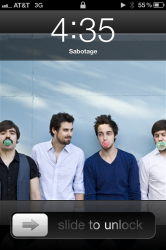
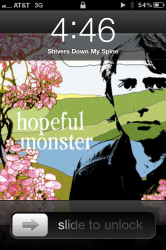
Mine was a little strange though. For some songs, it would just show the title of the track over my lockscreen picture (no album art). For some other songs, it would show a completely wrong album cover.......but this 'wrong' album cover was for albums that I don't even own.

For example, while playing the song Sabatoge by The Beastie Boys, it should show this album cover:


But instead, it would show this:
Click image for larger version

Name:	IMG_2689.PNG
Views:	9
Size:	655.1 KB
ID:	286136

EDIT: I just tineyed the above image, and apparently it's a band called Winter Gloves. Er, okay.

Another example: while playing the song Shivers Down My Spine by King Khan and the Shrines, it should show this album cover:
Thumb resize.

But instead, it would show this:
Click image for larger version

Name:	IMG_2690.PNG
Views:	8
Size:	645.9 KB
ID:	286137

EDIT: I just tineyed this image, and it is a band called Hopeful Monster and their genre of music is Gospel/Hawaiian/Psychedelic. Er, okay again.

I have no idea what those albums are. I don't have that stuff in my library.

Weird, eh?
Surely is offline   0 Reply With Quote
Old May 23, 2011, 01:11 AM   #13
Brucewl
Banned
 
Join Date: Sep 2010
Yeah, I also met the same problem as you and I can not find anything wrong with my songs. And sometimes something gonna wrong in cover flow. So I just update to ios 4.3.3
Brucewl is offline   0 Reply With Quote
Old Oct 17, 2011, 08:01 PM   #14
michael31986
Thread Starter
macrumors 65816
 
Join Date: Jul 2008
This still isn't fixed
michael31986 is offline   0 Reply With Quote
Old Oct 17, 2011, 08:06 PM   #15
Prodo123
macrumors 68020
 
Prodo123's Avatar
 
Join Date: Nov 2010
Quote:
Originally Posted by michael31986 View Post
This still isn't fixed
Best fix is update to latest iOS
Have not had a problem like this since iOS 4.3 beta around 7-8 months ago
__________________
MacBook Pro 15" 2.2Ghz hi-res glossy, 8GB RAM, Razer Orochi, Seagate Momentus XT 750GB iPhone 5 White 32GB Audiophile 5TB Total External Storage
Prodo123 is offline   0 Reply With Quote
Old Oct 17, 2011, 08:48 PM   #16
michael31986
Thread Starter
macrumors 65816
 
Join Date: Jul 2008
Wirelessly posted (Mozilla/5.0 (iPhone; CPU iPhone OS 5_0 like Mac OS X) AppleWebKit/534.46 (KHTML, like Gecko) Version/5.1 Mobile/9A334 Safari/7534.48.3)

I didn't update same thing though
michael31986 is offline   0 Reply With Quote

Reply
MacRumors Forums > iPhone, iPod and iPad > iPod touch

Thread Tools Search this Thread
Search this Thread:

Advanced Search
Display Modes

Posting Rules
You may not post new threads
You may not post replies
You may not post attachments
You may not edit your posts

BB code is On
Smilies are On
[IMG] code is On
HTML code is Off

Forum Jump

Similar Threads
thread Thread Starter Forum Replies Last Post
iOS 4.2.1 update lost all my text messages eriknba iPhone Tips, Help and Troubleshooting 39 Apr 3, 2011 04:05 AM
iOS 4.2.1 - Started Out Quick - Now Getting Choppy and Slow robotfist iPhone Tips, Help and Troubleshooting 23 Dec 28, 2010 06:37 AM
iPad is totally dead 14 hours after 4.2.1 upgrade JBmac iPad Tips, Help and Troubleshooting 7 Dec 1, 2010 11:40 AM
Upgrading to 4.2.1 from GM 4.2 through iTunes FFArchitect iPhone/iPad Programming 4 Nov 24, 2010 09:33 AM
A really bad problem to me on 4.2.1 zjzjn1 iPod touch 2 Nov 22, 2010 02:20 PM


All times are GMT -5. The time now is 12:58 AM.

Mac Rumors | Mac | iPhone | iPhone Game Reviews | iPhone Apps

Mobile Version | Fixed | Fluid | Fluid HD
Powered by vBulletin® Version 3.8.6
Copyright ©2000 - 2013, Jelsoft Enterprises Ltd.

Privacy / DMCA contact / Affiliate and FTC Disclosure
Copyright 2002-2013, MacRumors.com, LLC