|
|
#1 |
|
Mac Mini with Dual Monitors
Hi, im buying a Mac Mini in the summer and understand that you can run to monitors off it using one on the DVI and other off HDMI. Would running both monitors use up to much RAM or would a basic 2gb be enough.
If upgrade is needed how much would you recommend to upgrade to. Thanks
__________________
iPhone 4S 16GB Black
iPad 2 16gb WiFi Black - Gray Smart Colour Mac Mini 2011 2.3ghz i5 8GB |
|
|
|
0
|
|
|
#2 |
|
Since a memory upgrade can be performed pretty easily, and doing so won't affect your data or your day-to-day use, why not buy the base machine itself, use it for a few days, then upgrade to 4 GB if your experience is sub-optimal?
__________________
Fighting crime in a future time |
|
|
|
0
|
|
|
#3 |
|
Would the processor have any effect or would you say to just go with the base model?
__________________
iPhone 4S 16GB Black
iPad 2 16gb WiFi Black - Gray Smart Colour Mac Mini 2011 2.3ghz i5 8GB |
|
|
|
0
|
|
|
#4 |
|
Can you tell us what kind of work you'd be doing on it?
__________________
Fighting crime in a future time |
|
|
|
0
|
|
|
#5 |
|
Im jsut going into collage and not doing art/ graphics so just basic internet, typing, keynote presentations, emails, films/music. Just basic stuff like that
__________________
iPhone 4S 16GB Black
iPad 2 16gb WiFi Black - Gray Smart Colour Mac Mini 2011 2.3ghz i5 8GB |
|
|
|
0
|
|
|
#6 |
|
Keep the base processor and 2 GB. Upgrade to 4 GB only if you feel like your system could be faster.
__________________
Fighting crime in a future time |
|
|
|
0
|
|
|
#7 | |
|
Quote:
Thanks very much with your help
__________________
iPhone 4S 16GB Black
iPad 2 16gb WiFi Black - Gray Smart Colour Mac Mini 2011 2.3ghz i5 8GB |
||
|
|
0
|
|
|
#8 |
|
mac mini mid 2010 with 8 GB Ram.
dual monitor: 1920 x 1080p HDMI 1920 x 1200 through minidisplayport to VGA adapter The minidisplayport to DVI adapter will work ONLY with pure DIGITAL DVI-D, not DVI-I (analog 4 pin passthrough), so your second monitor needs a true DVI port, not just a dsub 15, or you need the minidisplayport to VGA $30 adapter. http://en.wikipedia.org/wiki/Digital_Visual_Interface |
|
|
|
0
|
|
|
#9 |
|
|
|
|
|
0
|
|
|
#10 |
|
I have a Mac mini late 2009, 2.53Ghz, 4GB RAM, 9400m.
It's hooked up to a Dell 2407 WFP-HC, 24" 1920x1200 (mini-DVI -> DVI adapter) and a BenQ G2220HDA 21.5" 1920x1080p (miniDisplayPort -> VGA adapter). I often use a video tutorial on one and work in Maya on the other. They work great, no problems. |
|
|
|
0
|
|
|
#11 | |
|
Quote:
I now run it with three monitors (3rd via USB-Video device) and 8Gb RAM which is leaps and bounds better than before :-) |
||
|
|
0
|
|
|
#12 |
|
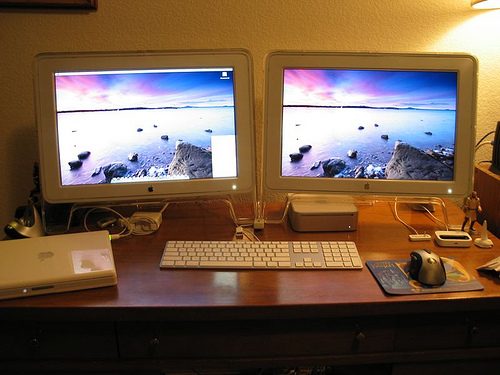
Proof that a 2009 Mini will run dual monitors:
![]()
__________________
Mac Mini (2011) i7 / Mac Mini (Early 2009) Powermac G5 1.6 w/Radeon 9800 Pro (Sold!) iBook G4 1.33Ghz (replaced a dead G3) Many iPods + iPhone 4S + iPad2 |
|
|
|
0
|
|
|
#13 |
|
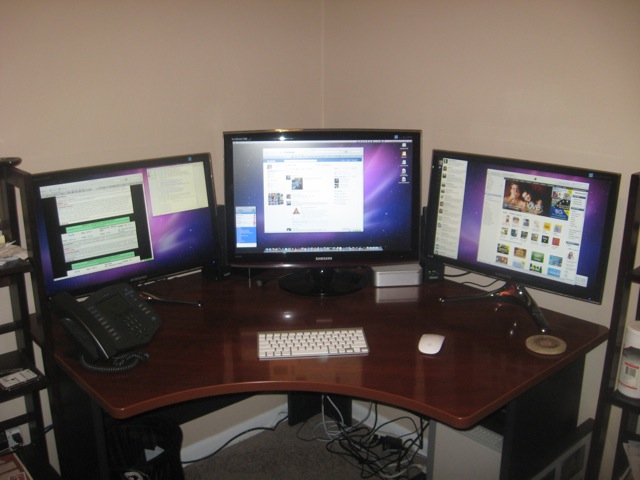
Here's my Mac Mini with 3 monitors - Wonder if anyone out there has 4 or more.
|
|
|
|
0
|
|
|
#14 |
|
Ya, I'd agree. Those systems have some performance bottlenecks already and this is a good way to reduce the number. Its cheap enough!
__________________
My townhouse could pass for a well stocked Apple store. |
|
|
|
0
|
|
|
#15 |
|
I was using the page file a lot on MacBook and that's for everyday tasks so definitely upgrade ram to 4 if not 8 for dual monitor setup. The gpu will be up to the task though.
|
|
|
|
0
|
|
|
#16 | |
|
Quote:
My setup is running: 1920 x 1080p HDMI (37") 1920 x 1200 through mini displayport to HDMI (24") Btw, Monoprice sells mini displayport adapters for about six dollars.
__________________
2012 Mini 2.3 i7 Samsung 840 250 GB SSD 16GB RAM 2012 13" MBP Samsung SSD, 16GB RAM TBD, iPad 4, iPhone 4S |
||
|
|
0
|
|
|
#17 |
|
A quick aside on RAM: it's probably as cheap as it's going to get, as manufacturers are shifting dram production to the kind used in mobile devices over the course of the year. 8GB for under $100 really is a steal, and a very good investment, especially if you'll be using the standard hard drive.
|
|
|
|
0
|
|
|
#18 |
|
The Mini will reserve 256MB of system RAM for the graphics regardless of whether you use one or two displays. The Mini can run two displays just fine.
|
|
|
|
0
|
|
|
#19 | |
|
Quote:
|
||
|
|
0
|
|
|
#20 | |
|
Quote:
2009: 1x Mini-DVI 1x Mini-DisplayPort 2010: 1x HDMI 1x Mini-DisplayPort You can use adapters from Apple or Monoprice to get the correct configuration of HDMI, DVI or VGA ports to support your monitors. If you require additional video ports, you can use a USB-Video adapter which works well, but does not perform well for video and other types of activities - Works well for web browsing and general office apps though. |
||
|
|
0
|
|
|
#21 | |
|
Quote:
Whats your setup configuration? I want to buy a MacMini but I have 3 Monitors. The 2009 MacMini just has 1DVI Output right? So what adapters are you using? Do you have QE/CI Enabled with 3 Monitors?? Greetings, Unisex |
||
|
|
0
|
|
|
#22 | |
|
Quote:
1x Mini-DVI 1x Mini-DisplayPort I convert both to HDMI with the appropriate adapter and connect two of the displays directly to the internal video. I use a USB->DVI adapter from NewerTech to support the third display. QE is not supported on this third display. |
||
|
|
0
|
|
|
#23 |
|
Sound's good thanks a lot!
So if QE/CI is not supported on the 3rd screen I can handle with. Main issue is to support QE/CI on the MacMini. So no QE/CI on a 3rd Monitor is okay - I can life with it! |
|
|
|
0
|
|
|
#24 |
|
Definitely go up to at least 4 gigs of RAM.
|
|
|
|
0
|
|
|
#25 |
|
|
1
|
![]() |
|
«
Previous Thread
|
Next Thread
»
| Thread Tools | Search this Thread |
| Display Modes | |
|
|
Similar Threads
|
||||
| thread | Thread Starter | Forum | Replies | Last Post |
| Resolved: Mac mini with AMD graphics HDMI scaling wrong with Windows 7 64 Bits | DSpawnZ | Mac mini | 10 | Dec 30, 2012 03:08 AM |
| Mac Mini Support Dual Monitors? | Harlowgold1 | Mac mini | 25 | Mar 8, 2012 05:19 PM |
| Will VGA Splitter work for 2 Monitors on mini displayport to VGA on Mac Mini 2010? | QuakeProd | Mac mini | 10 | Mar 30, 2011 02:29 AM |
| Mac Mini with Dual Monitors | mattburley1993 | Mac Basics and Help | 1 | Dec 31, 2009 04:38 PM |
| Anyone here use their mac pro with dual monitors and if so what monitors?? | jjahshik32 | Mac Pro | 82 | Apr 3, 2008 03:19 AM |
All times are GMT -5. The time now is 06:14 PM.


Linear Mode