

Register FAQ / Rules Forum Spy Search Today's Posts Mark Forums Read
Go Back   MacRumors Forums > News and Article Discussion > MacRumors.com News Discussion

Reply
 
Thread Tools Search this Thread Display Modes
Old Mar 11, 2011, 06:46 PM   #1
MacRumors
macrumors bot
 
Join Date: Apr 2001
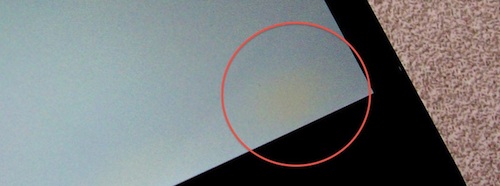
iPad 2 Yellow Screen Tinting Likely to Go Away Like iPhone 4?


iPhone 4 discoloration
A few readers have noticed a yellow tinting on their brand new iPad 2 screens. The color changes are reminiscent of a similar issue that appeared on early iPhone 4 shipments. At the time the issue was described as follows:
Quote:
Apple is using a bonding agent called Organofunctional Silane Z-6011 to bond the layers of glass. Apparently, Apple (or more likely Foxconn) is shipping these products so quickly that the evaporation process is not complete. However, after one or two days of use, especially with the screen on, will complete the evaporation process and the yellow "blotches" will disappear.
The issue seemed to resolve itself over a couple of days for the iPhone 4 based on reader experiences. With any brand new launch, Apple seems to be shipping the units as quickly as they are manufacturing them, preventing the required time for the bonding agent to set. We'll know for sure in a few days.

Article Link: iPad 2 Yellow Screen Tinting Likely to Go Away Like iPhone 4?
MacRumors is offline   1 Reply With Quote
Old Mar 11, 2011, 06:48 PM   #2
Lucky736
macrumors 6502a
 
Join Date: Jan 2004
Location: TX or MI
Send a message via AIM to Lucky736 Send a message via Yahoo to Lucky736
It'll go soon enough.
__________________
Black MacBook. 2.2GHZ. 4GB RAM. 64GB SSD. GMA X3100.
Mac Mini. 2.0GHZ. 2GB RAM. 120GB HD. GeForce 9400M.
iPhone 5. 16GB. CDMA/GSM. iOS 6.1.4. Unlocked.
BlackBerry Bold 9900. 16GB. GSM. Unlocked.
Lucky736 is offline   1 Reply With Quote
Old Mar 11, 2011, 06:48 PM   #3
vincenz
macrumors 601
 
vincenz's Avatar
 
Join Date: Oct 2008
Location: New York
At least you'll know it's brand new.
vincenz is offline   0 Reply With Quote
Old Mar 11, 2011, 06:49 PM   #4
TigerWoodsIV
macrumors regular
 
Join Date: Apr 2010
I'm gonna be so pissed if mine has this. I had it on my iPhone 4 and it didn't go away after a month so I got a replacement.
__________________
MacBook Pro 15" 2.6GHz, 4GB RAM, 200GB 7200 RPM
24" Apple Cinema Display (via Atlona AT-DP200 adapter)
iPad 2 16GB WiFi White, iPhone 4 16 GB, iPod Classic 120 GB
TigerWoodsIV is offline   0 Reply With Quote
Old Mar 11, 2011, 06:50 PM   #5
DrJohnnyN
macrumors 6502a
 
DrJohnnyN's Avatar
 
Join Date: Jan 2010
Location: Dallas, TX, USA
Adds character.
__________________
"In nothing do men more nearly approach the gods than in giving health to men." -Cicero
DrJohnnyN is offline   0 Reply With Quote
Old Mar 11, 2011, 06:50 PM   #6
kre62
macrumors 65816
 
Join Date: Jul 2010
It'll go away if it is indeed the glue issue.

This is not always the case, in fact its the minority in Apple yellow screen cases.

If your entire screen has a yellow tint to it, it's not a warm-toned screen, it isn't glue, it is a defect and you need a new iProduct.

If theres a few small blotches, yeah probably glue. But most users who have yellow screens have defective screens, yet everyone wants to jump to say it's glue.
kre62 is offline   0 Reply With Quote
Old Mar 11, 2011, 06:51 PM   #7
Sixtafoua
macrumors 6502
 
Join Date: May 2009
Location: Boston, MA
I didn't notice the yellow on mine until I read this... :/
__________________
My App
Sixtafoua is offline   1 Reply With Quote
Old Mar 11, 2011, 06:52 PM   #8
Quazimojo
macrumors regular
 
Join Date: Apr 2010
Location: Auburn Hills,Mi
Yeah i have some bleeding at the bottom/side (depending on orientation) on mine .

Pushing on the screen can make it worse which made me think the screen is pinched where the bleed is coming through so i have my screen to never sleep and ill leave it plugged in overnight to see if it disappears.

After a couple days if it's still there i will just exchange it but for now i will show some patience and see what comes of it .
Quazimojo is offline   0 Reply With Quote
Old Mar 11, 2011, 06:53 PM   #9
AlphaDogg
macrumors 68040
 
AlphaDogg's Avatar
 
Join Date: May 2010
Location: Denver, CO
It can't be glue because the iPad 2's screen is not fused to the glass (hence no glue needed)
__________________
15" 2.66GHz C2D uMBP | 13" 2.4GHz i5 MBP 500GB | '07 MacBook
iPhone 5 32GB | iPhone 3GS 8GB | iPhone 8GB
אני רוצה לעשות עליה לישראל
AlphaDogg is offline   1 Reply With Quote
Old Mar 11, 2011, 06:54 PM   #10
Dr Kevorkian94
macrumors 68000
 
Dr Kevorkian94's Avatar
 
Join Date: Jun 2009
Location: # 12 Grimmauld Place
Waited for my iPad 2 for 4 hrs and its awesome. The cameras are not as great as I expected but good (they looked better in the apple store). But over all very pleased.
__________________
ipod nano X3ipod touch 2 Gen 27 in aluminum ImaciPad 2 3G 16gb, iPad 64gb 32GB iPhone 4 S⃣ 10/5/11 Never Forget
Dr Kevorkian94 is offline   0 Reply With Quote
Old Mar 11, 2011, 06:57 PM   #11
DiScO197
macrumors regular
 
Join Date: Jul 2008
Hahahahah! Will I see this on mine on the UK launch? I'm going to wait out, as I've only just now got a first gen without something under the glass! Suckers!!
DiScO197 is offline   0 Reply With Quote
Old Mar 11, 2011, 06:57 PM   #12
Benjamins
macrumors 6502
 
Join Date: Jul 2010
If not just exchange it.
Benjamins is offline   0 Reply With Quote
Old Mar 11, 2011, 06:58 PM   #13
acslater017
macrumors 6502a
 
Join Date: Jul 2006
Location: San Francisco Bay Area
Quote:
Originally Posted by AlphaDogg View Post
It can't be glue because the iPad 2's screen is not fused to the glass (hence no glue needed)
One of the things I like about my iPhone 4 display, besides the Retina resolution, is how close the display seems to the glass. It really feels like you're touching the icons/buttons/photos.

It's one of those hard-to-describe things that took me awhile to recognize (after using my iPhone 3G for a bit), but is a hallmark of quality Apple design Like fine stitching or the lining of a coat.
acslater017 is offline   1 Reply With Quote
Old Mar 11, 2011, 07:01 PM   #14
Glideslope
macrumors 68000
 
Glideslope's Avatar
 
Join Date: Dec 2007
Location: NY
Quote:
Originally Posted by vincenz View Post
At least you'll know it's brand new.
I'll say. The A5 in the IFixit Teardown was Stamped Feb 11.
__________________
"Be extremely subtle, even to the point of formlessness. Be extremely mysterious, even to the point of soundlessness. Thereby you can be the director of the opponent's fate." Sun Tzu
Glideslope is offline   0 Reply With Quote
Old Mar 11, 2011, 07:02 PM   #15
marksman
macrumors 603
 
marksman's Avatar
 
Join Date: Jun 2007
Wouldn't be an apple launch without pee screen complaints.
marksman is offline   0 Reply With Quote
Old Mar 11, 2011, 07:06 PM   #16
GMcGarity
macrumors newbie
 
Join Date: Oct 2010
I have a 64 gb Black Wifi model and mine has some yellow discoloration along the bottom right side of the screen. I am sure it will fade in time but if not I will go to apple soon!
GMcGarity is offline   0 Reply With Quote
Old Mar 11, 2011, 07:07 PM   #17
kre62
macrumors 65816
 
Join Date: Jul 2010
Quote:
Originally Posted by marksman View Post
Wouldn't be an apple launch without pee screen complaints.
You say this as if it's the fault of whiney users or something. You should redirect your tone against Apple, who are the ones putting out the yellow screens.
kre62 is offline   0 Reply With Quote
Old Mar 11, 2011, 07:11 PM   #18
DiScO197
macrumors regular
 
Join Date: Jul 2008
Quote:
Originally Posted by Benjamins View Post
If not just exchange it.
Yep, go back to the end of that queue!
DiScO197 is offline   0 Reply With Quote
Old Mar 11, 2011, 07:14 PM   #19
oghowie
macrumors 6502
 
Join Date: Jul 2008
Wirelessly posted (Mozilla/5.0 (iPhone; U; CPU iPhone OS 4_3 like Mac OS X; en-us) AppleWebKit/533.17.9 (KHTML, like Gecko) Version/5.0.2 Mobile/8F190 Safari/6533.18.5)

I had yellow spots on my ip4. Kept it for 2 weeks and it never went away. It would actually get worse when the phone got warm from extended use.
oghowie is offline   0 Reply With Quote
Old Mar 11, 2011, 07:15 PM   #20
kmcrawford
macrumors member
 
Join Date: Mar 2008
Send a message via AIM to kmcrawford
I noticed it as soon as I turned my iPad 2 on. It is most noticeable when using an iPhone only app on the iPad. You can see the yellow glow just to the right of the home button. ( at least on mine). 16 gb white (aka Storm trooper)
__________________
iPhone 3G 16 GB, MacBook Pro, TV
http://kendevelopment.blogspot.com
kmcrawford is offline   0 Reply With Quote
Old Mar 11, 2011, 07:21 PM   #21
fobfob
macrumors 6502
 
Join Date: Oct 2008
You know what they say... never buy a first gen Apple device.

Oh wait...
fobfob is offline   0 Reply With Quote
Old Mar 11, 2011, 07:24 PM   #22
utsava
macrumors member
 
Join Date: Jun 2004
Quote:
Originally Posted by AlphaDogg View Post
It can't be glue because the iPad 2's screen is not fused to the glass (hence no glue needed)
My thoughts exactly... the ifixit teardown clearly shows that the touchscreen and LCD are not bonded together like they are on the iPhone 4. Hence, the cause of the yellowing cannot be the same as it was on the iPhone 4.
utsava is offline   0 Reply With Quote
Old Mar 11, 2011, 07:27 PM   #23
SilianRail
macrumors regular
 
Join Date: Feb 2011
Apple is already starting to fall apart without Steve running the show. They have a completely dominant market share and still rushed the iPad 2's launch.
SilianRail is offline   0 Reply With Quote
Old Mar 11, 2011, 07:30 PM   #24
RalfTheDog
macrumors 65816
 
RalfTheDog's Avatar
 
Join Date: Feb 2010
Location: Lagrange Point
Glue joke.

I think people are just sniffing their screens.
__________________
Programming is much like blacksmithing. You just keep pounding on it until it looks good. Then you pretend it is done.
RalfTheDog is offline   0 Reply With Quote
Old Mar 11, 2011, 07:34 PM   #25
FlameofAnor
macrumors regular
 
Join Date: Feb 2011
Lets hope this is an isolated problem.... if not, it will be a big headache for users, and for Apple.
FlameofAnor is offline   0 Reply With Quote

Reply
MacRumors Forums > News and Article Discussion > MacRumors.com News Discussion

Thread Tools Search this Thread
Search this Thread:

Advanced Search
Display Modes

Posting Rules
You may not post new threads
You may not post replies
You may not post attachments
You may not edit your posts

BB code is On
Smilies are On
[IMG] code is On
HTML code is Off

Forum Jump

Similar Threads
thread Thread Starter Forum Replies Last Post
iPad 2 back screen protector iLauren iPad 14 Aug 14, 2012 04:21 AM
iPad 2 Tethering to AT&T iPhone 4/4S DPOIFVet iPad 9 Oct 12, 2011 01:28 PM
Resolved: cannot connect to home wifi with iphone 4 :/ daniel-shi iPhone Tips, Help and Troubleshooting 8 Sep 26, 2011 02:23 PM
How to hide scratches on Iphone 4 antenna band? Escatech iPhone 8 Nov 16, 2010 11:47 AM


All times are GMT -5. The time now is 12:36 AM.

Mac Rumors | Mac | iPhone | iPhone Game Reviews | iPhone Apps

Mobile Version | Fixed | Fluid | Fluid HD
Powered by vBulletin® Version 3.8.6
Copyright ©2000 - 2013, Jelsoft Enterprises Ltd.

Privacy / DMCA contact / Affiliate and FTC Disclosure
Copyright 2002-2013, MacRumors.com, LLC