
|
|||||||
![]() |
|
|
Thread Tools | Search this Thread | Display Modes |
|
|
#1 |
|
How To: Enable VPN to watch Cablevision LiveTV outside your home
Now to enable VPN for Cablevision iPad app.
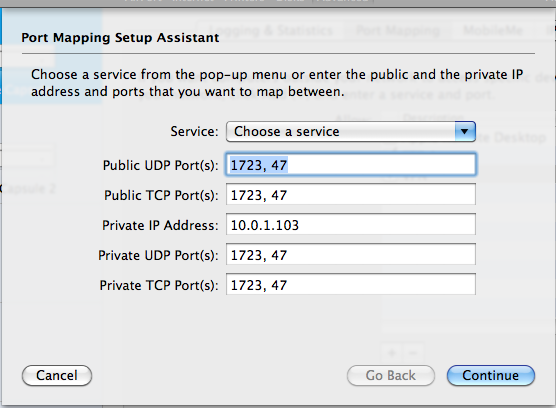
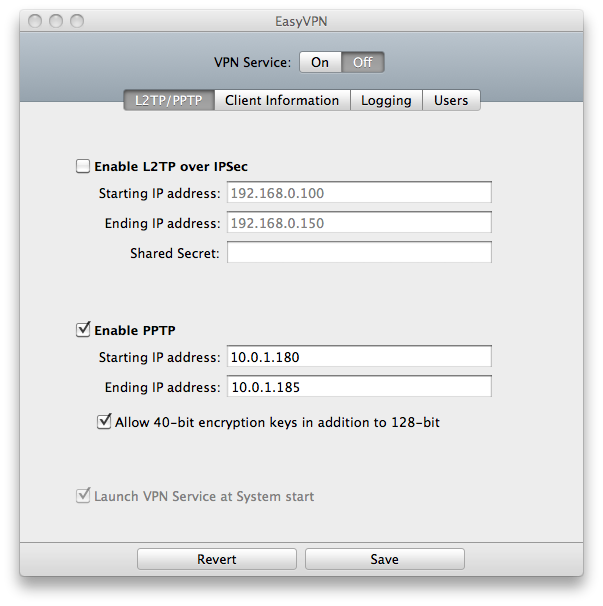
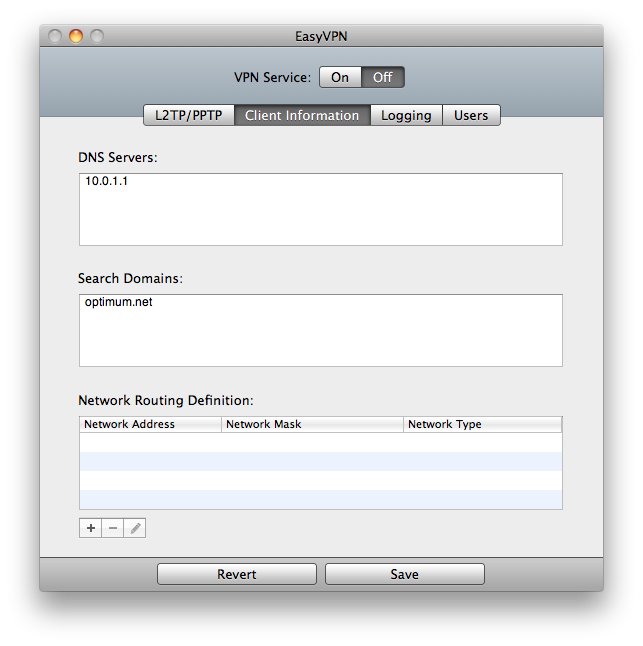
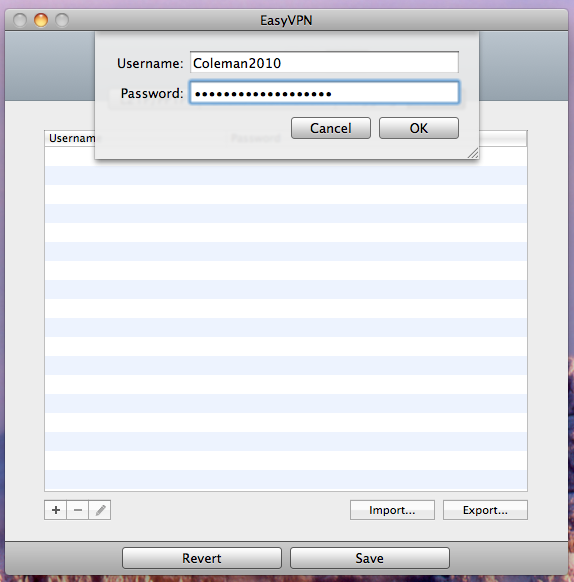
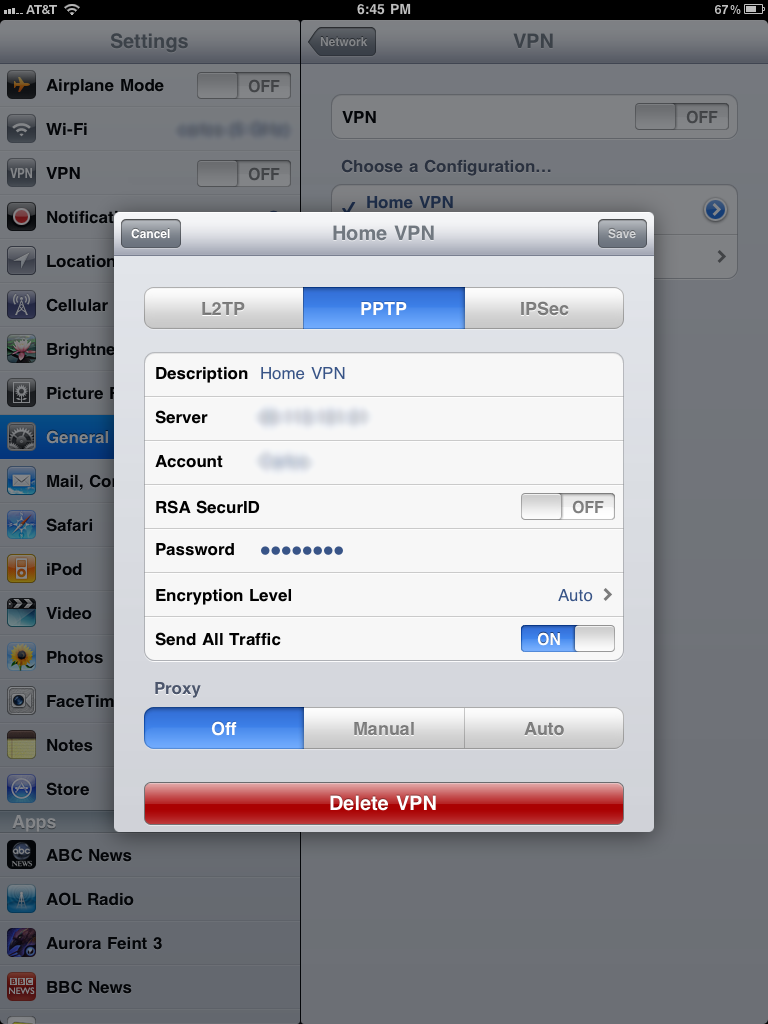
1. Enable port forwarding on your router to the internal IP address of the Mac running the VPN server software. Enable ports 1723 and 47. 2. Update/reboot the router. 3. Install EasyVPN. You can grab it here. It's $5 and allows a 30 day free trail. http://www.squashedsoftware.com/products-easyvpn.php 4. Click the L2TP/PPTP tab. 5. Click on enable PPTP. 6. Set your starting IP address high in the range of the DHCP IP addresses giving out by your router. For example. My router internally is 10.0.1.1 and it starts giving out IPs at 10.0.1.100. I set the VPN server to give out addresses 10.0.1.180-185. That will allow 5 connections. 7. Click on Allow 40-bit encyrption keys in addition to 128-bit. 8. Click on the Client Information tab. 9. For DNS server put in the internal IP address of your router. 10. Search Domains put in optimum.net 11. Click on the User Tab. 12. Click the + sign and create a user name and password for the VPN account. 13. Click save. 14. At the top click and turn on VPN service. If you click the logging tab it should say waiting for connections. 15. On the iPad click General/Network/VPN/Add VPN Configuration. 16. Name your connection 17. For server put in your public IP address. You can get your public IP by going to www.whatismyip.com. 18. For account put in the account name you created in EasyVPN. 19. Put in the password you set in EasyVPN. 20. Encryption Level set it to auto. 21. Turn on "Send All Traffic" 22. Click save. 23. Try connecting. In the easy VPN logging window it will show the iPad connecting to the VPN server. Fire up the cablevision app and enjoy Live TV over 3G or external WiFi. : ![]() P.S. Props to kalex for pointing me in the right direction figuring this out!!!
Last edited by Coleman2010; Apr 9, 2011 at 05:58 PM. |
|
|
|
0
|
|
|
#2 |
|
I forgot to put in the instructions to set energy saver in System preferences to to never sleep so your VPN server is always running.
|
|
|
|
0
|
|
|
#3 |
|
you don't need to have cablevision subscription to use this? i.e. being a customer
|
|
|
|
0
|
|
|
#4 |
|
You do have to have an account, therefor a customer is required. OR if you have friends/family and you could use their account.
__________________
Dell Studio XPS 15 i5 HTC HD7 Windows Phone 7 iMac i5 iPad 64GB Wi-Fi + 3G |
|
|
|
0
|
|
|
#5 |
|
Does anyone know if such instructions exist for the Time Warner TV app?
|
|
|
|
0
|
|
|
#6 |
|
|
0
|
|
|
#7 |
|
Thank you for the instructions. I'm a TW customer and was trying to do this with my account. Has anyone been able to get this to work on TW? What is the purpose of inserting the domain information? Since I'm on TW I used the domain and signup information for my TW account but wasn't sure if that was what you used for just made up your own login for the VPN.
i was able to pull up the channel screen, however, I can only get a couple of non-HD channel stream for about 5 secs. The app then tries to load again and eventually crashes. This was on 3g and I have not had the opportunity to try it on an external WiFi network. I'm not sure if this had to do with 3g or the upload speed from my home network. It would be great if it could stream on 3g. I checked the upload speed on my home network and I'm only getting about .50 Mbps. I'm not sure if that is sufficient to stream over 3g. Last edited by mikeylikesit; Apr 7, 2011 at 10:14 AM. |
|
|
|
0
|
|
|
#8 |
|
Any recommendations for Windows VPN software?
|
|
|
|
0
|
|
|
#9 |
|
this is why the Xfinity app is the best, you can use it away from home hehe
|
|
|
|
0
|
|
|
#10 | ||
|
Quote:
Quote:
|
|||
|
|
0
|
|
|
#11 | |
|
Quote:
|
||
|
|
0
|
|
|
#12 |
|
Wow. That is really bad.
Last edited by Coleman2010; Apr 8, 2011 at 02:01 PM. |
|
|
|
0
|
|
|
#13 |
|
I am curious. Has anyone else had success setting this up? How is it working out for you?
|
|
|
|
0
|
|
|
#14 |
|
Im going crazy trying to set this up. How do i know the range of dhcp ip addresses my router gives out? my router ip is the same as yours.
__________________
"Remembering that you are going to die is the best way I know to avoid the trap of thinking you have something to lose." ~Steve Jobs |
|
|
|
0
|
|
|
#15 |
|
I am trying to do this similar thing - but I am confused
Do I need a pc software based VPN? Can't I just use my router VPN? I have tried VPN with just iPad and router but not working. I wonder if it is because my ip address to my router from cablevision is not static? Although my router ip hasn't changed since I started trying to do this, it keep failing. Argh I am so pissed that I can't figure this out even with google
__________________
Apple Products - Nano Gen 3, Iphone 5, Macbook, iPad 2 |
|
|
|
0
|
|
|
#16 | |
|
Quote:
What router do you have? |
||
|
|
0
|
|
|
#17 |
|
What router do you have? Your router should have a configuration page where you can look and see what IPs it's giving out. Or just go into system preferences/network on your mac and look at your IP and the router IP address.
|
|
|
|
0
|
|
|
#18 |
|
I have a buffalo WHR-HP-G54 flashed to the latest DDWRT Flash that has VPN services ........
__________________
Apple Products - Nano Gen 3, Iphone 5, Macbook, iPad 2 |
|
|
|
0
|
|
|
#19 |
|
I was able to get it working. Thanks for your instructions. Now I need to wait for TW to improve their service so I can actually get more than 5 secs of video stream. I would be very interested to know if anyone who has TW cable has been able to get this to work reliably.
|
|
|
|
0
|
|
|
#20 | |
|
Quote:
Edit: I found the range and it was set at 1-200. So i set the starting range too 100 and used your setting for easyvpn for 180-185. Still no luck
__________________
"Remembering that you are going to die is the best way I know to avoid the trap of thinking you have something to lose." ~Steve Jobs Last edited by likemyorbs; Apr 8, 2011 at 11:56 PM. |
||
|
|
0
|
|
|
#21 |
|
Thanks so much for posting these instructions. I got it all working, connected to the VPN from my iPad, but when i launch the optimum app, it still thinks i am away from home network...for some reason the home network does not replicate through the VPN... any ideas? many thanks
|
|
|
|
0
|
|
|
#22 |
|
What is your setup now? what firewall, what vpn software?
|
|
|
|
0
|
|
|
#23 |
|
using easyvpn on imac, mac firewall, i can vpn into my home network.
Last edited by erubenst; Apr 9, 2011 at 05:14 PM. |
|
|
|
0
|
|
|
#24 | |
|
Quote:
http://www.screencast.com/users/jimh...3-36bf80775077 also this for Ipad info http://jimiz.net/blog/2010/04/ipad-v...ure-and-setup/ |
||
|
|
0
|
|
|
#25 |
|
Got it to work... i needed to enable "Send all Traffic" on the iPad VPN client... Thanks again Coleman2000
|
|
|
|
0
|
![]() |
|
«
Previous Thread
|
Next Thread
»
| Thread Tools | Search this Thread |
| Display Modes | |
|
|
Similar Threads
|
||||
| thread | Thread Starter | Forum | Replies | Last Post |
| How to watch Hulu from outside the US? | Daptin | Mac Basics and Help | 10 | Apr 15, 2012 03:41 PM |
| How To: Enable tethering on 3.1.2 | The General | Jailbreaks and iOS Hacks | 23 | Oct 19, 2009 09:03 PM |
| My 'lil how to: Enabling Time Capsule/External Harddrive for Apple TV | Russlush3 | Apple TV and Home Theater | 0 | Jul 18, 2009 10:00 PM |
| How come no one talks about how hard it is to get a Wi-Fi signal outside your home? | MK25toLife | iPod touch | 36 | Jan 3, 2008 02:23 PM |
All times are GMT -5. The time now is 02:09 AM.


Linear Mode

