Register FAQ / Rules Forum Spy Search Today's Posts Mark Forums Read
Go Back   MacRumors Forums > Apple Hardware > Desktops > iMac

Reply
 
Thread Tools Search this Thread Display Modes
Old May 10, 2011, 07:15 PM   #1
one1
macrumors 65816
 
Join Date: Jun 2007
Location: Chattanooga, TN
27" iMac LCD screen information (this is nowhere else but here)

As with everything hardware with newer Apple stuff, lack of info means it's done the hard way or not at all. I've done it the hard way so you don't have to. The newer part number for the mid 2010 iMac screen doesn't even exist on the internet yet. (until now)

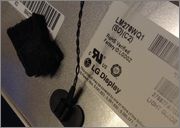
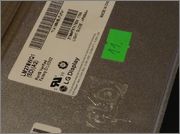
27" Late 2009 Core Duo uses LG screen LM270WQ1 (SD) (A2)

27" Mid 2010 i3, i5, i7 all use LM270WQ1 (SD) (C1)

The difference is NEARLY none, except one single thing. They changed 1 plug for no apparent reason but to screw with you. The part numbers on the controller boards are the same, everything else is the same. They simply changed the connector. It's not stronger, bigger, nor better suited, it's just "different".

You may notice the (A2) screen is beginning to pop up a few good places now, but the (C1) screen doesn't even exist on google. ......at all.

To remedy this if you have to replace the screen, buy the (A2) screen and swap the controller board in question with your old one.

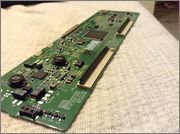
The board with the WHITE PLUG is the Late 2009 Core DUO.

The board with the BLACK plug is the Mid 2010 i3,i 5, i7.

This plug can be seen in the pics below in the first picture the plug is closest to you in pic #1, small, and it is a 4 pin plug to the right of the copper square.

This board is dead center at the top rear of your LG 27" screen. It's only about a 5 minute job.
Attached Thumbnails
Click image for larger version

Name:	IMG_0313.JPG
Views:	132
Size:	155.1 KB
ID:	284857   Click image for larger version

Name:	IMG_0312.JPG
Views:	95
Size:	204.9 KB
ID:	284858   Click image for larger version

Name:	IMG_0311.JPG
Views:	102
Size:	191.3 KB
ID:	284859  

Click image for larger version

Name:	IMG_0291 1.JPG
Views:	75
Size:	194.0 KB
ID:	284860   Click image for larger version

Name:	Screen Shot 2011-05-05 at 9.34.48 PM.png
Views:	57
Size:	516.1 KB
ID:	284861  
__________________
iMac 2011 2.5 i5
iPad 2 white
iPhone 4s
one1 is offline   1 Reply With Quote
Old May 10, 2011, 07:49 PM   #2
vladi
macrumors regular
 
Join Date: Jan 2010
Ha nice job!
vladi is offline   0 Reply With Quote
Old May 10, 2011, 07:52 PM   #3
flipster
macrumors 6502a
 
Join Date: Mar 2010
Location: Boston
I'm curious as to why they would change one simple little thing like that if it has no effect/benefit from the previous displays

Nice find, btw
__________________
2008 iMac, 24", 3.06 GHz, 6GB, NVIDIA Geforce 8800 GS, Verizon Black iPhone 4 16GB
"Simplicity is the ultimate sophistication." -Leonardo da Vinci
flipster is offline   0 Reply With Quote
Old May 11, 2011, 07:23 PM   #4
one1
Thread Starter
macrumors 65816
 
Join Date: Jun 2007
Location: Chattanooga, TN
I have looked the boards over and they are identical, there seems no need other than to sell a new board with the LCD if you swap them. One has a build date as late 2009 and one has a build date as mid 2010, otherwise identical.
__________________
iMac 2011 2.5 i5
iPad 2 white
iPhone 4s
one1 is offline   0 Reply With Quote
Old Oct 25, 2011, 01:31 PM   #5
bruce302ford
macrumors newbie
 
Join Date: Apr 2010
What type of IPS panel?

Cant seem to find this info anywhere, it must not be important to anyone: maybe you can help. What type of IPS panel is the LG LM270WQ1? S-IPS, H-IPS, P-IPS? Classic Hitachi IPS?
All of the teardowns from the last few years of these products simply say it is an IPS panel.
Thanks for any help.
bruce302ford is offline   0 Reply With Quote
Old Mar 13, 2013, 01:32 PM   #6
Fat Fatster
macrumors newbie
 
Join Date: Sep 2010
one1 ... thank you so much for the post.

I have a Aug 2010 iMac. the LG panel has the

C2

designation. it has the little BLACK plughole.

The screen of course has the usual problem:
https://discussions.apple.com/thread...rt=75&tstart=0
http://www.youtube.com/watch?v=4QJ4r...ature=youtu.be

I very fortunately found a replacement screen for a low price, but the replacement screen is the

A2

designation with the little WHITE plug.

I am going to just open the metal panel (two or three large X screws) to replace the board as you describe -- to be clear, that's what you mean right? I should pop off the largish metal panel, and then it's easy to swap the boards?

I guess an alternate would be to CHANGE THE LITTLE CABLE - but goodness knows where you'd find such a thing?

I'll just go ahed and try that anyway, but generally thanks a million for this fantastic post -- it makes one feel not alone in the world
Fat Fatster is offline   0 Reply With Quote
Old Mar 13, 2013, 03:56 PM   #7
Fat Fatster
macrumors newbie
 
Join Date: Sep 2010
Yup, incredibly it worked perfectly! Thanks a million to one1.

Here's two photos that show my original (ie newer) C2 (LM270WQ1)

(BLACK plug type on the controller board)

that comes from a Aug 2010, iMac quad 2.93 8go

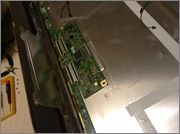
(Note that you can see this black plug (it has two tiny square holes on top) in image #3 at the bottom of this post. It is the "largest" object on the edge of the ControllerBoard right next to the camera.)

And I bought from eBay an A2 (LM270WQ1)

I bought it in 2013 (I am writing this in March 2013). one1 says that the A2 is from a Late 2009 iMac.

(WHITE plug type on the controller board.)

(Note the one from my iMac has the temperature sensor still attached. You just pull that off by sliding something l;ike a screwdriver underneath it, it is simply glued on.)


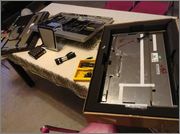
These next large photos may help anyone who needs to swap the ControllerBoard.

The long flap of metal (it is as wide as the whole display) easily lifts-up if you remove the four obvious screens.

To open that type of ribbon cable. The long BLACK piece actaully lifts-up. In fact it lifts-up towards the INSIDE of the controller board. (Or the other way on the other end of the ribbon cables.) If you look carefully at the #3 photo below you will see the long BLACK things standing up.

Very luckily for me, the ribbon cables worked the first time I put the ribbon cables in. Suggest, be very careful that the ribbon cables look really STRAIGHT. Using a magnifying glass, look at the left and right side of the ribbon cables and see if they are microscopically at the same distance against the plastic edges of the receiver. Note that they push in a little further on one side but there is some tiny something inside (you can't see) which they HIT on the other side. So it would be easy to incorrect push in both sides, meaning they would be on a slight angle. Do not do this. Slide in only until you feel the "stop" on the one side. Looking at the "posts" on each side, ensure the ribbon is absolutely square.

Tip: using your old panel which you are probably throwing away, and the ControllerBoard you won't be using: You can experiment over and over seating the ribbon cables on that unneeded panel/board.


I hope this helps someone and I can only thank One1 yet again, thank you One1. You saved me $1000 !!

Last edited by Fat Fatster; Mar 14, 2013 at 03:58 AM. Reason: more details
Fat Fatster is offline   0 Reply With Quote
Old Mar 14, 2013, 10:05 PM   #8
one1
Thread Starter
macrumors 65816
 
Join Date: Jun 2007
Location: Chattanooga, TN
Hey that's great! Good job too! Back when this was posted in 2011 I was the first to actually put these two side by side and figure this out so I had to do it the hard way. Glad everything worked out for you!
__________________
iMac 2011 2.5 i5
iPad 2 white
iPhone 4s
one1 is offline   0 Reply With Quote
Old Mar 15, 2013, 09:13 AM   #9
Fat Fatster
macrumors newbie
 
Join Date: Sep 2010
I truly thank you so much! You literally saved me a grand and a huge amount of hassle. Thank you so much man, cheers.

I now just turn that iMac on and off all day saying "Whoo, it works!"

Thanks again, cheers


Quote:
Originally Posted by one1 View Post
Hey that's great! Good job too! Back when this was posted in 2011 I was the first to actually put these two side by side and figure this out so I had to do it the hard way. Glad everything worked out for you!
Fat Fatster is offline   0 Reply With Quote

Reply
MacRumors Forums > Apple Hardware > Desktops > iMac

Thread Tools Search this Thread
Search this Thread:

Advanced Search
Display Modes

Posting Rules
You may not post new threads
You may not post replies
You may not post attachments
You may not edit your posts

BB code is On
Smilies are On
[IMG] code is On
HTML code is Off

Forum Jump

Similar Threads
thread Thread Starter Forum Replies Last Post
Change brightness of 27" iMac (external display) kristoffers4 iMac 0 Aug 22, 2011 04:41 PM
27" iMac screen problems, LCD looks burnt? Grey blotches on screen? HacKage iMac 7 Dec 5, 2010 06:10 PM
27" iMac Arriving Today! [Update] It's Perfect - Photos Inside! Locker iMac 12 Nov 24, 2010 05:35 PM
Screen problems (this is really weird) Help! Insulin Junkie iPod touch 7 May 16, 2008 06:00 AM


All times are GMT -5. The time now is 10:00 PM.

Mac Rumors | Mac | iPhone | iPhone Game Reviews | iPhone Apps

Mobile Version | Fixed | Fluid | Fluid HD
Powered by vBulletin® Version 3.8.6
Copyright ©2000 - 2013, Jelsoft Enterprises Ltd.

Privacy / DMCA contact / Affiliate and FTC Disclosure
Copyright 2002-2013, MacRumors.com, LLC