
|
|
#1 |
|
MacBook Pro
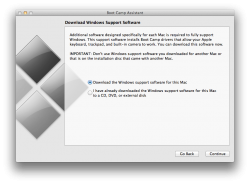
Clean install of Mac OS X 10.7, clean install of Windows 7 x86. From within Mac OS X, when I go to download Boot Camp drivers, Boot Camp Assistant gives this error message: Can't install Windows Support Software because it is not currently available from the Software Update server. From within Windows, Apple Software Update lists no Boot Camp Software. From the Mac OS X 10.7 installation media, there are no Windows driver bundles like in previous Mac OS X versions. So if Apple Software Update doesn't download anything, Boot Camp Assistant doesn't download anything, and there is nothing to install if you have a 10.7 DVD, how are you supposed to install drivers under Windows? |
|
|
|
0
|
|
|
#2 |
|
I purchased a new MacBook Air this week, and Boot Camp assistant downloaded the BootCamp 4.0 drivers for Windows 7. I'd suggest trying again. Perhaps the drivers aren't up yet. Did you try your old BootCamp 3.2 drivers?
|
|
|
|
0
|
|
|
#3 |
|
I was able to install the Boot Camp drivers from a 10.6/Snow Leopard disc.
This is an older MacBook Pro @ 2.16 GHz, and Boot Camp Assistant has never been able to download drivers. |
|
|
|
-1
|
|
|
#4 | |
|
Maybe try again later? Apple's servers could have been busy.
You can download them yourself from here on the right of the page: http://www.apple.com/support/bootcamp/ I'm pretty sure although they say update that they'll install by themselves. Quote:
Has for a while I think? Maybe version 3. |
||
|
|
0
|
|
|
#5 | |
|
Quote:
|
||
|
|
0
|
|
|
#6 |
|
I've tried to download the drivers through Boot Camp Assistent (Lion) three times. It takes forever and I had problems. I couldn't finish the process. It's very frustrating. I think I will try to download the "old" version (3.2), create the partition, install Windows 7 with the old drivers and then try to update them. Does anybody have a better idea/solution?
Thanks G |
|
|
|
0
|
|
|
#7 |
|
whenever I install boot camp I just go on apple.com and download the latest version (or the 3 latest versions last time since I was starting from SL and it made me install all 3 incrementally...lol)
|
|
|
|
0
|
|
|
#8 |
|
@gentlefury
What URL? Downloads link off .../support/bootcamp says "No results found." Typed "bootcamp" in search box, got a couple dozen v3.x EXE files labeled "Update for...," is that it? I'm newbie but expected a Mac installer. BTW, tried using Bootcamp Assistant in SL 10.6.8 Utilities folder but it complains that I don't have at least 10GB of free space for the partition even though Get Info reports over 40GB free on the internal drive. Objective: Simply want to use the Windows-only Parrot Bluetooth Config software to setup my hands free device over BT. Wanted to do this using Parallels Desktop, their instructions say "First, install bootcamp." Maybe it would be easier to get a PC? :P |
|
|
|
0
|
|
|
#9 | |
|
This past weekend I just installed Win 7 in bootcamp and it downloaded the drivers and burned a CD for me with them on it. Worked just fine. You are doing something wrong.
Quote:
|
||
|
|
0
|
|
|
#10 |
|
I've been trying to download the support software and it's been taking forever to download. I have already installed Windows 7 64 Ultimate but it has no network adapter and the screen is not as clear as it should be. I have already installed all the bootcamp updates, I just need some drivers.
__________________
2011 13" MacBook Pro i5, 8 GB RAM, 1 TB HDD 13" BlackBook Core Duo, 2 GB RAM, 320 GB 7200 RPM Ipod Classic 160GB White iphone 4 32gb |
|
|
|
-1
|
|
|
#11 |
|
Success story & closure to my earlier post.
Short of a full blown Boot camp installation, I used my Snow Leopard (SL) DVD without updates and got Bluetooth working in WinXP using the Bootcamp drivers under Parallels since Bootcamp Ass't (luckily) reported I had insufficient space for another partition. Admittedly this is not a Bootcamp solution but is proves the older drivers on the DVD work fine with SL 10.6.8. Steps: Inserting the SL DVD mounts "Mac OS X Install DVD" along with a "Windows Support" volume. Open the mounted Windows Support volume. Navigate to /Boot Camp/Drivers/Apple; copy "AppleBluetoothInstaller.exe" and "AppleBluetoothEnablerInstaller.exe" to a location that Windows can access. Start WinXP, run AppleBluetoothInstaller.exe, then AppleBluetoothEnablerInstaller.exe; they both reported success at the end of their quick installation. Briefly at this point in Windows Device Manager a few new broken/unknown devices appear but it resolves itself as Windows finishes detecting and configuring things. Bootcamp users might be done at this point. Immediately thereafter in Parallels' menu I selected Devices->USB->Apple Bluetooth USB Host Controller. Not sure if it was that action or just latency with the Win installer but at that point Window started through the usual "Found new hardware..." process with balloons in its System Tray reporting progress (unattended) until it finally reported "Your new hardware is installed but there were problems." However, a second later within the Device Manager window I had open it did more shuffling and before my eyes the broken new components in Device Manager moved to become a new category off the trunk named Bluetooth Radios, with children "Apple Buit-in Bluetooth" and "Microsoft Bluethooth Enumerator." No broken devices, after which Bluetooth works flawlessly in WinXP. In the case of using a virtual machine on the Mac, when WinXP is running the Bluetooth status icon in Finder's menu bar changes appearance; clicking on it displays "Bluetooth: Not Available" while WinXP is running. I successfully ran the Windows mObridge Config Update Wizard and configured my car's ABT2010-MBZ-F bluetooth hands free device (a great product by the way) wirelessly via bluetooth. Joy! Hopefully this provides some details and hope to anyone aiming to use Bluetooth purely in Bootcamp w/ Lion. I plan to upgrade soon and will report if bluetooth still works afterwards. My system is a MacBook Pro 2,2 with 2.33 GHz Core 2 Duo. UPDATE - BLUETOOTH NOT WORKING IN LION: Testing with a VM and not actual Boot Camp but found that the above configuration using Boot Camp drivers from the Snow Leopard 10.6 DVD DOES NOT FUNCTION with the Lion OS X 10.7 initial download and with the mandatory Parallels 6 "sidegrade" to 6.0.12094. It breaks the Mac's bluetooth with such toxicity that, after attempting to attach bluetooth to the VM using Parallels' Devices menu, even following a clean shutdown of the "bluetoothless" Windows OS, bluetooth for the Mac no longer appears in the Mac System Preferences and Mac OS displays a dialog that no bluetooth hardware is present! Requires a hard reboot to restore bluetooth presence to the Mac System Preferences. Re-attaching the "bluetoothless" Windows drive image to a Mac running Snow Leopard 10.6.8 and bluetooth againt works flawlessly in Windows XP. So for now, this confirms bluetooth dirvers from the Snow Leopard DVD Boot Camp package work only with Snow Leopard, and not Lion, as described here. Last edited by SoCalMac; Aug 15, 2011 at 05:55 PM. Reason: Updated after upgrading to Lion |
|
|
|
0
|
|
|
#12 | |
|
Quote:
It's not just me. https://discussions.apple.com/thread/3207049 http://superuser.com/questions/31477...t-camp-drivers It's like having one huge button that says "GO". I click it, it tells me it can't download anything. Not a lot of room for error there. |
||
|
|
0
|
|
|
#13 |
|
can't download support software
when I try I get msg saying I'm not connected to the internet! (see pic)
|
|
|
|
0
|
|
|
#14 |
|
I don't know why this has become so painful, but it has.
Instructions for manual download are near the end of this threadL http://forums.macrumors.com/showthread.php?t=892725 B
__________________
MBA (13" 1.7 GHz 128GB), UMBP (15" SD 2.8 GHz), UMB (13" 2.4 GHz), iMac (17" Yonah), 32GB iPad 3 WiFi+LTE, 64 GB iPad WiFi, 32 GB iPhone 5, Airport Extreme |
|
|
|
0
|
|
|
#15 | |
|
Quote:
|
||
|
|
0
|
|
|
#16 | |
|
Quote:
B
__________________
MBA (13" 1.7 GHz 128GB), UMBP (15" SD 2.8 GHz), UMB (13" 2.4 GHz), iMac (17" Yonah), 32GB iPad 3 WiFi+LTE, 64 GB iPad WiFi, 32 GB iPhone 5, Airport Extreme |
||
|
|
0
|
|
|
#17 |
|
it is a shame that the link for the manual download has been removed....
|
|
|
|
0
|
|
|
#18 |
|
I downloaded and burned the "Windows support software" to a DVD just this afternoon. This allowed me to upgrade my bootcamp software on Windows to version 4.0 from 3.2.
__________________
15" 2011 MacBook Pro, 2.2 GHz i7 Quad, 8GB DDR3, 1GB Radeon HD 6750M, 750GB HDD; 32GB iPhone 5
|
|
|
|
0
|
|
|
#19 |
|
|
0
|
|
|
#20 | |
|
Quote:
B
__________________
MBA (13" 1.7 GHz 128GB), UMBP (15" SD 2.8 GHz), UMB (13" 2.4 GHz), iMac (17" Yonah), 32GB iPad 3 WiFi+LTE, 64 GB iPad WiFi, 32 GB iPhone 5, Airport Extreme |
||
|
|
1
|
|
|
#21 |
|
It worked for me like I mentioned before.
Last edited by balamw; Aug 6, 2011 at 10:04 AM. Reason: Removed offer to host the file. Please do not republish copyrighted material. |
|
|
|
0
|
|
|
#22 |
|
I installed Windows 7 Home Premium 32bit today on a 2011 MBA and it worked. Had to do it twice - the first time around something was wrong and Windows wouldn't install on the Partition Bootcamp had created for it.
2nd time it worked like a charm - downloading the drivers also worked without a hitch. |
|
|
|
0
|
![]() |
|
«
Previous Thread
|
Next Thread
»
| Thread Tools | Search this Thread |
| Display Modes | |
|
|
Similar Threads
|
||||
| thread | Thread Starter | Forum | Replies | Last Post |
| n00b question re. Boot Camp set-up: Sequence? | waiting | iMac | 6 | Oct 7, 2011 01:37 AM |
| Boot Camp 32 Bit on 2011 Mini? | dojonate | Mac mini | 2 | Aug 26, 2011 01:14 AM |
| 2010 2.4 or 2.66 Mini with 4GB Support Boot Camp with COD4 | Wicked1 | Mac mini | 3 | Apr 5, 2011 09:57 PM |
| Classic environment is no longer supported | scissorband | Mac Basics and Help | 7 | Aug 26, 2010 12:10 PM |
All times are GMT -5. The time now is 07:22 AM.


15" 2011 MacBook Pro, 2.2 GHz i7 Quad, 8GB DDR3, 1GB Radeon HD 6750M, 750GB HDD;
Linear Mode

