
Successful setup of OS X Lion + Bootcamp Windows 7 Ultimate + Data Partition
Ok, so after many, many hours I think I've finally figured out how to successfully install Mac OS X Lion with Windows 7 on a Bootcamp partition AND an 3rd data partition. Here is a screenshot of my setup on my 13" MacBook Pro:
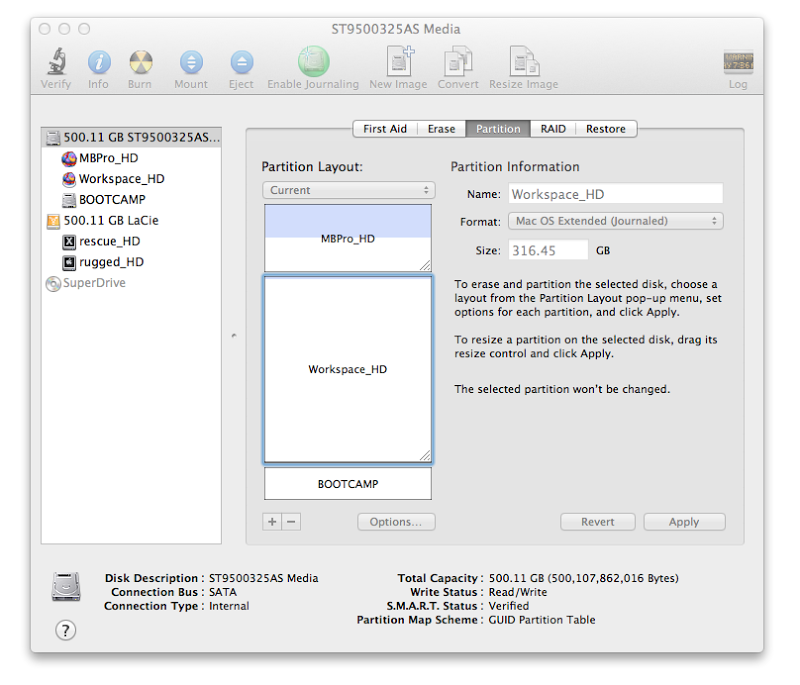
As you can see, I have my internal 500GB hard drive partitioned the following way:
120GB - OS X Lion (system and apps)
316GB - workspace partition (user files, projects)
64GB - Bootcamp Windows 7 Ultimate
To make this work, I started with the standard procedure of installing OS X Lion on a single Mac OS Ext (journ) partition and using Bootcamp Assistant to build the Bootcamp partition for Windows.
Then I did 2 key things:
1. Before installing Windows on the Bootcamp partition, I first went back to Disk Utility, shrunk the OS X Lion partition, and inserted a 3rd partition Workspace_HD for all my user files. Then I restarted and installed Windows 7.
2. After Win 7 Ultimate, the Bootcamp drivers and Office 2010 are installed and activated, I DID NOT make any changes to any partitions. I can put whatever I want on any partition, but I CAN NOT shrink, resize, delete, create, or modify any partition. Any change to the partition tables after Windows is installed will BREAK the Bootcamp partition.
I went thru 3 broken installs of Bootcamp/Win7 to figure this out. Again, the key to this working is creating your extra partitions AFTER you make the Bootcamp partition but BEFORE you install Windows.
I will rebuild my system for a 5th time to fully document the process with screenshots, but this time with 5 partitions: OS X Lion startup, Workspace, custom 20GB OS X Lion recovery partition, 30GB FAT32 shared Mac/Win data partition, and a Bootcamp partition with Windows 7 Ultimate.
Until then, here is a quick step by step of what I did:
- Install OS X Lion on a single partition hard drive.
- Run Bootcamp Assistant.
- Download drivers for Mac and burn to CD.
- Make 60GB Bootcamp partition for Windows.
- When prompted for install disc, STOP installation and quit Bootcamp.
- Launch Disk Utility. Look at the 2 partitions.
- Shrink Mac OS X partition to 100GB.
- Click on + to create a 3rd partition in free space.
- Split that partition into however many other partitions you want.
- Quit Disk Utility.
- Insert Windows 7 installer DVD and restart Mac.
- After the startup chime, hold down OPTION key.
- Wait a while until the Windows 7 DVD appears and select it.
- Mac should start up from DVD. Start installing Windows 7.
- Continue until finished. DO NOT connect to internet.
- Load Bootcamp drivers CD that you burned and install.
- When finished, restart and log into Windows 7.
- Continue installing your applications. Do activations.
- When finished, restart, holding down the OPTION key.
- You should now see your OS X Lion and Win 7 partitions.
OK, hope this works for you!! Good Luck!! ;-)
Ernie
-
Ok, so after many, many hours I think I've finally figured out how to successfully install Mac OS X Lion with Windows 7 on a Bootcamp partition AND an 3rd data partition. Here is a screenshot of my setup on my 13" MacBook Pro:
As you can see, I have my internal 500GB hard drive partitioned the following way:
120GB - OS X Lion (system and apps)
316GB - workspace partition (user files, projects)
64GB - Bootcamp Windows 7 Ultimate
To make this work, I started with the standard procedure of installing OS X Lion on a single Mac OS Ext (journ) partition and using Bootcamp Assistant to build the Bootcamp partition for Windows.
Then I did 2 key things:
1. Before installing Windows on the Bootcamp partition, I first went back to Disk Utility, shrunk the OS X Lion partition, and inserted a 3rd partition Workspace_HD for all my user files. Then I restarted and installed Windows 7.
2. After Win 7 Ultimate, the Bootcamp drivers and Office 2010 are installed and activated, I DID NOT make any changes to any partitions. I can put whatever I want on any partition, but I CAN NOT shrink, resize, delete, create, or modify any partition. Any change to the partition tables after Windows is installed will BREAK the Bootcamp partition.
I went thru 3 broken installs of Bootcamp/Win7 to figure this out. Again, the key to this working is creating your extra partitions AFTER you make the Bootcamp partition but BEFORE you install Windows.
I will rebuild my system for a 5th time to fully document the process with screenshots, but this time with 5 partitions: OS X Lion startup, Workspace, custom 20GB OS X Lion recovery partition, 30GB FAT32 shared Mac/Win data partition, and a Bootcamp partition with Windows 7 Ultimate.
Until then, here is a quick step by step of what I did:
- Install OS X Lion on a single partition hard drive.
- Run Bootcamp Assistant.
- Download drivers for Mac and burn to CD.
- Make 60GB Bootcamp partition for Windows.
- When prompted for install disc, STOP installation and quit Bootcamp.
- Launch Disk Utility. Look at the 2 partitions.
- Shrink Mac OS X partition to 100GB.
- Click on + to create a 3rd partition in free space.
- Split that partition into however many other partitions you want.
- Quit Disk Utility.
- Insert Windows 7 installer DVD and restart Mac.
- After the startup chime, hold down OPTION key.
- Wait a while until the Windows 7 DVD appears and select it.
- Mac should start up from DVD. Start installing Windows 7.
- Continue until finished. DO NOT connect to internet.
- Load Bootcamp drivers CD that you burned and install.
- When finished, restart and log into Windows 7.
- Continue installing your applications. Do activations.
- When finished, restart, holding down the OPTION key.
- You should now see your OS X Lion and Win 7 partitions.
OK, hope this works for you!! Good Luck!! ;-)
Ernie
-
