
Got a tip for us?
Let us know
Become a MacRumors Supporter for $50/year with no ads, ability to filter front page stories, and private forums.
Show us your Thunderbolt/Cinema Display setup!
- Thread starter LevMac
- Start date
- Sort by reaction score
You are using an out of date browser. It may not display this or other websites correctly.
You should upgrade or use an alternative browser.
You should upgrade or use an alternative browser.

skyline r34
macrumors 6502


Here my setup
Wow, very nice, loving the dual screen setup, are they both Thunderbolt ?
Would love a pic flat on showing them both side by side


KScottMyers
macrumors 6502
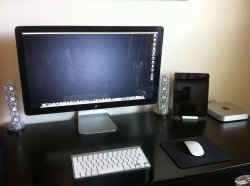
You gotta love that clean, simple, minimalist look.
View attachment 303519
Just replaced my Apple 23" Cinema Display and 2006 Mac Pro. Loving the new TBD with an i7 Mini.

xraydoc
Contributor
View attachment 303519
Just replaced my Apple 23" Cinema Display and 2006 Mac Pro. Loving the new TBD with an i7 Mini.
Nice. Amazing that the little mini can replace a Mac Pro, but it's certainly a fast little thing.

Snap! regarding the Ikea Galant glass top desk.
Yeah, that makes me nervous looking at that. What are those desks rated at? The ACDs weigh a zillion pounds. If that thing where to go it would traumatize you for life. Also, if your legs were under the table.......
But we all know. You can trust IKEA. 😱
I know of this happening actually. People assume they will hold up. But I have some unfortunate memories. Very bad results, and serious injury.

dubAdub
macrumors member
Yeah, that makes me nervous looking at that. What are those desks rated at? The ACDs weigh a zillion pounds. If that thing where to go it would traumatize you for life. Also, if your legs were under the table.......
I wouldn't have any worries about the frame or legs. If there's going to be an issue I think it's likely to be excessive load on the glass or a sharp impact.
Mine has about 30 kg (66 lbs) spread out over the desk. I tried to put most of the load near the supports. I'm not worried about the present load. The glass top is pretty sturdy.
Dropping a hammer on it might cause trouble though.
Apple Expert
macrumors 65816
Yeah, that makes me nervous looking at that. What are those desks rated at? The ACDs weigh a zillion pounds. If that thing where to go it would traumatize you for life. Also, if your legs were under the table.......
But we all know. You can trust IKEA. 😱
I know of this happening actually. People assume they will hold up. But I have some unfortunate memories. Very bad results, and serious injury.
I recently purchased that desk. I opted for the non glass surface. Ikea is nice stuff, but I didn't feel to comfortable with the glass surface.
blevins321
macrumors 68030
I recently purchased that desk. I opted for the non glass surface. Ikea is nice stuff, but I didn't feel to comfortable with the glass surface.
Yeah I have what I thought was a nice IKEA desk and it collapsed last week after I apparently bumped one of the legs at the wrong angle, causing the bolt to detach. Luckily the weight was centered on the back, so the only casualty was my Viewsonic monitor, which was saved however by a particularly Matrix-esque move on my part.
🙂 Great displays - was worried all the negative feedback on glossy screen, but now that they're infront of me...fantastic!
Temporary setup as it is..moving soon so new desk/layout soon to make it less cluttered
What is driving these two? I wanted to buy two when I went to the store but I still don't a mbp can handle two of these well. My current gen 17" revs up time to time with its fans so I can only imagine what it would sound like with two of them.


CWallace
macrumors G5
I wish someone with a new 27" iMac and 2 Thunderbolt Displays would post a pic^^ Thats my dream setup ^^
I have a new 27" iMac with a new ATD, but I'm still figuring out how to place them. 😕 😛
I have a new 27" iMac with a new ATD, but I'm still figuring out how to place them. 😕 😛
I don't have a 27" but my setup has 2x 21,5 and 1x 21,5 imac and I made a stand out of 2 iphone boxes height is perfect but I'll prolly get 2 wallmounts or make a stand

revelated
macrumors 6502a
View attachment 303519
Just replaced my Apple 23" Cinema Display and 2006 Mac Pro. Loving the new TBD with an i7 Mini.
Good minimalist look.
I actually managed to create what I feel is the most attractive workspace I've ever had at a job. Company provided 13" 2011 MBP + self-purchased discounted Thunderbolt Display = quite nice. The stand I bought for the MacBook Pro fits perfectly underneath the display with room to breathe, and the fan vent underneath keeps the MBP cool even in clamshell mode.
This is what Apple should have done. Create a true dock solution. First picture is after I got everything wired. Second is the "promo shot". Third is the "day to day" shot. Lighting came out different because I was toying with the brightness settings of the Bionic to compensate for over-darkening that it was doing.
Since I know at least one person will ask....
Keyboard: Logitech Wireless Solar Keyboard K750. Quite an amazing keyboard, this. It's "solar" but it charges from pretty much any light source. So basically I will never need to replace batteries because the overhead lighting keeps it charged throughout the day. Helps that it matches the monitor too. Why not an Apple Keyboard, you ask? Because I run VMs at work 50% of the time and it's just easier to do it with a PC keyboard.
Stand: Cooler Master NotePal Ergostand Notebook Cooler R9-NBS-4UAK. This stand can also lift to various ergonomic positions if one wants to use the laptop's screen as a secondary monitor; but I figured that it would be best suited as the base under the display, and wow does it look great there. It actually has a USB hub on it as well which I use instead of the Thunderbolt's hub given some of the reports issues with keyboards and mice randomly dropping out. It's also easier to reach to add or remove USB devices rather than having to turn the monitor around each time. I do use the Ethernet passthrough even though I don't really use the local LAN due to its slowness. The stand has a USB-powered fan; there's a single cable that you could plug into the Thunderbolt Display or, in my case, into the MacBook Pro so that the fan will keep the laptop cool using the existing power.
The mouse is a Microsoft Wireless Desktop Mouse....6000, I think. I've had it for years. I keep it because it has a quiet scroller which is key for me. It's also more ergonomic than the Magic Mouse or the Magic Trackpad. It's powered by Apple Rechargeable Batteries...and they seem to last quite long.
This is quite the green setup. The Apple displays are more energy efficient overall than most of the Dell and HP monitors floating around. The MacBook Pro is less power grubby than any of the other machines in the office and has the only truly recyclable battery. The solar keyboard is as green as it gets, and the rechargeable batteries means no improper disposals. I'm the only one in the office with an Apple computer, and also the only one running a solid state drive.
I almost hesitated in buying the monitor, and in truth it's quite possible that I may end up returning it before the 14-day, if money for some reason gets tight. But I do love the setup.
Attachments


Last edited:
As an Amazon Associate, MacRumors earns a commission from qualifying purchases made through links in this post.
What is driving these two? I wanted to buy two when I went to the store but I still don't a mbp can handle two of these well. My current gen 17" revs up time to time with its fans so I can only imagine what it would sound like with two of them.
Hi Mate,
It's off a 15" MBP you can barely see it in the pic near the guitar amp 🙂
I run mine on a fan cooler, but I did tinker around with the mbp without the cooler at first - I couldn't hear anything during that time.


dubAdub
macrumors member
A question to you lucky owners - whats the thunderbolt cable length?
It is about 1m (3' 4") long. That's long enough to have the cable reach across the desk and rest the MBA on the chair.