|
|||||||
![]() |
|
|
Thread Tools | Search this Thread | Display Modes |
|
|
#26 |
|
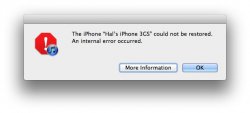
Same message here.
And when i try again, while my iPhone had been backed up and the whole iOS had already been downloaded, it starts the whole process again from scratch. Even the second time it 'just did'nt work' I'll try again tomorrow
__________________
15.4" Macbook Pro 2.2 Ghz Intel Core i7, 4 Gb RAM | OSX 10.8.3 | 23" ACD | iPhone4 | TV2 | iPad3
Last edited by Europe calling; Oct 12, 2011 at 02:03 PM. |
|
|
|
0
|
|
|
#27 |
|
Man ..... I already suck at iOS5.
|
|
|
|
2
|
|
|
#28 |
|
got it too
same error. 4g, not jailbroken.
|
|
|
|
-2
|
|
|
#29 |
|
I got the same thing. I'm on a iP4 on 4.3.5.
I keep retrying but it keeps failing, the download was fine it appears the issue is with installing the OS. I did notice it tries to verify the installation with Apple so maybe its due to over utilisation of Apples servers?
__________________
2011 - 11" MBA | Core i5 | 4 GB RAM | 128GB SSD iPhone 5 32GB
|
|
|
|
0
|
|
|
#30 | |
|
Quote:
__________________
2012 11'' MacBook Air 2.0 GHz i7, iPhone 5 64 GB Verizon |
||
|
|
0
|
|
|
#31 |
|
Yep, i got this too the first couple of times, then it worked
|
|
|
|
0
|
|
|
#32 |
|
Those who Have had this error post in this thread when you get it to work please
Give the rest of us some hope I may do it before bed then 4.30am then it will surely work |
|
|
|
0
|
|
|
#33 |
|
Fixed
Had the same exact error ( on OS X .7.1). put the iPod in recovery mode and hit restore. It authorized and then began. Works like a charm!
|
|
|
|
0
|
|
|
#34 |
|
I got the same thing. Just keep trying - my iPhone updated fine on the second try, my iPad took three or four, but is updating now. I'm guessing it's just a lot of requests hitting Apple's servers.
__________________
13" MacBook Pro: Pissing off elitist Mac users since 2009! |
|
|
|
0
|
|
|
#35 |
|
Me too
![]() iPhone 4 16GB |
|
|
|
0
|
|
|
#36 |
|
"An Internal Error Occurred"
wtf, I Cant update or restore my iPhone 4 to iOS 5, it says An Internal Error Occurred.
|
|
|
|
0
|
|
|
#37 |
|
Guys guys, didnt you ever think of updating the itunes program itself, try to do so, and run the upgrade again. Works here, but i also got the same error as you did, i updated my itunes, and viola, running ios 5.. :-)
__________________
iPhone 4 - 16GB - IOS 5.0.1 Un-Tethered ![]() iPhone 4 - 16GB - IOS 5.0.1 Un-Tethered ![]() iPod Touch 3G - 32GB - IOS 4.1.0 Un-Tethered
|
|
|
|
0
|
|
|
#38 |
|
Same here! Won't work for my iPod Touch 4th gen or iPad 2.
Edit: Just got IOS 5 on iPod Touch 4th gen. Will have to try later on iPad 2. Edit 2: Got IOS 5 on iPad 2. Now just got to get setting and everything just the way I want so I will be good to go when I get my iPhone 4S! Last edited by MustangJoe; Oct 12, 2011 at 03:41 PM. |
|
|
|
0
|
|
|
#39 |
|
try rebooting your iphone
this worked for me
__________________
sig.'s waste time and brain bandwidth |
|
|
|
0
|
|
|
#40 | |
|
Quote:
__________________
2011 - 11" MBA | Core i5 | 4 GB RAM | 128GB SSD iPhone 5 32GB
|
||
|
|
0
|
|
|
#41 |
|
Ugh, same problem here. iPhone 4.. it was jailbroken but I updated to 4.2.10 prior to updating to OS 5. Rebooted the computer and iTunes, still getting the same message. Anyone have any idea why this is happening?
|
|
|
|
0
|
|
|
#42 |
|
Rebooting both devices now to see if it's that, although what's the betting rebooting makes iTunes d/l the update again!
|
|
|
|
0
|
|
|
#43 |
|
I got the same thing, but it took a couple of tries and it worked. I didn't need to put it DFU mode or anything I just retried and it worked
__________________
~Mike Flynn |
|
|
|
0
|
|
|
#44 |
|
How to launch an update without backup? This thing is taking too much time.
|
|
|
|
0
|
|
|
#45 |
|
Same problem, running iTunes 10.5 on OS X 10.7.1 - but the OS version shouldn't matter.
Tips?
__________________
rMBP 15"(2012) 2.3 i7 | 16GB | 256GB | 650M iMac 27"(2011) 3.1 i5 | 8GB | 1TB | 6970M DS211j 2x2TB |
|
|
|
0
|
|
|
#46 |
|
And I am running the latest version of iTunes (10.5) so it's not that.
|
|
|
|
0
|
|
|
#47 |
|
Updated iTunes and tried to update, got the error message. Going to update my OSX and try again! Anyone fixed it??
__________________
- iPhone 5 32GB Black- 15" MBP i7 750GB- New iPad 32GB Black
|
|
|
|
0
|
|
|
#48 |
|
Back up you phone and then click restore instead of update. That should get you sorted. Then restore from back up when iOS 5 is installed.
__________________
![]() |
|
|
|
0
|
|
|
#49 |
|
Running through a similar issue with my phone. My computer could not restore the phone, but by going into settings --> general and doing a complete reset ON THE PHONE I was able to get it reset. It's attempting a new restore from my computer now... should be able to let you know how that goes in about 3 minutes.
|
|
|
|
0
|
|
|
#50 |
|
|
0
|
![]() |
|
| Tags |
| ios 5 verizon iphone |
«
Previous Thread
|
Next Thread
»
| Thread Tools | Search this Thread |
| Display Modes | |
|
|
Similar Threads
|
||||
| thread | Thread Starter | Forum | Replies | Last Post |
| HELP > "The iPhone "iPhone" could not be restored. An unknown error occurred (1600)" | yani2k8 | Jailbreaks and iOS Hacks | 44 | Sep 23, 2011 05:29 PM |
| The iPhone could not be restored. An unknown error occurred (1600) | GIZBUG | Jailbreaks and iOS Hacks | 1 | Jun 7, 2011 12:30 PM |
| HELP! The iPhone "iPhone" could not be restored. An unknown error occurred (1015). | tatstarfreak | iPhone Tips, Help and Troubleshooting | 7 | Jan 12, 2011 08:20 AM |
| The iPod 'iPod' Could not be restored. An unkown error has occured [20] | Mastermmm | iPod touch | 3 | May 18, 2010 03:56 AM |
| *SOLVED* The iPod "iPod" could not be restored. An unknown error occured (20)???? | Austin2048 | iPod touch | 2 | Jun 14, 2009 07:56 PM |
All times are GMT -5. The time now is 12:26 AM.


15.4" Macbook Pro 2.2 Ghz Intel Core i7, 4 Gb RAM | OSX 10.8.3 | 23" ACD | iPhone4 | 


Linear Mode