I put some crappy software on my computer. It came with an installer that supposedly added some "components." Is there a way to find out what the installer installed so that I can remove it all?

Got a tip for us?
Let us know
Become a MacRumors Supporter for $50/year with no ads, ability to filter front page stories, and private forums.
Is there a way to know what an installer installed?
- Thread starter mobydick01
- Start date
- Sort by reaction score
You are using an out of date browser. It may not display this or other websites correctly.
You should upgrade or use an alternative browser.
You should upgrade or use an alternative browser.

Mr. Retrofire
macrumors 603
I put some crappy software on my computer. It came with an installer that supposedly added some "components." Is there a way to find out what the installer installed so that I can remove it all?
If the installer used a standard Mac OS .pkg format, then you can use Pacifist to find out where the installer installed which software components. I use this software for Mac OS X (and updates) developer previews.

GGJstudios
macrumors Westmere
The most effective method for complete app removal is manual deletion:
Mr. Retrofire
macrumors 603
The most effective method for complete app removal is manual deletion...
Especially if you do not know, where the app components are installed (OPs original question).
🙄
GGJstudios
macrumors Westmere
Yes, the manual method I posted will identify associated files, regardless of where they may be installed.Especially if you do not know, where the app components are installed (OPs original question).
Ah, yes, Pacifist. An excellent piece of software made by a MacNN forum member, IIRC. Unfortunately, it's $20 (I'm cheap) and not yet Lion compatible (I'm running Lion).If the installer used a standard Mac OS .pkg format, then you can use Pacifist to find out where the installer installed which software components. I use this software for Mac OS X (and updates) developer previews.
Well I'm familiar with that method, however in this instance I believe it may be insufficient.Yes, the manual method I posted will identify associated files, regardless of where they may be installed.
The software I downloaded was Ogg Drop. Why I decided to delete it should be obvious: It ain't gonna work in 10.7. (Although that fact wasn't obvious to me when I downloaded it). Anyway, the .dmg contains the app (to be copied to the Applications folder), and the Components Installer.pkg.
I installed that package before realizing the app was useless, so presumably it actually installed junk as opposed to just pretending to, right? If it did, I can't find it simply by searching for the app name according to the guide...
GGJstudios
macrumors Westmere
What makes you think it's insufficient?Well I'm familiar with that method, however in this instance I believe it may be insufficient.
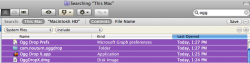
What makes you think it's insufficient?
Well, you are getting different result than I...
When searching for "ogg" the only thing that I get (which is actually related to the .ogg extension) is the Quicktime component.
GGJstudios
macrumors Westmere
Did you change the criteria to include System Files, as instructed?Well, you are getting different result than I...
When searching for "ogg" the only thing that I get (which is actually related to the .ogg extension) is the Quicktime component.
Did you change the criteria to include System Files, as instructed?
Yep.
In the terminal,
lists all packaged installed.
To see all the crap that a package copied to your system,
This will probably output a load of junk that scrolls off the screen, so you can either pipe it to more,
and flip through the results, or output it to a text file and then open it in textedit or whatever,
I believe an alternative that yields the same results is to find the .bom files and then list their contents. e.g.,
Edit: Here's an article that might help. It's for SL though. Receipts in Lion are kept in /private/var/db/receipts/
http://www.macworld.com/article/47341/2005/10/viewprogdetails.html
Code:
pkgutil --pkgs --volume /lists all packaged installed.
To see all the crap that a package copied to your system,
Code:
pkgutil --files package (<-- full name of package here)This will probably output a load of junk that scrolls off the screen, so you can either pipe it to more,
Code:
pkgutil --files org.virtualbox.pkg.virtualbox | moreand flip through the results, or output it to a text file and then open it in textedit or whatever,
Code:
pkgutil --files org.virtualbox.pkg.virtualbox > ~/Desktop/vbox_stuff.txtI believe an alternative that yields the same results is to find the .bom files and then list their contents. e.g.,
Code:
robotjr:Library mike$ sudo find / -iname "*.bom" | grep -i virt  (<-- something relevant)
/private/var/db/receipts/org.virtualbox.pkg.vboxkexts.bom
/private/var/db/receipts/org.virtualbox.pkg.vboxstartupitems.bom
/private/var/db/receipts/org.virtualbox.pkg.virtualbox.bom
/private/var/db/receipts/org.virtualbox.pkg.virtualboxcli.bom
robotjr:Library mike$ lsbom /private/var/db/receipts/org.virtualbox.pkg.virtualboxcli.bom
Edit: Here's an article that might help. It's for SL though. Receipts in Lion are kept in /private/var/db/receipts/
http://www.macworld.com/article/47341/2005/10/viewprogdetails.html
Last edited:

Excellent - that was a huge help. Thanks.In the terminal,
Code:pkgutil --pkgs --volume /
lists all packaged installed.
To see all the crap that a package copied to your system,
Code:pkgutil --files package (<-- full name of package here)
This will probably output a load of junk that scrolls off the screen, so you can either pipe it to more,
Code:pkgutil --files org.virtualbox.pkg.virtualbox | more
and flip through the results, or output it to a text file and then open it in textedit or whatever,
Code:pkgutil --files org.virtualbox.pkg.virtualbox > ~/Desktop/vbox_stuff.txt
I believe an alternative that yields the same results is to find the .bom files and then list their contents. e.g.,
Code:robotjr:Library mike$ sudo find / -iname "*.bom" | grep -i virt (<-- something relevant) /private/var/db/receipts/org.virtualbox.pkg.vboxkexts.bom /private/var/db/receipts/org.virtualbox.pkg.vboxstartupitems.bom /private/var/db/receipts/org.virtualbox.pkg.virtualbox.bom /private/var/db/receipts/org.virtualbox.pkg.virtualboxcli.bom robotjr:Library mike$ lsbom /private/var/db/receipts/org.virtualbox.pkg.virtualboxcli.bom
Edit: Here's an article that might help. It's for SL though. Receipts in Lion are kept in /private/var/db/receipts/
http://www.macworld.com/article/47341/2005/10/viewprogdetails.html
GGJstudios
macrumors Westmere
In most cases, app removal software like AppZapper doesn't do a thorough job of finding and removing files/folders related to deleted apps. For more information, read this.If you are lazy you could just use AppZapper