

I've looked around and surprisingly haven't found good info on using Wine now that Rosetta is gone. So I've done a bit of experimenting and come up with a step-by-step guide. I tried WineBottler, PlayOnMac, and Wineskin and found WineBottler to work best (or at all), even though it's using the oldest version of Wine. I'm also not using the nifty bottling feature because it duplicates all of the files (over 1GB per game).
There are lots of steps here but honestly it's not that hard. If you've been considering dual-booting or using a VM, give this a try first!
Diablo II gameplay works perfectly as far as I can tell, StarCraft not quite but very close, you'll have to see for yourself.
Wine
Notes
Games
Log in to your Battle.net account and download the Mac client for the game you want to install.
Unzip and run the Downloader app to download the installers. When it's finished, continue with the following steps.
Tip: When installing games, you are in Windows world! Use Ctrl-V to copy your CD Key.
1. Diablo II
Issues
Steps
1a. Diablo II: Lord of Destruction (optional)
1b. Post-Installation
2. StarCraft
Issues
Steps
There are lots of steps here but honestly it's not that hard. If you've been considering dual-booting or using a VM, give this a try first!
Diablo II gameplay works perfectly as far as I can tell, StarCraft not quite but very close, you'll have to see for yourself.
Wine
- Download WineBottler:
http://winebottler.kronenberg.org/
http://darwine-winebottler.en.softonic.com/mac - Drag Wine and WineBottler to the Applications folder.
- Run Wine.app
- Close the 3 windows it opens.
Notes
- If you are asked to Enter RandR mode, click Always Allow.

- If you ever get a black screen when you run a game, you should be able to hit Esc to exit the game. Quit X11 and then try again.
Games
Log in to your Battle.net account and download the Mac client for the game you want to install.
Unzip and run the Downloader app to download the installers. When it's finished, continue with the following steps.
Tip: When installing games, you are in Windows world! Use Ctrl-V to copy your CD Key.
1. Diablo II
Issues
- Cinematics don't display
- The arrow cursor shows on top of the game cursor
Steps
- In the D2-1.12A-enUS folder, right click Installer.exe, hover over Open With and select Wine.
- The following dialog will open. Leave "Run directly in" selected and click Go.

- Click Install Diablo II.
- Agree to the Terms and Conditions and enter your name and CD Key. Click OK.
- Leave the default destination directory. Click OK.
- When installation completes, click Back and then Exit Installer.
1a. Diablo II: Lord of Destruction (optional)
- In the D2LOD-1.12A-enUS folder, right click Installer.exe, hover over Open With and select Wine.
- Leave "Run directly in" selected and click Go.
- Click Install Diablo II - LOD and complete the installation. Then click Back and Exit Installer.
1b. Post-Installation
- Open the Wine Files folder in your home folder. This is the virtual Windows hard drive.
- Navigate to drive_c/Program Files/Diablo II. (Note: If you'd like, you can copy existing save files here.)

- Right click Diablo II.exe and select Make Alias. Rename the alias to
- Diablo II, then drag it to your Applications folder.
- To run Diablo II, double-click the alias (or select it in your Applications stack if you have that) and then click Go. Or you can use Spotlight to launch Diablo II - Lord of Destruction.lnk.
- Cinematics don't work, you'll see a blank screen. Just keep clicking and you'll get to the main menu.
- Connect to Battle.net to download and install the latest patch. The game will restart when finished.
- You're done! Have fun!
2. StarCraft
Issues
- General slight choppiness, the mouse cursor looks like it moves at half framerate. It seems fine for me but you wouldn't be playing any pro games like this. I found a solution (see Cure for slowness) but it completely breaks the graphics for me.
- White screens in the Battle.net menus. Gameplay is fine.
Steps
- In the StarCraft 1.15.2 enUS Installer folder, right click Installer.exe, hover over Open With and select Wine.
- The following dialog will open. Leave "Run directly in" selected and click Go.
- The StarCraft installer opens. Click Install StarCraft.
- Agree to the Terms and Conditions and enter your name and CD Key. Click OK.
- Leave the default destination directory. Click OK.
- StarCraft will install.
- When installation is complete, click Exit Installer.
- Open the Wine menu in the menubar and click Configuration.
- Under the Graphics tab, uncheck Allow the window manager to control the windows. Click OK. If you skip this step, you won't be able to connect to Battle.net to play or download patches.

- Open the Wine Files folder in your home folder. This is the virtual Windows hard drive.
- Navigate to drive_c/Program Files/StarCraft. (Note: If you'd like, you can copy existing save files here.)
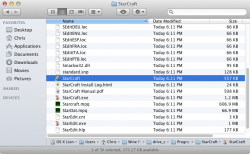
- Right click StarCraft.exe and select Make Alias. Rename the alias to StarCraft, then drag it to your Applications folder.
- To run StarCraft, double-click the alias (or select it in your Applications stack if you have that) and then click Go. Or you can use Spotlight to launch StarCraft - Brood War.lnk.
- Connect to Battle.net to download and install the latest patch. The game will restart when finished.
- You're done! Have fun!


