
Got a tip for us?
Let us know
Become a MacRumors Supporter for $50/year with no ads, ability to filter front page stories, and private forums.
Convert avchd .mts to .mov?
- Thread starter thepathlesswood
- Start date
- Sort by reaction score
You are using an out of date browser. It may not display this or other websites correctly.
You should upgrade or use an alternative browser.
You should upgrade or use an alternative browser.

simsaladimbamba
Guest
Transcoding .MTS files (AVCHD footage) to an editable format (.MOV)
Since this topic comes up a lot and searching does not seem to be successful, here is a little guide on how to transcode .MTS files into .MOV files.
1. Download ClipGrab, as it has a component (ffmpeg) the next application (2.) needs.
2. Download this Automator script called Rewrap2M4V.
3. Drag the .mts file(s) onto the unzipped Rewrap2M4V application.
4. See the results with the new .m4v file(s) being created.

5. Download MPEG Streamclip and open the resulting .m4v file.
6. Select File > Export to QuickTime (CMD+E).
7. Select your video codec under the Compression selection drop down menu - I chose ProRes 422
8. Select your audio codec under the Sound selection drop down menu - I chose Uncompressed
10. Click Make Movie.

11. See the resulting .mov file.

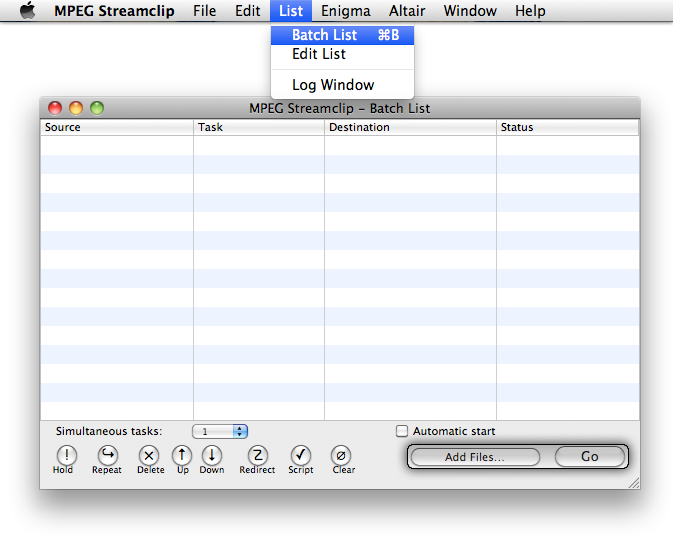
If you have several video files, you can use MPEG Streamclip's Batch List:
Additional Info:
If you have any problems with no sound being present in the resulting .mov file, download the A52Codec for Mac and copy the two .component files as indicated by the mounted DMG file.
And then there is also Small tool to convert video containers without reencoding
Since this topic comes up a lot and searching does not seem to be successful, here is a little guide on how to transcode .MTS files into .MOV files.
Transcoding .MTS files (AVCHD footage) to an editable format (.MOV)
1. Download ClipGrab, as it has a component (ffmpeg) the next application (2.) needs.
2. Download this Automator script called Rewrap2M4V.
3. Drag the .mts file(s) onto the unzipped Rewrap2M4V application.
4. See the results with the new .m4v file(s) being created.
5. Download MPEG Streamclip and open the resulting .m4v file.
6. Select File > Export to QuickTime (CMD+E).
7. Select your video codec under the Compression selection drop down menu - I chose ProRes 422
8. Select your audio codec under the Sound selection drop down menu - I chose Uncompressed
ProRes and Uncompressed are the proper selections, if you want to edit the video in Final Cut Pro.
You can only choose the Apple Intermediate Codec for use in iMovie and/or Final Cut Express.
9. If the video is interlaced (1080i), select Interlaced Scaling. If the video is progressive (720p, 1080p), deselect Interlaced Scaling.You can only choose the Apple Intermediate Codec for use in iMovie and/or Final Cut Express.
10. Click Make Movie.
11. See the resulting .mov file.
If you have several video files, you can use MPEG Streamclip's Batch List:
Additional Info:
If you have any problems with no sound being present in the resulting .mov file, download the A52Codec for Mac and copy the two .component files as indicated by the mounted DMG file.
And then there is also Small tool to convert video containers without reencoding
Last edited:
This is an excellent walkthrough, thank you for doing this.
I see that you can use the batch list to convert multiple m4v files to .mov files, but to convert the original mts files to m4v do they have to be done individually or can you do multiple files here too?
I assume once you've converted to .mov you can delete the m4v files to save space on the hard drive?
Finally, would both imovie and FCP recognise these .mov files from the hard drive and so you don't need to get them from the camera?
I see that you can use the batch list to convert multiple m4v files to .mov files, but to convert the original mts files to m4v do they have to be done individually or can you do multiple files here too?
I assume once you've converted to .mov you can delete the m4v files to save space on the hard drive?
Finally, would both imovie and FCP recognise these .mov files from the hard drive and so you don't need to get them from the camera?
simsaladimbamba
Guest
ClipGrab is free, ReWrap2M4V is free.This is an excellent walkthrough, thank you for doing this. Is this software free?
Just drag multiple files over the ReWrap2M4V icon.I see that you can use the batch list to convert multiple m4v files to .mov files, but to convert the original mts files to m4v do they have to be done individually or can you do multiple files here too?
Yes, as long as you keep the .mts files as backup (if you want a backup), as the .mov files are bigger than the .mts files.I assume once you've converted to .mov you can delete the m4v files to save space on the hard drive?
Yes, they would, but pay attention to this part:Finally, would both imovie and FCP recognise these .mov files from the hard drive and so you don't need to get them from the camera?
ProRes and Uncompressed are the proper selections, if you want to edit the video in Final Cut Pro.
You can only choose the Apple Intermediate Codec for use in iMovie and/or Final Cut Express.
Last edited:
Thanks once again. How much bigger are the .mov files?Yes, as long as you keep the .mts files as backup (if you want a backup), as the .mov files are bigger than the .mts files.
Err, what does this mean? Sorry for my lack of technical knowledge but I have no idea what Apple Intermediate Codec is?Yes, they would, but pay attention to this part:
ProRes and Uncompressed are the proper selections, if you want to edit the video in Final Cut Pro.
You can only choose the Apple Intermediate Codec for use in iMovie and/or Final Cut Express.
When you say prores and uncompressed is this not quicktime?
simsaladimbamba
Guest
Depending on resolution and codec, 42 to 100 GB per hour of video.Thanks once again. How much bigger are the .mov files?
.mov is a QuickTime format/container, which can use a variety of codecs (like the Divx and Xvid codecs found with many .avi files), Apple Intermediate Codec is the codec used for iMovie and FCE compatible footage, ProRes is the codec for FCP compatible footage.Err, what does this mean? Sorry for my lack of technical knowledge but I have no idea what Apple Intermediate Codec is?
When you say prores and uncompressed is this not quicktime?
Wow that's a lot. As you're probably realising I'm no computer boff. One of the reasons I'm getting a mac is to speed up my video editing. With the amount of video footage I have if I convert all my mts files to quicktime I'll have no space left on my hard drive (I'm buying a 512GB SSD). I do have a 1TB external HDD that I could use. However, if I use the external HDD rather than SSD I assume this would dramatically slow the system in terms of editing, rendering and saving?Depending on resolution and codec, 42 to 100 GB per hour of video.
I think I follow now, what you're saying is that when I've converted the files to m4v, when I come to use the MPEG streamclip to convert m4v to quicktime I need to select Apple Intermediate codec if using iMovie, and ProRes if using FCP. If you use the Apple Intermediate Codec will the edited video still be in Full HD? Same question for ProRes?
This has been a very steep learning curve for me as I currently use Sony Vegas Movie Studio Platinum 9 on the PC which reads mts files from the hard drive and so there's no need to convert files and select codecs. Basically it's idiot proof for numpties like me 😉
simsaladimbamba
Guest
It is best to use an external HDD to store the video files you work with, Firewire 800 being the best affordable connection, though Thunderbolt is better, but still a bit pricey.Wow that's a lot. As you're probably realising I'm no computer boff. One of the reasons I'm getting a mac is to speed up my video editing. With the amount of video footage I have if I convert all my mts files to quicktime I'll have no space left on my hard drive (I'm buying a 512GB SSD). I do have a 1TB external HDD that I could use. However, if I use the external HDD rather than SSD I assume this would dramatically slow the system in terms of editing, rendering and saving?
The video will retain its original resolution unless you change settings in MPEG Streamclip.If you use the Apple Intermediate Codec will the edited video still be in Full HD? Same question for ProRes?
While that is easier, it also puts more stress on the CPU, as AVCHD footage is highly compressed and the CPU is needed to decode it properly.This has been a very steep learning curve for me as I currently use Sony Vegas Movie Studio Platinum 9 on the PC which reads mts files from the hard drive and so there's no need to convert files and select codecs. Basically it's idiot proof for numpties like me 😉
Apple Intermediate Codec and ProRes are editing codecs and are not as CPU intensive, though the "downside" is bigger video files.
I started editing video in the late nineties, and one hour of video footage would take up 13 GB (DV-PAL), thus I am accustomed to give my video footage enough room.
The biggest project I worked on was in SD (not HD) and we had to use 12 TB of HDD capacity to store it, and we even compressed 1/3 of the footage to a tenth of its original size.
It is best to use an external HDD to store the video files you work with, Firewire 800 being the best affordable connection, though Thunderbolt is better, but still a bit pricey.
The video will retain its original resolution unless you change settings in MPEG Streamclip.
While that is easier, it also puts more stress on the CPU, as AVCHD footage is highly compressed and the CPU is needed to decode it properly.
Apple Intermediate Codec and ProRes are editing codecs and are not as CPU intensive, though the "downside" is bigger video files.
I started editing video in the late nineties, and one hour of video footage would take up 13 GB (DV-PAL), thus I am accustomed to give my video footage enough room.
The biggest project I worked on was in SD (not HD) and we had to use 12 TB of HDD capacity to store it, and we even compressed 1/3 of the footage to a tenth of its original size.
Wow that's some big project. I think I'll give iMovie a shot then before spending £200 on FCP. I'm only doing amateur stuff so don't need all the functions of FCP, I just want the best picture quality.
Do FireWire and thunderbolt work with all HDD, or will I need to go and buy a FireWire/thunderbolt compatible external drive?
simsaladimbamba
Guest
Do FireWire and thunderbolt work with all HDD, or will I need to go and buy a FireWire/thunderbolt compatible external drive?
Firewire and Thunderbolt are just interfaces like USB 2.0 or USB 3.0, just faster and more capable.
If you buy a Firewire HDD or Thunderbolt HDD, and you have a Firewire 800 port on your Mac (every current Mac except the MacBook Air or a Thunderbolt port on your Mac (every Mac released in 2011), then it will work.
Firewire and Thunderbolt also have the advantage of daisy-chaining.
Firewire and Thunderbolt are just interfaces like USB 2.0 or USB 3.0, just faster and more capable.
If you buy a Firewire HDD or Thunderbolt HDD, and you have a Firewire 800 port on your Mac (every current Mac except the MacBook Air or a Thunderbolt port on your Mac (every Mac released in 2011), then it will work.
Firewire and Thunderbolt also have the advantage of daisy-chaining.
Unfortunately my external drives are only USB 2 and USB 3. What Ill probably do is have the files on the computer whilst working on them and then put then on the external drives for long term storage. I'll probably end up buying an external SSD drive one day when they come down in price.
Thanks for all your help, really appreciate it. 🙂
simsaladimbamba
Guest
An external HDD is fast enough, no need to use an SSD for video storage, as one HD stream does only have a data rate of up to 25 MB/s, thus Firewire 800 and any HDD will be fast enough to play two streams concurrently.
An external HDD is fast enough, no need to use an SSD for video storage, as one HD stream does only have a data rate of up to 25 MB/s, thus Firewire 800 and any HDD will be fast enough to play two streams concurrently.
Either way I'd have to buy a new external drive as I don't believe either are FireWire compatible. I'll have to look at the specs.

J4YP34
macrumors newbie
This is a very good guide if you want to transcode.
However there is an easier way.
Download and install ClipWarp > Drag .MTS files > ReWrap the files into .MOV formats.
The file size is pretty much the same as the video/audio hasnt been touched, they have simply been re-wrapped to .MOV format which can be imported into FCP.
When you import into FCP you can then choose to transcode on import or (do what I do and) untick "create optimised media"so that the original files are unchanged.
This workflow is super fast and you can rewrap multiple files at once. The only draw back is that it's not free.
However there is an easier way.
Download and install ClipWarp > Drag .MTS files > ReWrap the files into .MOV formats.
The file size is pretty much the same as the video/audio hasnt been touched, they have simply been re-wrapped to .MOV format which can be imported into FCP.
When you import into FCP you can then choose to transcode on import or (do what I do and) untick "create optimised media"so that the original files are unchanged.
This workflow is super fast and you can rewrap multiple files at once. The only draw back is that it's not free.
Thanks. Have just replied to the post you made on the other thread.This is a very good guide if you want to transcode.
However there is an easier way.
Download and install ClipWarp > Drag .MTS files > ReWrap the files into .MOV formats.
The file size is pretty much the same as the video/audio hasnt been touched.
When you import into FCP you can then choose to transcode on import or (do what I do and) untick "create optimised media"so that the original files are unchanged.
I have a query about clipwrap. Does it download as an app that I can then copy to an external hard drive and then install on another hard drive, or do you just get one installation? The reason for my question is that I'm going to be getting a SSD and so don't want to pay for the software twice. Will I have to wait until I have my SSD?
simsaladimbamba
Guest
I have a query about clipwrap. Does it download as an app that I can then copy to an external hard drive and then install on another hard drive, or do you just get one installation? The reason for my question is that I'm going to be getting a SSD and so don't want to pay for the software twice. Will I have to wait until I have my SSD?
You can install it again, just keep the installer or re-download the application and re-enter the registration information you got after purchasing it.
You can install it again, just keep the installer or re-download the application and re-enter the registration information you got after purchasing it.
Thanks, I can't get that rewrap 2M4v to work. I drag the mts files onto the app like stated but nothing happens. I've downloaded the other apps too
simsaladimbamba
Guest
Thanks, I can't get that rewrap 2M4v to work. I drag the mts files onto the app like stated but nothing happens. I've downloaded the other apps too
You have ClipGrab inside your Applications folder?
You have ClipGrab inside your Applications folder?
Yeah
----------
Figured it out, I had to transfer the rewrap app from downloads to the application folder too 😱
simsaladimbamba
Guest
Figured it out, I had to transfer the rewrap app from downloads to the application folder too 😱
You don't really need to though, I had the ReWrap app in various folders to test it, but maybe Lion is different. But if it works, it works. Computers, bloody bastards.
You don't really need to though, I had the ReWrap app in various folders to test it, but maybe Lion is different. But if it works, it works. Computers, bloody bastards.
You're telling me. The added problem is that I don't know how to use them either 😱
Right the numpty of all questions now. I can't remember whether my old camcorder recorded in 1080p or 1080i, is there a way that I can tell if it's interlaced or not? I've gone to file info and it doesn't say there 😱
simsaladimbamba
Guest
Is this your first?You're telling me. The added problem is that I don't know how to use them either 😱
Right the numpty of all questions now. I can't remember whether my old camcorder recorded in 1080p or 1080i, is there a way that I can tell if it's interlaced or not? I've gone to file info and it doesn't say there 😱
In order to find out, what scanning method (progressive or interlaced) your video was recorded with, you can use the following one of the three applications to analyse a sample video file.
- VideoSpec (free)
- MediaInfo (free)
- Media Inspector (2.99 USD in the Mac App Store (MAS))
Is this your first?
My first Mac yes. but I was being harsh on myself. I'm just no IT whizz
In order to find out, what scanning method (progressive or interlaced) your video was recorded with, you can use the following one of the three applications to analyse a sample video file.
- VideoSpec (free)
- MediaInfo (free)
- Media Inspector (2.99 USD in the Mac App Store (MAS))
Thanks 🙂
----------
That videospec app has shed some light why some of my videos play in in certain apps and not others. My old camcorder was 1080i, but my new camera is 1080p 🙄
Well I gone with clipwrap after all as the other method didn't have any sound. Also a 250mb mts clip became a 2.2GB .mov clip 😱
I've noticed that playback of 1080i rewrapped files using quicktime is not great, especially when panning it's very blurry. Also there's a few glitches. 1080p footage plays fine with quicktime. Is this just a quicktime thing, and if I edit with my 1080i footage the final product will be OK?
I've noticed that playback of 1080i rewrapped files using quicktime is not great, especially when panning it's very blurry. Also there's a few glitches. 1080p footage plays fine with quicktime. Is this just a quicktime thing, and if I edit with my 1080i footage the final product will be OK?