|
|
#1 |
|
Airport Express static noise from speakers
Don't know if this is the right section in the forum to post this (sorry
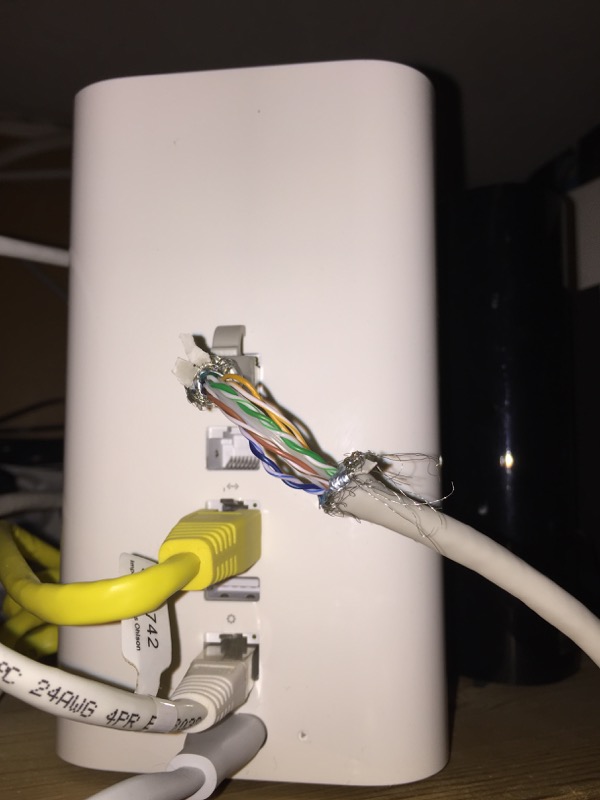
). But I need some help from audiophiles and Apple experts. I have no knowledge about audio equipment so i hope someone is willing to help me out .Currently i have an airport express connected by 3.5mm audio cable to the line in of my speakers. My airport Express is hooked up to a ethernet cable, and transmits wifi signal to share my internet. When i turn up my speakers to 80% i can hear static noise (speaker interference). Is there something i can do about this? |
|
|
|
0
|
|
|
#2 |
|
Are you sure the jack is not loose?
|
|
|
|
0
|
|
|
#3 |
|
Double checked, its not loose. Its definitely coming from the AE. Since i unplugged it and connected the cable directly to my mp3 player and no static interference there. Could it have something to do with the AE transmitting Wifi and thus affecting the signal? I used a regular cable not optical.
|
|
|
|
0
|
|
|
#4 | |
|
Quote:
|
||
|
|
0
|
|
|
#5 |
|
thanks for ur reply's sedulous. Yes the line noise is always there. I can hear the static when there is no music playing and i turn up the volume. It sounds like when you hold a phone close to a speaker. if i play music i can cover the sound though. But its annoying if the song is finished and you hear the interference.
|
|
|
|
0
|
|
|
#6 |
|
Wirelessly posted (iPhone 4s: Mozilla/5.0 (iPhone; U; CPU iPhone OS 4_2_1 like Mac OS X; en-us) AppleWebKit/533.17.9 (KHTML, like Gecko) Version/5.0.2 Mobile/8C148 Safari/6533.18.5)
Couple if things you can try: Change the wifi channel your Airport uses with Airport Utility. Plug the Airport in to a different wall recepticle. Try using a shielded or thicker audio out cable. What other electronics are near the audio out cable? Power cords, etc. Try moving these as far as possible away from the audio out cable. |
|
|
|
0
|
|
|
#7 | |
|
Quote:
I use the old 3.5mm cable of my creatures JBL speaker set. How can i tell if its a shielded cable? |
||
|
|
0
|
|
|
#8 | |
|
Quote:
|
||
|
|
0
|
|
|
#9 |
|
Ok so here's what i did
.. Moved the AE ... didn't help. Switched 3.5mm cable.. no effect... Probably both of them are not shielded though, so thats still an option. I did find out that if i unplug the ethernet cable, the static interference is gone, as is also when i unplug the entire AE, or turn wifi off. So its either the wifi signal or the ethernet cable. Any other suggestions i could try to block of that interference?
|
|
|
|
0
|
|
|
#10 | |
|
Quote:
|
||
|
|
0
|
|
|
#11 |
|
is it a hum/buzz?
do your speakers have a ground pin? it's quite possible that you have a ground loop going on. try a ground lift on the speakers what's at the other end of the ethernet cable? try swapping out that piece of gear also. if it's going into a cable modem/router, try unplugging the coax cable (cable tv cable) going into it and see if that fixes it? |
|
|
|
0
|
|
|
#12 | |
|
Quote:
@waw74 yes its like a buzz sound, not sure if i can find a ground lift, will look into that. also the other end of the ethernet cable is connected to a router 2 floors down. The other end of the ethernet cable (which is very long) does have its connector clip broken. Could that cause it? I mean the clip that flat thing in the middle, that makes sure it stays connected. (So when i plug that in the router i don't hear the click, that the cable is in, if you know what i mean )---------- Only hard thing to swap out of this process is the ethernet cable, as it has to pass two floors through many walls etc. ****. I will try to bring my speaker and AE downstairs and connect it to a short and different ethernet cable, and try the entire setup to see if the interference is gone. Maybe the AE always causes interference when an ethernet cable is connected, or i have to swap the cable. Will post findings.(Really appreciate the help. Thanks guys!) Last edited by Crius; Jan 28, 2012 at 05:05 PM. |
||
|
|
0
|
|
|
#13 |
|
Wow, that is a long cable and it does sound like it is the source of the noise. Hope you have a solution that works for you.
|
|
|
|
0
|
|
|
#14 |
|
as long as the plug is well seated, it shouldn't be a problem that the clip is missing, and even then it should just cause the network to drop out completely.
quite possible the ethernet cable got too close to an electrical wire in the wall. or is probably running directly alongside one. if that's the case, it's actually causing a current to be created in the ethernet cable. (see induction, the magnetic field from the electric, will cause a current in the ethernet, just like a generator). not sure what problems it will cause, but probably not a good situation. might cause damage to your network gear. and there is the possibility of someone getting shocked off the ethernet cable. if you can't re-run the cable, take a look at a powerline ethernet adapter to get the network signal upstairs. for a ground lift, all you have to do is cut the ground pin off. if the speakers don't have a ground pin, then you don't need to lift the ground. if you don't want to damage your speakers, you can get a short grounded extension cord, and cut the pin off of that. keep in mind, the ground is there for a reason. it's relatively safe to unground some speakers, but for power tools, and anything else that has a large amount of electricity going near your body, the ground is absolutely necessary as a safety precaution. Improperly grounded equipment can cause severe injury or death |
|
|
|
1
|
|
|
#15 |
|
Okay, so here are my findings. I brought the entire setup downstairs, switched out the ethernet cable for a different one, turned everything back on, problem remained. The interference is still there.
What we can conclude from this that either my AE is broken and the the audio signal is influenced by the ethernet cable, or this problem is considered "normal" for any Airport Express. Is there anyone who could try this issue on an setup where the AE is connected by Ethernet cable, and that you use the wifi for airplay? The interference can only be heard when the speakers are on 80% or higher volume level and not playing any song. |
|
|
|
0
|
|
|
#16 |
|
I had the same problem with my Airport Express. I could here an AM radio station between songs when the volume of the AMP was turned up. I isolated it to the Ethernet cable at the router. My Ethernet cables are cat 6 which are shielded and 50 feet long. I use this cable to connect the AEX to router. If I unplugged the 50 foot ethernet cable at the router but leave it plugged in at the AEX, the AM radio station would go away.
To remedy this problem, I connected a second router with only the AEX connected. All other ethernet connections are on the first router. Some of the other connections are Cat 5 cables which could be picking up the AM radio station. I also only enabled the wireless on the first router. |
|
|
|
0
|
|
|
#17 |
|
You could try a digital lead out of the Airport Express to a DAC then to the speakers.
Or add a few switches your network to reduce Ethernet cable lengths. |
|
|
|
1
|
|
|
#18 |
|
Usb
I had the same problem, when I unplugged the usb chord from AEx the humming stopped, I simply just replaced the older USB chord with new shielded one and the humming stopped.
|
|
|
|
0
|
|
|
#19 |
|
AirPort Xpress hum issues with AudioEngine spkrs
Was able to isolate and identify hum issues caused by AirPort Express connection to audio in connection to Audioengine self powered speakers. Problem was resolved by using shorter (1-2') length mini jack wires from airport express to speaker input. Apparently longer lengths pick up interference. Also better insulation shielding woould help.
Problem all gone. |
|
|
|
0
|
|
|
#20 |
|
Problem Fix
Read through all the comments and for me what fixed this was removing the USB connection to my printer. After this the was absolutely no buzzing!
![]() Problem Fixed! (My printer is an HP Deskjet and AirPort Express Generation 2) |
|
|
|
0
|
![]() |
|
«
Previous Thread
|
Next Thread
»
| Thread Tools | Search this Thread |
| Display Modes | |
|
|
Similar Threads
|
||||
| thread | Thread Starter | Forum | Replies | Last Post |
| Use Airport express with no internet connection to airplay pandora from iphone 4.2.1 | Chuckcapps | iPhone | 34 | Oct 15, 2012 01:05 PM |
| Run Airport Extreme on 5 GHz, and Airport Express on 2.4? | williamsonrg | Mac Peripherals | 2 | Aug 29, 2011 09:05 PM |
| multiple airport express setup | Jefferyd32 | Mac Peripherals | 4 | Mar 27, 2011 12:34 AM |
| What exactly does an airport express do? | cootersgarage6 | Mac Peripherals | 29 | Jan 27, 2011 02:44 PM |
| Pairing Airport Express to D Link Router | marktasker | Mac Basics and Help | 2 | Nov 18, 2010 11:22 AM |
All times are GMT -5. The time now is 05:46 PM.


). But I need some help from audiophiles and Apple experts. I have no knowledge about audio equipment so i hope someone is willing to help me out


Linear Mode