|
|
#1 | ||
|
[GUIDE] MLPostFactor Install 10.8 on old unsupported Mac
![]() Special note: I would like to give a shout out to @MLForAll. Without him, all these wouldn't have been possible! We work real hard everyday trying to make this possible for everyone. Follow us on Twitter @Wayne_819 & @MLForAll. Im not always online here on MacRumors but i am 24/7 on Twitter, tweet me to get instant replies.Guide is being updated to prepare the launch of 0.3. Hi, Welcome. First of all. What is "MLPostFactor" you might ask. Well. As we all know, Apple has dropped OSX Mountain Lion support for older generation of Macs (2006~2008 Macs). The goal of the project is to support all those "drop out" Macs. So we designed this app to do just that. Read more @ Post #2![]() UPDATE: 8th April 2013 INTRODUCING MLPostFactor 0.2.2! After nearly 1 month of testing, we're finally ironed out all the bugs in MLPostFactor 0.1. New user interface, easier to use. What are you waiting for? Update NOW! MLPostFactorV0.2.2 Supports 10.8.3. If you have these 2 machines, please download 64 bit version of MLPostFactor 0.2.2 Beta - Mac Pros with upgraded graphics > Wait for MLPostFactor0.2.2 X64 - Xserve with graphics card upgrade > Wait for MLPostFactor0.2.2 X64 - X1600 based iMacs & MBPs (this is optional, general public is advised to download 32bit version) If you have the machines below. Please download 32 bit version of MLPostFactor 0.2.2 Beta. - MacBooks with X3100 > Perfect (MLPostFactor0.2.2) - MacBookAir with X3100 > Perfect (MLPostFactor0.2.2) - MacBookPros with X1600 > Perfect (MLPostFactor0.2.2) - iMacs with X1600 > Perfect (MLPostFactor0.2.2) - MacBooks with GMA 950 > Perfect (MLPostFactor0.2.2) - iMacs with GMA 950 > Perfect (MLPostFactor0.2.2) - Mac Minis with GMA 950 > Prefect (MLPostFactor0.2.2) - Mac Pros with 7300GT and X1900XT > Prefect (MLPostFactor0.2.2) - iMacs with 7600GT > Prefect (MLPostFactor0.2.2) ---------------------------------------------------------------------------------------------------------------------------------- A Little Note Before You Proceed. Or better known as Terms & Condition(s). MLPostFactor V0.2.2 is still a BETA software, try at your own risk, (we aren't responsible if your Mac blows up . Please back up everything before installing. Although we don't expect any bugs or crashes, but if you do find one, tell us! We will try our best to resolve it in future version.Notable Bugs & Issues - mDNSResponder did not work atm due to a bug in MLPostFactor, refer #1710 for a manual fix or wait for V0.3 (Moderate) - NumLock LED will not go off after being triggered, however, the actual key works fine (Minor) - iSight has very low frames hence, not usable (Minor) - Disk Utility can't repair permission, fix coming in V0.2 (Serious) - System running in Root (Minor) Hold up, theres one last thing, if i find out anyone that uses this for commercial purposes, Ill kick your arse ![]() -----Agree? Scroll Down----------Disagree? Click Here----- ----------------------------------------------------------------------------------------------------------------------------------- Requirements: - a Mac with Core 2 Duo processor and with Lion installed. (PowerPC, Core Duo/Solo NOT supported) - At least 2GB of RAM. - A copy of Mountain Lion. - 8GB USB (Optional. No longer required for MLPostFactor) - A second partition with at least 20GB free. Name it Mountain Lion. Full instructions: 1. OBTAINING A LEGAL COPY OF MOUNTAIN LION. (Skip to 2 if already done) ![]() Picture 1A 1.1 Get a copy of Mountain Lion, please purchase the retail version of ML from the Mac App Store (refer Pic 1A). 1.2 ways to obtain it legally. METHOD ONE * Download Parallel Desktop 8 Trial, install Lion via Parallel Desktop. Once completed, buy Mountain Lion from the Mac App Store inside Parallel Desktop and copy it to your Applications folder. METHOD TWO * Get a supported Mac and buy it directly from the App Store, copy it to a thumb drive (8GB or larger) and transfer it back to the unsupported Mac. Whatever it is, you must have the 4.xxGB Install OSX Mountain Lion.app in your Applications Folder. ![]() 1. Open Disk Utility, create TWO new partition. Name one "Install" (8GB) and the other "ML" (20GB>) ![]() ![]() ![]() ![]() ![]() 2. Run MLPostFactor, click next in this installer, and select the partition named "Install" 3. After installing, reboot into "Install" partition 4. Install ML on partition named "ML". 5. You will get "Installation Failed" at the end of the installation, its normal. 6. Go to Utilities and select MLPostFactor apply it to the partition "ML" 7. Reboot into Mountain Lion 8. Enjoy! DOWNLOAD AREA Don't know which one to download? Just download the 32-bit version! MLPostFactor-32bit Download Link (V0.2.2 Beta) (For Macs with GMA950, GMA X3100, X1300, X1600, X1900XT, 7300GT & 7600GT Graphics) RapidShare (32-bit version) MediaFire (32-bit version) MLPostFactor-64bit Download Link (V0.3 Beta) (For Mac Pro & xserve (with upgraded graphics). Optional for X1600.) RapidShare (64-bit version) Coming Soon! MediaFire (64-bit version) Coming Soon! MLPostFactor V0.2.2 supports upgrade from existing systems! Quote:
Quote:
![]() ![]() Donation Links: HackerWayne/@Wayne_819 Paypal MLForAll/@MLForAll Paypal Change Logs Its too long to be listed here, im trying to keep it neat & tidy. If you're interested, they can be found at: Pastebin The End of the tutorial. Works great? Share & like it Remember, sharing is caring
Last edited by hackerwayne; May 11, 2013 at 01:16 AM. |
|||
|
|
35
|
|
|
#2 | ||
|
Original Posts Deleted. Reason: To add space for MLPostFactor Explanation.
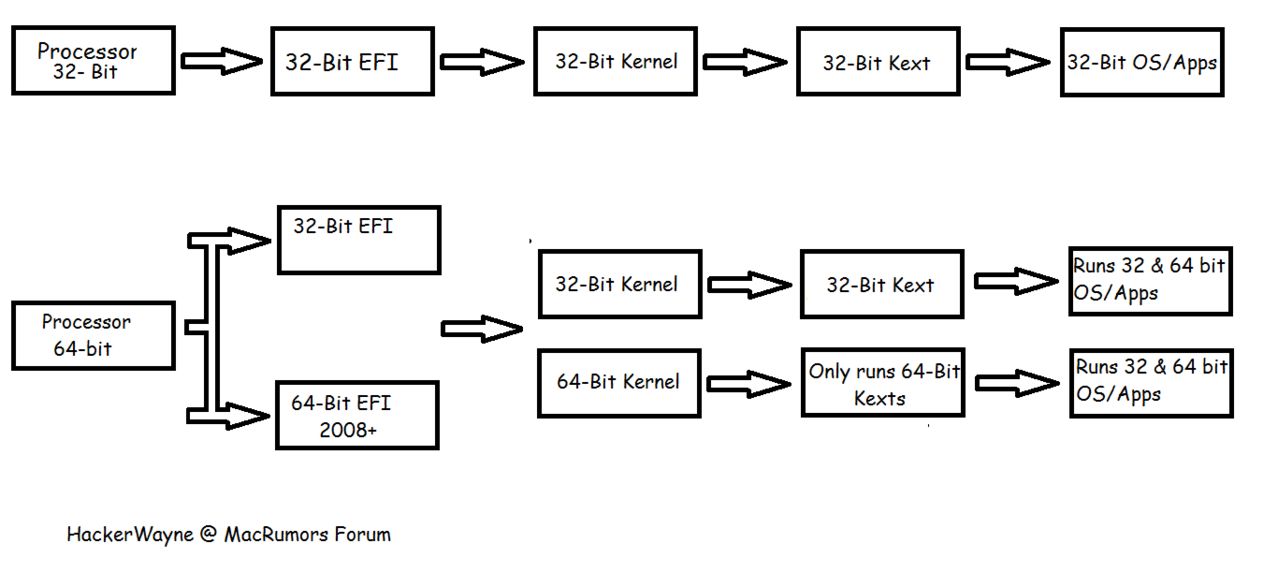
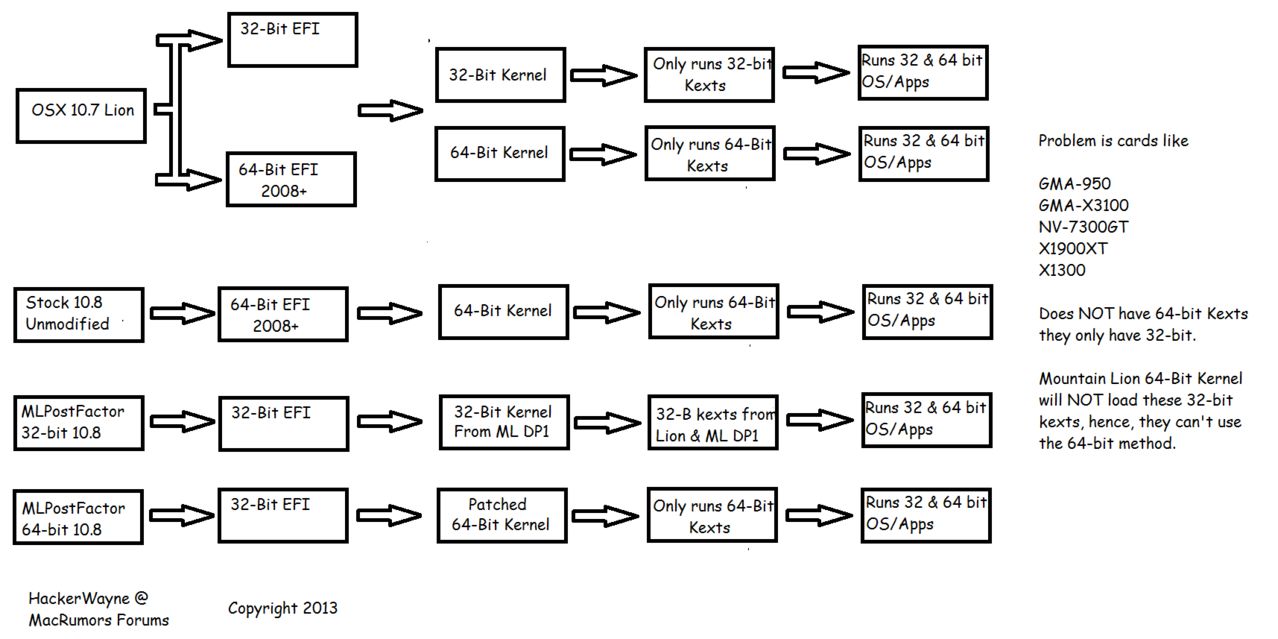
Right, I take the advantage of this empty space to explain how MLPostFactor works. I will try my best to explain it here. Before i get very technical, lets do a basic overview of what "Mountain Lion" is. What is Mountain Lion. What makes it so different comparing to Lion? Alright, Mountain Lion is the 8th version of OS10. What makes it so different comparing to Lion? Before i get to that, let me explain what "Kexts" is. Kexts is Kernel Extensions in short, it basically like Drivers on Windows. There are 2 versions of kexts. 1 is 32-bit the other is 64-bit. Lion uses mostly 32-bit kexts where as Mountain Lion uses mostly 64-bit kexts. 32-bit kexts vs 64-bit kexts I took some time to create these 2 charts/pictures. Picture explains everything. Kernel Architecture Basically explains how the kernel works. Direct Link to view it larger -> http://postimg.org/image/vcdw5zvhz/ OS Architecture. Lion versus Mountain Lion versus MLPostFactor. ![]() Direct Link to view it larger ->http://postimg.org/image/tnh0j2qaf/ Obviously, this is a simplified version.. REALLY REALLY simplified for newbies. You need to understand the above before you understand what im trying to explain next. So I understand now the "hacked" Mountain Lion on my unsupported Mac is running 32-bit mode. Can i ask what has been replaced? What we're the "hacked" files? - Umm.. Honestly, i don't know where to start. Talk about extensions/kexts, they are either from 10.7.5 or Mountain Lion DP1. The other things that are replaced/modified are: PlatformSupport.plist, OpenGL.framework, OpenCL.framework, EFI, Mach_Kernel, mDNSResponder etc etc. I will post the full list when I'm free. Will this work for Hackintosh? - Frankly speaking, i don't know. Chances are it will, but not without modification. Maybe you should try it with Chameleon from Mountain Lion Developer Preview 1 or Lion. What exactly is not working currently? - iSight (low FPS, so deemed not working) - NumLock LED stays on (NumLock key works, only the LED) - Disk Utility won't repair permission (Fixed, coming in V0.3) - Bonjour/Network Sharing does not work. (Fixed, coming in V0.3, in the mean time, a manual fix is available, see Post #1710) Dock appeared to be transparent? 1. Open Terminal and type Code:
defaults write com.apple.dock hide-mirror -bool yes killall Dock Quote:
Quote:
Last edited by hackerwayne; Apr 11, 2013 at 02:00 PM. |
|||
|
|
0
|
|
|
#3 |
|
What driver are the graphics using? A heretofor unknown 64bit Intel 950 driver? (put "kextstat" into the term)
---------- Unless 64bit drivers are released for the graphics the solution is probably to run ML with a 32bit kernel. Try hold down the "3" and "2" keys during startup. |
|
|
|
0
|
|
|
#4 |
|
Yup.. its the Intel GMA 950. On my Mac Pro, Im using a AMD HD 5770. And that has no issues at all, The second card - Nvidia 7300GT was not recognized. The Mac Pro is the very first one that came out in 2006.. Mac Pro 1,1 with upgraded processors (8 core)
|
|
|
|
0
|
|
|
#5 |
|
I suspect the 950 is just using some fall-back framebuffer driver with no hardware acceleration (hence terrible performance).
Unless you can get a 32bit kernel to boot (to use the 10.7.3 driver) it's probably hopeless (short of someone getting ahold of the driver source and compiling for 64bit). See if the "3" "2" trick works (should if ML is still shipping with a 32bit kernel included) |
|
|
|
0
|
|
|
#6 | |
|
Quote:
UPDATE: I tried kexts from 10.6.8.. The results, i get full acceleration on extrenal screen. Internal screen remains blank duh~ |
||
|
|
0
|
|
|
#7 |
|
Can it boot into 32bit mode tho? (on any hardware?)
If so then that + the kexts from Lion might work. |
|
|
|
0
|
|
|
#8 |
|
How to tell if its booting into 32bit mode? Kext from snow leopard works but only external display.. Internal still either blank screen (when plug into ext) or framebuffer mode (when not connected) Lions kext will do nothing lol.. its rufusing it..
|
|
|
|
0
|
|
|
#9 |
|
See screenshot. If it's booting in 32bit mode it should say 'no'.
|
|
|
|
0
|
|
|
#10 |
|
Lack of 32 bit kext support is listed as a "known issue"
http://pastebin.com/EkUY1E5s I can see why Apple would want to remove this support, to force 3rd parties to release 64bit drivers and hence not block the rollout of the 64bit kernel. The problem is that Apple won't do this itself! (how likely are 3rd parties? Expect a lot of your aftermarket hardware to not work with ML ever if this remains) |
|
|
|
1
|
|
|
#11 |
|
|
0
|
|
|
#12 |
|
how does it run? quicker?
|
|
|
|
1
|
|
|
#13 |
|
Just to double-check it's telling the truth, if you open System Monitor and find kernel_task is the 'kind' Intel or Intel (64 bit)?
|
|
|
|
0
|
|
|
#14 |
|
Haha cunning.
__________________
15" MBP Core i7 | 27" ACD | AEBS | 5G iPod | iPhone 5 | 3G Apple TV | iPad mini |
|
|
|
0
|
|
|
#15 | |
|
Quote:
Update: manage to get it open, it says Intel without 64.. that means its in 32bit mode See pics.. And it seems to run fine with 1GB of ram.. lmao lol.. haha Last edited by hackerwayne; Feb 17, 2012 at 02:48 PM. |
||
|
|
0
|
|
|
#16 |
|
Try "uname -a" in the terminal if that will come up (and if Terminal.app isn't working try ssh'ing into the machine).
edit -- Nevermind you got it open. Seems then that you do have ML in 32 bit kernel mode: the only problem is for whatever reason 32bit kext loading isn't working (perhaps it was intentionally black-listed?). Don't know where you can take it from here for now, but it's good to know ML can load a 32bit kernel. |
|
|
|
0
|
|
|
#17 | |
|
Quote:
|
||
|
|
0
|
|
|
#18 |
|
http://www.hackint0sh.org/f180/80288.htm
It's pretty easy to 'force' a kext to load at boot. Try that with the Lion 950 kext. p.s. good luck, if you get it working it'll probably be worth a headline at all the mac sites |
|
|
|
0
|
|
|
#19 | |
|
Quote:
Pics will be up shortly.. =) anyway, should i post the installation method here? Update: Pics to prove that graphics accelaration works. Launchpad is finally working xD! Last edited by hackerwayne; Oct 13, 2012 at 03:44 AM. |
||
|
|
2
|
|
|
#20 |
|
Yes please post the full instructions I'd like to try / I'm sure others would too.
Let's just cross our fingers Apple doesn't pull the 32bit kernel out of ML before it ships. Not sure if there are technical reasons that'd prevent them or not. |
|
|
|
0
|
|
|
#21 |
|
See post #1 for the guide.
Last edited by hackerwayne; Oct 20, 2012 at 08:06 AM. |
|
|
|
24
|
|
|
#22 |
|
ummm i love you dude!!!!!!!!
Thank god! i was getting worried i wont be able to use the features i actually wanna use !!!
|
|
|
|
0
|
|
|
#23 |
|
In essence the Mountain_Lion.dmg could be minimally modded to 1. remove the installer hardware checks (trivial) and 2. to include the missing drivers from Lion, and you should be able to install on a an 'unsupported' system like any other.
If this same technique works for other 'unsupported' systems I'm sure just such a modded installer will find it's way to the nether-regions of the internet to allow all Lion-compatible systems to install ML. |
|
|
|
1
|
|
|
#24 | ||
|
Quote:
![]() ---------- Quote:
|
|||
|
|
0
|
|
|
#25 |
|
I assume you need a modified OSInstall.mpkg to get the installer running. That's what people have needed in the past to get OSX on unsupported hardware anyway.
edit -- Check out the guide here: http://osx.mechdrew.com/guides/advanced3.shtml You might also just try using the Lion OSInstall.mpkg, although if that Macbook has only 1gb of ram you'd need to modify it for that anyway. Do that, add the Lion kexts and set their permissions, and cross your fingers. Last edited by stewacide; Feb 17, 2012 at 04:35 PM. |
|
|
|
0
|
![]() |
|
«
Previous Thread
|
Next Thread
»
| Thread Tools | Search this Thread |
| Display Modes | |
|
|
Similar Threads
|
||||
| thread | Thread Starter | Forum | Replies | Last Post |
| Help! Need to know settings to run L4D on old macbook white | Winhacker95 | Mac and PC Games | 1 | Jul 30, 2012 02:57 PM |
| latest 10.6.8 update on my early 2011 MBP screwed up display port | -=Danimal=- | MacBook Pro | 0 | Jul 27, 2011 12:37 PM |
| Mac OS X 10.8 Nyan Cat | Vasileios | Wasteland | 6 | Jul 22, 2011 08:45 AM |
| Need to replace HD on old PPC white Macbook. | duelingdragons | MacBook | 7 | Aug 27, 2010 10:38 AM |
| 8 month old macbook pro NO problems | squeeks | MacBook Pro | 8 | Feb 17, 2008 06:32 PM |
All times are GMT -5. The time now is 12:13 AM.


@Wayne_819 & @MLForAll. Im not always online here on MacRumors but i am 24/7 on Twitter, tweet me to get instant replies.
. Please back up everything before installing. Although we don't expect any bugs or crashes, but if you do find one, tell us! We will try our best to resolve it in future version.


Linear Mode