
Got a tip for us?
Let us know
Become a MacRumors Supporter for $50/year with no ads, ability to filter front page stories, and private forums.
Where are backups stored on a Mac
- Thread starter snerkler
- Start date
- Sort by reaction score
You are using an out of date browser. It may not display this or other websites correctly.
You should upgrade or use an alternative browser.
You should upgrade or use an alternative browser.
It's hidden. You need to go there manually.
OK, thanks. How do I do that?

But as stated above, I can't find a mobilesync folder 😕
Sorry... I forgot the user library is hidden by default.
Two approaches.
1. While in Finder, do an option-click on the Go menu and that will show the user Library folder as an option.
or...
2. While in Finder, click Go/Go to folder... then enter the below string.
Code:
/Users/yourname/Library/Application Support/MobileSync/Backup
Last edited:
Thanks I now get this, ow do I know what backup is what? Are these both iphone and iPad, or just iPhone?Sorry... I forgot the user library is hidden by default.
Two approaches.
1. While in Finder, do an option-click on the Go menu and that will show the user Library folder as an option.
or...
2. While in Finder, click Go/Go to folder... then enter the below string.
Code:/Users/user/Library/Application Support/MobileSync/Backup
P.S. Can I ask that you edit your post please so that my user account name doesn't appear. I didn't realise it showed on my pics so have deleted them.
Edit: Pics removed due to photobucket issues
Last edited:
Thanks I now get this, ow do I know what backup is what? Are these both iphone and iPad, or just iPhone?
There will one folder for any iOS device (iPhone/iPad/Touch) you have backed up. There will also be folders for older devices maybe you owned before.
You can delete these from iTunes preferences under the Devices tab rather than messing around in that folder.

P.S. Can I ask that you edit your post please so that my user account name doesn't appear. I didn't realise it showed on my pics so have deleted them.
Done.
There will one folder for any iOS device (iPhone/iPad/Touch) you have backed up. There will also be folders for older devices maybe you owned before.
You can delete these from iTunes preferences under the Devices tab rather than messing around in that folder.
Image
Done.
Thanks for all the advice, very helpful. And thanks for the edit.
Hey i am confused
where do i see where my backups are?
i know the poster above explained but i cant see it on finder?
You can see them either in iTunes prefs like in my post above or in Finder by looking in the below folder. To get there click the desktop to bring focus to Funder, then hit shift-command-g then paste in the below path and hit enter.
Code:
~/Library/Application Support/MobileSync/BackupYou can see them either in iTunes prefs like in my post above or in Finder by looking in the below folder. To get there click the desktop to bring focus to Funder, then hit shift-command-g then paste in the below path and hit enter.
Code:~/Library/Application Support/MobileSync/Backup
thanks
can you delete backups?
there is like 100 backups?
Are you supposed to have that many?😱
Also is it better just to use icloud to back up my iphone?
thanks
can you delete backups?
there is like 100 backups?
Are you supposed to have that many?😱
Also is it better just to use icloud to back up my iphone?
Yes, but you should delete them from the iTunes interface. Just go to iTunes preferences and you will see them listed by device under the device tab.
I use both iCloud backup and the encrypted local backup both just so I have a local copy in case something goes haywire with iCloud. Also much faster to restore from local than iCloud. In the new iTunes 11 just click manual backup in the summary screen to do a local backup.
Yes, but you should delete them from the iTunes interface. Just go to iTunes preferences and you will see them listed by device under the device tab.
I use both iCloud backup and the encrypted local backup both just so I have a local copy in case something goes haywire with iCloud. Also much faster to restore from local than iCloud. In the new iTunes 11 just click manual backup in the summary screen to do a local backup.
Okay i have a couple of questions.
How does it work with backups? If i was to lose my iphone and i get a new one, how do i get my backup from my prev iphone on to the new one?
Also does you iphone back up as soon as it is connected to the laptop or do you do it manually. My one seems to be manual.
Okay i have a couple of questions.
How does it work with backups? If i was to lose my iphone and i get a new one, how do i get my backup from my prev iphone on to the new one?
Just plug the phone in to iTunes and click the restore button and it will ask which backup you want to restore from.
Also does you iphone back up as soon as it is connected to the laptop or do you do it manually. My one seems to be manual.
It depends how you have it setup. If you have it setup to backup to iCloud, it will never backup to iTunes on the computer unless you manually click the Back up Now button in iTunes 11.
If you do not have iCloud backup turned on it will backup to iTunes automatically when you sync the phone.
I like to have it backup to iCloud and then manually backup to iTunes so I have two backups. If I am on the road away from iTunes I could still restore from the iCloud backup.
Just plug the phone in to iTunes and click the restore button and it will ask which backup you want to restore from.
It depends how you have it setup. If you have it setup to backup to iCloud, it will never backup to iTunes on the computer unless you manually click the Back up Now button in iTunes 11.
If you do not have iCloud backup turned on it will backup to iTunes automatically when you sync the phone.
I like to have it backup to iCloud and then manually backup to iTunes so I have two backups. If I am on the road away from iTunes I could still restore from the iCloud backup.
Is itunes back up only music and photo's or is it contacts as well?
Ahh okay thanks
The reason i don't want to use icloud is i have a lot of music downloaded from itunes accounts that are not mine (tut tut ) and when you use iCloud and you want to restore your phone, you get all these email pop ups stating for you to put the itunes email address and password to prove those songs were purchased from you. If you do not, the pop ups will keep occurring when you use your phone and it is impossible to get rid of. I had to completely wipe my phone and start again because i couldn't get rid of the pop ups.
Also how do you set the itunes to back up when ever you sync.
Is itunes back up only music and photo's or is it contacts as well?
Also how do you set the itunes to back up when ever you sync.
iTunes backup will backup everything including your contacts.
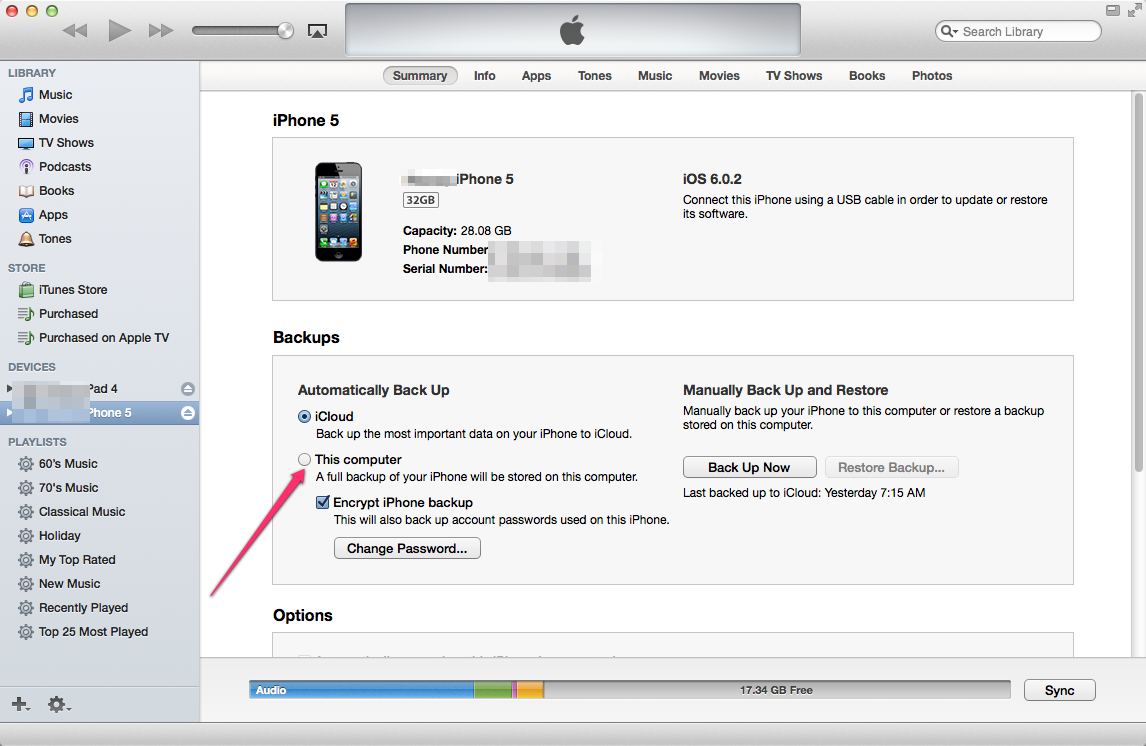
Plug the phone into iTunes and under the Summary tab check "This Computer" under the Backup section like I marked in my screenshot. This will make it backup each time you sync.

AMCarter3
macrumors newbie
This is a very useful conversation. Question... Does the manual backup process save a new copy of the iphone or replace the older one? I see two folders in my Mobilesync/Backup folder. Since I have my iPhone and iPad connected to iTunes, is it accurate to assume one folder is the iPhone backup and the other is the iPad backup?
This is a very useful conversation. Question... Does the manual backup process save a new copy of the iphone or replace the older one? I see two folders in my Mobilesync/Backup folder. Since I have my iPhone and iPad connected to iTunes, is it accurate to assume one folder is the iPhone backup and the other is the iPad backup?
Yes. There will be a separate backup for every iOS device.