
In honor of This Thread, I decided we should make one for iOS 6. , but what are the little things?
UPDATE: Thank you to everyone who discovered unknown or un advertised features. I have tried to compile the information into this one post. If there is anything that you think has been left out of this or any incorrect information please PM me.
Maps/Navigation
* Road names that you're turning onto are in blue, street names you can turn onto are in green.
* The road you are on is under your position in blue.
* Whenever you approach a turn it goes from 3D view to overhead view to give you a clear view of the turn then back again after the turn is completed.
* Direction road signs fly up and away and another flies in from underneath to take it's place when completing a step.
* You can't have hybrid (satellite + road names) or satellite map tiles while navigating (turn by turn).
* Siri continues to give directions while on the phone even if using a headset (she transfers to the headset). Obviously she gives directions if music/podcasts/audio is playing (volume is lowered slightly and she is REALLY loud)
* Being able to say, "take me home" and have her start to navigate to your home address is beautiful. You really don't need to touch it at all.
Thank you QuarterSwede
Features Slide
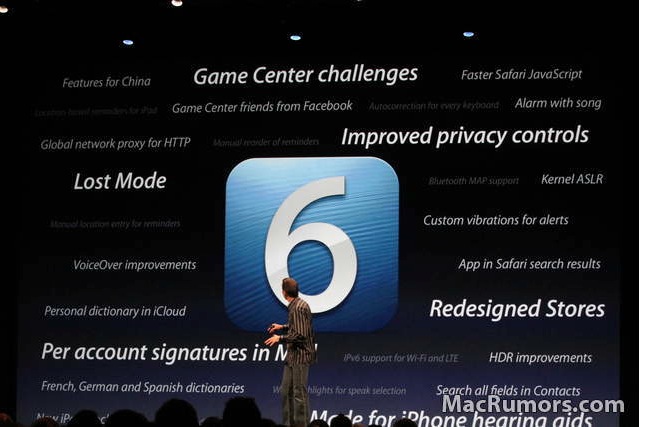
Below is the slide of some of the 200 features from the iOS 6 Keynote.
Reminders
Manual reorder of reminders
Manual location entry for reminders
Share Buttons
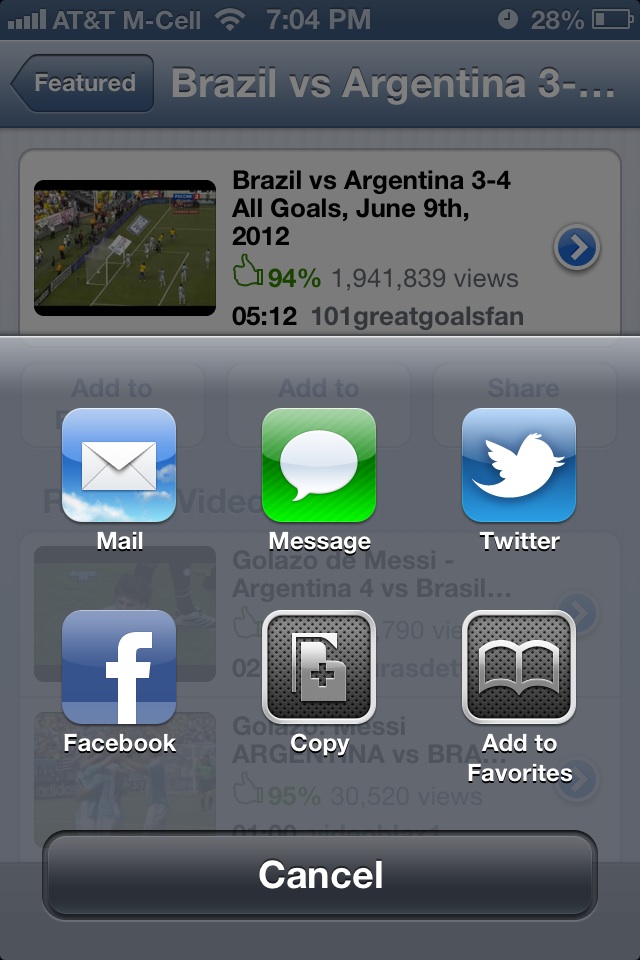
Share buttons now use a grid like way to select where you want to share (iMessage, email, twitter, facebook, etc) instead of popping up as a list.
EX:
iMessage
In iMessage you can set the caller ID for replying and for starting a new conversation (they can be different).
New option allows you to only alert you for iMessages from people in contacts (meaning a text/iMessage from an unknown number won't notify you)
Alerts
Can now receive Amber alerts.
Also must receive Government Emergency Alerts.
Music App
Music app has been changed to look more like the iPad Music app
Podcasts can be shared via email.
Mail App
Per Account Signatures
No longer shows you the progress of mail sending and it now immediately makes the sent whoosh sound even though it's still sending
Contacts
Search all fields in Contacts
App Store
App Download Process Shows up in Store with option to Open when complete.
Installed Apps also have the "open" button instead of "installed"
Downloading an app no longer pushes you back to the home screen.
An app that has been updated will get a blue ribbon overlaid in the corner that says "New" (similar to a newsstand item).
App Store has new look.
If downloading a free app there is no longer a need to enter a password.
In some places you can quickly swipe through apps in the app store on iPad. Works with related apps, more apps by the developer and apps on the featured page. Click for Example
Dictionary
Personal dictionary in iCloud (presumably syncs with Mountain Lion)
Settings
Bluetooth can be toggled on/off from settings without having to go into general.
New icon.
3 new Wallpapers
Use as Wallpaper share option in Photos
Clock App
Is on iPad (Previously in iOS 5 there was no native clock app on the iPad.)
On iPad clock app temperature shows up along with time.
CLICK HERE TO VIEW
Siri
Location commands work worldwide.
Other
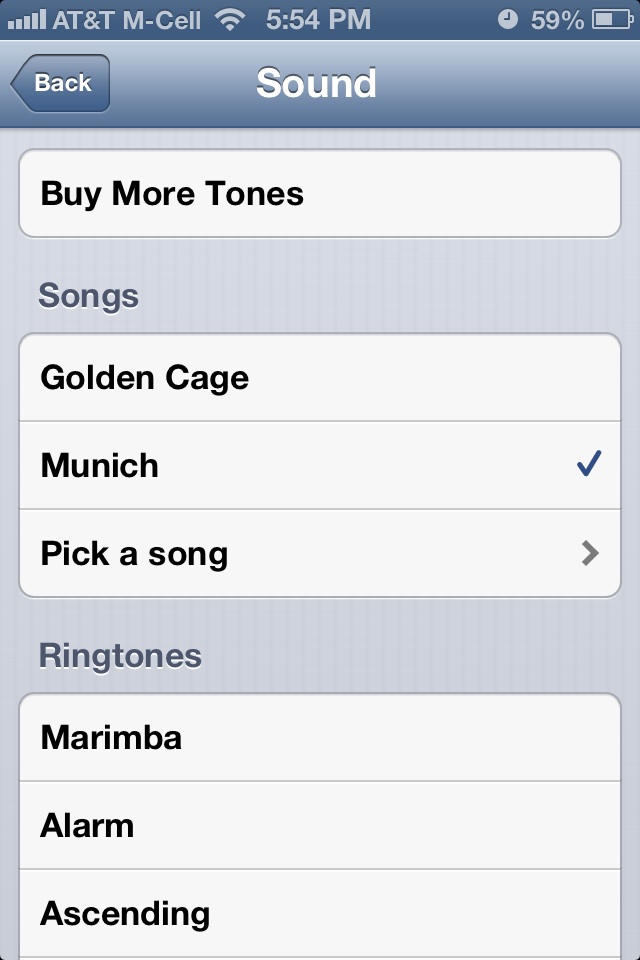
Alarm can now be set with a song.
EX:
Tons of new Emoji's Click to view! Thank you Vitruviux.
More language support:
- Autocorrection for every keyboard
- French, German and Spanish dictionaries
UPDATE: Thank you to everyone who discovered unknown or un advertised features. I have tried to compile the information into this one post. If there is anything that you think has been left out of this or any incorrect information please PM me.
Maps/Navigation
* Road names that you're turning onto are in blue, street names you can turn onto are in green.
* The road you are on is under your position in blue.
* Whenever you approach a turn it goes from 3D view to overhead view to give you a clear view of the turn then back again after the turn is completed.
* Direction road signs fly up and away and another flies in from underneath to take it's place when completing a step.
* You can't have hybrid (satellite + road names) or satellite map tiles while navigating (turn by turn).
* Siri continues to give directions while on the phone even if using a headset (she transfers to the headset). Obviously she gives directions if music/podcasts/audio is playing (volume is lowered slightly and she is REALLY loud)
* Being able to say, "take me home" and have her start to navigate to your home address is beautiful. You really don't need to touch it at all.
Thank you QuarterSwede
Features Slide
Below is the slide of some of the 200 features from the iOS 6 Keynote.
Reminders
Manual reorder of reminders
Manual location entry for reminders
Share Buttons
Share buttons now use a grid like way to select where you want to share (iMessage, email, twitter, facebook, etc) instead of popping up as a list.
EX:
iMessage
In iMessage you can set the caller ID for replying and for starting a new conversation (they can be different).
New option allows you to only alert you for iMessages from people in contacts (meaning a text/iMessage from an unknown number won't notify you)
Alerts
Can now receive Amber alerts.
Also must receive Government Emergency Alerts.
Music App
Music app has been changed to look more like the iPad Music app
Podcasts can be shared via email.
Mail App
Per Account Signatures
No longer shows you the progress of mail sending and it now immediately makes the sent whoosh sound even though it's still sending
Contacts
Search all fields in Contacts
App Store
App Download Process Shows up in Store with option to Open when complete.
Installed Apps also have the "open" button instead of "installed"
Downloading an app no longer pushes you back to the home screen.
An app that has been updated will get a blue ribbon overlaid in the corner that says "New" (similar to a newsstand item).
App Store has new look.
If downloading a free app there is no longer a need to enter a password.
In some places you can quickly swipe through apps in the app store on iPad. Works with related apps, more apps by the developer and apps on the featured page. Click for Example
Dictionary
Personal dictionary in iCloud (presumably syncs with Mountain Lion)
Settings
Bluetooth can be toggled on/off from settings without having to go into general.
New icon.
3 new Wallpapers
Use as Wallpaper share option in Photos
Clock App
Is on iPad (Previously in iOS 5 there was no native clock app on the iPad.)
On iPad clock app temperature shows up along with time.
CLICK HERE TO VIEW
Siri
Location commands work worldwide.
Other
Alarm can now be set with a song.
EX:
Tons of new Emoji's Click to view! Thank you Vitruviux.
More language support:
- Autocorrection for every keyboard
- French, German and Spanish dictionaries
Last edited:


