|
|
#1 |
|
Which USB 3.0 Hub?
Hi - I need a USB 3.0 hub for my 2012 MBA, and am unsure which one to get, as it sounds like some are partially incompatible with Macs! I'm running OS X 10.8.1 Mountain Lion, if it makes any difference. A 4-port hub would probably be fine, so I've been considering:
TRENDnet TU3 H4 or D-Link USB 3.0 4 Port Hub There's also these ones: Uspeed USB 3.0 4 Port Hub and StarTech.com 4 Port Black SuperSpeed USB 3.0 Hub Which would be best? I'm currently thinking the D-Link might be the one to go for, but would value input from anyone who's had experience of any of these! Thanks
__________________
13" Macbook Air (mid-2012), 2.0Ghz i7, 8GB RAM, 256GB SSD (Samsung Display/SSD); 15" Macbook Pro (early-2008), 2.53Ghz C2D, 6GB RAM, 256GB Crucial M4 SSD; 32Gb iPhone 5 White; 16GB iPhone 4 Black |
|
|
|
0
|
|
|
#2 |
|
I had the Uspeed and returned it. Didn't work half the time.
__________________
jesterpictures.com theoryiseverything.com jarek.com Shoot for the Impossible...Then do it MacPro Octo 2.66, 32GB, ATI 4870, 23" ACD, Dell 2311h -- 15" MBP 2.6 i7, Anti-Glare, 16GB, 240GB SSD + 1TB |
|
|
|
0
|
|
|
#3 |
|
|
0
|
|
|
#4 |
|
No idea. I have the Caldigit combo card. Worked fine with one drive plugged into the hub, but another drive or anything else and it would crap out.
__________________
jesterpictures.com theoryiseverything.com jarek.com Shoot for the Impossible...Then do it MacPro Octo 2.66, 32GB, ATI 4870, 23" ACD, Dell 2311h -- 15" MBP 2.6 i7, Anti-Glare, 16GB, 240GB SSD + 1TB |
|
|
|
0
|
|
|
#5 | |
|
Quote:
|
||
|
|
0
|
|
|
#6 | |
|
Quote:
I found out that the FIRST device one plugs in to an external USB port CONFIGURES the external USB bus. Be sure that after powering up the computer, you plug in the USB 3 Hub to an external port FIRST. After that, you can plug things in and they will be recognized correctly. I verified this for my installation using the System Information page and looking at the USB window. So plug in the USB 3 hub first. Then you can plug things into the hub (USB-3 or USB-2) and they should go to the correct bus when you look at the USB config. Hope this is of some assistance. Barry |
||
|
|
0
|
|
|
#7 |
|
Does this means that if I connect a usb 3 hub first at a usb2 port, will be badly configured? Is this really what happens? It seems absurd.
I will buy a new usb3 hub now, and because I am looking to future connectivity options, I 'll take a usb 3 hub. Why stick to the old usb2 format? But, I don't have a machine with usb3 port right now. So, is it forbidden to me, to connect it to my current mbp with usb2 ports, until I will get a new one with usb3 ports someday in the future? |
|
|
|
0
|
|
|
#8 |
|
|
0
|
|
|
#9 |
|
|
0
|
|
|
#10 |
|
|
0
|
|
|
#11 |
|
Has anyone had luck with this hub from Targus?
http://www.targus.com/us/productdeta...&sku=ACH120USZ
__________________
rMBP 2.6/16GB/512GB | iMac mid 2011 27" 3.4/16GB/2GB AMD Radeon 6970 | iPhone 5 Black & Slate 32GB
|
|
|
|
0
|
|
|
#12 |
|
And the winner is...
About to order the newest iMac and want to wire a USB 3.0 hub into the cabinet to reduce clutter. I will repeat the primary question here, what USB 3.0 hub ( 3 ports minimum) will work properly and consistently at speeds greater than 2.0?
Would a 10 or 15 cable greatly diminish performance? |
|
|
|
0
|
|
|
#13 |
|
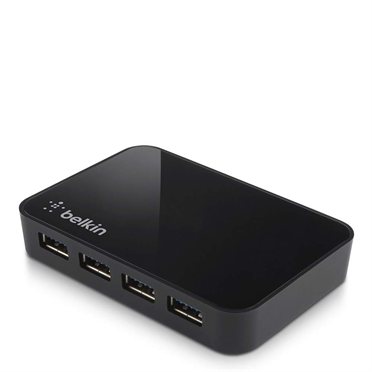
I recently purchased a Belkin Superspeed USB 3.0 4-Port Hub and it's not USB 3.0 compatible with the brand new 27" iMac
![]() Great looking unit, probably best looking unit out there but its only recognized as a USB 2.0 right now. I'm going to keep it because I got it on boxing day for less than half its price so its not worth my hassel of returning. I mounted it under my desk flush with the front of the desk, so sleek and clutter free. Love it. Ill just wait for USB 3.0 to be compatible with the iMacs. Product page: http://www.belkin.com/us/F4U058-Belkin/p/P-F4U058
__________________
27" iMac | 3.4GHz Quad-Core i7 | 32GB | 3TB Fusion Drive | NVIDIAGeFrc GTX 680MX 2G GDDR5 iPhone 4s 16GB | iPad 4th Gen 64GB | Apple TV 3rd Gen | Time Capsule 3TB |
|
|
|
0
|
|
|
#14 |
|
I've been running the C2G USB3 hub on a 2012 mini, and it was throwing out a lot of interference for bluetooth devices. and now it will not power on. returning it today. was hopeful, they typically make good products.
so now too am on the hunt for a reliable unit. |
|
|
|
0
|
|
|
#15 | |
|
Quote:
But good news!
__________________
27" iMac | 3.4GHz Quad-Core i7 | 32GB | 3TB Fusion Drive | NVIDIAGeFrc GTX 680MX 2G GDDR5 iPhone 4s 16GB | iPad 4th Gen 64GB | Apple TV 3rd Gen | Time Capsule 3TB |
||
|
|
0
|
|
|
#16 |
|
Hey everyone!
After an excruciatingly long search for a USB 3.0 hub working at USB 3 speeds for my USB 3-capable 15" MacBook Pro w/ Retina Display, I finally ordered this one from Amazon: http://www.amazon.com/gp/product/B00..._ya_os_product Besides the fact that it has seven USB 3.0 ports, it also has an extra strong (10W output!) "charging port" for anyone with an iPad 3 or 4, which takes a LOT longer to charge on a regular USB port. The power supply also seems to be adequate considering it has to potentially power 7 USB 3.0 devices, plus any device you might have on the charging port. Then there is the 18-month warranty that the newly renamed company (Anker) gives with purchase. This baby JUST became available again, so it's a brand new revision of the product, which is evidenced by the new company name on the product itself. It also no longer states that Mac users need not apply, but instead notes that anyone still running OS X 10.7 upgrade to Mountain Lion (10.8.2 or later). I'll do some benchmarks and write a review when I get it. For now, I shall enjoy the anticipation of its delivery. ;-)
__________________
Ivy-Bridge (Late-2012) Mac mini (6,2) w/16GB DDR3-1600MHz RAM, quad Core i7-3615QM 2.3GHz/3.3GHz max. Turbo, 2x240GB Intel 520 Series SATA III SSD's in RAID 0 w/ TRIM enabled |
|
|
|
0
|
|
|
#17 | |
|
Quote:
|
||
|
|
0
|
|
|
#18 |
|
I'm waiting on my 2012 iMac to be delivered and I've just ordered this hub:
http://www.ianker.com/product/68UPHUB-S10U I have some questions I wondered if any of you's could answer for me please? 1: Is it recommend to disconnect the hub everytime from the iMac before putting the iMac to sleep? 2: If the answer to question 1 is yes, then the hub I've ordered has an on/off switch on it, would I be able to just switch the hub off, rather than disconnecting it from the iMac everytime I put the iMac to sleep? 3: I am planning on having the following things connected to my hub: Printer (USB 2), 3 external hard drives (all USB 2), USB 3 4TB external hard drive. If I have all of the above devices connected to the hub. With there been some of the devices been USB 2 and one of the devices been USB 3, will the USB 3 device be transferring at the USB 3 rate or will it be at USB 2 rate, due to there been USB 2 devices connected to the hub? Thanks in advance
__________________
iMac Late 2012, 2.9GHz Quad-Core Intel Core i5, 1TB Fusion Drive, NVIDIAGeFrc GTX660M 512M GDDR5, 24 GB ram iPhone 5 32 GB, iPad 3rd Generation 32 GB |
|
|
|
0
|
|
|
#19 | |
|
Quote:
__________________
MBP 8,2 15" 2.2Ghz w/ 120GB SSD + 500GB MBA 4,2 13" 1.7Ghz w/ 128GB SSD Mac Mini 6,2 2.3ghz w/ 240GB SSD + 1TB Mac Pro 1,1 w/ 8 cores @ 2.66 w/ 240GB SSD |
||
|
|
0
|
|
|
#20 |
|
I don't like that all the ports are in the front
I have everything in the same table so I want one that has ports both in front & back So I can put stuff I'm never going to remove in the back, like mouse,keyboard, & speakers And in the front ports I can put stuff like flashdrives or when I need to connect my iphone to the computer |
|
|
|
0
|
|
|
#22 |
|
I have had experience with 2 different USB hubs.
The D-Link DUB-1340 and the Monoprice PID 9955. The D-Link was terrible, until I found a Windows computer to upgrade the firmware, which isn't actually from D-Link (they haven't offered the update yet), and isn't supposed to be for end user use. The D-Link, and most USB 3.0 hubs on the market are running the Via Labs 810 chipset. Ergo, you can run the "not for end users" firmware off of Via Labs website. It may not be supported, but it actually runs really well. My only other complaint with the D-Link is that it seems really difficult to get a good connection with the USB cables, a simple bump with a foot can often jar them enough to get a drop. I actually just set up the Monoprice hub about an hour ago. I've had four drops already. This is running the newer Via Labs 812 chipset, with no firmware updates available. The nice thing about the 812 is that it can power 3.8 amps when plugged into AC. That's enough for 2 iPhones and an iPad. I'm going to stick with the D-Link and its flaws for now. |
|
|
|
0
|
|
|
#23 | ||
|
wow some sad reviews on that one. It seems like these things die quickly.
I think the Kanex ones are highly regarded, but I'm sitting on the fence until I hear more. I've a growing box of junk peripherals accumulated over the years. I think it's a money pit for sure. Quote:
---------- Quote:
__________________
visit focused-e, my e-business company |
|||
|
|
0
|
|
|
#24 |
|
I too have been looking for a USB 3.0 hub and bought this one from Anker:
http://www.amazon.com/Oct-2012-Upgra...ds=usb+3.0+hub It worked great for the first couple days, and now what it does when my computer goes to sleep (or at random) is drop the connection to all the devices. Meaning my hard drives don't get ejected properly while they are actively connected to the computer. That to me screams unreliability and I already requested a return through Amazon. Back to the hunt. I'd like to have a 10 port hub to be honest, I have this 7 port hub filled on my desk in addition to daisy-chaining to my old USB 2.0 hub which is halfway filled. (Lots of hard drives and peripherals on my desk) |
|
|
|
0
|
|
|
#25 | |
|
Quote:
__________________
If you are a MacRumors newbie, chances are I will disregard your post. |
||
|
|
0
|
![]() |
|
«
Previous Thread
|
Next Thread
»
| Thread Tools | Search this Thread |
| Display Modes | |
|
|
All times are GMT -5. The time now is 09:07 PM.


Linear Mode