|
|
#1 |
|
Setting up a printer on a wireless network?
We have a lexmark 1300 series printer that is have hooked up to a PC. Recently however the PC wont communicate with the printer, though when I plug my macbook in it works perfectly. I'm going to try and connect the printer to wireless if this is possible to see if this fixes the communication error with the PC, but i'm not sure where to begin. How do I do this?
__________________
"A little bit of this… and a whooole lotta that" MacBook Air 11 inch (Mid 2011); Intel Core i5; 2GB RAM; OS X 10.8.3 Mountain Lion
iPod Touch 4th Gen; 32GB; iOS 6.1.3 |
|
|
|
0
|
|
|
#2 |
|
Is your printer WiFi capable?
If not, which is what I'm assuming, I would start by reinstalling the printer drivers (can be found at Lexmark's website or on the disc that came with your printer). Once you get it working on your Windows machine, you can share the printer to any other computers connected to the network (wired or wireless). The only downside to this is that the Windows computer has to be on in order to print from your MacBook. edit: If your wireless router has a USB port, you may be able to use it that way.
__________________
![]() Last edited by Stooby Mcdoobie; Nov 13, 2012 at 09:29 PM. |
|
|
|
0
|
|
|
#3 | |
|
Quote:
our current router doesn't have a USB port, but if we get a new one soon it probably will
__________________
"A little bit of this… and a whooole lotta that" MacBook Air 11 inch (Mid 2011); Intel Core i5; 2GB RAM; OS X 10.8.3 Mountain Lion
iPod Touch 4th Gen; 32GB; iOS 6.1.3 |
||
|
|
0
|
|
|
#4 | |
|
Quote:
Moral of the story: Friends don't let friends do windows...
__________________
"I'll buy almost anything if it's shiny and made by Apple..." -Macbook Wheel Ad |
||
|
|
0
|
|
|
#5 | |
|
Quote:
)
__________________
"A little bit of this… and a whooole lotta that" MacBook Air 11 inch (Mid 2011); Intel Core i5; 2GB RAM; OS X 10.8.3 Mountain Lion
iPod Touch 4th Gen; 32GB; iOS 6.1.3 |
||
|
|
0
|
|
|
#6 |
|
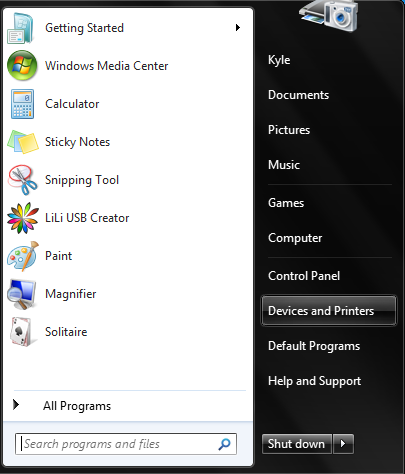
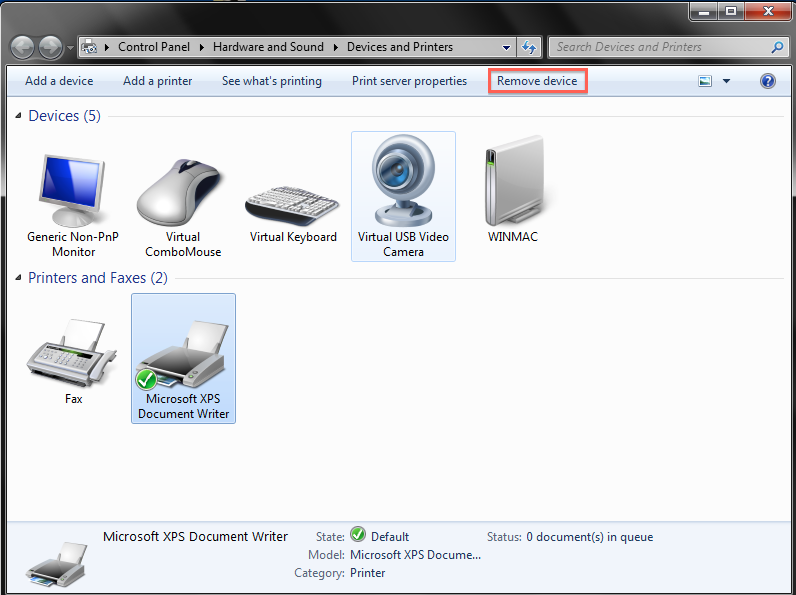
Another thing I'd try would be to delete the printer and its settings completely:
Start menu -> Devices and Printers ![]() Then choose your printer from the list and hit 'Remove device' ![]() Windows should try to find the drivers automatically next time you plug it in, and setting it up as a new printer might get it to start working again.
__________________
![]() |
|
|
|
0
|
|
|
#7 |
|
I am having a similar problem, but in reverse. My HP7260 printer is plugged into my wireless router via ethernet. My MacBook Pro running Lion is not able to print wirelessly anymore. It worked fine before I switched out the router for the newer version. (It is the Verizon FIOS Actiontec, hardwired to the Dell desktop, but plugged directly into printer with cable.)
When I try to print from the laptop, it says the printer is not connected. I checked that System Preferences still show the printer and that sharing is enabled. Would a simple reboot of the modem/router make a difference? thanks. |
|
|
|
0
|
|
|
#8 |
|
Quote:
__________________
"A little bit of this… and a whooole lotta that" MacBook Air 11 inch (Mid 2011); Intel Core i5; 2GB RAM; OS X 10.8.3 Mountain Lion
iPod Touch 4th Gen; 32GB; iOS 6.1.3 |
|
|
|
0
|
|
|
#9 |
|
After an hour on the phone with Verizon tech support, we finally got the printer working on the network again. It required an IP address and a bunch of settings that had to be adjusted.
Thanks for any suggestions though. |
|
|
|
0
|
![]() |
|
«
Previous Thread
|
Next Thread
»
| Thread Tools | Search this Thread |
| Display Modes | |
|
|
All times are GMT -5. The time now is 07:56 AM.


)


Linear Mode