|
|||||||
![]() |
|
|
Thread Tools | Search this Thread | Display Modes |
|
|
#1 |
|
Cheap Mac Pro eSata Solution? Port Multiplier supported or not?
Hi,
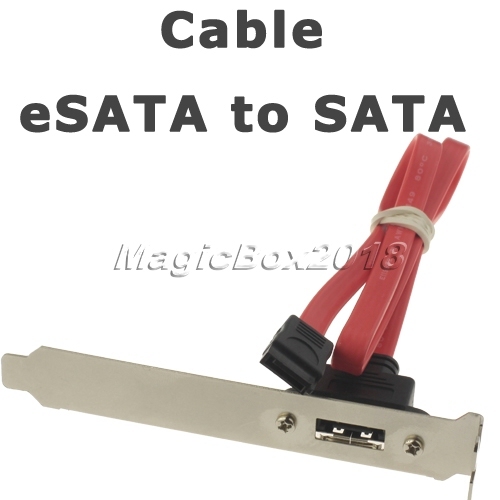
Just picked up the Mediasonic ProRAID 4 Bay hard drive enclosure. Set in JBOD (RAID-0 Spanning) mode gives me total capacity of 6TB (3x2TB). The enclosure supports eSATA 3GB/s and USB 3.0 at 5GB/s. I am using it with my Mac Pro 4,1 (2009) with USB 2.0 and it gives me about 30-35mb/s, which is about the same as my NetGear NV+ over ethernet. I bought the MediaSonic for a faster solution and more storage. I saw this Sata to eSata Bracket on eBay for $2, will that work with the spare (second optical bay) SATA port on the logic board? Or does the community recommend USB 3.0 or PCI-E eSata cards (3GB/s or 6GB/s). I am only looking to spend about $30 at the most. ![]() ![]() Item ID: 300528872728 Last edited by mseth; Jan 6, 2013 at 07:40 PM. |
|
|
|
0
|
|
|
#2 |
|
I don't believe the Mac controller of that vintage supports AHCI (to recognize SATA drives connected after boot) let alone a port multiplier. Your RAID0 enclosure would not be acting like a port multiplier anyway, it would look like a single large disk to the MAC, not a bunch of small ones.
I have a couple eSATA drives connected to the mother board port through one of those brackets and as long as the drives are turned on prior to booting the machine, and connected with less than a meter of cable length, they work just fine. Data transfer is much faster than USB, the same as to/from an internal drive. You should see quite a bit better performance than any type of USB connection, well worth the $2 investment... Firewire 800 is a little more robust and fast, but you don't have that option.
__________________
2013 15 inch rMBP and a few other MacBooks, a couple iMacs, AppleTV, Airport Extreme, Time Capsule, MacPro early 08, G4 Dual gigbit enet, Cube G4, some older stuff. |
|
|
|
0
|
|
|
#3 |
|
I doubt the port multiplier will work, I also doubt it will be hot-pluggable. However, yes, that plug will work with the ODD port on the mobo
__________________
http://latewire.com |
|
|
|
0
|
|
|
#4 | |
|
Quote:
I plan to have it plugged in all the time, but I want to power it on when I want (while the system is running) and eject it when I want. Even if I have to restart the machine, it's not a big deal. |
||
|
|
0
|
|
|
#5 | |
|
Quote:
When the system is up an running you can eject the external SATA disks and power them down without an issue. As long as the Mac does not reboot in the interim, when you turn the external drive back on the drive will reappear in the finder, no problem, usually. If the system is booted up with the external disk off, subsequently turning the disk on will do nothing. You will have to restart the Mac with the external disk powered on for the disk to be recognized. This is the same as it works for internal SATA drives/devices. I think thats what you meant by no big deal. (I don't know if the most recent vintage MacPro firmware supports AHCI and also notifies the OS of new SATA devices. AHCI is the feature that allows hot swap of SATA devices.)
__________________
2013 15 inch rMBP and a few other MacBooks, a couple iMacs, AppleTV, Airport Extreme, Time Capsule, MacPro early 08, G4 Dual gigbit enet, Cube G4, some older stuff. Last edited by ColdCase; Dec 1, 2012 at 03:28 PM. |
||
|
|
0
|
|
|
#6 | |
|
Quote:
I am not sure if USB 3.0 might be a better option. I could use extra USB ports as I have the back ports occupied. Leaving me with only two USB ports unused, both in the front. I need a STABLE option and I don't think BestBuy Canada carries any USB 3.0 PCI-E cards that are based on the NEC chipset let alone a maximum $30 price tag. |
||
|
|
0
|
|
|
#7 |
|
SATA is far better for disks as consumer disks are natively SATA. USB has a stack to deal with. Your Mac will transfer disk data at a higher rate over that spare SATA port than any USB 3.0 link will. USB has its advantages for other device types, but for disks it is simply for convenience.
On the other hand, the JBOD performance could be a bottleneck. JBODs are great for combining a bunch of disks and presenting them to the computer as one large one and on one physical connection. There is no speed bump for JBOD, however (otherwise known as disk spanning). You get a speed bump if you RAID0 (stripe across) the disks. A port multiplier presents the disks and individual devices (up to 15) to the operating system over a single physical connection. That allows you to use OS software based RAIDs. Two or three drives will saturate the single connection, so you won't get additional speed by adding more drives behind the PM. The Mac doesn't support this, so you'll need a relatively inexpensive SATA PCI card. In any rate, the cable is cheap and fairly easy to add, doesn't hurt trying it, perhaps the performance is as good as you like. Otherwise you are looking for perhaps a PCI with 6GB PM compatible SATA ports.
__________________
2013 15 inch rMBP and a few other MacBooks, a couple iMacs, AppleTV, Airport Extreme, Time Capsule, MacPro early 08, G4 Dual gigbit enet, Cube G4, some older stuff. Last edited by ColdCase; Dec 1, 2012 at 06:29 PM. |
|
|
|
0
|
|
|
#8 |
|
So
1) connecting your ProRaid to the spare SATA port will provide better performance. 2) If that is not good enough, you are looking at adding a SATA PCI card that supports SATA hot swap, port multiplier, and 6 GB. The ProRaid striped RAID0 may give you better performance than OS software RAID, but IDK.
__________________
2013 15 inch rMBP and a few other MacBooks, a couple iMacs, AppleTV, Airport Extreme, Time Capsule, MacPro early 08, G4 Dual gigbit enet, Cube G4, some older stuff. |
|
|
|
0
|
|
|
#9 | |
|
Quote:
Thanks for the help, I ordered the Sata to eSata cable with bracket from BestBuy, will try it and post the results. Hopefully, it works and I can return it and get the cheaper and longer $2 one from eBay instead. Anything faster than USB 2.0 is what I'm looking for. I think SATA II should be sufficient enough since in a JBOD, I'm rarely using two disks at a time. |
||
|
|
0
|
|
|
#10 |
|
Is there really any benefit to you using RAID0 in this setup?
Seems risky for zero benefit... |
|
|
|
0
|
|
|
#11 | |
|
Little more money than you want to spend, but work well. I have the second one, first wiill probably work for you.
http://eshop.macsales.com/item/Newer...gy/MXPCIE6GS2/ http://eshop.macsales.com/item/Newer...gy/MXPCIE6GRS/ Important, this is an issue I ran into as I wanted the hot plug feature without constant rebooting (sleeping the computer requires a reboot to mount externals). I have a 4 disk Sans Digital that's powered off when not in use. I have the same computer running snow leopard. Quote:
__________________
2009 Nehalem Mac Pro, 2.66 GHz, 12GB ram, 120GB Samsung SSD OSX boot, 80GB Intel SSD, 6 2TB Samsung Eco☛10TB internal storage ZFS |
||
|
|
0
|
|
|
#12 | |
|
Quote:
I bought the Mediasonic ProRAID and put in 3x 2TB Drives for more storage and faster speeds. Right now USB 2.0 gives me the same r/w speeds as the NV+. Much stable solution that a generic card from eBay. Will try simple cable solution first. Last edited by mseth; Dec 3, 2012 at 09:30 PM. |
||
|
|
0
|
|
|
#13 | |
|
Quote:
Risky, no? |
||
|
|
0
|
|
|
#14 |
|
CONFIRMED. eSata to Sata CABLE / PLATE / BRACKET WORKS WITH JBOD.
Going to buy the $2 one from eBay and return this one to BestBuy. Getting about 115mb/s Read/Write in BlackMagic Disk Speed Test. If anyone else is looking to get one, make sure the cable length is 50cm otherwise it won't fit. |
|
|
|
0
|
|
|
#15 | |
|
Quote:
No matter how you have your working disk, you need a BACKUP disk. The recovery is the same for both cases ... replace the failed drive and restore from your backup. I agree that it is statistically a bit more "likely" that a RAID-0 array will fail due to having more than 1 disk, but that probability is still pretty low for a given user over the active life of the equipment with modern drives. And since you have a good working backup ... it becomes largely irrelevant. Last edited by hfg; Dec 6, 2012 at 03:23 PM. |
||
|
|
1
|
|
|
#16 | |
|
Quote:
It isn't worth it, even with a backup.
__________________
| Mac Pro 4,1 (2009) | 3.33Ghz W3680 | 6870 | 16GB | 830 256GB + 840 250GB | | MacBook Pro 2010 | 2.4Ghz i5 | 8GB | 320 300GB | | iPhone 5 32GB | Hazro HZ27WD | |
||
|
|
1
|
|
|
#17 | |
|
Quote:
Oh, it is worth it ... very much so! There was a thread here a couple of days ago where someone suggested a 2 disk RAID-0 was twice as likely to fail. Another poster provided all the probability mathematics to prove that it was really only about 50% more likely to fail. With the significant speed improvement, the slight additional probability of disk failure for a given user is mitigated with a solid, automatic backup plan. |
||
|
|
1
|
|
|
#18 |
|
It's RAID-0 Spanning so its not stripping the data, just writing to disk 1 until that fills up then going to disk2. RIGHT? Would it not be recoverable I pop the disks out, put them in the Mac Pro and use software recovery tools?
|
|
|
|
0
|
|
|
#19 | |
|
Quote:
I had one drive fail in a spanned disk and no data was recoverable from it while all files on disk 2 were recovered by the vendor (failed under warranty). When you use the term RAID, most are thinking striping or some kind of redundancy. If you use the term disk spanning or concatenation, which is really not a RAID technique but more JBOD, there may be less confusion.
__________________
2013 15 inch rMBP and a few other MacBooks, a couple iMacs, AppleTV, Airport Extreme, Time Capsule, MacPro early 08, G4 Dual gigbit enet, Cube G4, some older stuff. Last edited by ColdCase; Dec 9, 2012 at 12:03 AM. |
||
|
|
0
|
|
|
#20 | |
|
Quote:
For a quick intro to RAID types: http://en.wikipedia.org/wiki/Standard_RAID_levels |
||
|
|
0
|
|
|
#21 | |
|
Quote:
** This is not true in all Mac Pros. The 2006 MP can't run a port multiplier.
__________________
http://latewire.com |
||
|
|
0
|
|
|
#22 | |
|
Quote:
The other one is called RAID-0 STRIPPED. Last edited by mseth; Dec 11, 2012 at 10:20 PM. |
||
|
|
0
|
|
|
#23 |
|
i tried plugging that into the board once, got all wonky. could not write to the hard drive from what i remember
|
|
|
|
0
|
|
|
#24 | |
|
Quote:
I know span should work, but I was told JBOD wouldn't work with older Mac Pros (new ones may be different)
__________________
http://latewire.com |
||
|
|
0
|
|
|
#25 | |
|
Quote:
Returned the short adapter to best buy, be careful the bracket doesn't even fit in the PCIE slot, the metal plate is too short and the cable is wayyy to short, so I had to feed the cable into the case by removing a metal plate from an empty slot. STILL WAITING ON $2 one from eBay to arrive. Last edited by mseth; Dec 11, 2012 at 10:22 PM. |
||
|
|
0
|
![]() |
|
«
Previous Thread
|
Next Thread
»
| Thread Tools | Search this Thread |
| Display Modes | |
|
|
All times are GMT -5. The time now is 11:12 AM.


Linear Mode