|
|||||||
![]() |
|
|
Thread Tools | Search this Thread | Display Modes |
|
|
#1 |
|
How to determine if iPhone 4S is Verizon or AT&T model?
I have a Verizon iPhone 4S and I wanted to swap it for an AT&T model iPhone 4S, but how do I tell whether or not I am looking at an AT&T model or not?
I won't have access to a working AT&T sim card to test it out (I have an old one laying around, if that will work). .
__________________
I have a dream that one day iOS users, Android users, and Windows Phone users will be able to sit down together at a table of brotherhood. Follow me on Twitter |
|
|
|
0
|
|
|
#2 |
|
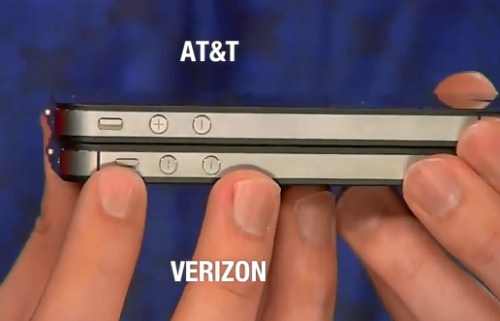
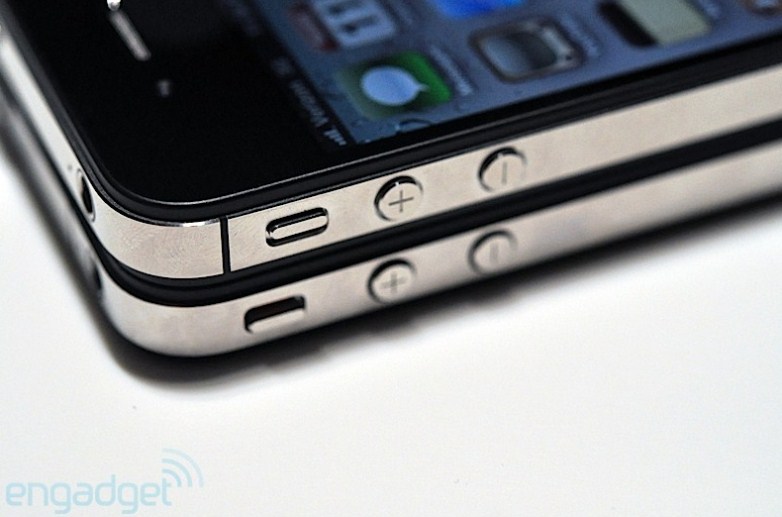
AT&T iPhones don't have the antenna band on them (the little sliver on the side of the phone) because they're GSM compatible. Verizon's iPhones do.
__________________
iPad 4th gen Black/ 32GB/ iOS 6.1.3 iMac G4 1.0 GHz/ 1.25 GHz PPCG4 (7445) iPod |Classic Black/ 80GB|U2 edition 20GB iPhone |4S White/16GB/ iOS 6.1.3|3G White/16GB iOS 4.2.1 Last edited by SnowLeopard OSX; Dec 10, 2012 at 01:53 AM. |
|
|
|
0
|
|
|
#3 |
|
Unless I'm mistaken the hardware in the phones is exactly the same on the 4S. I don't know what would happen if you had an AT&T locked one and tried to use it on Verizon. I know they can be unlocked by the carrier, but usually that requires the contract to expire.
__________________
21.5" iMac 3.06 Ghz, 4 GB RAM, 500 GB HDD; iPhone 4S 16GB; third-gen iPad WiFi black 32 GB; third-gen TV
|
|
|
|
1
|
|
|
#4 |
|
Michael is right, the 4S are identical so there's no way to tell physically. Best way to tell is to go into Settings > General > About > Look @ the Carrier.
__________________
Retina 15" MacBook Pro (Mid-2012) iPhone 5 (64gb/black) iPad 3 (16gb/black) |
|
|
|
1
|
|
|
#5 | |
|
Quote:
![]()
__________________
iPad 4th gen Black/ 32GB/ iOS 6.1.3 iMac G4 1.0 GHz/ 1.25 GHz PPCG4 (7445) iPod |Classic Black/ 80GB|U2 edition 20GB iPhone |4S White/16GB/ iOS 6.1.3|3G White/16GB iOS 4.2.1 |
||
|
|
0
|
|
|
#7 |
|
I thought Verizon's iPhone don't have SIM cards?
And I also thought the antenna band difference is only for the iPhone 4? The iPhone 4S should be the same for both AT&T and Verizon.... isn't it?
__________________
-iPhone 3GS white 16GB iOS 6.1.3 -iPhone 3GS black 16GB iOS 6.1.3 -iPod Touch 4G white 32GB iOS 6.1 |
|
|
|
0
|
|
|
#8 |
|
Every iPhone 4S made is identical.
The carrier is locked to it through software. |
|
|
|
1
|
|
|
#9 | |
|
Quote:
For the 4S, go into Settings --> General --> About and look at the model number. Then compare it to this (lovingly lifted from Everymac.com) MC918LL/A is the order number for the 16 GB configuration in black locked to AT&T with a two-year contract. With 32 GB or 64 GB of storage, in black, locked to AT&T, the order numbers are MC919LL/A and MD269LL/A. With 16, 32, or 64 GB of storage, in white, locked to AT&T, the order numbers are MC920LL/A, MC921LL/A and MD271LL/A. Locked to Verizon, in black, the order numbers respectively are MD276LL/A, MD278LL/A, and MD280LL/A. Locked to Verizon, in white, order numbers are MD277LL/A, MD279LL/A, and MD281LL/A. Locked to Sprint, in black, the order numbers are MD377LL/A, MD379LL/A, and MD381LL/A. Locked to Sprint, in white, order numbers are MD378LL/A, MD380LL/A, and MD382LL/A. Finally, the order numbers for unlocked models are MD234LL/A, MD241LL/A, and MD257LL/A in black and MD237LL/A, MD244LL/A, and MD260LL/A in white for 16 GB, 32 GB and 64 GB, respectively. Although the unlocked model is a "world phone," Apple unfortunately has disabled its CDMA capability in software. For example, see the screenshot from my phone. It's a white, 32GB AT&T 4S with a model number of MC921LL, just as it shows up in that list
__________________
2.5GHz 2011 iMac, 1.8GHz Rev.F MacBook Air, 32GB iPad mini, and 32GB iPhone 5 as my main drivers. "One more thing - You've waited for this, so here's your PowerBook G5!" - Steve Jobs @ WWDC 2014 |
||
|
|
2
|
|
|
#10 | |
|
Quote:
__________________
iPad 4th gen Black/ 32GB/ iOS 6.1.3 iMac G4 1.0 GHz/ 1.25 GHz PPCG4 (7445) iPod |Classic Black/ 80GB|U2 edition 20GB iPhone |4S White/16GB/ iOS 6.1.3|3G White/16GB iOS 4.2.1 Last edited by SnowLeopard OSX; Dec 10, 2012 at 02:40 AM. |
||
|
|
0
|
|
|
#11 |
|
|
0
|
|
|
#12 |
|
Best thing to do is spend a $1 and get an AT&T microsim on ebay or somewhere. The old deactivate AT&T sim will work too.
This way you will know 100% if it works with AT&T its an AT&T iphone. Sim not supported its verizon or Sprint or locked to another carrier. |
|
|
|
0
|
|
|
#13 | |
|
Quote:
|
||
|
|
2
|
|
|
#14 | ||
|
Quote:
Quote:
That's why I was asking if the old sim would work. I'm swapping this for someone else, and I personally don't have AT&T. However if need be, I can pick up a prepaid sim from AT&T just to see if this will work.
__________________
I have a dream that one day iOS users, Android users, and Windows Phone users will be able to sit down together at a table of brotherhood. Follow me on Twitter |
|||
|
|
3
|
|
|
#15 |
|
Yes, once you pop in the AT&T sim it will bring you to the welcome screen to activate it.
You might need to be connected to wifi though in order to see if it will activate or it will display sim not supported. Even if the sim is inactive its ok, as long as its an AT&T sim you will know what's up. |
|
|
|
2
|
|
|
#16 | |
|
Quote:
__________________
I have a dream that one day iOS users, Android users, and Windows Phone users will be able to sit down together at a table of brotherhood. Follow me on Twitter |
||
|
|
1
|
|
|
#17 |
|
You don't even have to turn it on.
On the back of the phone, GSM AT&T models have the FCC, Xed trash can, and CE symbols. The CDMA version does not. |
|
|
|
2
|
|
|
#18 |
|
|
0
|
|
|
#19 |
|
|
0
|
|
|
#20 |
|
I know this is already resolved but another way is to go into the settings check where the IMEI is. Verizon models also have an ESN. I believe it's labeled MEID on the iPhone 4S.
|
|
|
|
1
|
![]() |
|
«
Previous Thread
|
Next Thread
»
| Thread Tools | Search this Thread |
| Display Modes | |
|
|
All times are GMT -5. The time now is 08:40 PM.


TV


Linear Mode