|
|
#1 |
|
Two monitor confusion
I've just added a second monitor (Dell S2330MX) to my iMac running Lion. The monitors are connected but I'm confused about how to operate them independently. I can mirror the monitors but that isn't what I want to do. Right now I'm working on the iMac and the second monitor is displaying a screen saver.
1. Can I have an internet connection (Firefox) showing on one monitor while I'm working in Word on the other? How do I do this? 2. I do a lot of editing, sometimes with multiple documents. I use Word for Mac. Can I have one document showing on one monitor and another document on the main monitor? Can I cut and paste between the two? 3. Do I need an app? if so, which one? |
|
|
|
0
|
|
|
#2 |
|
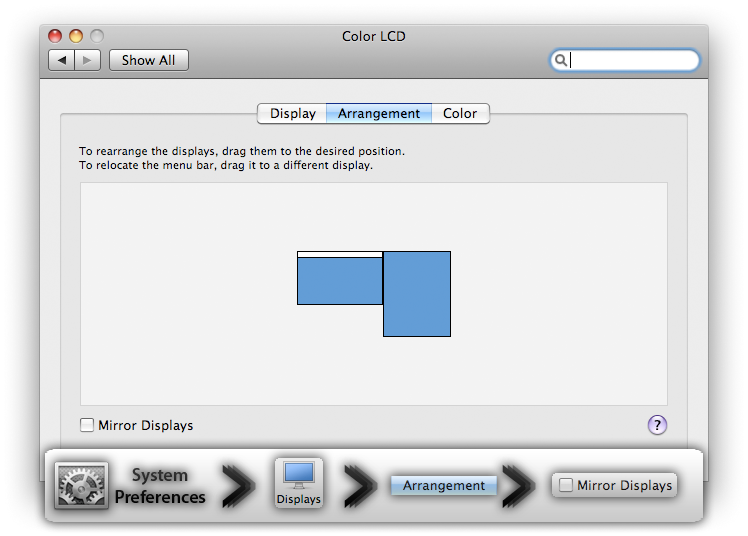
If mirroring is disabled, you can just drag windows to whatever display you want according to your arrangement of the displays.
Normally they are aligned horizontally, thus you either drag a window from the main monitor (the one with the Menu Bar) to the right or left, thus you can have two or more windows spread around two monitors. No special apps are needed, though Mac OS X 10.7 Lion is not the most dual display friendly OS if you want to use fullscreen apps. Was that understandable? System Preferences > Displays >> Arrangement >>> Mirror Displays (also know, that when MIRROR DISPLAYS is checked, that the display with the lowest resolution determines the maximum resolution used on both, thus one display will have a lower than native resolution, except when both displays have the same native resolution)
__________________
This is not
|
|
|
|
0
|
|
|
#3 | |
|
Quote:
How do i open, say gmail, on the second monitor while I working in Word on the iMac? |
||
|
|
0
|
|
|
#4 | |
|
Quote:
What happens if you are in Finder and the mouse is on the secondary screen (the one you want to move windows to) and press CMD+N?
__________________
This is not
|
||
|
|
0
|
|
|
#5 |
|
I've set the arrangments side by side with the Dell on the right a little lower.
In Finder, with cursor on Dell, Cmd+N yields a search window on the iMac, nothing on the Dell |
|
|
|
0
|
|
|
#6 |
|
And as you drag such Finder window on the iMac screen, once you want to move it to the Dell, only the mouse keeps going, but the Finder window is suddenly not moving anymore and stays on the iMac screen? If that is so, then that is really strange.
__________________
This is not
|
|
|
|
0
|
|
|
#7 |
|
Ah, ha. It took me while but I think I've got it now, Many thanks. Put me on the top of your Dumb List.
|
|
|
|
0
|
![]() |
|
«
Previous Thread
|
Next Thread
»
| Thread Tools | Search this Thread |
| Display Modes | |
|
|
All times are GMT -5. The time now is 03:38 AM.


Linear Mode