hello
i downloaded and installed chrome for mac, this is myt first day with mac so bear with me 🙂
now there is an icon on the desktop which looks like a white disc drive in the top right corner with chrome written below it/icon in it
and there is a smaller than normal window pops up that shows the icon of chrome an arrow downwards and then a folder which to me looks like the app folder?
what does this all mean?
--
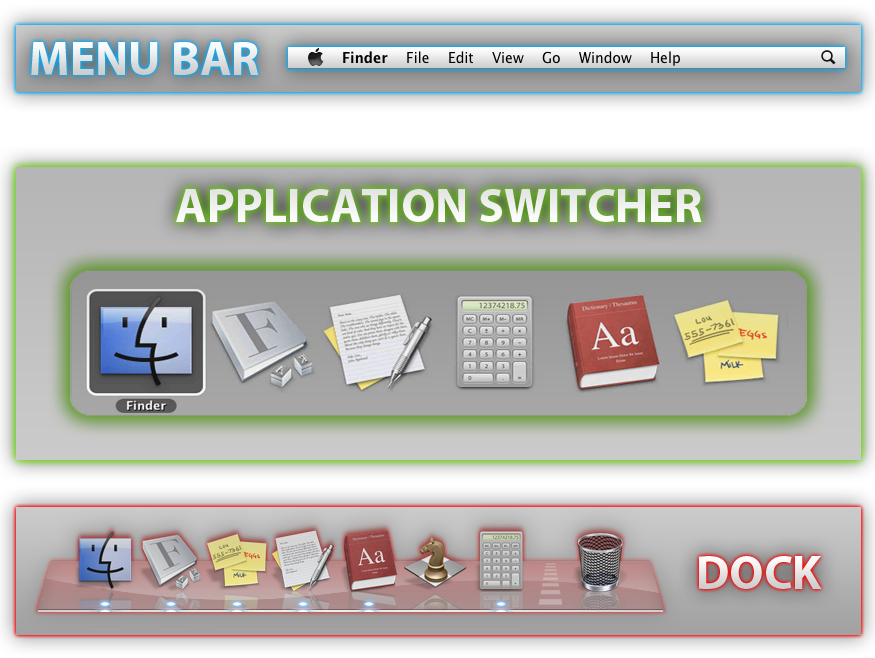
ill tell you when i saw the smaller window i pulled the google chrome icon to the desktop, it then said copying to desktop blah blah, then i put it where i intended to in the quicklaunch bar or whatever that bottom bar is called
id like to know what i did and if theres anything i can do to clean up my desktop more
i tried to attach photos to the post but it only let me choose the iphoto library or apeture library, i dont know what the hell that meant, but then a spinning color wheel came up and so i quit that
nate
i downloaded and installed chrome for mac, this is myt first day with mac so bear with me 🙂
now there is an icon on the desktop which looks like a white disc drive in the top right corner with chrome written below it/icon in it
and there is a smaller than normal window pops up that shows the icon of chrome an arrow downwards and then a folder which to me looks like the app folder?
what does this all mean?
--
ill tell you when i saw the smaller window i pulled the google chrome icon to the desktop, it then said copying to desktop blah blah, then i put it where i intended to in the quicklaunch bar or whatever that bottom bar is called
id like to know what i did and if theres anything i can do to clean up my desktop more
i tried to attach photos to the post but it only let me choose the iphoto library or apeture library, i dont know what the hell that meant, but then a spinning color wheel came up and so i quit that
nate