|
|
#1 |
|
What devices make up your home network?
Just ordered a couple of new networking devices, including a NAS device for the first time. It got me enthusiastic to start adding some new toys and so I'm curious as to what others use within their home network.
Please describe/list your devices. I'm particularly interested in router and NAS choices and new fangled devices like network connected TVs, speakers, photo frames, kitchen appliances, home surveillance, etc. I'm not so interested in the specifics of all your computers/tablets/phones, but mentioning at least the operating systems used for these devices will be helpful for contextualising your other choices. If you want to go further, please feel free to explain your choices and what you hope to add in the future. My list, Computers: Windows PCs and Macs Tablets: iPads Phones: iPhones and Androids Router: Airport Extreme (on order) NAS: Synology DS213 (on order; intended use is as a backup location and media server) Digital Media Receiver / gaming: xBox 360 Printer: Brother DCP-750CW Next thing I want to add is a wireless speaker system (ideally one that is both DLNA and Airplay compatible) |
|
|
|
0
|
|
|
#2 |
|
Let's have a think about this... (thank god for a 60mbps connection!)
Computers: 27" iMac 21" iMac (old) 17" iMac homebuilt desktop PC 12" Powerbook Toshiba laptop Devices: iPhone 4S iPhone 3GS 2x iPod touch 4G iPod touch 3G iPod touch 1G iPad 2 iPad 3 Nokia Lumia 800 (I think it is) Consoles: 2x PS3 2x Xbox 360 2x Wii Wii U PS Vita 3DS XL and 3DS PSP-2000, 3000 and Go DS fat, Lite and DSi Others: Bravia TV DAB+Internet radio (looking into getting a NAS to keep files floating around the house)
__________________
Maybe if everyone who'd ever been close to you had died, you'd be sarcastic, too.
Also come join us Steam users! |
|
|
|
0
|
|
|
#3 |
|
Network Devices
Last edited by jasonvp; Dec 29, 2012 at 01:29 PM. Reason: added the airport |
|
|
|
0
|
|
|
#4 |
|
Way too many!
Family Room
Spoiled 10-year-old Daughter's Room
Kitchen
WiFi Devices
Home Office... Well, too dang many.
__________________
Pro, 2 X 2.8 Ghz Quad-Core 13" MacBook iPhone 4S 16 GB iPad 64 GB WiFi AT&T (1st Gen) Macbook Pro i7 Apple TV2 iPad 64 GB AT&T (3rd Gen)
Last edited by Nermal; Dec 29, 2012 at 04:37 PM. Reason: timg |
|
|
|
0
|
|
|
#5 |
|
Gotta think about this one...
Devices I interact with: Hac Pro 15" MacBook Pro iPhone 4S HP TouchPad (don't use it much anymore) Xbox 360 Raspberry Pi Infrastructure: 2x AirPort Extreme Dynalink PPPoA Bridge Tenda GigE Switch HP Data Vault (6 TB and nearly full!) |
|
|
|
0
|
|
|
#6 |
|
Computers:
27" iMac (hardwired) Mac Mini (hardwired) My 17" MacBook Pro (wifi) My wife's 17" MacBook Pro (my old one) (wifi) Devices My iPhone My wife's iPhone My iPad My wife's iPad Two TiVos Slingbox (which actually doesn't work currently) Wii Blu-Ray Player Two wifi cameras Networking Time Capsule router 8-port Netgear switch at the main input 5-port Netgear switch on my desk One AirPort Express currently just an Airplay device to play music in the living room A second Airport Express which will go on the top floor to extend range once I stop being lazy.
__________________
A lack of planning on your part should not constitute an emergency on mine. |
|
|
|
0
|
|
|
#7 |
|
2 MacBook Pros
1 PC desktop (ethernet) 1 Wii 2 iPhones 1 iPod touch 1 iPad 1 Brother Network Printer (ethernet) 1 $45 netgear Wireless G router I get 20Mb/s on Wireless G at the end of my house, and I think my connection is rated for only 25Mb/s... so holding out on upgrading the router.
__________________
"When we hit our lowest point, we are open to the greatest change." |
|
|
|
0
|
|
|
#8 |
|
2 MBP's
1 iMac 3 iPads 6 iPhones Crappy belkin router, 10 Mbps connection.
__________________
2012 RMBP 2.3/8/256. 16Gb iPhone 5 Black & Slate. |
|
|
|
0
|
|
|
#10 |
|
No touch screens. It's a Windows 8 machine but I use a wireless keyboard with touch pad and a trackball. I find the trackball easier to use at 3-4 mph.
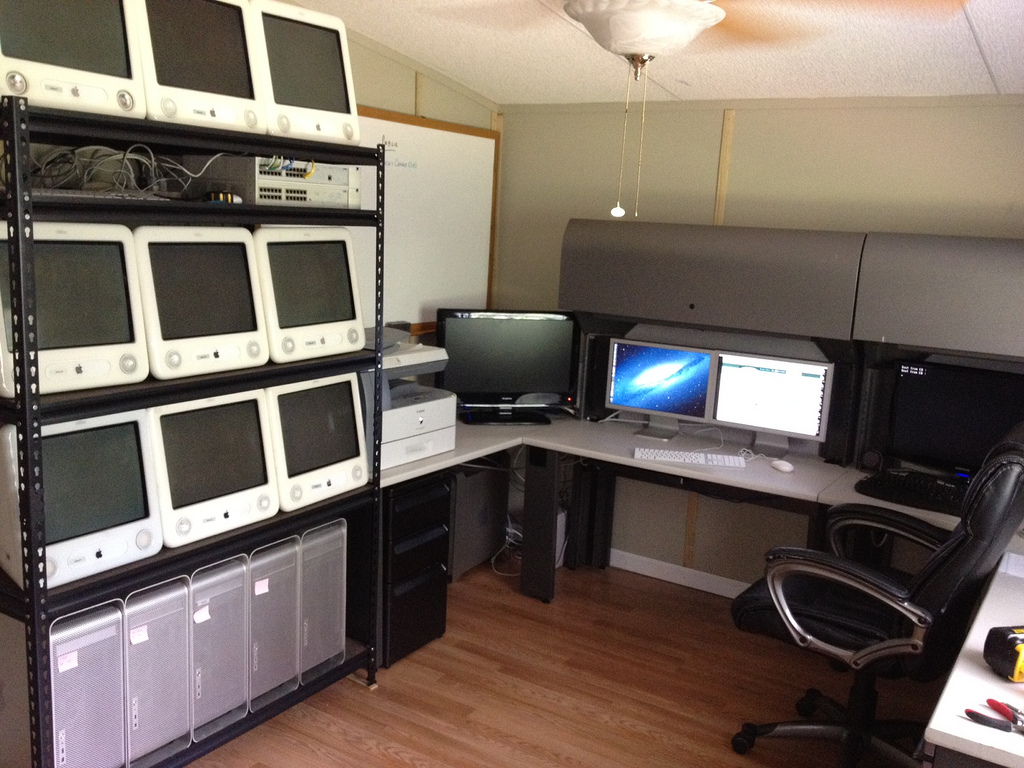
![]() Using teenage labor to set up eMacs
__________________
Pro, 2 X 2.8 Ghz Quad-Core 13" MacBook iPhone 4S 16 GB iPad 64 GB WiFi AT&T (1st Gen) Macbook Pro i7 Apple TV2 iPad 64 GB AT&T (3rd Gen)
|
|
|
|
0
|
|
|
#11 | |
|
Quote:
If anyone has the DS212J and using it for multiple tasks, I'd be interested to hear your experience. I've heard great things for both, but I would consider myself somewhat of a power user, at least demanding user, and want to make sure it's capable of keeping up. Computers: MBP, Win7 Laptop, deceased Win7 desktop (replacing with mac mini), Ubuntu PC Tablets: iPad, iPods (Touch) Phones: iPhones Router: Linksys X2000 (likely to be replaced with NAS purchase) NAS: Synology DS213 (mulling) Digital Media Receiver / gaming: xBox 360, PS3, Wii, ATV2 Printer: Cheap Canon Last edited by rjbruce; Feb 6, 2013 at 03:38 PM. |
||
|
|
0
|
|
|
#12 |
|
Router
20" iMac HP printer 15" MBP 2 iPhones Wii |
|
|
|
0
|
|
|
#13 |
|
15" MBP
Home-built Windows PC for gaming HP OfficeJet 6500 MFP HTC Thunderbolt (Android) Acer Iconia A500 (Android 10" tablet) ATV2 LG Blu-Ray player iPad2 (work-issued) Occasionally pop my work-issued 13" MBP or Dell E6410 on my network All fed off a Netgear WNDR3700v2 That's nothing though, the MAC filter on my parent's router is nearly full. 8 people that could be there at any given time that might want a device on wireless, each with 2-3 devices.
__________________
2012 15" MBP, 2.3 GHz, 16 GB RAM, 500 GB HDD, Hi-Res glossy |
|
|
|
0
|
|
|
#14 |
|
Network/Router
|
|
|
|
0
|
|
|
#15 | |
|
Quote:
|
||
|
|
0
|
![]() |
|
«
Previous Thread
|
Next Thread
»
| Thread Tools | Search this Thread |
| Display Modes | |
|
|
All times are GMT -5. The time now is 12:39 PM.


Pro, 2 X 2.8 Ghz Quad-Core 

I support the
Linear Mode