|
|
#1 |
|
Can't Open Any Office Apps After Installing 2011
I'm running 10.8.2
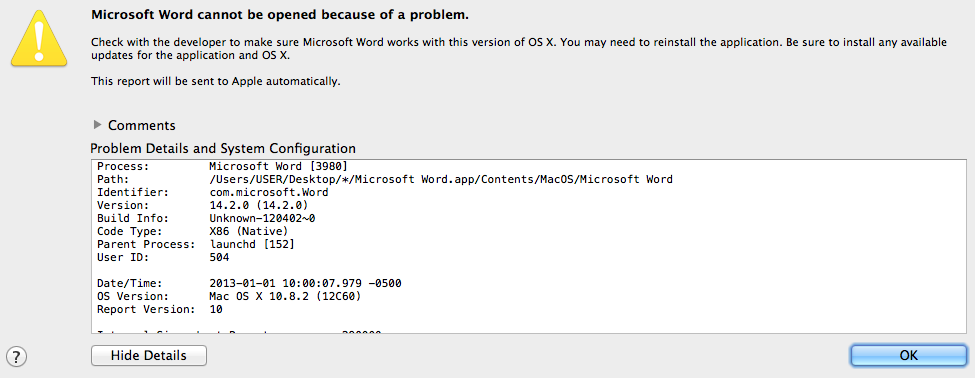
I have Microsoft Office 2008 and it open fine. Installed Microsoft Office 2011 and here's what I get when I try to to an app ![]() Anyone dealt with and fixed this yet?
__________________
macbeliever Macbook iPhone 5 magic mouse airport
|
|
|
|
0
|
|
|
#2 |
|
I had that when I first installed it. Just do a full delete of it (search the forums on how to delete fully) and reinstall after a reboot. Fixed it for me. If you're lazy and don't feel like searching the forums, AppCleaner may be able to help you delete all the plist files associated with the apps.
__________________
iPhone • iPad • MacBook Pro |
|
|
|
0
|
|
|
#3 |
|
Same error message, not responding to a complete delete and reinstall
I received my new iMac in mid December, and I used the Migration Assistant to move everything. Unsurprisingly, MS Office failed to work. I paid MS another $12 so I could download a new copy of MS Office 2011 and tried installing it. Installation succeeded, but every time I opened a Word or Excel file, it crashed.
I deleted Office from both iMacs, old and new, including all of the MS files hidden everywhere. Reinstalled but the same thing happens. Deleted everything, including the downloaded disk image, downloaded it again, and reinstalled. Same result--crash! I have no idea what to try next. My wife is beginning to doubt my technical expertise. I've tried to mollify her with OpenOffice and Pages, but she is getting frustrated and angry. Any ideas on what to try? Please save my marriage! |

|
|
|
0
|
![]() |
|
| Tags |
| microsoft office 2011 |
«
Previous Thread
|
Next Thread
»
| Thread Tools | Search this Thread |
| Display Modes | |
|
|
All times are GMT -5. The time now is 05:37 PM.


Macbook 


Linear Mode