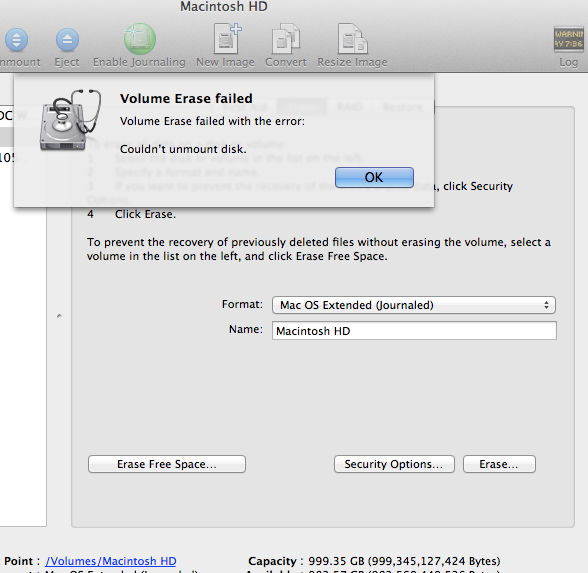
i tried eraseing my internal hdd with disk utility to use it for secondary storage only, because i am booting osx mountain lion off a external ssd. so i dont need the osx on the internal hard drive anymore, id rather use it to store random files....But when i go in disk utilty to erase it (journaled), it gives me an error "Volume Erase Failed with error: Couldn't unmount disk"... so it doesnt let me go further...anybody understand this? much aprecciated. thanks.😕

Got a tip for us?
Let us know
Become a MacRumors Supporter for $50/year with no ads, ability to filter front page stories, and private forums.
Cannot erase HDD with mountain lion disk utility? error
- Thread starter PavelT
- Start date
- Sort by reaction score
You are using an out of date browser. It may not display this or other websites correctly.
You should upgrade or use an alternative browser.
You should upgrade or use an alternative browser.

Macman45
macrumors G5
That's because it's booting from the external drive, where you have OSX. I don't know exactly what you have left behind on the internal, but remove the sad if it's USB or F/W and then try booting holding down OPTION again, if you get nothing, then that drive is wiped, but your Mac is obviously booting from the ssd hence the "Eject " message. If you erase from there, you willlose the info on the SSD.
Last edited:
sorry,im a bit confused by your reply. both the internal harddrive osx and the external ssd osx are visable on the imac. i am currently using the external ssd osx and i just want to wipe out the internal drive so i can simply use it to store files. because i have teh osx running on my ssd.
Can you please try to disable Time Machine in the system preferences ?
Found this :
https://forums.macrumors.com/threads/1294299/
Found this :
https://forums.macrumors.com/threads/1294299/

justperry
macrumors G5
sorry,im a bit confused by your reply. both the internal harddrive osx and the external ssd osx are visable on the imac. i am currently using the external ssd osx and i just want to wipe out the internal drive so i can simply use it to store files. because i have teh osx running on my ssd.
If you boot of the external you should be able to wipe the internal HD, BUT if you startup from the internal and want to wipe the internal you can NOT do so because it is the startup disk.
Macman45
macrumors G5
If you boot of the external you should be able to wipe the internal HD, BUT if you startup from the internal and want to wipe the internal you can NOT do so because it is the startup disk.
This is what I was getting at. If you boot normally, then enter Disk Utility, locate the Internal drive you want to erase, it should be a simple process.
Macman45
macrumors G5
yeah i am booting, starting up, using the external ssd osx, but i get that error "coudnt unmount disk" trying to erase theh internal hdd...
So it does boot to a useable state?
Try a disk permissions repair:
http://support.apple.com/kb/HT1452

I think(might know) what the problem is, go into System Preferences, select Spotlight and under privacy add the internal disk to it.
This prevents Spotlight from indexing your internal disk, I have seen this before.
ok. thanks, i will try this. but before i do, i heard that the internal drives on the imacs are laced with a recovery osx on them but on the motherboard. if i erase the internal drive, will the recovery osx get erased as well?
justperry
macrumors G5
ok. thanks, i will try this. but before i do, i heard that the internal drives on the imacs are laced with a recovery osx on them but on the motherboard. if i erase the internal drive, will the recovery osx get erased as well?
Yes/No, if you select the Volume and not the HD it won't, if you select the HD it will.
This has nothing to do with firmware, if there is an internet recovery in the firmware it will stay, it will not get erased since it is in firmware.
I think(might know) what the problem is, go into System Preferences, select Spotlight and under privacy add the internal disk to it.
This prevents Spotlight from indexing your internal disk, I have seen this before.
ok. i did add the internal hdd in the system pref>spotlight>privacy>
...then i tried again. i tried to disk utility erase 'journal' the internal hd Volume and it popped up error again telling me that it could not unmount disk....😕
image:
Another idea :
Boot into recovery mode with your external SSD (that is holding ALT upon starting your Mac)
Use diskutility from there to erase your 1 tb HDD
Edit : by the way , do they both have the name : Macintosh HD ? Because if that is the case , the SSD will be Macintosh HD and your 1 tb disk will be Macintosh HD1 upon mounting. And then using Macintosh HD will not work it think because the SSD already has that name
Boot into recovery mode with your external SSD (that is holding ALT upon starting your Mac)
Use diskutility from there to erase your 1 tb HDD
Edit : by the way , do they both have the name : Macintosh HD ? Because if that is the case , the SSD will be Macintosh HD and your 1 tb disk will be Macintosh HD1 upon mounting. And then using Macintosh HD will not work it think because the SSD already has that name
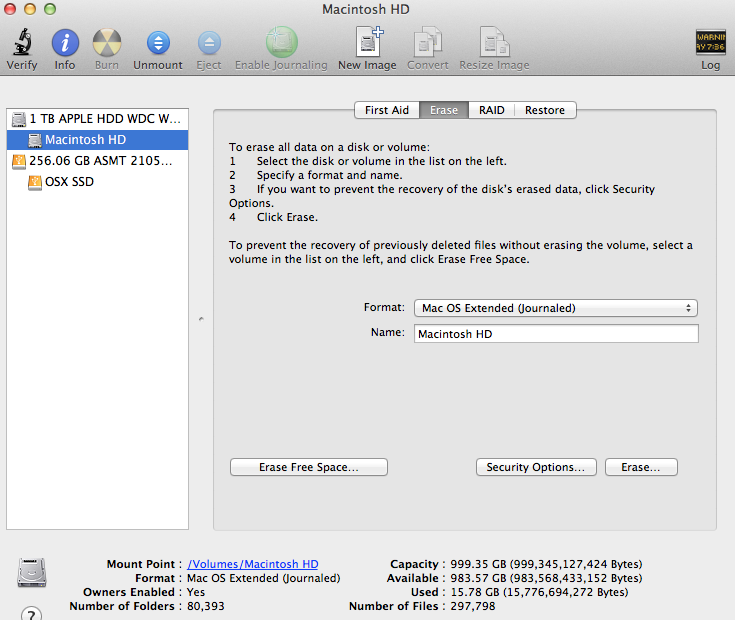
they both have distinctive names.
Image
I follow this post I want to do the same I hope will find the solution
justperry
macrumors G5
Why don't you try to repartition that 1 tb ?
Click on the 1 TB APPLE HDD disk (not volume) and choose 1 partition then apply ?
If you read than you should know that's exactly what he is trying to do now.
ok. i did add the internal hdd in the system pref>spotlight>privacy>
...then i tried again. i tried to disk utility erase 'journal' the internal hd Volume and it popped up error again telling me that it could not unmount disk....😕
image:
Image
Sorry for the somewhat late reply, I live in a different time zone.
The problem you can't do wipe or partition on the disk is that the disk is in use, that's why I said before to do the Spotlight Privacy thing.
Now, this did not work so there is/are some other things still going on, there are most likely files in use.
The easiest way around this problem seems to be to startup from a non working full system, what I mean with this, startup from an install disk or recovery, this uses no files on the disk and you should be able to wipe/partition it this time.
But, you can also do the following, you want to use the disk for files, why not just move everything to the trash, or better use terminal to remove all files on the disk.
The command for this is:
sudo rm -rf "path to folder/file"
Hit enter
Note: You may have to enter a password, the sudo command gives you root permissions and will delete everything.
"path to folder/file" without the quotes, you can just drag the folder on the terminal window, it will automatically add the path.
After -rf there needs to be a space.
If you do this will all the folders at the root level it is clean and you can then use it for files.
This way you don't need to erase anything.
Note: Be careful with what you do, this command WILL delete everything you point the path to
justperry
macrumors G5
@justperry
where can i read that he is trying to partition the disk ?
In his first post he says erasing, erasing the disk is the same as creating 1 new partition!!!!
Or more in some cases, most of the time it creates also invisible disks needed by the system.
great stuff. yeah i just went for on>option>recovery>disk utility>and erase the internal volume from there. and its worked...now theres an empty internal drive. thanks a bunch guys🙂
Glad you eventually were able to, good for you.🙂
In his first post he says erasing, erasing the disk is the same as creating 1 new partition!!!!
Or more in some cases, most of the time it creates also invisible disks needed by the system.
Glad you eventually were able to, good for you.🙂
I'm having the same problem. Was the solution to startup from an install disk/recovery? Thanks!
justperry
macrumors G5
I'm having the same problem. Was the solution to startup from an install disk/recovery? Thanks!
Here is your answer, it's just a few posts above yours.
great stuff. yeah i just went for on>option>recovery>disk utility>and erase the internal volume from there. and its worked...now theres an empty internal drive. thanks a bunch guys🙂
Still don't get it!
I Still actually not understand this, for example where is "on" and options in Maverick. On like the power button? And then there's no option selection. 😕
If possible could someone show me with picture and Step 1-5 how you did this?
Thanks
Here is your answer, it's just a few posts above yours.
I Still actually not understand this, for example where is "on" and options in Maverick. On like the power button? And then there's no option selection. 😕
If possible could someone show me with picture and Step 1-5 how you did this?
Thanks