|
|||||||
![]() |
|
|
Thread Tools | Search this Thread | Display Modes |
|
|
#1 | |
|
Oracle Updates Java 7 to Address Security Vulnerability
![]() ![]() Oracle has now released Java 7 Update 11, and the release notes indicate that it does indeed address the vulnerability. The new release registers with a version string of 1.7.0_11-b21, satisfying Apple's requirement for a minimum version number of 1.7.0_10-b19. In addition to the fix for the vulnerability, Java 7 Update 11 also sees a change in the default security level setting from "Medium" to "High". Under the new setting, users will be warned before the Java plug-in runs any unsigned application. Quote:
|
||
|
|
0
|
|
|
#2 |
|
"Medium" to "High" isn't it awesome?
__________________
“All this has happened before, and all this will happen again.” |
|
|
|
5
|
|
|
#3 |
|
Sorry for the dumb question...I have "Enable Java" UNCHECKED in Safari Preferences, and intend to leave it that way.
Should I download the Java Update anyway? ![]() Thanks...
__________________
Two things are infinite, the universe and human stupidity; and I'm not sure about the universe. -- Albert Einstein Last edited by Shrink; Jan 14, 2013 at 09:05 AM. |
|
|
|
0
|
|
|
#4 |
|
The internet is safe once again!
|
|
|
|
0
|
|
|
#5 | |
|
Quote:
Unchecking a preference in Safari does not mean it is "disabled" on your entire system. Leave it unchecked if you want, but at least fix the problem (or get rid of it). Last edited by RMo; Jan 14, 2013 at 10:08 AM. Reason: Added reply to other question-answerer |
||
|
|
6
|
|
|
#6 |
|
Since Java updates are no longer built into OS X, how do I update Java?
|
|
|
|
0
|
|
|
#7 | |
|
Quote:
Note that if the updater is broken, see this thread: http://forums.macrumors.com/showthread.php?t=1525000 Edit: For those who still only have Java SE 6 installed, head to http://www.oracle.com/technetwork/ja...ads/index.html to download v7.
__________________
13" MacBook Pro - 2.53 GHz C2D - 500GB HDD - 8GB RAM- Samsung Galaxy Nexus LTE |
||
|
|
2
|
|
|
#8 |
|
Do you have the Java System Pref?
All updates run through that on my computer.
__________________
Laptop: 15" Unibody MacBook Pro [Penryn], 2.53 GHz, 8 GB RAM, 250 GB HD, nVidia 9400M Desktop: Mac Pro [Clovertown] 2.66GHz Octo, 12GB RAM, 8800GT, 20" Cinema Display Mobile:iPhone |
|
|
|
0
|
|
|
#9 |
|
Why is it so often Java that appears to get caught out in these security vulnerabilities?
__________________
|
|
|
|
0
|
|
|
#10 |
|
|
6
|
|
|
#11 | ||
|
Quote:
edit I got tree'd Quote:
thanks |
|||
|
|
0
|
|
|
#12 |
|
could someone please clarify this for me.
I dont have java in system preferences. I know I am running java as I am using Adobe CS6. I have disabled java in safari. Am I still at risk, how should I update?
__________________
iMac 27 (Late 2012) 13" 2010 MacBook Pro (Mid 2010) iPod Touch 3nd Gen 8 GB iPhone 4 iPad 4 |
|
|
|
2
|
|
|
#13 |
|
Chrome?
Would anyone care to explain how this effects Chrome users? (Chrome is still 32 bit and this update is only for 64 bit browsers)
__________________
ACMT - Apple Certified Macintosh Technician Mac OS X Certified 10.5, 10.6, 10.7, 10.8
|
|
|
|
0
|
|
|
#14 |
|
A pretty fast fix and from what I have read, a rather thorough one. This leaves the question of why it took so long to discover and deal with the messy version they pushed out during the summer. Apple's use of the kill switch was a little worrying in a way but protected the whole Mac community. All things considered, a pretty good weekend.
|
|
|
|
0
|
|
|
#15 |
|
I think with most system built in software like Java it should be delivered via App Store if you are updated with app store, but I am not seeing it.
|
|
|
|
0
|
|
|
#16 |
|
It won't come through the App Store since it is coming direct from Oracle. You will need to check for the update in the System Preferences Java pane.
|
|
|
|
0
|
|
|
#17 |
|
|
0
|
|
|
#18 | |
|
Quote:
so the answers are going to be vague where it is. A quick scan found mine in Utilities - It is titled Java Preferences. The version on file shown is Java SE6 -ver 13.8.5. / and was last opened Oct 21,12. The system must have messed with it - because I never do. I scanned the 4 tabs - there is no specific labeled 'update tab' - so I don't know where some are seeing this for fact. We'll leave it at that.
__________________
MP3.1,8GB,4TB, MBPro13 5.5, iPad1 64G, iPhone 3gs, iTouch, PB15 1.6, ATv, Rxv3900. |
||
|
|
0
|
|
|
#19 |
|
I'm confused
I have done the update and Java in System Preferences tells me I am using the latest version 7. However when I type 'java -version' in terminal I get java version "1.6.0_37" Java(TM) SE Runtime Environment (build 1.6.0_37-b06-434-11M3909) Java HotSpot(TM) 64-Bit Server VM (build 20.12-b01-434, mixed mode) Can anyone explain? Thanks |
|
|
|
0
|
|
|
#20 | |
|
Quote:
You are fine. The new version 7 you installed is just the web plugin. Go the above link and it should show 7. The 'java -version' command just shows what version Java virtual machine you have installed. That is used to run local apps that run on Java. Different that Java web applets. |
||
|
|
0
|
|
|
#21 | |
|
Quote:
|
||
|
|
0
|
|
|
#22 |
|
For those struggling
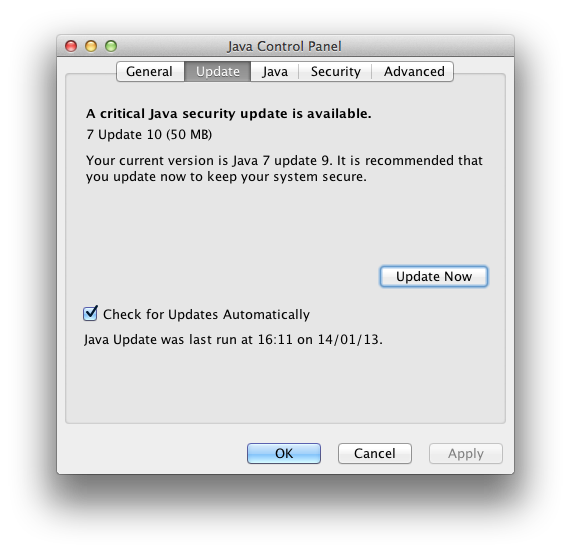
Open system preferences. If you see a Java icon, the 'standalone' version of Oracle's Java is installed. Click that icon and it'll open up the java control panel. Check for updates and you'll get this: ![]() Click update now. It'll guide you through the update and hey presto you're done. If you want to make sure it worked, go back to that Java control panel and check the version. It should show as Java 7 update 10. If you dont have the java icon, you dont have Java installed. However some apps have it 'built in' - these will need to be updated by the app developer however likely wont be a problem.
__________________
|
|
|
|
0
|
|
|
#23 |
|
Thanks. That makes sense.
__________________
|
|
|
|
0
|
|
|
#24 | |
|
Quote:
1. Oracle, as a corporation, has no incentive to fix security issues. It doesn't generate profit. 2. Taking a PR beating eventually provided enough incentive - it finally lit enough of a bonfire under their nuts to fix the issue. |
||
|
|
0
|
|
|
#25 |
|
Back when Apple decided to leave the support for Java to Oracle, I tried to install Oracles Java Runtime (don't remember which version it was)
But I found that for some reason suddenly Java required the use of the discrete graphics on my MBP. Not thinking about the security impact, I uninstalled Java and reinstalled Apples most recent Java Runtime, and happily forgot about it. Now with this vulnerability, I thought I better upgrade to the latest Java, but I can see that it is still forcing the discrete graphics to kick in. -Why is that? I cannot see a reason for it. -Is there a way to prevent it? br Barry
__________________
Oh Yeah! |
|
|
|
0
|
![]() |
|
«
Previous Thread
|
Next Thread
»
| Thread Tools | Search this Thread |
| Display Modes | |
|
|
All times are GMT -5. The time now is 09:36 PM.


13" MacBook Pro - 2.53 GHz C2D - 500GB HDD - 8GB RAM

Linear Mode