
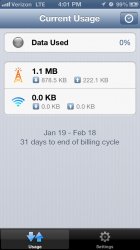
I did a 2 mile run. And that's how much data was used. This by no means a scientific study. But I am hoping that everybody can contribute and we can come with with a good number.

View attachment 391311View attachment 391312
I did a 2 mile run. And that's how much data was used. This by no means a scientific study. But I am hoping that everybody can contribute and we can come with with a good number.

I'm impressed with 2 miles in 7 minutes!
I thought the same thing.
And battery went from 98% to 99%. I want a battery like that!

Lmao... Good eye!
What good eye. It's plugged in. It's supposed to go up.

I am very interested in this topic as well. Has Apple ever officially said how much data their mapping program uses? I wish Apple would allow DL'ing of maps in advance, or at least for your route. At any rate, I expect Apple maps uses less than Google maps, because there is less detail presented on the Apple screen than Google.
Oh and BTW, I don't necessarily interpret a "2 mile run" to mean a literal RUN ... I think the OP might have done this in his car?
What good eye. It's plugged in. It's supposed to go up.
I am very interested in this topic as well. Has Apple ever officially said how much data their mapping program uses? I wish Apple would allow DL'ing of maps in advance, or at least for your route. At any rate, I expect Apple maps uses less than Google maps, because there is less detail presented on the Apple screen than Google.
Oh and BTW, I don't necessarily interpret a "2 mile run" to mean a literal RUN ... I think the OP might have done this in his car?
I am very interested in this topic as well. Has Apple ever officially said how much data their mapping program uses? I wish Apple would allow DL'ing of maps in advance, or at least for your route. At any rate, I expect Apple maps uses less than Google maps, because there is less detail presented on the Apple screen than Google.
Oh and BTW, I don't necessarily interpret a "2 mile run" to mean a literal RUN ... I think the OP might have done this in his car?

what app is that?
Data Man

http://gizmodo.com/5948066/there-is-one-thing-that-apple-maps-is-a-lot-better-than-google-maps-at
According to this, Apple Maps is 5 times more data efficient then Google.
I guess if you're on a data limit this would be a thing to consider when choosing which app to use.
Too bad Apple Maps doesn't do much of anything else better then Google Maps.
I don't know about Apple Maps ( I'm new to the Iphone) but I know Google Maps will cache maps of a entire area ahead of time, for example Dallas-Fort Worth Metroplex and the navigation works even with the data turned off.

Still doesn't explain the 2 miles in 7 minutes. 😀
hi guys,
slightly off-topic query, but what's the advantage of using DataMan over the regular options in iOS setting (Settings - General - Usage - Cellular Usage)? cos i reset this every month.
Also, is there any app that shows me what app is using how much data? i know this is built into the android, but was wondering if there's something that tells me which of my apps eat up most of my monthly 1 gb data plan.
cheers!
Onavo Count tells you how much data the apps are using.