|
|
#1 |
|
External flash storage with TB and USB 3.0
Greetings all.
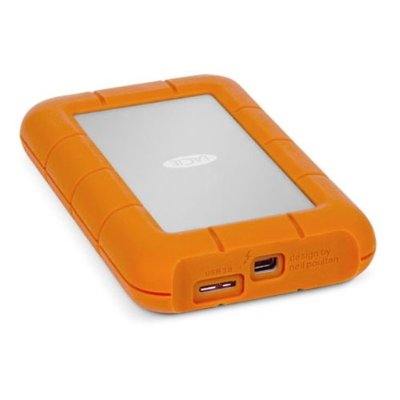
I am looking for an external storage solution for my macs. (and pc's) I need 256GB but preferably 512GB of flash storage that is accessible via Thunderbolt and USB 3.0. I prefer a bus-powered solution so it is mobile as well. Since I want the SSD for speed I am looking for the fastest solution available. I would not want to spend far above 350€. Taking all of this in consideration, I found that the LaCie Rugged 256GB SSD Thunderbolt and USB 3.0 Drive fits my needs, but speed-wise it seems a tad slow for an SSD. (380MB/s whilst a good SSD goes up to 500?) Is there any other product I should look into? Am I better off purchasing an enclosure and a SSD apart? I could really use some advice. To add to that, I'd love to see the perfect solution if I WAS NOT on a budget as well. Your input is appreciated. Thanks already for your replies. With kind regards, Jeutie |
|
|
|
0
|
|
|
#2 |
|
why not get this? http://www.amazon.com/Passport-Porta...nal+hard+drive
2tb hard drive for much less than what you are wanting to pay
__________________
Galaxy S4 Verizon iPad 4 16gb wifi 2011 13" Macbook Pro,i5 2.3 ghz, 16gb corsair ram, 128gb ocz vertex4, 1tb hdd (replaced superdrive) Thunderbolt Display
|
|
|
|
0
|
|
|
#3 | |
|
If you have a computer that does not have an ssd or a sata 2 one, then the 380mb/s of the lacie rugged is unimportant. when copyig files to the external
ssd the read speed of your internal drive is the bottleneck, when copying files to the internal drive then the internal drives write performance is the bottleneck. Only if you have an internal ssd that is quicker then 380mb/s would it be worth it to get a quicker external ssd then the lacie rugged. You could have a look at thundebolt and usb 3.0 enclosures and fit a samsung 840 pro inside. then it would be quicker. Quote:
__________________
2010 15" i7 AG MBP, 2009 17" AG MBP, 2009 8C 2.26 MP, 2010 quad MP,2010+07 MM, 17" 2007 MBP, 20" iMac G5,17" PB G4,4x30"CD,9 screens, G3's,G4's, 17"iMac g4,iMac G3 turquoise,macintoshes dating to 1990 Last edited by The-Pro; Jan 25, 2013 at 03:49 AM. |
||
|
|
2
|
|
|
#4 | |
|
Quote:
|
||
|
|
0
|
|
|
#5 | |
|
Quote:
Last edited by PastFuture; Jan 25, 2013 at 07:13 AM. |
||
|
|
0
|
|
|
#6 |
|
The best solution would be to use USB 3.0 or drop your PCs. Just put a 240GB SanDisk SSD in a USB 3.0 enclosure. As those enclosures operate on SATA-II, the 256GB Samsung 840 Pro would be a waste - unless you replace another SSD in one of your computers with it and use the old one in the enclosure.
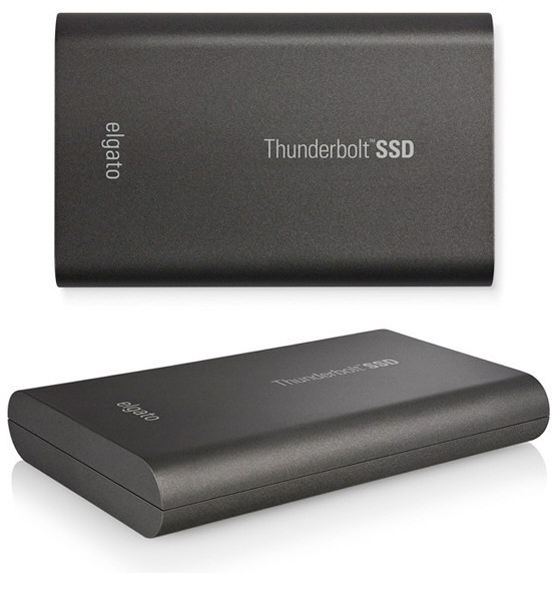
Otherwise, you're left with the LaCie Rugged SSD (which is actually slower than a USB 3.0 solution), as the elgato Thunderbolt SSD doesn't have USB 3.0 and the LaCie Little Big Disk blows your budget and doesn't come with USB 3.0 either. ![]() ![]()
Last edited by Giuly; Jan 25, 2013 at 06:08 AM. |
|
|
|
1
|
|
|
#7 |
|
yes correct but when opening my aperture library (26000pics) the read from my internal ssd doesnt go beyond 110mb/s. so i didnt think its important if u have 380 or 500mb/s read speed. thats just me, might be different for someone else
__________________
2010 15" i7 AG MBP, 2009 17" AG MBP, 2009 8C 2.26 MP, 2010 quad MP,2010+07 MM, 17" 2007 MBP, 20" iMac G5,17" PB G4,4x30"CD,9 screens, G3's,G4's, 17"iMac g4,iMac G3 turquoise,macintoshes dating to 1990 |
|
|
|
0
|
|
|
#8 | |
|
Quote:
Thanks a lot for your input. I guess I'll have to look into something else then.
|
||
|
|
0
|
|
|
#9 |
|
Sounds like the USB3 requirement is a saftey net for a remote possibility. You may want to get a TB enclosure for your SSD solution that you would use every day, and then pick up a cheap USB3 enclosure as prices drop. On the occasion that you need to plug it into your PC, a 5-minute swap will keep you in business.
|
|
|
|
2
|
|
|
#10 | |
|
Quote:
|
||
|
|
0
|
|
|
#11 | |
|
Quote:
Although this works perfectly fine and is rather inexpensive, you don't have an enclosure around the SSD. In that case you would need the complementary Seagate Backup Plus HDD and replace the HDD inside. If you now take the (temporarily) useless USB 3.0 enclosure and install the spare hard drive into it, you have yourself a 1TB backup solution or iTunes drive as well. |
||
|
|
1
|
|
|
#12 | |
|
Quote:
|
||
|
|
0
|
![]() |
|
«
Previous Thread
|
Next Thread
»
| Thread Tools | Search this Thread |
| Display Modes | |
|
|
All times are GMT -5. The time now is 11:19 AM.


iPad 4 16gb wifi 


Thanks a lot for your input. I guess I'll have to look into something else then.
Linear Mode