
|
|
#1 |
|
App for simple layering of text and graphics?
I'm having to keep one computer running Snow Leopard as I still use two apps that won't run on later versions of OS X.
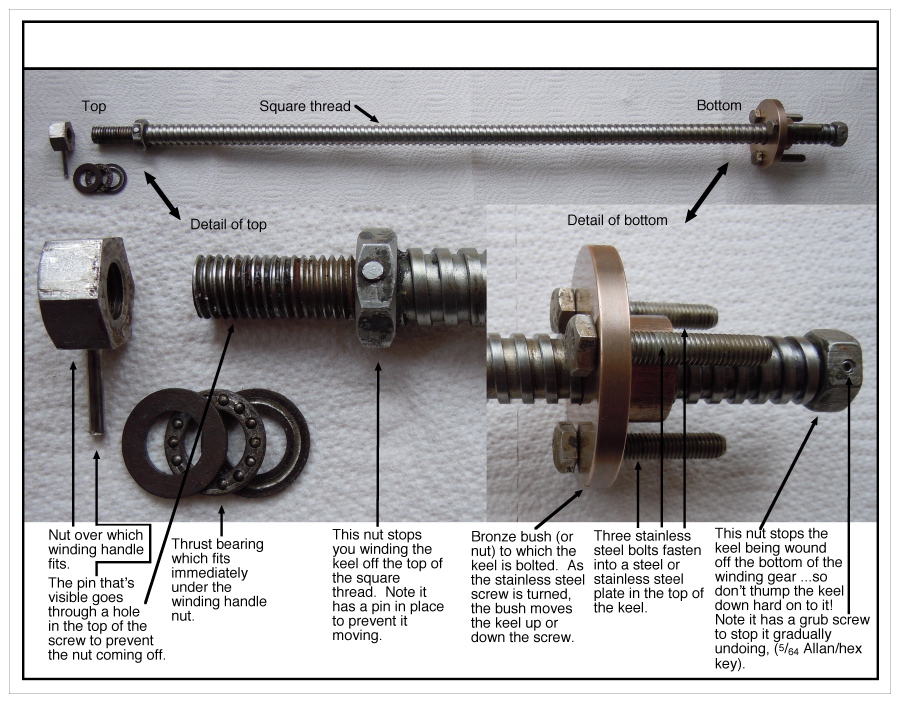
One is AppleWorks (renamed from ClarisWorks). Although I've used MS Office apps since Word 4 in 1989, I found AppleWorks was better suited to mixed text, graphics and so on. I mostly used it for putting arrows and labels on maps when giving directions to events, but also for labelled diagrams such as this: Can you recommend an inexpensive, easy-to-use app that treats such photos, text labels and drawn graphics (such as arrows in the diagram above) as layered objects - one that runs on the latest versions of OS X? Please note that I'm not looking for an app with advanced/professional graphics functionality. |
|
|
|
0
|
|
|
#2 |
|
I use Pages for stuff like that. £13 from the App Store. No idea of the $ price, but it won't be much.
__________________
PPC Mini, 10.4.11, Intel Mini, 10.6.6, White MacBook 10.6.8 iPhone 3GS, using o2 PAYG |
|
|
|
0
|
|
|
#3 |
|
I would recommend Adobe Photoshop CS6. It does wonders with text and photos. It also does layers that you can hide and unhide. It's really pretty amazing.
|
|
|
|
0
|
|
|
#4 | |
|
Quote:
1. Inexpensive. 2. Simple. I suggest that the OP takes a look at Pixelmator, while it perhaps gives him more than he needs, there are lots of excellent tutorials on the develpoers website and unlike Photoshop, does not require you to take a 2nd mortgage to buy it. Currently $14.99 in the Mac App Store. Also a new App, Napkin looks like it might be a good choice as well, for what the OP wants to do, but I have not tried it myself yet, but I have been thinking of getting it. Does not look like it has layers though. As David said, Pages or Keynote can be used to produce simple labeled diagrams.
__________________
Productivity Orchard Be more productive with your Mac |
||
|
|
0
|
|
|
#5 |
|
Thanks for these useful suggestions. It looks that Pages will be the solution. Thanks Dave. iWork could be useful in other ways, though for mainly text-based documents I've used Word for many years (eg, typesetting documents to be printed for publication). I've created a 'library' of Word styles and macros, so I can do jobs quickly and efficiently. I wonder how my skills in Word and AppleWorks will transfer to Pages, which initially looks very different!
I'll take a look at Pixelmator too. Thanks James. However, its name makes me think it might be aimed at pixel graphics (like AppleWorks Paint documents) rather than manipulatable objects (like AppleWorks Draw documents). I do have a pixel-based app I occasionally use. It's an old version of GraphicConverter (6.0), I use mostly to shrink JPGs or save in a different format -- I don't understand some of it's more sophisticated functions! (I must investigate upgrading it to the latest version, 8.5.1!) If Napkin doesn't have layers, I think it would be less useful. Thanks for your suggestion, Luis, but I think James is right that Adobe Photoshop CS6 would be beyond what I need. I do use iPhoto's editing functions, for example, 'Adjust Shadows' to brighten only the darkest areas of the photo and 'Adjust Highlights' to darken only the lightest parts. I'd like to be able to do this selectively to areas of a photo I select. Maybe Photoshop would help with that, but I expect I could find something simpler and less expensive for that too. |
|
|
|
0
|
|
|
#6 |
|
You can annotate pictures with Preview (View -> Show edit toolbar). It might be a bit too simple for what you want, but after you've drawn arrows and added labels you could then export the picture into your word processor of choice.
__________________
2011 11" Air i5 1.6/4/128; 2011 Mac mini; iPad 3 32GB WiFi; iPhone 5 64GB; Apple TV3 |
|
|
|
0
|
|
|
#7 |
|
John, I went ahead and bought a copy of Napkin, and it looks like a really useful app. Given what you want to do I think it is a very good fit. iMore did a review video on YouTube. Take a look, it gives you a pretty good idea on what it can do. The call out feature is very handy.
__________________
Productivity Orchard Be more productive with your Mac Last edited by James Craner; Jan 26, 2013 at 12:14 PM. |
|
|
|
0
|
|
|
#8 |
|
Acorn maybe?
|
|
|
|
0
|
|
|
#9 |
|
Keynote would also be excellent for the job, and better than Pages IMO, for that kind of work.
__________________
"There's no bigot like a religious bigot and there's no religion more fanatical than that espoused by Macintosh zealots." ~Martin Veitch, IT Week [31-01-2003] |
|
|
|
0
|
|
|
#10 |
|
Second for Keynote.
If you're already looking into Pages, may as well get them both as part of the iWork bundle. |
|
|
|
0
|
|
|
#11 | ||
|
Quote:
Quote:
Although I add arrows and labels to maps, aerial photos, diagrams, etc, I only produce them occasionally, just a few a year – I am retired. So it would be better value to get something with additional functionality. Pages may not be quite as efficient or versatile as Napkin and Acorn for producing diagrams with labels, but it is probably sufficient for me and I hope would also give me functionality for different tasks. For example, I guess Pages would give me a page-layout functionality very different from Word, (because Word tends to be rather orientated around a linear flow of text, despite being able to insert graphics and text boxes and manipulate how they relate to the main body of text). Thanks T'hain Esh Kelch and svenr. I had assumed that Keynote would be similar to Pages in how you produce the sort of diagrams I have in mind. Can you explain why you think Keynote would be better than Pages? Things that were good about AppleWorks for this task were:
Last edited by old john; Jan 27, 2013 at 07:11 PM. Reason: Correction |
|||
|
|
0
|
![]() |
|
«
Previous Thread
|
Next Thread
»
| Thread Tools | Search this Thread |
| Display Modes | |
|
|
All times are GMT -5. The time now is 09:21 PM.


Linear Mode
