|
|
#1 |
|
Installing Snow Leopard on a Mac Pro 2011
Hey folks,
I'm trying to Install an OS on the Mac Pro (MP) and I found out that I am unable to install SL on a MP 2011 so I booted up into the OS with my current drive and I tried to install it to the second hdd which I have. I formatted it w/ GUID partition table and as the installer is running, it shuts down and boots up into the apple logo and stays there. Any ideas? I was also wondering If I can do a fresh Mountain Lion install on the MP that came with Lion originally? |
|
|
|
0
|
|
|
#2 | |
|
Quote:
__________________
Illustrations & Web Graphic Design |
||
|
|
0
|
|
|
#3 |
|
The 29 / 19 USD Mac OS X 10.6 Snow Leopard Upgrade DVD from the Apple Online Store will only work with pre-2010 Macs.
As your 2011 Mac originally was released with Mac OS X 10.6 Snow Leopard back in 2010, it can run Mac OS X 10.6 Snow Leopard, but you need another Mac with Mac OS X 10.6 Snow Leopard to install Mac OS X 10.6 Snow Leopard onto the 2010/2011 Mac Pro (the same Mac Pro). Like this for example: [SUCCESS!]Late 2011 Macbook Pro with Snow Leopard As for OS X 10.8 Mountain Lion, go to the Apple Online Store, buy it, download it and do not install it, but make an installer with a USB flash memory thumb drive. If you want to make a bootable installation medium, you can follow these steps: • Lion DiskMaker
__________________
This is not
|
|
|
|
0
|
|
|
#4 | |
|
Wait a second! Aren't the 2010 and 2012 Mac Pros the same thing, except for speed bumped processors? How can there be a difference if they used the same logic board but just bumped up the speed?
So, if someone got a 2012 Mac Pro(same as 2010), and it came with Lion preloaded, you are telling me that Snow Leopard 10.6.4 won't install? My Mac Pro is a 6-core Westmere and its discs state 10.6.4 Snow Leopard.. so, that won't work on the 2012 versions? Same identifier, same firmware. Quote:
|
||
|
|
0
|
|
|
#5 | |
|
Quote:
__________________
Illustrations & Web Graphic Design |
||
|
|
0
|
|
|
#6 | |
|
Quote:
And the other answer is, a Mac, that already came with Mac OS X 10.6 Snow Leopard does not need to be serviced by the Mac OS X 10.6 Snow Leopard Upgrade DVD, and since every Mac released since 10/2009 comes with Mac OS X 10.6 Snow Leopard and later, Apple did not bother to update the Upgrade DVD any further, as that DVD was meant for x86 Macs released between 2006 and 2009.
__________________
This is not
|
||
|
|
0
|
|
|
#7 |
|
But the Mac Pro HW hasn't changed since '09
__________________
The Christian resolution to find the world ugly and bad has made the world ugly and bad--Nietzsche |
|
|
|
0
|
|
|
#8 |
|
The chips and chipsets have though, have they not? Nehalem to Westmere I suppose, but then again, I am not that versed with Mac Pros.
__________________
This is not
|
|
|
|
0
|
|
|
#9 | |
|
Quote:
But I think the OP is talking about a MacBook Pro..
__________________
The Christian resolution to find the world ugly and bad has made the world ugly and bad--Nietzsche |
||
|
|
0
|
|
|
#10 |
|
Not the first time, but then again, we probably will never know, außer die Luisenburger essen wieder ihr PeMa Brot nicht auf.
__________________
This is not
|
|
|
|
0
|
|
|
#11 |
|
10.6.4 special build or 10.6.5+ will boot and install on Mac Pro 2010-2012.
But I think OP is talking 'book. So, wrong thread.
__________________
Mac Pro W3680, GTX 680 2GB, 12GB DDR3, SSD; MBP Mid 2012, 2.6GHz Core i7, 16GB DDR3, SSD |
|
|
|
0
|
|
|
#12 |
|
Op must be talking about a Macbook Pro.
I've used my 10.6.4 disks (the ones that came with my 2010 Mac Pro) on a "2012" Mac Pro (the later model with the slight processor bump). The disk booted and installed fine. The hardware identifier hasn't changed on the Mac Pro since the 2010 model (it's still MacPro5,1). There is literally no way to identify the newer Mac Pro from the older, since they're the same- only the CPUs differ, and the 10.6.4 disk doesn't care about the slight difference. -SC
__________________
2010 Mac Pro (MacPro5,1), 2*2.93ghz, 64GB, 4x2TB, Apple RAID Card, 5970 GPU, 2xSD, Eizo CG276W |
|
|
|
0
|
|
|
#13 |
|
Out of interest, why would you want to do this?
Apple clearly don't want you to! I find that OS X 10.8 is the best release of OS X yet. I wouldn't want to go back to 10.6! |
|
|
|
0
|
|
|
#14 | ||
|
Maybe the current OS X 10.8 Mountain Lion does not satisfy the OP's needs?
Quote:
Quote:
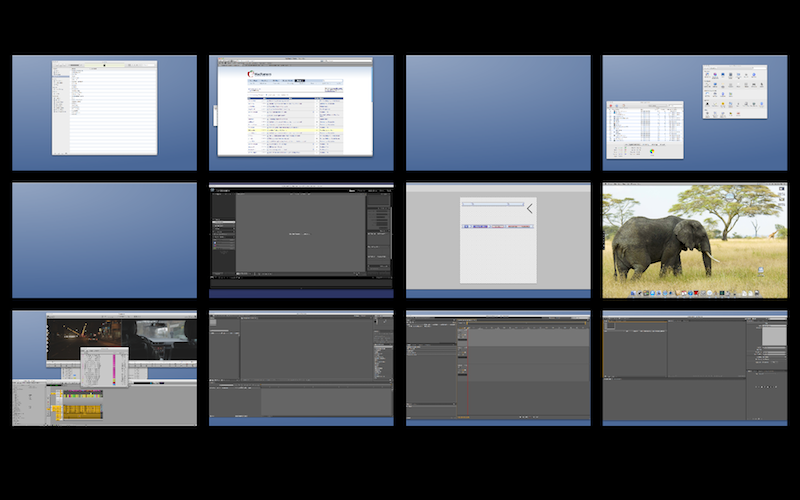
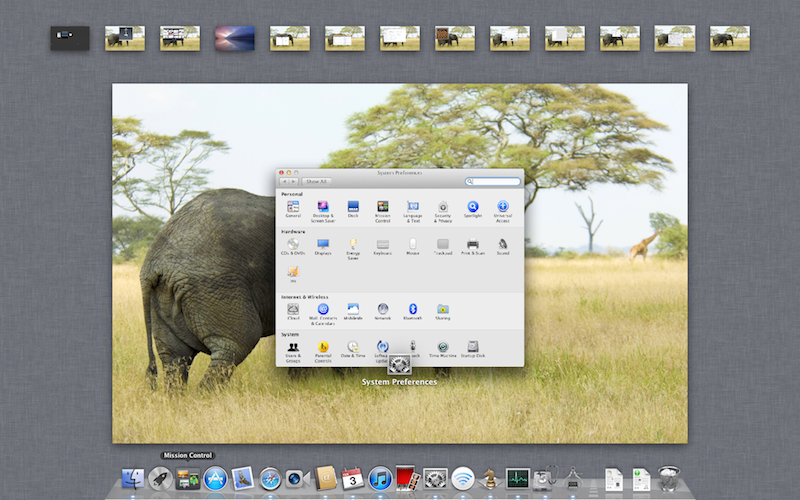
I for example still prefer Mac OS X 10.6 Snow Leopard over Mac OS X 10.7 Lion and OS X 10.8 Mountain Lion, just for Spaces alone. Imagine going from Spaces in Mac OS X 10.6 Snow Leopard, looking like this to Mission Control in Mac OS X 10.7 Lion, looking like this Of course, not everyone uses that many Spaces, but Mission Control seriously hampers the usefulness of more than four virtual desktops.
__________________
This is not
|
|||
|
|
2
|
|
|
#15 | |
|
Quote:
To answer the OP question, yes, you can install Snow Leopard on a 2012 Mac Pro if you were referring to the workstation instead of the notebook, and it runs very well. ---------- As well as 2012 machines preloaded with 10.8.0 |
||
|
|
0
|
|
|
#16 |
|
While you refer to 2012 Mac Pros, which only got a slight CPU upgrade in 2012, I was talking about the 2011 Mac mini, and the 2012 Mac mini cannot be used with Mac OS X 10.6 Snow Leopard anymore. Sadly.
__________________
This is not
|
|
|
|
0
|
|
|
#17 |
|
My bad - I was referring to the 2010/2012 Mac Pro. I tried to install Snow Leopard on a 2011 Air (different subject) which I think would have similar internals than like the mini, but ran into thermal issues with the Air. I sold it before I messed with it too much, but Lion actually ran on that fine. That as just tinkering, as usual.
|
|
|
|
0
|
|
|
#18 | |
|
Quote:
__________________
This is not
|
||
|
|
0
|
|
|
#19 |
|
There has to be a restriction coded in the software that checks for a hardware ID number.
The Hackint0sh community should be able to help with this (I.e. a way to rebuild the install DVD after removing the hardware check). I'm sure there are a hundred different reasons one would prefer Snow Leopard over Lion / Mt. Lion, but for me it's simple: I don't want any part of iOS on anything BUT an iOS device. I'm sure there are other like-minded individuals out there. Good luck, OP. check the usual Hackintosh hangouts. |
|
|
|
1
|
|
|
#20 | |
|
Quote:
If you have another mac that can install SL, then you can also use target disk mode to install it. |
||
|
|
0
|
|
|
#21 | |
|
I agree!!!
I detest Lion and Mountain Lion.. I have no need for itoys in my OS and no need for IOS integration at all.. I prefer Snow Leopard as this is the LAST true and stable Mac OS X out there.. for my PowerPC Macs Leopard is just as good..
I like pure Mac OS X versions, not IOS additions. Mountain Lion, Lion = Toy OS's, where as Snow Leopard, Leopard, and Tiger are REAL Workhorse OSes. Enough ranting... Quote:
---------- While I know it won't run on a Quad G5, could I install Mountain Lion via FTDM to my Quad G5? Again, I know it wouldn't work.. but just asking if it were even possible to install it. If you have another mac that can install SL, then you can also use target disk mode to install it.[/QUOTE] |
||
|
|
0
|
|
|
#22 |
|
If the G5 is in TDM, probably, as it is only seen as an HDD by the installer nothing more.
__________________
This is not
|
|
|
|
0
|
|
|
#23 | |
|
Quote:
__________________
Mac Pro W3680, GTX 680 2GB, 12GB DDR3, SSD; MBP Mid 2012, 2.6GHz Core i7, 16GB DDR3, SSD |
||
|
|
0
|
|
|
#24 |
|
I ended up just upgrading to Mountain Lion. It's not that bad to be fair, It's not as horrible as Lion. Still a shame that Apple doesn't let you do this, thanks for the help folks!
|
|
|
|
0
|
![]() |
|
«
Previous Thread
|
Next Thread
»
| Thread Tools | Search this Thread |
| Display Modes | |
|
|
All times are GMT -5. The time now is 05:53 AM.


Linear Mode