|
|||||||
![]() |
|
|
Thread Tools | Search this Thread | Display Modes |
|
|
#1 |
|
Looking to Replace Home Windows Based Desktop With Used Mac Pro: What to Look For
Hi, One of my 2 home's Windows based desktops recently died and am considering to purchase an Mac Desktop as a replacement. I'm familiarized with Apple laptops as we have home a 2012 Air (wife), 2010 MBP 13" (daughter) and 2012 15" rMBP (mine) but not so much on the Apple desktops. We want to re-use the 26 inch Samsung screens (2) were using on the old desktop and am not considering the iMac, but rather focusing on the Mac Pro series. If I want to purchase an used unit, what is the minimum configuration I should look for? I have seen 2009-10 Mac Pro's on the lower $1k range and wonder if they would be a good choice or not.
Thanks, ![]() Francisco
__________________
2012 15" rMBP 2.7 | 16 | 768 | (Full Samsung) | 64GB Nifty Micro SD I5 | 64 | JB | EC Black Ops | AT&T ∞ Data iPad 4 | 6.1.2 | 32 GB | AT&T + LTE Mac Mini | 2.5 |500 | 120GB SSD |
|
|
|
0
|
|
|
#2 |
|
Has a Mac mini ever crossed your mind? It uses much less electrical power than a Mac Pro, which gets you saving on your electric bill, but it is still a good performer and even faster than some basic Mac Pros.
Or have you looked at the Refurbished Mac section in the Apple Online Store for slightly older Mac Pros?
__________________
This is not
|
|
|
|
0
|
|
|
#3 |
|
What will be the typical use of the computer? This is important.
A Mac Mini would probably work well unless your wife is counting on it for really intensive work or games. |
|
|
|
0
|
|
|
#4 |
|
Use will be primarily Ms Office applications and web browsing (YouTube, FaceBook, etc.)
__________________
2012 15" rMBP 2.7 | 16 | 768 | (Full Samsung) | 64GB Nifty Micro SD I5 | 64 | JB | EC Black Ops | AT&T ∞ Data iPad 4 | 6.1.2 | 32 GB | AT&T + LTE Mac Mini | 2.5 |500 | 120GB SSD |
|
|
|
0
|
|
|
#5 | |
|
Quote:
A Mac mini can drive two monitors, it has a Mini DisplayPort and HDMI out, thus you may only need an adapter to connect your two monitors.
__________________
This is not
|
||
|
|
0
|
|
|
#6 |
|
Thanks for the input. What configuration I should look for?
__________________
2012 15" rMBP 2.7 | 16 | 768 | (Full Samsung) | 64GB Nifty Micro SD I5 | 64 | JB | EC Black Ops | AT&T ∞ Data iPad 4 | 6.1.2 | 32 GB | AT&T + LTE Mac Mini | 2.5 |500 | 120GB SSD |
|
|
|
0
|
|
|
#7 |
|
The base Mac mini should do more than fine, but if you might want a faster CPU, you could look at the quad core mini.
Hell, even a 2010 Mac mini will work for you.
__________________
This is not
|
|
|
|
0
|
|
|
#8 |
|
What should be a fair price for a slightly used MD387LL/A Mini (October 2012 release)?
thanks
__________________
2012 15" rMBP 2.7 | 16 | 768 | (Full Samsung) | 64GB Nifty Micro SD I5 | 64 | JB | EC Black Ops | AT&T ∞ Data iPad 4 | 6.1.2 | 32 GB | AT&T + LTE Mac Mini | 2.5 |500 | 120GB SSD |
|
|
|
0
|
|
|
#9 | |
|
Quote:
|
||
|
|
0
|
|
|
#10 | |
|
Quote:
If you have never owned a Macintosh tower, I think you would be in for a treat. They are really, really nice machines. The Mac mini has its place, but it doesn't compare to the Mac Pro IMO. |
||
|
|
0
|
|
|
#11 | |
|
Quote:
But the Mac Pro would be more than overpowered for the stated needs of the OP (post #4), thus a Mac mini is the better choice, unless one has too much money and can buy a four or eight core workstation to run MS Office and also can easily live with the additional electric bill costs such Mac Pro would accumulate during rendering those spreadsheets.
__________________
This is not
|
||
|
|
0
|
|
|
#12 |
|
The mac mini is probably your best bet. It'll run significantly faster than old model mac pros and is relatively cheap. The reason to run a mac pro is simple, you have large work loads which require running a computer for endless hours at max capacity.
If you're a casual user, or you're not a member of a small subset of professional users, then you look at iMacs and mac minis. From my experience, it's quite rare to run into someone that owns a mac pro that actually needs a mac pro for their work. More often than not, former pc owners and old stock mac users assume the tower to be the default machine. The mac mini is not some netbook. The quad core mini can more than adequately handle the work loads of many people using mac pros. I tend to think many people use mac pros because of a perceived prestige of ownership, a preference for towers, or a gross misunderstanding of their own computing needs. Of course, then you find people that actually need a mac pro, and they're a different breed entirely. Check out the mac mini, you'll be pleasantly surprised.
__________________
Mac Mini 5,1, 2.3 ghz, 8GB RAM, 1.5TB (HTPC) Mac Mini 5,2, 2.5 ghz, 16GB RAM, 500 GB HD, 256 GB SSD iPhone 4S |
|
|
|
0
|
|
|
#13 |
|
Thanks. I think will look for a MD387LL/A model. I noticed Apple says it comes with a video adapter, but mot sure which one. If my 2 Samsung monitors have DVI inputs, what accessory will I need to connect it?
Thanks!
__________________
2012 15" rMBP 2.7 | 16 | 768 | (Full Samsung) | 64GB Nifty Micro SD I5 | 64 | JB | EC Black Ops | AT&T ∞ Data iPad 4 | 6.1.2 | 32 GB | AT&T + LTE Mac Mini | 2.5 |500 | 120GB SSD |
|
|
|
0
|
|
|
#14 | ||
|
Quote:
Quote:
__________________
This is not
|
|||
|
|
0
|
|
|
#15 |
|
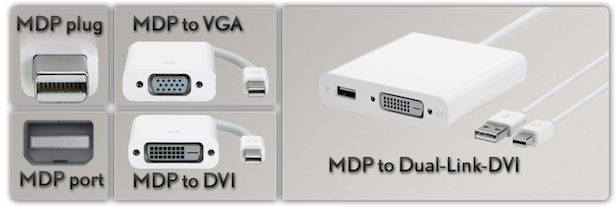
Thanks for the info. Looking at the rear panel of the Mac Mini I understand the supplied adapter would go on the HDMI port. I don't see a Mini Display Port in the back of the unit, but rather a Thunderbolt port. Does the second video adapter can be fed from the Thunderbolt port?
![]() I have one more question. I have a 256GB SSD from my Retina MacBook Pro on an external enclosure since swap it with a bigger (512GB) unit shortly after I purchased the laptop. Can I somehow install it on the Mac Mini? I noticed there ia an option for an SSD from Apple but wonder what is the connector would need to adapt it. Thanks, Francisco
__________________
2012 15" rMBP 2.7 | 16 | 768 | (Full Samsung) | 64GB Nifty Micro SD I5 | 64 | JB | EC Black Ops | AT&T ∞ Data iPad 4 | 6.1.2 | 32 GB | AT&T + LTE Mac Mini | 2.5 |500 | 120GB SSD Last edited by fskywalker; Feb 17, 2013 at 05:24 PM. |
|
|
|
0
|
|
|
#16 | |||
|
Quote:
Quote:
To learn more about Thunderbolt (TB) and its compatibility with Mini DisplayPort (MDP):And yes, the TB port also supports audio out via an appropriate MDP > HDMI adapter, but then again, you have an HDMI out already. As for the rest of the question, I answered it here in your other thread.
__________________
This is not
|
||||
|
|
0
|
|
|
#17 |
|
I have a question related to displays:
I have a graphics card on my PC that has two dual link DVI outputs, and I have two HP LP3065 30" displays connected to it, and it works perfectly. Card is a nVidia 8800GTX. I recently purchased a mid 2010 mac pro, comes with the ati 5770. This card has just one DVI output. I have to connect my two 30" monitors, but I've heard the the mini display port to DVI adapter can be flickery. Finally, my question: Is there any graphics card out there with 2 DVI ports for the mac pro, that can run my two 30" monitors at their native 2560x1600 resolution? |
|
|
|
0
|
|
|
#18 |
|
Well, I answered my own question: Just purchased the nVidia GeForce GTX285 1GB for macs. Perfect for two 30" monitors connected via DVI cables.
|
|
|
|
0
|
![]() |
|
«
Previous Thread
|
Next Thread
»
| Thread Tools | Search this Thread |
| Display Modes | |
|
|
All times are GMT -5. The time now is 04:12 PM.


Linear Mode