|
|
#1 |
|
MacBook Air instant-on not so instant
I recently got my Macbook Air 13" with a Core i7 and 8GB RAM with 256GB Flash Storage. They claimed that instant on was instant but for me it is not. When my Macbook Air goes to sleep on charge, it wakes up instantly. When it goes to sleep and I wake it up within 10 minutes, it wakes up instantly but for example at night I would close the lid and leave it by my bed. In the morning I would open the screen and it would freeze. The keyboard backlight is off, the space to enter your password is white with no thing to type and it takes a few seconds to turn on. Why is this and can someone help resolve this?
Much appreciated |
|
|
|
0
|
|
|
#2 | |
|
Quote:
__________________
11" MacBook Air 2012, 13" MacBook (Black), iPhone 4 32GB, iPad Mini 32GB, 15GB free storage! Better than Dropbox or iCloud! Which is better? You decide here |
||
|
|
0
|
|
|
#3 |
|
First to your quetion there's 2 diffrent form of sleep in the MacBook the first one,is a light sleep where all your data is stored in the ram until woken up, the other is a deep sleep where the ram will copy everything to the ssd then when you wake it up from this sleep it has to copy everthing from the ssd back to the ram thats why you experince this lag , if you not going to use the computer within 4 hours just turn it off
|
|
|
|
1
|
|
|
#4 |
|
I have a 2011 13" MBA 4GB/256GB. I rarely reboot it, just put it to sleep at the end of the day. But I quit from everything except mail and skype before putting it to sleep.
It wakes up in just a couple seconds every morning with no problem and I have been doing this every day for about a year. True, the MBA also starts up pretty quickly from a full shutdown, but then I have to enter my username and password (the way I have mine configured). |
|
|
|
0
|
|
|
#5 |
|
***** did I just read?
It's a Mac, not a PC. It doesn't need rebooted daily. You only need to reboot if things seem a little weird or slow.
If you were supposed to turn them off every night they wouldn't have developed the "power nap" feature. Mine has a little lag when first waking up after a long sleep too. A few seconds (maybe 5 ish?) isn't that bad. It does seem longer than it was when it was brand new, but I assume that has something to do with all the programs I keep running. I never turn off my MBA unless it's not going to be used for several days (never happens). The longest I've gone without rebooting is 30 days. Jeff |
|
|
|
2
|
|
|
#6 |
|
Thank you guys. I really should put it to sleep at night but the one problem is the start up chime! You see it wakes the whole family in the morning
|
|
|
|
0
|
|
|
#8 | |
|
Quote:
|
||
|
|
1
|
|
|
#9 |
|
I don't remember the actual command but it had something to do with set hibernate mode. Changing this value will keep your MBA from going onto deep sleep but battery will be used at a faster rate.
|
|
|
|
0
|
|
|
#10 |
|
enter this command into Terminal and hit enter.
sudo tmutil disablelocal it'll ask you for your password. restart. bingo |
|
|
|
0
|
|
|
#11 | |
|
Quote:
Really, anything would be better than the air full-out freezing for a few seconds.
__________________
MacBook Air • 17" MacBook Pro • iPod Nano • Apple TVCustom Windows 7 Desktop • Surface RT • WP8 experience comes from bad judgment." - Mulla Nasrudin |
||
|
|
2
|
|
|
#12 | ||
|
Quote:
If you keep it plugged it, or have something plugged into one of the USB ports, it won't drop down into "deep sleep" mode and will still be "instant on." The "deep sleep" mode is what helps it keep battery life even if you don't use it for up to 30 days. Quote:
|
|||
|
|
2
|
|
|
#13 | |
|
There is nothing to resolve, this is normal.
So Apple "instant" is a slight exaggeration, what else is new? Quote:
__________________
Solution: FREE, Explanation: Is gonna cost ya. |
||
|
|
0
|
|
|
#14 | |
|
Quote:
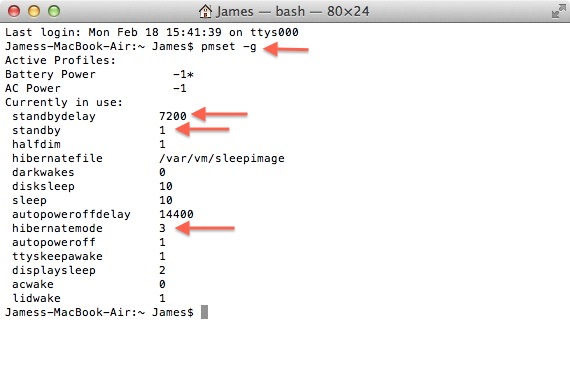
Pros: Better battery life when in hibernate, because it cuts power to the RAM. Cons: Takes a few seconds longer to wake up (since it is reading from the SSD instead of the RAM) Here is how you can change/tweak how long it will take for hibernate to kick in. If you want it to take longer, you'll want a higher number. 1. Open Terminal. 2. Type (without the quotation marks) "pmset -g" and then press ENTER. 3. You will see the following readout: ![]() 4. Locate the "standby" and "standbydelay" entries. "standby" should read "1", and "standbydelay" will be a larger number (I forget what the default is). The "standbydelay" is the length of time, in SECONDS, after you put your MBA to sleep that it will wait before going into standby/hibernate mode. Also, make sure that "hibernatemode" is set to "3". 5. You'll want to change this to a larger number if you don't want your MBA to hibernate as quickly. I have mine set to 7200, which is 2 hours. So, my MBA will not hibernate until it has been closed and sleeping for 2 hours. If I close the lid and open it back up within 2 hours, it works as "instant-on" (which is the behavior that you're looking for) -- after 2 hours of being asleep, it writes its RAM to the SSD and powers down, which makes it take a few extra seconds to wake up when I open the lid. 6. To change this number, input the following command into Terminal: First, type (without the quotes) "sudo pmset -a standby 1" and press ENTER. Type in your password and press enter again. Then, type (without the quotes) "sudo pmset -a standbydelay [the number of seconds you want your MBA to wait before going into hibernate]" and press ENTER. If you wanted to set it to 2 hours, your command would be "sudo pmset -a standbydelay 7200" . Increase this number as necessary to get the behavior you are looking for. I hope this helps! James |

||
|
|
6
|
|
|
#15 | |
|
Jimbogiant post is pretty good if you want to extend the delay before hibernation, however, it should be noted that extended the delay to hibernation will mean you will use more battery in that time before hibernation. It will be negligible but just something to be aware of.
Quote:
__________________
New to forums? |
||
|
|
0
|
|
|
#16 |
|
Excellent for your patience explanation and procedure. All in all, too much Ado for a few seconds, but that's what OP wants...
__________________
Solution: FREE, Explanation: Is gonna cost ya. |
|
|
|
0
|
|
|
#17 | |
|
Quote:
|
||
|
|
0
|
|
|
#18 | |
|
Quote:
enter this command into Terminal and hit enter. sudo tmutil disablelocal |
||
|
|
0
|
|
|
#19 |
|
People might not want to disable the local Time Machine facility
__________________
New to forums? |
|
|
|
0
|
|
|
#20 |
|
|
0
|
|
|
#21 | |
|
Quote:
1) OP is using Time Machine to begin with, and 2) His local TM backup file has gotten so large that his drive is full (or almost full). Local TM backups won't have any bearing on how quickly his MBA hibernates after he puts it to sleep, which is the problem he was describing (local TM backups do not cause the login screen to exhibit the behavior he was describing -- that happens when you are waking up an MBA from hibernate). Don't get me wrong though, I think OP could also benefit from disabling the local TM backup, if only to gain back some space on the SSD. Just don't conflate the cause and effect of doing each of these commands. |
||
|
|
0
|
|
|
#22 |
|
Hi James I'd like to change the time to 2 hours like yours but whenever I try step 6 it just ignores the command and on the next line it says MBA:~ Myname$ it doesn't ask for my password.
Edit: I went ahead with it anyway and then ran pmset -g and it actually shows the standbydelay changed to 7200. I'm not sure why it didn't ask for my password but I guess it worked. Thanks for the help. |
|
|
|
0
|
|
|
#23 |
|
i have never turned off my 2011 MacBook Pro 15inch unless the system forces me to due to update. I constantly have the following on, and always just close the lid at night:
In VMWare: Windows 7 (now Windows 8) Microsoft OneNote Microsoft Outlook (about 10 windows) Two browsers (Firefox/Chrome) totaling 20+ tabs Microsoft Word, PowerPoint, Excel (10+ files, 20mb+ excel files) Snipping Tool MSPaint (For fast copy/paste screenshot manipulation) Visio Firebug Adobe Photoshop In OSX Safari (20+ tabs) Sublime 2 Terminal FTP Evernote It takes less than 5 seconds to start in the morning. Really, I never notice any delay after I open the lid. If anything, it's the Windows 8 log in screen taking the longest time as it actually connects to the server to check my password. (I hate the Windows 8 log in screen.) (samsung 830 ssd, 16gb ram) |
|
|
|
0
|
|
|
#24 |
|
Mouse freezes
I get instant on with my 2011 11" MBA- no white screen, it all looks normal. But, I get no reaction from the trackpad and no mouse cursor for about 8 secs.
Before I get flamed, no 8 secs is not the end of the world. But, it is annoying and I only had this once I upgraded to ML. Anyone else experienced this? |
|
|
|
0
|
|
|
#25 | ||
|
Quote:
---------- Quote:
I made my hibernatedelay longer so I get the "instant-on" behavior more often. I really haven't noticed a huge hit on my standby battery life either, but YMMV. |
|||
|
|
0
|
![]() |
|
«
Previous Thread
|
Next Thread
»
| Thread Tools | Search this Thread |
| Display Modes | |
|
|
All times are GMT -5. The time now is 05:12 PM.


Or mute it before it goes to sleep

MacBook Air • 17" MacBook Pro • iPod Nano • Apple TV
Linear Mode