|
|
#1 |
|
FB-dimm temperatures help needed
Hi,
I got a mac Pro 1.1, recently upgraded CPU's to Xeons X5365, flashed pc radeonHd 5770, SanDisk SSD, managed to install ML 10.8. Everything is running perfectly, I can even do the updates however one thing bothers me a bit. Temp monitor shows that my RAM temp is a bit high. I got 8x2GB modules and the temperatures are between ~68 to ~77 depending on the location. Is this something to worry about? I got no problems whatsoever, it is rock stable.Just curious if it has any long term impact and if I should play with SMC fan control. Any help is much appreciated. Thanks, Last edited by mactune; Feb 20, 2013 at 03:52 PM. |
|
|
|
0
|
|
|
#2 | |
|
Quote:
|
||
|
|
0
|
|
|
#3 |
|
Thanks. I was worried that it could have impact down the line.
|
|
|
|
0
|
|
|
#4 |
|
If you're worried you can still take a fan control app and make the intake fan run faster (will increase the noise level)
__________________
Hackintosh 3.5Ghz i7 3770k, 32 GB RAM, eVGA GTX 680 2048 MB SuperClocked, Samsung 830 128GB SSD MacBook Pro Late '08 2.8 Ghz C2D, 4GB RAM, Nvidia 9400M & 9600M GT |
|
|
|
0
|
|
|
#5 |
|
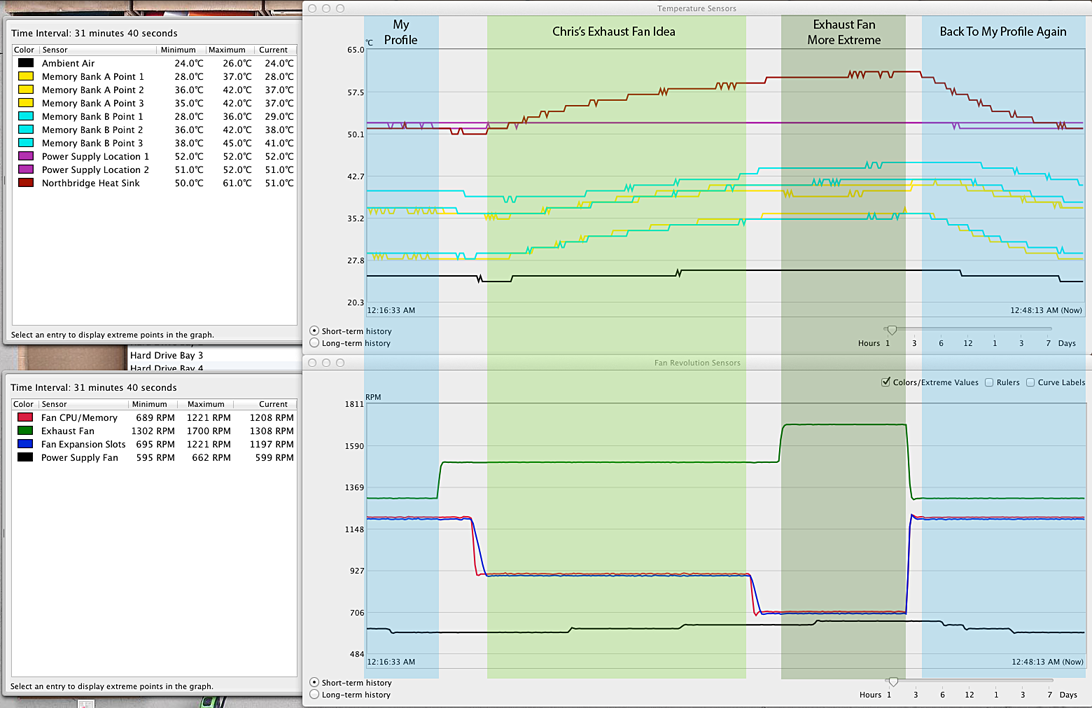
I prefer to kick up the exhaust fan. The intake fan has to blow over the processor heat sinks before hitting the RAM, but the exhaust fan pulls the nicely contained hot air out
__________________
The Christian resolution to find the world ugly and bad has made the world ugly and bad--Nietzsche |
|
|
|
0
|
|
|
#6 |
|
Apple Engineers Are Goofy!
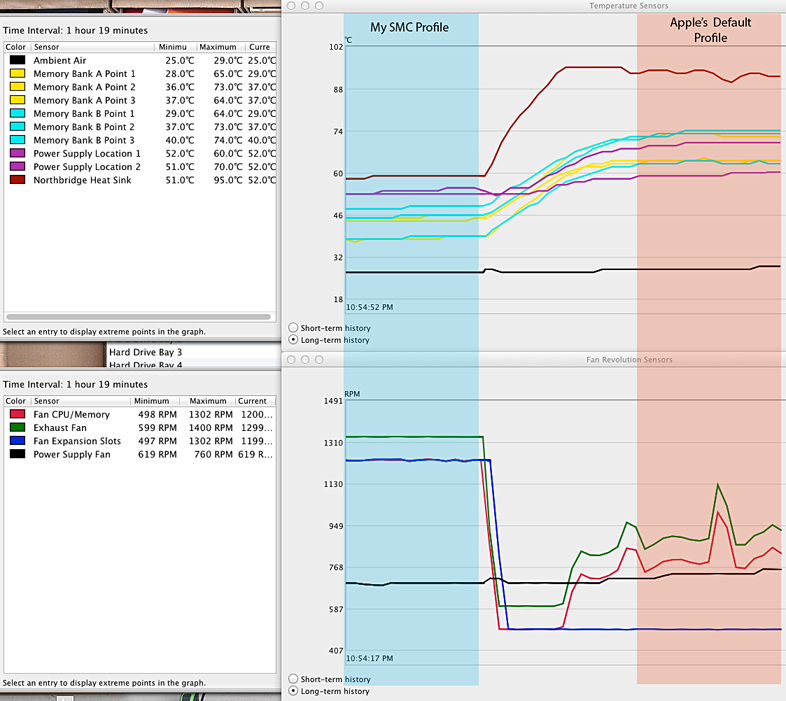
Yeah, Apple's native fan profile walks a line between goofy and insane.
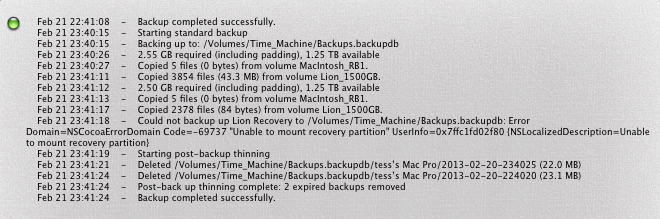
![]() My Profile in blue on the left. Temperatures on the top, Fan speeds on the bottom. Apple's Profile in salmon on the right. Temperatures on the top, Fan speeds on the bottom. My way is just to set all fans to the same speed and create multiple profiles differing by 100RPM each starting with 1000 and going up to 3000. Unlike Apple I don't think the fans should ever be below 1,000 unless you're using it outside in the snow or something. You can see clearly here that Apple's default profile while dynamic, keeps Northbridge at nearly 100˚C and the RAM between 65˚and 75˚C. That's too high. The OP is right, that will likely cause problems. Even while testing this I got a Soft Write Error to my TimeMachine: Chris's idea of only cranking the exhaust fan works. It's a different sound for sure. Higher pitch and a tad less efficient. It also seems to increase the PSU fan and dust bunnies there are harder to clean. Still it works pretty good tho! ![]() ![]()
__________________
The Right <--> Left paradigm is an illusion which keeps the masses playing checkers while the elite play chess. -- Oh My... Last edited by Tesselator; Feb 21, 2013 at 03:52 PM. |
|
|
|
0
|
|
|
#7 |
|
i can't hear the rear fan at 1k the same cannot be said for the others
__________________
The Christian resolution to find the world ugly and bad has made the world ugly and bad--Nietzsche |
|
|
|
0
|
|
|
#8 |
|
Thanks Tesselator for detailed info. After I installed smcFanControl and set defaults to 1000rpm for each fan the temps look much better. I Also tried 2000rpm and for a second I thought it will lift off
so much noise. Much appreciated. |
|
|
|
0
|
|
|
#9 |
|
Yeah, 2,000 would be for when you needed to render some heavy animation frames during a summer heat-wave. I bounce mine between 1,000 and 1,300 mostly.
|
|
|
|
0
|
![]() |
|
«
Previous Thread
|
Next Thread
»
| Thread Tools | Search this Thread |
| Display Modes | |
|
|
All times are GMT -5. The time now is 02:33 AM.


however one thing bothers me a bit. Temp monitor shows that my RAM temp is a bit high. I got 8x2GB modules and the temperatures are between ~68 to ~77 depending on the location. Is this something to worry about? I got no problems whatsoever, it is rock stable.


You can see clearly here that Apple's default profile while dynamic, keeps Northbridge at nearly 100˚C and the RAM between 65˚and 75˚C. That's too high. The OP is right, that will likely cause problems. Even while testing this I got a Soft Write Error to my TimeMachine:

Linear Mode