|
|
#1 |
|
4th Gen iPod Touch extremely slow sync
I haven't had a 4th gen iPod touch in a while, been using an iPhone 4S and now a 5. But I just got one for fun for cheap, refurbished and certified from Apple so it should be all good. But it seems extremely slow when I am adding media to it. A small 286mb file took well over 5 minutes to actually download onto the iPod.
Is something wrong? I don't remember my 8gb 4th gen from a few years ago moving this slow and my iPhone 5 loads the same file in 10 seconds. The iPod I just got is 32gb, does that make a difference?
__________________
Whole lotta Apples, very little $. Last edited by MrXiro; Mar 4, 2013 at 12:45 AM. |
|
|
|
0
|
|
|
#2 |
|
The same file should not be syncing 60x slower than your iPhone. Check the usual suspects: Try a different cable, different USB port, different computer (if possible), restart the device, maybe even restore the device to factory-fresh condition.
If all those things don't work, you have a good case to getting a replacement unit from Apple.
__________________
Voted "Most likely to start his own cult" by my high school class. |
|
|
|
1
|
|
|
#3 |
|
Yeah I'd say that's about right the 6 iPod 4th gens I own all sync about the same speed as yours (32GB all bought brand new.) 286MB is a big file, not a small file, the average song or app is about 6 to 18 MB. Plus Lightning is about as fast as thunderbolt, and 30 pin is as slow as USB 2.0
__________________
MBP Retina 16GB RAM, 512GB SSD, Mountain Lion iPod touch 5th gen 64GB black iPad 3rd gen 64GB black iPod shuffle 4th gen 2GB silver Nikon D7000 DSLR
|
|
|
|
0
|
|
|
#4 | |
|
Quote:
5 min for a 286mb file is USB 1.1 speeds. My daughter's 8gb 4th Gen iPod Touch loaded the same file in 52 seconds. I first tried a settings reset which worked until I logged back into the wifi, unplugged the USB cable and plugged it back in again. After a 2nd plug in it was slow again. I did a factory restore and erased all my content this time and logged back into the wifi. It seems to be on par with my daughter's iPod now. I'm wondering if the issue is an app that is screwing things up...
__________________
Whole lotta Apples, very little $. |
||
|
|
1
|
|
|
#5 | |
|
Quote:
__________________
Whole lotta Apples, very little $. |
||
|
|
1
|
|
|
#6 | |
|
Quote:
Also, was it said anywhere that the cable was USB 2.0? I have a feeling it's 3.0 because it syncs way faster than 30 pin.
__________________
MBP Retina 16GB RAM, 512GB SSD, Mountain Lion iPod touch 5th gen 64GB black iPad 3rd gen 64GB black iPod shuffle 4th gen 2GB silver Nikon D7000 DSLR
|
||
|
|
0
|
|
|
#7 | |
|
Quote:
It's probably faster components within the new devices that actually speed things up if they are faster. From Apple.com: This USB 2.0 cable connects your iPhone, iPad, or iPod with Lightning connector to your computer's USB port for syncing and charging or to the Apple USB Power Adapter for convenient charging from a wall outlet. -Source (Look under Overview)
__________________
Whole lotta Apples, very little $. Last edited by MrXiro; Mar 5, 2013 at 11:31 PM. |
||
|
|
0
|
|
|
#8 | |
|
Quote:
I hope you didn't think I was rude at all, if so, I am sorry.
__________________
MBP Retina 16GB RAM, 512GB SSD, Mountain Lion iPod touch 5th gen 64GB black iPad 3rd gen 64GB black iPod shuffle 4th gen 2GB silver Nikon D7000 DSLR
|
||
|
|
0
|
|
|
#9 | ||
|
Quote:
Quote:
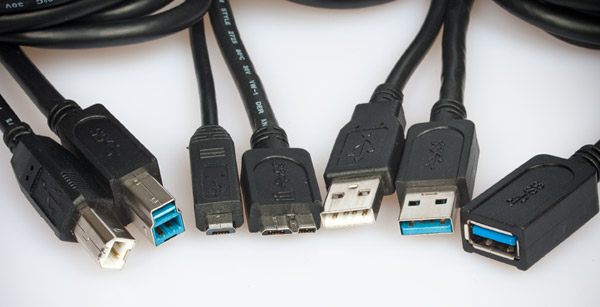
Could be a number of reasons why current gen devices are faster. The biggest reason being faster NAND Flash. I have a USB 2.0 flash drive that is slower than any USB 2.0 5400 rpm hard drive I've ever used. In theory a flash drive should be much faster than an HDD. But definitely not in the case for the ones I have. Also internal components within the new devices might have faster bus speeds. I'm not sure what was bottlenecking my iPod Touch. It worked as it should after a reset though. I'm exchanging it anyway because I don't want to risk an issue 15 days into owning it. Never had that problem before though. You can always test your Lightning connected devices on a USB 2.0 equipped computer and see if it's any slower. I see no reason why apple wouldn't list Lightning cables as 3.0 especially since 3.0 is backwards compatible. Another reason I doubt it's 3.0 is the cable. USB 3.0 cables are a bit thicker. The Lightning cable is the same thickness as the 30-pin ![]() One last reason is; why would Apple not advertise that it's a 3.0 cable? A 3.0 cable is backwards compatible with a 2.0 device and is literally 10X faster! Not advertising it would be like them NOT telling us that newest Macbook is "2X faster!". Very unlike Apple.
__________________
Whole lotta Apples, very little $. |
|||
|
|
0
|
|
|
#10 | |
|
Quote:
__________________
MBP Retina 16GB RAM, 512GB SSD, Mountain Lion iPod touch 5th gen 64GB black iPad 3rd gen 64GB black iPod shuffle 4th gen 2GB silver Nikon D7000 DSLR
|
||
|
|
0
|
|
|
#11 |
|
I bet they'll have USB 3.0 cables in the future.
__________________
Whole lotta Apples, very little $. |
|
|
|
0
|
|
|
#12 |
|
Yeah! I hope so.
__________________
MBP Retina 16GB RAM, 512GB SSD, Mountain Lion iPod touch 5th gen 64GB black iPad 3rd gen 64GB black iPod shuffle 4th gen 2GB silver Nikon D7000 DSLR
|
|
|
|
0
|
![]() |
|
«
Previous Thread
|
Next Thread
»
| Thread Tools | Search this Thread |
| Display Modes | |
|
|
All times are GMT -5. The time now is 11:03 PM.


MBP Retina 16GB RAM, 512GB SSD, Mountain Lion 

Linear Mode