|
|
#1 |
|
Help Needed Mini MD387 with added SSD Drive
Hi Everyone:
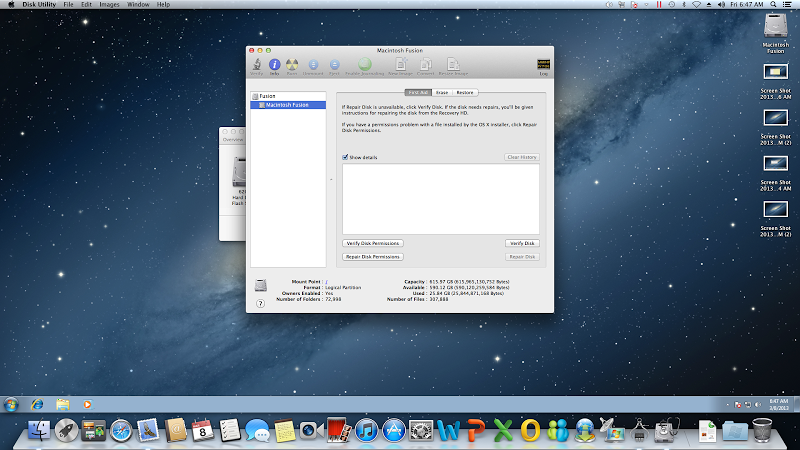
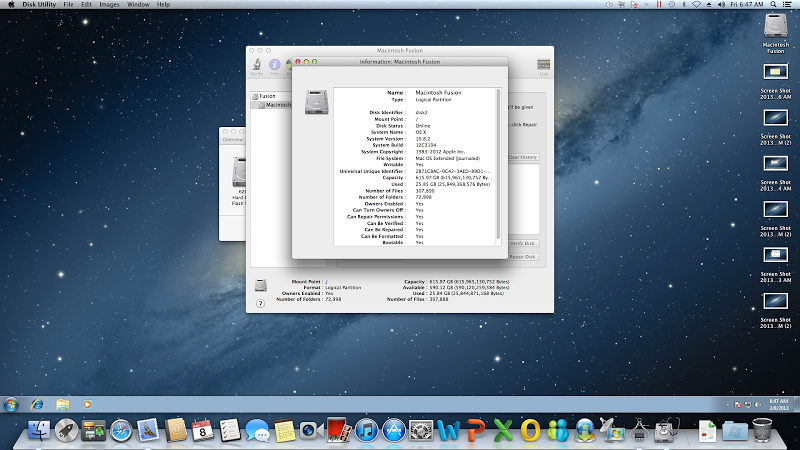
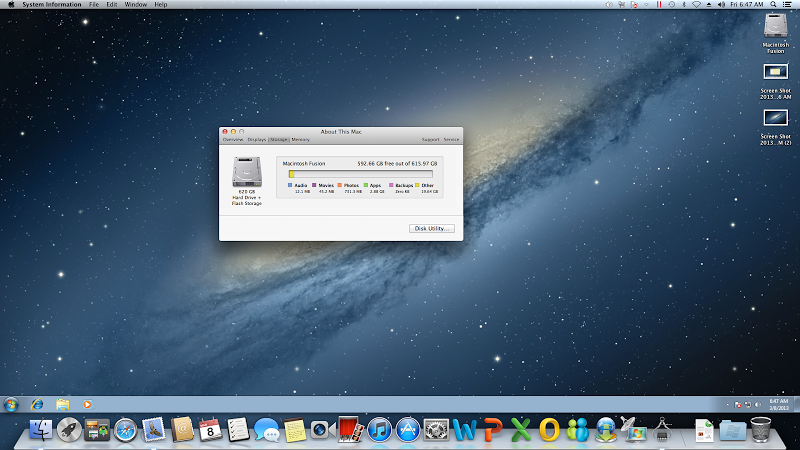
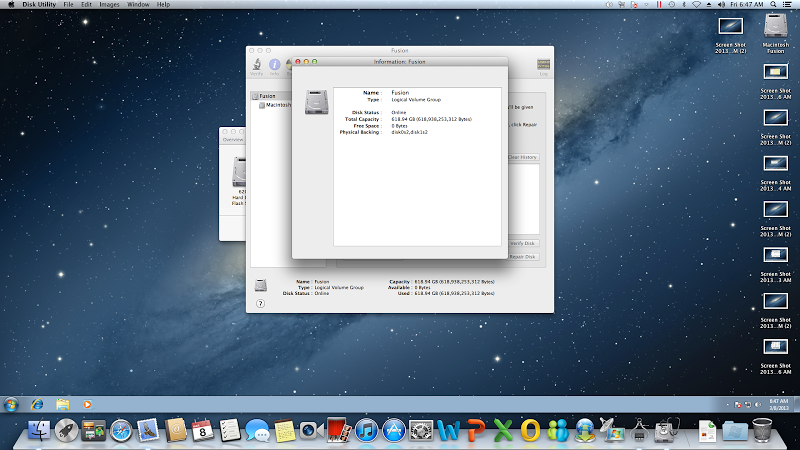
I purchased last week (got it yesterday) a slightly used basic Mac Mini (MD387LL/A ; machine was sold to original owner on December 12, 2012), to which was added a second Intel 120GB SSD drive with the use of the OWC kit. It came with 4GB of memory, but I upgrade it to 16GB by installing two 8GB SIMS (Corsair Vengeance RAM DDR3 1600 MHz PC3 12800, model CMSX16GX3M2A1600C10) even before starting it for the first time and sucessfully went through the initial setup and showed the 16GB memory without any issues. When I checked the hard drive space, I noticed that it reflected a 620GB hard disk instead of the expected 500GB and 120GB hard disks, noticed it said "hard drive + flash storage", as shown below: ![]() I went to the disk utikity option and this is what it shows: ![]() ![]() ![]() It talks about a logical volume group (fusion drive). Is this the way that it should be configured? I wonder if Mac Minis with 2 HD's always shows like this. Furthermore, I did a Mac OX update after installing a few programs and the machine startup is really slow (took several minutes to start), which makes me beleive there is something wrong with the way the HD's were configured by the original owner. Your help will be appreciated. ![]() Francisco
__________________
15" rMBP 2.7GHz | 16GB | 768GB | 64GB micro SD | Samsung Screen I5 |64GB | JB | EC Black Ops | AT&T ∞ Data iPad 4 |Black | 6.1.2 |32 GB | AT&T + LTE Mac Mini | 2.5 Ghz |500GB | 120GB Intel SSD Last edited by fskywalker; Mar 8, 2013 at 01:00 PM. |
|
|
|
0
|
|
|
#2 |
|
you have a fusion drive setup. there is nothing wrong with a fusion drive setup.
as to if it is slow or a broken setup that is another story. and your ram has been known to not work well. test the ram with this free program (wait for link) http://www.kelleycomputing.net/Rember/ test all ram and run 2 passes takes a few hours. you may have a ram issue not the fusion setup > I have a fusion setup with a 256gb ssd and a 500gb hdd. see snap shot |
|
|
|
0
|
|
|
#3 |
|
Thanks, will check the memory tonight. I just educated myself on the fusion drive setup and understand the machinhe should be actually booting from the SSD, so this should provide a fast booting and better performance on daily access of data versus the standard 500GB spinning HD.
Last edited by fskywalker; Mar 8, 2013 at 01:11 PM. |
|
|
|
0
|
|
|
#4 |
|
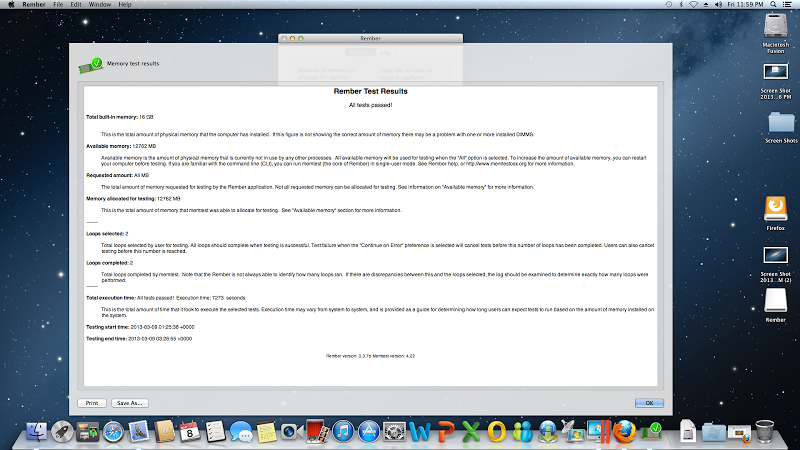
Hi Phillip, just finished running the suggested memory test, it said it was successful:
![]() What else may you or someone suggest? Thanks
__________________
15" rMBP 2.7GHz | 16GB | 768GB | 64GB micro SD | Samsung Screen I5 |64GB | JB | EC Black Ops | AT&T ∞ Data iPad 4 |Black | 6.1.2 |32 GB | AT&T + LTE Mac Mini | 2.5 Ghz |500GB | 120GB Intel SSD |
|
|
|
0
|
|
|
#5 | |
|
Quote:
|
||
|
|
0
|
|
|
#6 |
|
Hi, I re-started my computer again after the memory test and it again took a long time to start. I shut it down and re-install the OEM 4GB memory and re-start and it was still very slow. I decided to test the machine without an external USB HD that I have from my old PC, which holds some data I want to pass to the Mac Mini, and the machine started up really quickly. I then switched back to the new Corsair memory and it also went up pretty quickly, so seems that the issue is with that external drive.
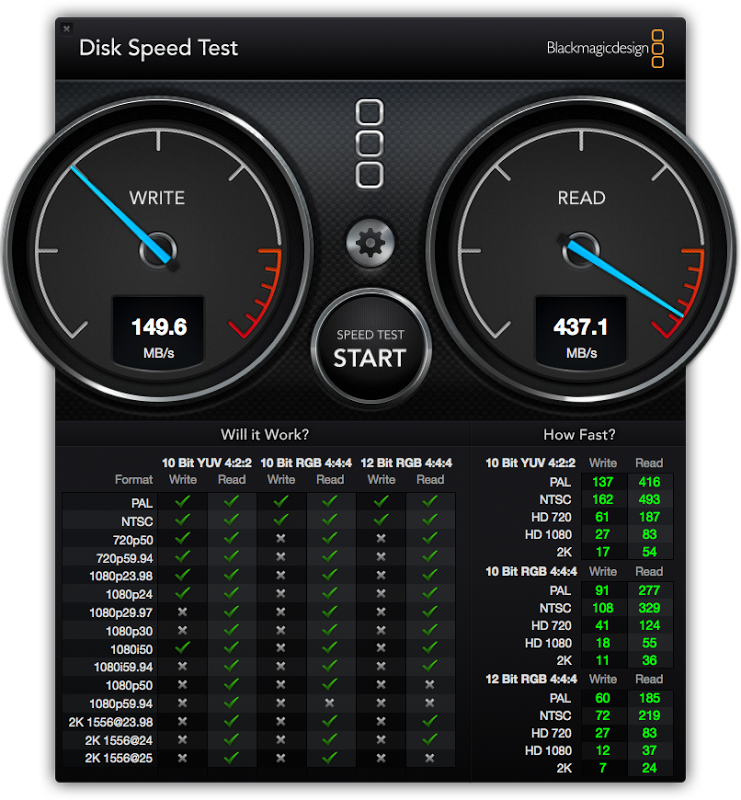
I just run BlackMagic on the fusion drive and this is the result: ![]() Is this good for a fusion drive? Thanks, Francisco
__________________
15" rMBP 2.7GHz | 16GB | 768GB | 64GB micro SD | Samsung Screen I5 |64GB | JB | EC Black Ops | AT&T ∞ Data iPad 4 |Black | 6.1.2 |32 GB | AT&T + LTE Mac Mini | 2.5 Ghz |500GB | 120GB Intel SSD |
|
|
|
0
|
|
|
#7 |
|
Somehow I don't get it, now you say from external drive, when this is not attached it is much faster.
Another thing is, don't upload huge files, were about 7 posts in and it's already 4 MB, not everybody is on a fast internet. |
|
|
|
0
|
|
|
#8 | |
|
Quote:
|
||
|
|
0
|
|
|
#9 | |
|
Quote:
![]() What I meant is that the external HD apparently was causing the delay in the booting of the computer; without it being connected the issue has been solved. I'm now copying all it contents to a USB3.0 2TB external drive just purchased (on a Windows based computer) to then transfer the pictures, etc. I need to the new Mac Mini through the USB3.0 drive. The blackmagic test above refers to the combined 500GB HD plus the Intel 120GB SSD drive, which the machines see as a single, "fusion" drive; question is whether that performance is good as compared to other fusion drives, either the one sold by Mac or the ones done by users, just like mine (done by the original owner). Regards,
__________________
15" rMBP 2.7GHz | 16GB | 768GB | 64GB micro SD | Samsung Screen I5 |64GB | JB | EC Black Ops | AT&T ∞ Data iPad 4 |Black | 6.1.2 |32 GB | AT&T + LTE Mac Mini | 2.5 Ghz |500GB | 120GB Intel SSD |
||
|
|
0
|
|
|
#10 | |
|
No worries, just a tip, if you only want to show a window on your desktop as a screenshot, hit Command-Shift-4 and then the space Bar, it allows you to select just the window you want to capture.
Quote:
MRoogle |
||
|
|
0
|
|
|
#11 | |
|
Quote:
the read is good the write is mediocre. my diy is a 256gb samsung 810 sata II and the stock oem 500gb 5400 rpm hdd. my write is very good for a sata II ssd. (260-270 is best possible) same for the read. your ssd model can be found look at my thumbnail for my ssd. if you show your ssd model I can tell if it is writing up to speed. it is reading well for sata III Last edited by philipma1957; Mar 9, 2013 at 10:05 AM. |
||
|
|
0
|
|
|
#12 | |
|
Quote:
__________________
15" rMBP 2.7GHz | 16GB | 768GB | 64GB micro SD | Samsung Screen I5 |64GB | JB | EC Black Ops | AT&T ∞ Data iPad 4 |Black | 6.1.2 |32 GB | AT&T + LTE Mac Mini | 2.5 Ghz |500GB | 120GB Intel SSD |
||
|
|
0
|
|
|
#13 |
|
okay I will check/ meanwhile here are results on my diy fusion look at the random write and random read 4k numbers.
specs show that drive can read and write at 500. http://ark.intel.com/products/66248/...-6Gbs-25nm-MLC now your read is good 400 plus.. the write is not so good but and here is the big but. if i remember the speed test you are using does compression and the ssd you uses does not so write scores are not accurate. that ssd uses a sandforce controller so the test scores vary a lot on test to test. try doing xbench disk only see your scores on that. you should smack my scores hard. my scores are on a sataII ssd. http://xbench.com/ Last edited by philipma1957; Mar 9, 2013 at 10:21 AM. |
|
|
|
0
|
|
|
#14 | |
|
Quote:
__________________
15" rMBP 2.7GHz | 16GB | 768GB | 64GB micro SD | Samsung Screen I5 |64GB | JB | EC Black Ops | AT&T ∞ Data iPad 4 |Black | 6.1.2 |32 GB | AT&T + LTE Mac Mini | 2.5 Ghz |500GB | 120GB Intel SSD |
||
|
|
0
|
|
|
#15 |
|
The Fusion Drive has to learn which files to put on the SSD and which on the hard drive, so you'll have to reboot the Mac Mini a couple of times and the boot gets faster.
It might be that the system installs itself on the hard drive, as you don't really shut down Macs, but rather you put them to sleep. But if you happen to restart it more often, it adapts itself and the booting time decreases. As far as the write speeds go, I guess you didn't turn on TRIM after reinstalling. |
|
|
|
0
|
|
|
#16 | |
|
Quote:
Results 392.39 System Info Xbench Version 1.3 System Version 10.8.2 (12C3104) Physical RAM 16384 MB Model Macmini6,1 Drive Type Fusion Disk Test 392.39 Sequential 233.73 Uncached Write 455.35 279.58 MB/sec [4K blocks] Uncached Write 390.87 221.15 MB/sec [256K blocks] Uncached Read 94.76 27.73 MB/sec [4K blocks] Uncached Read 553.71 278.29 MB/sec [256K blocks] Random 1221.63 Uncached Write 1107.73 117.27 MB/sec [4K blocks] Uncached Write 742.66 237.75 MB/sec [256K blocks] Uncached Read 2768.90 19.62 MB/sec [4K blocks] Uncached Read 1506.28 279.50 MB/sec [256K blocks] Looks like here it does reflect a much better read and write performance, close to the 400 spec of the Intel SSD Regards, Francisco
__________________
15" rMBP 2.7GHz | 16GB | 768GB | 64GB micro SD | Samsung Screen I5 |64GB | JB | EC Black Ops | AT&T ∞ Data iPad 4 |Black | 6.1.2 |32 GB | AT&T + LTE Mac Mini | 2.5 Ghz |500GB | 120GB Intel SSD |
||
|
|
0
|
|
|
#17 | |
|
Quote:
|
||
|
|
0
|
![]() |
|
«
Previous Thread
|
Next Thread
»
| Thread Tools | Search this Thread |
| Display Modes | |
|
|
All times are GMT -5. The time now is 03:51 AM.


Linear Mode