Register FAQ/Rules Forum Spy Search Today's Posts Mark Forums Read

Welcome to the Mac Forums forums. Please read the FAQ if you have questions. Register to participate.

 
Go Back   Mac Forums > Apple Hardware > Notebooks > MacBook Pro, PowerBook
TouchArcade.com - iPhone Game Reviews and News

Reply
 
Thread Tools Search this Thread Display Modes
Old Sep 14, 2006, 07:51 PM   #1
Khurram
macrumors regular
 
Join Date: Aug 2006
Any trick to getting the screws open for ram installation?

So i just got 2 gigs of g skill ram but I can't install it

I opened the left and right screws on the L shaped protector in front of the ram, but I cannot make the middle screw budge for the life of me, my fingers are practically bleeding! Is there a trick to loosening it?

If I take my macbook to the apple store do you think they will open the screw for me even though I'm not installing apple ram?
How should I go about this?
Khurram is offline   Reply With Quote
Old Sep 14, 2006, 08:02 PM   #2
treblah
macrumors 65816
 
treblah's Avatar
 
Join Date: Oct 2003
Location: 29403
Send a message via AIM to treblah
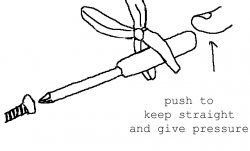
Are you using one of these?

If so, apply pressure on the end and twist with your other hand.

Last edited by treblah : Oct 28, 2006 at 02:47 AM.
treblah is offline   Reply With Quote
Old Sep 14, 2006, 09:16 PM   #3
Khurram
Thread Starter
macrumors regular
 
Join Date: Aug 2006
Quote:
Originally Posted by treblah
Are you using one of these?

If so, apply pressure on the end and twist with your other hand.

No, i'm just using a tiny screwdriver...what is the specific name for that thing your holding?

Do you think they will open it up for me at the apple store if i'm not installing apple ram?
Khurram is offline   Reply With Quote
Old Sep 14, 2006, 10:05 PM   #4
treblah
macrumors 65816
 
treblah's Avatar
 
Join Date: Oct 2003
Location: 29403
Send a message via AIM to treblah
Quote:
Originally Posted by Khurram
No, i'm just using a tiny screwdriver...what is the specific name for that thing your holding?

Do you think they will open it up for me at the apple store if i'm not installing apple ram?
It's a Stanley #0 Phillips head screwdriver. Picked it up at Target. Comes in a package with 4 other small screwdrivers.
treblah is offline   Reply With Quote
Old Sep 14, 2006, 11:09 PM   #5
miles01110
macrumors Demi-God
 
miles01110's Avatar
 
Join Date: Jul 2006
Location: Switzerland
Apply downward pressure while applying torque. 2 of the screws on my MBP were quite hard to get out.
miles01110 is offline   Reply With Quote
Old Sep 15, 2006, 07:58 AM   #6
Khurram
Thread Starter
macrumors regular
 
Join Date: Aug 2006
Quote:
Originally Posted by miles01110
Apply downward pressure while applying torque. 2 of the screws on my MBP were quite hard to get out.
So should I go at the screws from a vertical position with my macbook up on it's side?
Or horizontally?
Khurram is offline   Reply With Quote
Old Sep 14, 2006, 08:03 PM   #7
benthewraith
macrumors 68000
 
benthewraith's Avatar
 
Join Date: May 2006
Location: Jacksonville, FL
Send a message via AIM to benthewraith Send a message via MSN to benthewraith
Quote:
Originally Posted by Khurram
So i just got 2 gigs of g skill ram but I can't install it

I opened the left and right screws on the L shaped protector in front of the ram, but I cannot make the middle screw budge for the life of me, my fingers are practically bleeding! Is there a trick to loosening it?

If I take my macbook to the apple store do you think they will open the screw for me even though I'm not installing apple ram?
How should I go about this?
Well, if you're screw is stripped, I don't know. Are you sure you're using the correct screwdriver?

One of my screws were tight as bejeezus, but I was able to get it to open.
benthewraith is offline   Reply With Quote

Reply

Mac Forums > Apple Hardware > Notebooks > MacBook Pro, PowerBook

Thread Tools Search this Thread
Search this Thread:

Advanced Search
Display Modes

Posting Rules
You may not post new threads
You may not post replies
You may not post attachments
You may not edit your posts

vB code is On
Smilies are On
[IMG] code is On
HTML code is Off
Forum Jump


All times are GMT -5. The time now is 09:20 PM.

Mac News | Mac Rumors | iPhone Game Reviews | iPhone Apps

Powered by vBulletin® Version 3.6.10
Copyright ©2000 - 2009, Jelsoft Enterprises Ltd.
Copyright 2002-2009, MacRumors.com, LLC