|
|||||||
![]() |
|
|
Thread Tools | Search this Thread | Display Modes |
|
|
#1 |
|
How do I set my printer to print ONLY black and white?
Holy smokes I don't know why this is so hard to figure out. I have an HP C3180 printer and it prints color. I don't want to use up the color cartridge. I only want to print black and white printouts. How do I set this on my mac?
HELP! |
|
|
|
0
|
|
|
#2 |
|
Man I wish I could really help you out with this but I'm in the same boat as you.
I can tell you this though, you have to do it from Print Set Up on you computer. I know this is absolutely no help but I noticed no one has replied yet. |
|
|
|
0
|
|
|
#3 |
|
I've looked through the different options and I can't find this option either. Annoying...
__________________
+++++++++++++++++++++++++++++++++++++++++++++++++ . |
|
|
|
0
|
|
|
#4 |
|
Bad news....I can't help because I don't know either.
Sorry
__________________
Next purchases: Bose headphones (BOUGHT), Speakers (BOUGHT), and Display..... |
|
|
|
0
|
|
|
#5 |
|
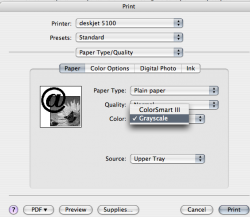
File>Print>Paper Type/Quality>Color>Grayscale
Not sure if there's a permanent setting for this like there is in Windows. I use a draft quality, grayscale setting on my suck*** windows 98 machine and HP inkjet printers at work.
__________________
Not Applicable
|
|
|
|
0
|
|
|
#6 | |
|
Quote:
|
||
|
|
0
|
|
|
#7 |
|
Odd, when I tried to print, I don't get the Type/Quality option.
__________________
+++++++++++++++++++++++++++++++++++++++++++++++++ . |
|
|
|
0
|
|
|
#8 |
|
|
0
|
|
|
#9 |
|
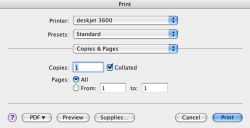
Click your copies and pages, then adjust from there. This has worked for my Canon printers and as far as my Epson I think the printer has a few options that Canon doesn't (I think
) but not sure.
__________________
27" iMac, 3.4GHz Quad-Core Intel Core i7, 16GB RAM, 1TB HDD + 256GB SSD, AMD Radeon HD 6970M 2GB; Quad G-Drive; 12" Wacom Cintiq
|
|
|
|
0
|
|
|
#10 |
|
For some HP printers you can simply remove the color cartridge, close the cartridge latch (if any) and the printer will adjust accordingly.
|
|
|
|
0
|
|
|
#11 |
|
yep, just about to ask what happens when you just take it out. Works for me on my psc1300 or something close that.
__________________
Oh yes mustard! That'll do... Mustard? Don't let's be silly. Now lemon, that's different... |
|
|
|
0
|
|
|
#12 | |
|
Quote:
THANKYOU iSaint!!!
|
||
|
|
0
|
|
|
#13 |
|
Thanks Maynerd and Artful Dodger!
__________________
+++++++++++++++++++++++++++++++++++++++++++++++++ . |
|
|
|
0
|
|
|
#14 |
|
True. Once you have changed settings, select Presets for an option to save as a newly named preset.
__________________
Not Applicable
|
|
|
|
0
|
|
|
#15 |
|
print b/w default
I am new to this
but would really like to know how to set my printer to grayscale as a global setting for all users the printer is hp3180 on imac os10.5.2 am getting tired of buying expensive color thanx dwbro124@comcast.net |
|
|
|
0
|
![]() |
|
«
Previous Thread
|
Next Thread
»
| Thread Tools | Search this Thread |
| Display Modes | |
|
|
Similar Threads
|
||||
| thread | Thread Starter | Forum | Replies | Last Post |
| How to print in black and white in Leopard | computerman-8 | Mac OS X | 17 | Apr 18, 2012 08:50 PM |
| Resolved: Photoshop CS help - change only Black in B&W image to gradient? | ttttaylor | Design and Graphics | 6 | May 10, 2011 03:51 PM |
| How do I set my dock to default settings? | grosslyclever | Mac Basics and Help | 8 | Dec 15, 2009 09:20 AM |
| Printer Won't Print in Black and White | Mal | Mac Peripherals | 1 | May 23, 2008 11:38 PM |
| How can I force my printer to print in B&W? | ascender | Mac OS X | 18 | Oct 21, 2006 04:26 PM |
All times are GMT -5. The time now is 07:57 PM.


) but not sure.
THANKYOU iSaint!!!
Linear Mode