|
|
#1 |
|
Changing Mac Boot Order?
Hi, I just bought my first Mac a few weeks back and the switch has been going good but have had one thing that I can't seem to find any info on...
Is it possible to change the boot order on a Mac like in the BIOS on a PC? The reason I ask is that when I have my external hard drive connected the bootup time is slower. Could this be that the Mac equivalent of the BIOS is doing a quick scan of the hard drive first, looking for an bootable operating system? Or is that extra time just OS X mounting the hard drive? |
|
|
|
0
|
|
|
#2 |
|
I believe that the system will always search for available boot volumes on all connected drives before choosing one. That's why the optical drive will spin up as well during the boot process.
__________________
Ⓟ PIRATE PARTY OF CANADA — Information leadership for the 21st century |
|
|
|
0
|
|
|
#3 |
|
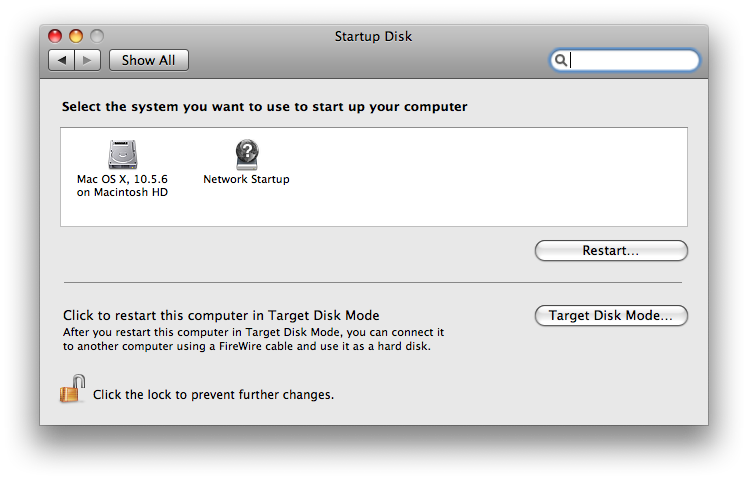
Yes you can change the boot order. Go to System Preferences —> Startup Disk:
![]() If you have other bootable volumes connected they will show up and then you can choose which one you want to use.
__________________
Mac Pro | 27" iMac | 15" MacBook Pro with Retina display | iPhone 5 | iPad 3 | iPad mini
|
|
|
|
0
|
|
|
#4 |
|
Thanks for your replies.
@Alphaod - unfortunately even when you specify the default mac HD, it still looks in the external also. @BlueRevolution - that's more what I was getting at. Does anyone know how to stop the bootup process from doing this unnecessary check? It doesn't add all that much time to the bootup time but I just don't see much point in checking every connected drive when you can change the boot device by using the boot option keys if you ever needed to. Thanks again! |
|
|
|
0
|
|
|
#5 |
|
I don't think it's possible, no. This is something that takes place on the firmware level, and isn't something that you want to be messing around with. You'll just have to resign yourself to the extra 5 seconds of startup time, or to leaving the external drive off until the boot process has begun.
__________________
Ⓟ PIRATE PARTY OF CANADA — Information leadership for the 21st century |
|
|
|
0
|
|
|
#6 |
|
Looks I'll just have to put up with the extra time then
I shouldn't really be complaining anyway considering I'm used to waiting 10x as long for my old PC to boot up. Thanks again.
__________________
Aluminum Macbook, 2.4 GHz, 4 GB RAM ; iPhone 4S 64GB |
|
|
|
0
|
|
|
#7 |
|
How many times are you booting that this is an issue? You shouldn't be turning your Mac "off" when done, as there are maintenance scripts that run in the early AM (like 3AM) that should be run routinely as they keep your Mac running fast. I think the only time I ever boot is if a software installation requires it. Other than that, no crashes, no BSOD and and no other reason to turn it off as you can control everything else with the Power settings.
Edited to add: I see you are running a Macbook. In that case, you probably WOULD be turning it off more than a desktop. My mistake!
__________________
13" 2012 MBA/i7/8GB/256GB 24" 2008 iMac/2.8GHz/6GB/240GB SSD & 2TB FW800 HDD "Fused" 2GB TC; ATV 3; 32GB iPad 4; iPhone 5 Nikon D300 / Nikkor 35mm f/1.8, 50mm f/1.8, 70-300mm VR / Sigma 10-20mm Last edited by Mike in Kansas; Mar 16, 2009 at 08:39 AM. Reason: added new information |
|
|
|
0
|
|
|
#8 |
|
I don't know, my iBook only turns off every couple of weeks. The rest of the time it's plugged in and sleeping.
__________________
Ⓟ PIRATE PARTY OF CANADA — Information leadership for the 21st century |
|
|
|
0
|
|
|
#9 | |
|
Quote:
My MBP rarely reboots. It's either on or asleep.
__________________
*** Is redesign innovation? The false burdens of Apple iOS *** | Apple User Art | Celebs with Macs | Mac: Power Users | Tech Humor |
||
|
|
0
|
![]() |
|
«
Previous Thread
|
Next Thread
»
| Thread Tools | Search this Thread |
| Display Modes | |
|
|
Similar Threads
|
||||
| thread | Thread Starter | Forum | Replies | Last Post |
| Change windows boot order? | SlickShoes | Windows, Linux & others on the Mac | 2 | Jul 9, 2011 02:26 PM |
| Changing Mac OSX Time Color | roher4 | Mac OS X | 0 | May 3, 2011 04:29 PM |
| Searched everywhere and no solution: Changing MAC Address? | yetieater | Apple TV and Home Theater | 2 | Dec 3, 2010 11:23 PM |
| Change to BIOS change Mac boot times? | Kyffin | Mac OS X | 2 | Oct 1, 2010 06:11 AM |
| Changing Mac Boot Icon | mashinhead | Mac OS X | 2 | Sep 10, 2006 10:36 PM |
All times are GMT -5. The time now is 11:20 PM.


I shouldn't really be complaining anyway considering I'm used to waiting 10x as long for my old PC to boot up. Thanks again.

Linear Mode